

Introduction
Websocket is a bidirectional communication protocol. In traditional rest api, client-server communication is a uni-direction protocol. i.e. in a single communication channel request will be sent and a response will be received. To send another request new tcp connection has to be established. But as in Websocket communication, over a single TCP communication, multiple messages can be exchanged.
We will implement the same using Python. For this, we will use Python packages
- WebSockets
- asyncio
Follow the below steps to create client and server communication step-by-step.
Step 1. Create a directory for the project and type the below command to create a virtual environment for your project.
pipenv shell
Step 2. Install packages required.
pipenv install websockets
pipenv install asyncio
Step 3. Create a sample py file for the server, and add the below code.
import websockets
import asyncio

# Creating WebSocket server
async def ws_server(websocket):
    print("WebSocket: Server Started.")

    try:
        while True:
            # Receiving values from client
            endpoint_with_input = await websocket.recv()

            # Prompt message when any of the field is missing
            if endpoint_with_input == "":
                print("Error Receiving Value from Client.")
                break

            # Printing details received by client
            print("Details Received from Client:")
            print(f"endpoint_with_input: {endpoint_with_input}")

            data = endpoint_with_input.split(" ")
            endpoint = data[0]
            print("endpoint : ", endpoint)

            params =  data[1:]
            print("params : ", str(params))

            if endpoint == "add":
                _result = int(params[0]) + int(params[1])

            elif endpoint == "sub":
                _result = int(params[0]) - int(params[1])

            elif endpoint == "mul":
                _result = int(params[1]) * int(params[0])

            else:
                _result = "endpoint not found"

            await websocket.send(f"Result {_result}")
            print("==========================")

    except websockets.ConnectionClosedError:
        print("Internal Server Error.")


async def main():
    async with websockets.serve(ws_server, "localhost", 7890):
        await asyncio.Future()  # run forever

if __name__ == "__main__":
    asyncio.run(main())
Step 4. Create a sample py file for the client, and add the below code.
import websockets
import asyncio

# The main function that will handle connection and communication
# with the server
async def ws_client():
    print("WebSocket: Client Connected.")
    url = "ws://127.0.0.1:7890"
    # Connect to the server
    async with websockets.connect(url) as ws:
        while True:
            endpoint_with_input = input("Type endpoint param1 param2 so on ")

            if endpoint_with_input == 'exit':
                exit()

            # Send values to the server
            await ws.send(f"{endpoint_with_input}")
            # Stay alive forever, listen to incoming msgs

            print("===============================")
            msg = await ws.recv()
            print(msg)
            print("================================")

# Start the connection
asyncio.run(ws_client())
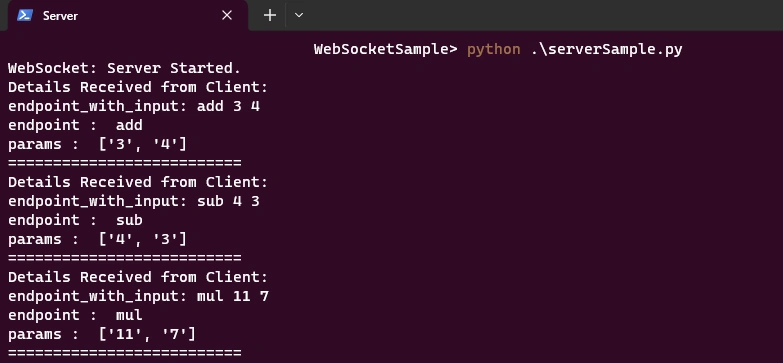
Step 5. In one terminal run the server application.
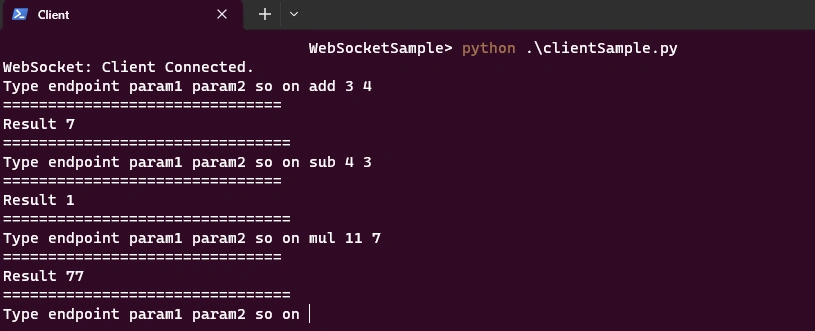
Step 6. In another terminal run the client application.
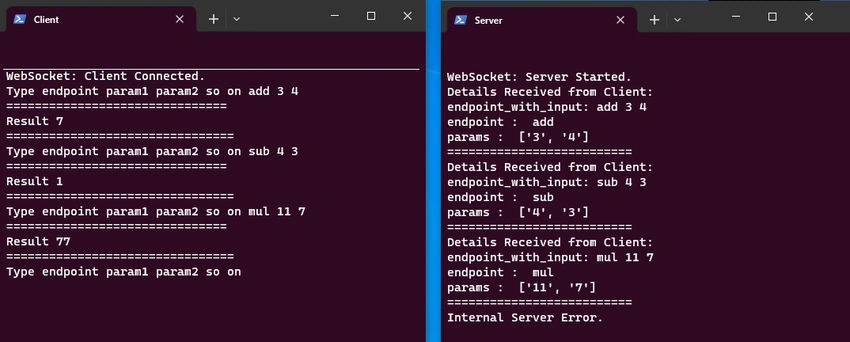
Step 7. Below is the snap of the executed code.
Summary
I hope it helps to create and understand WebSocket communication.
Join the conversation! Your thoughts help the community grow.