

The Web API is a platform to develop HTTP / HTTPS-based services that can be used by native applications like smartphones, tablets, and any browsers. The WebAPI is a core part of ASP.NET and provides ways to create Restful services and can be used by any applications that can understand HTTP communications.
Implementation of Restful operations using ASP.NET Web API
Let's create a sample application and do this step-by-step.
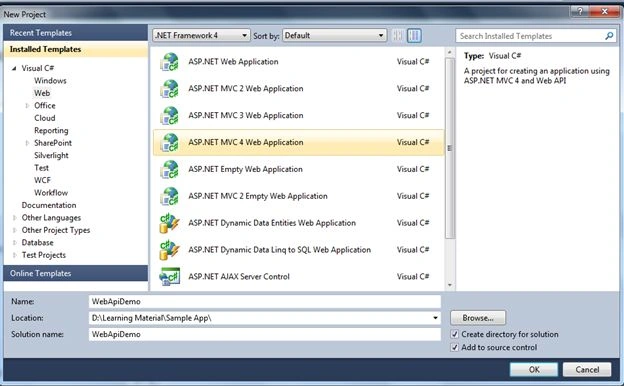
Step 1. Let's first create a sample web application using "ASP.NET MVC 4 Web Application" and name it as you choose. I used "WebApiDemo" as shown in the following image.
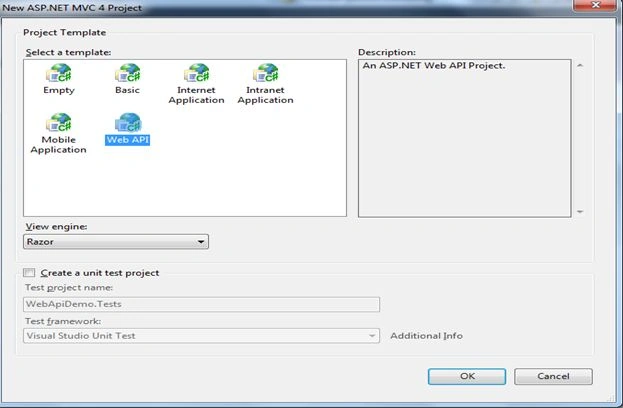
Step 2. Click OK and choose the Web API command from the templates shown in the wizard window.
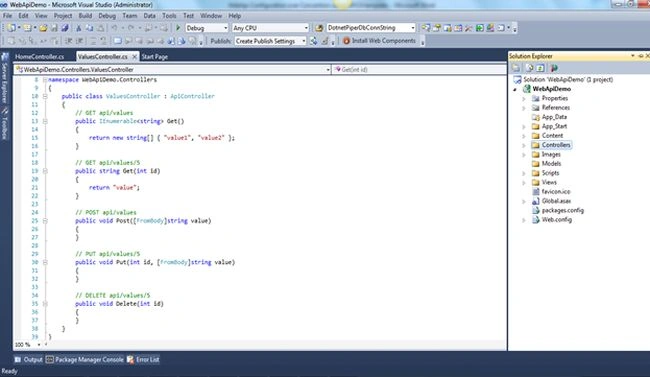
Step 3. You will find the application structure as shown below at first sight.
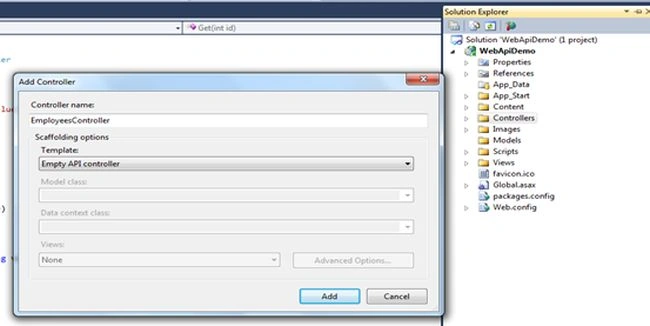
Step 4. Right-click the Controllers folder in the Solution Explorer of Visual Studio. Select "Add" ➤ "Controller" and provide the name of EmployeesController for the controller. Leave the option "Empty API Controller" selected in the Template dropdown and click "Add", as shown in the figure below. Notice that the generated controller class inherits from ApiController, a class that is part of the ASP.NET Web API framework.
Step 5. Right-click the Models folder in the Solution Explorer of Visual Studio. Select "Add" ➤ "Class" to add a new class with the name of Employee.
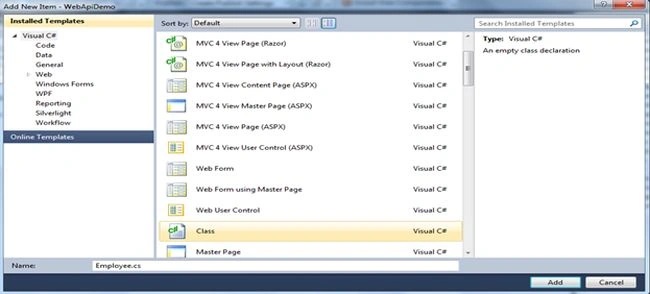
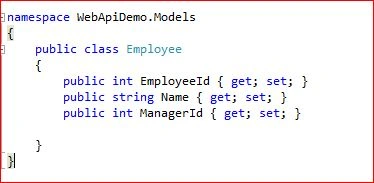
After creating the Employee class, kindly add the following code to this class.
Code Segment
public class Employee
{
    public int EmployeeId { get; set; }
    public string Name { get; set; }
    public int ManagerId { get; set; }
}
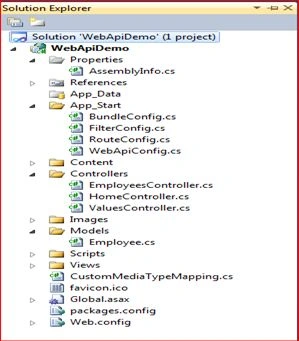
This is the complete structure of the solution as depicted in the image below.
Now we'll open the EmployeeController and implement the Get-Post-Delete-Update methods one by one.
Execution of Get Method of WebAPI
Now open the EmployeeController and paste the following code into that as the Get WebAPI method.
[HttpGet]
[ActionName("GetEmployeeByID")]
public Employee Get(int id)
{
    //return listEmp.First(e => e.ID == id);
    SqlDataReader reader = null;
    SqlConnection myConnection = new SqlConnection();
    myConnection.ConnectionString = @"Server=.\SQLSERVER2008R2;Database=DBCompany;User ID=sa;Password=xyz@1234;";

    SqlCommand sqlCmd = new SqlCommand();
    sqlCmd.CommandType = CommandType.Text;
    sqlCmd.CommandText = "Select * from tblEmployee where EmployeeId=" + id + "";
    sqlCmd.Connection = myConnection;

    myConnection.Open();
    reader = sqlCmd.ExecuteReader();
    Employee emp = null;
    while (reader.Read())
    {
        emp = new Employee();
        emp.EmployeeId = Convert.ToInt32(reader.GetValue(0));
        emp.Name = reader.GetValue(1).ToString();
        emp.ManagerId = Convert.ToInt32(reader.GetValue(2));
    }

    myConnection.Close();
    return emp;
}
In the same way, we will implement the Post and Delete employee. Now I have run the application and see the results. Press F5, it will show you the following screen.
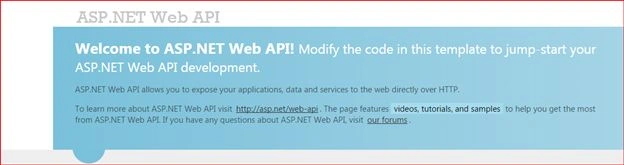
The preceding Blue screen shows that the Web API is up and running.
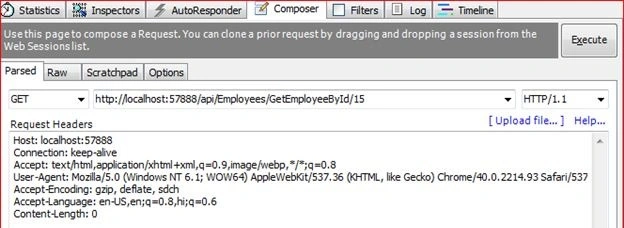
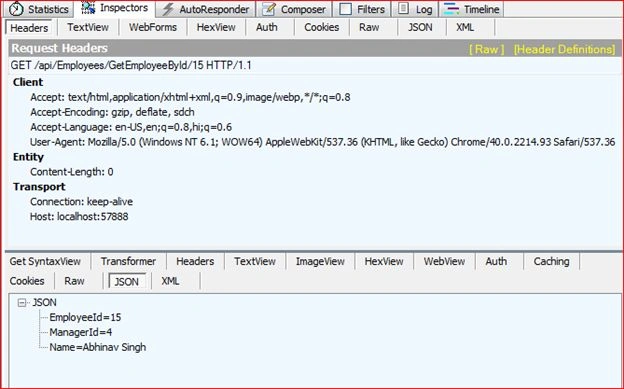
I've used Fiddler to trace the requests, so I will open Fiddler to execute the following link to retrieve the information of the EmployeeID “15”.
http://localhost:57888/api/Employees/GetEmployeeById/15.
Execution of AddEmployee (POST) Method of WebAPI
Now open the EmployeeController and paste the following code into that as the Post WebAPI method. The code is shown below.
[HttpPost]
public void AddEmployee(Employee employee)
{
    //int maxId = listEmp.Max(e => e.ID);
    //employee.ID = maxId + 1;
    //listEmp.Add(employee);

    SqlConnection myConnection = new SqlConnection();
    myConnection.ConnectionString = @"Server=.\SQLSERVER2008R2;Database=DBCompany;User ID=sa;Password=xyz@1234;";

    //SqlCommand sqlCmd = new SqlCommand("INSERT INTO tblEmployee (EmployeeId,Name,ManagerId) Values (@EmployeeId,@Name,@ManagerId)", myConnection);
    SqlCommand sqlCmd = new SqlCommand();
    sqlCmd.CommandType = CommandType.Text;
    sqlCmd.CommandText = "INSERT INTO tblEmployee (EmployeeId,Name,ManagerId) Values (@EmployeeId,@Name,@ManagerId)";
    sqlCmd.Connection = myConnection;

    sqlCmd.Parameters.AddWithValue("@EmployeeId", employee.EmployeeId);
    sqlCmd.Parameters.AddWithValue("@Name", employee.Name);
    sqlCmd.Parameters.AddWithValue("@ManagerId", employee.ManagerId);

    myConnection.Open();
    int rowInserted = sqlCmd.ExecuteNonQuery();
    myConnection.Close();
}
Since the WebAPI is already in running mode, I'll execute the following link to add an employee to the database. http://localhost:57888/api/Employees/AddEmployee and will pass the given the following parameters {"EmployeeId":20,"Name":"Mike Prior", "ManagerId":6}.
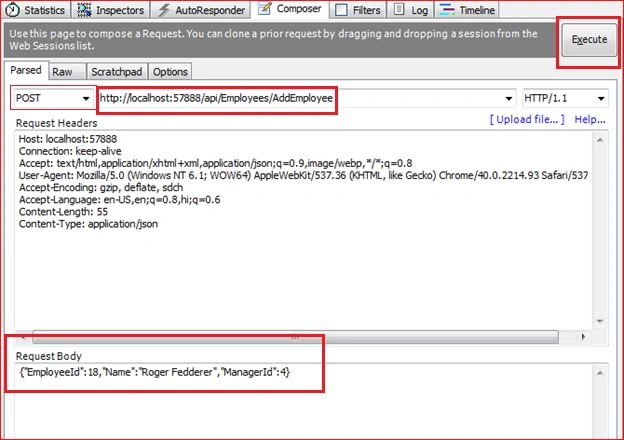
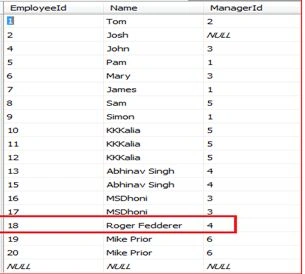
Please open the database to confirm whether or not the user “Roger” has been added to the database. Kindly look at the image shown below.
We are almost done with the execution of the Post method.
Execution of DeleteEmployeeById (Delete) Method of WebAPI
Now open the EmployeeController again and paste the following code into that as the Delete WebAPI method.
[ActionName("DeleteEmployee")]
public void DeleteEmployeeByID(int id)
{
    SqlConnection myConnection = new SqlConnection();
    myConnection.ConnectionString = @"Server=.\SQLSERVER2008R2;Database=DBCompany;User ID=sa;Password=xyz@1234;";

    SqlCommand sqlCmd = new SqlCommand();
    sqlCmd.CommandType = CommandType.Text;
    sqlCmd.CommandText = "delete from tblEmployee where EmployeeId=" + id + "";
    sqlCmd.Connection = myConnection;

    myConnection.Open();
    int rowDeleted = sqlCmd.ExecuteNonQuery();
    myConnection.Close();
}
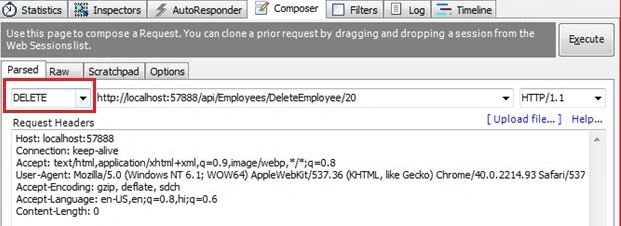
Since the WebAPI is already in running mode, I'll execute the following link to delete an employee by the employee id database. http://localhost:57888/api/Employees/DeleteEmployee/20.
Please open the database to confirm that EmployeeID “20” has been deleted. Kindly look at the image shown below:
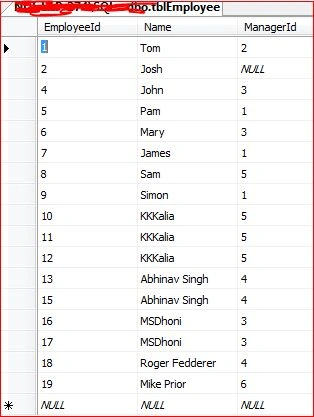
Note. I have intentionally left the implementation of the Update method so that the end user can have hands-on on this. I'll also add a database backup for user help.
Go through these detailed links to learn more about the WebAPI.
- How MediaTypeFormatter and MediaTypeMapping Are Associated With Each Other in WebAPI.
- WebAPI: MediaTypeFrommatters in WebAPI.
Detailed links to learn more about the WebAPI.
Points to consider
- You should have a little knowledge of the WebAPI.
- You should have knowledge of the Fiddler tool to execute the functionality.
- There is a need for SQL Server also.
I hope it will help you somewhere down the line.
Keep coding and Smile.
Sohil SanghaviPosted Sep 14, 2020, 1:53 AM
How to test the put delete and post without using fiddler
abdulrehman anwarPosted Jul 9, 2019, 8:26 AM
You are missing this [ActionName("AddEmployee")] please wite this code below httppost, as you declare for others get , and delete
Viral OndhiyaPosted Jun 20, 2019, 12:05 AM
Hi, nice explanation by this articles. but i have error in POST method. Null Reference Exception. occur in WebAPIViral.dll but not was handled use code .
monir hossainPosted Jan 6, 2019, 2:12 AM
Good article. Thanks a lot.
devi prasadPosted May 13, 2018, 4:18 AM
Getting error message port 57888 is in use
donlot ganolPosted Nov 14, 2017, 3:18 AM
Hai, i wanna ask to part get method, how can i show all data? because i tried ur code, i got 1 data only. thank u so much.
Marcos GalavizPosted Sep 13, 2017, 10:11 AM
Hi I realy apreciate your code, Im new with "C", I use your example to get data from my own database and is great, but if a want to make for example a GetAllEmployees, do I have to doit in the same controller? Im confused I realy apreciate any help to understand it better :(
Shams RehmanPosted Jan 31, 2017, 5:49 AM
I know these methods and i have test also.Now i need complete project which is design.
pranav gautamPosted Jan 27, 2017, 4:17 AM
In my case its returng the type like its returning webApiDemo.Models.Employee
ali radPosted Jan 19, 2017, 2:28 AM
G'day mate. for HTTPPost request you must determine Content-Type : application/json in Fiddler. it works correctly
Pankaj GuptaPosted Dec 5, 2016, 2:09 PM
Delete is working but insert means " public void AddEmployee(Employee employee)" employee is taking null values...Plz guide.
shashi kantPosted Jul 14, 2016, 6:50 AM
Please tell me how to consume this to add record as I am getting object reference exception error.
Arvind ChourasiyaPosted Apr 30, 2016, 7:05 AM
and connection string is- string cs = "data source=GSPSDELL102\\SQLEXPRESS;database=LoadTest2010;max pool size=500;Pooling=False;Integrated Security=SSPI";
Arvind ChourasiyaPosted Apr 30, 2016, 7:05 AM
Getting error 404 while debugging with fidler my url is http://localhost:29455/api/Emp/GetEmployeeById/20 my project Name-WebApiDemo Controller Name-EmpContrller and Model Name-Employee.
ranveer markadPosted Mar 1, 2016, 3:03 PM
not work post method AddEmployee and Delete
Ryan NzPosted Feb 29, 2016, 7:01 AM
Sorry to come back and ask again. Now I am testing the Post action. But I keep getting the object reference not set an instance of an object. This was tested with the sample demo provided but it didn't work either. Thanks for your help.
Ryan NzPosted Feb 29, 2016, 5:34 AM
Now I found the reason. In the WebApiConfig.cs, the routeTemplate needs to be routeTemplate: "api/{controller}/{action}/{id}", For some reason the action is missing.
Sachin KaliaPosted Feb 28, 2016, 11:50 AM
were you able to manage get request perfectly?
Sachin KaliaPosted Feb 28, 2016, 11:49 AM
You may be confronting this error because you didn't choose POST option from dropdown just left to http://localhost:57888/api/Employees/AddEmployee .Please share me exact steps what are you performing..
Ryan NzPosted Feb 28, 2016, 6:21 AM
same problem here. Are you able to fix this?
uzair qurashiPosted Nov 12, 2015, 3:09 PM
Hi.. hope u r fine... i have a problem when i test to post method in wep api using fiddler ..HTTP/1.1 404 Not Found is shown