

Introduction
In this article, we will learn how to implement Token Based Authentication in Web APIs to secure the data.
There are 4 common methods of Web API Authentication
- HTTP Authentication Schemes (Basic & Bearer)
- API Keys
- OAuth (2.0)
- OpenID Connect
Here we will learn OAuth authentication. OAuth is an open standard for token based authentication and authorization on internet. By using OAuth we can create Token Based Authentication API.
What is Token Based Authentication in Web API?
Token-based authentication is a process where the client application first sends a request to Authentication server with a valid credentials. The Authentication server sends an Access token to the client as a response. This token contains enough data to identify a particular user and it has an expiry time. The client application then uses the token to access the restricted resources in the next requests until the token is valid. If the Access token is expired, then the client application can request for a new access token by using Refresh token.
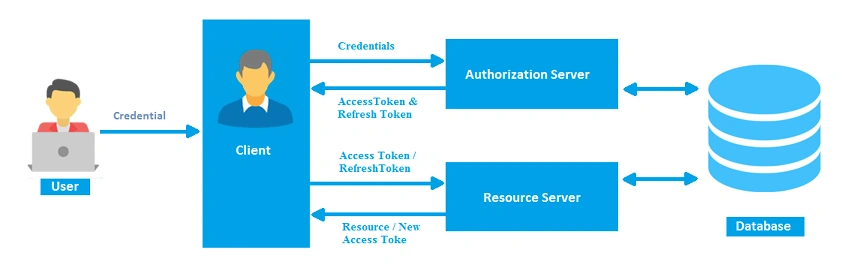
Advantages of Token Based Authentication
- Scalability of Servers
- Loosely Coupling
- Mobile-Friendly
Let’s discuss the step by step procedure to create Token-Based Authentication.
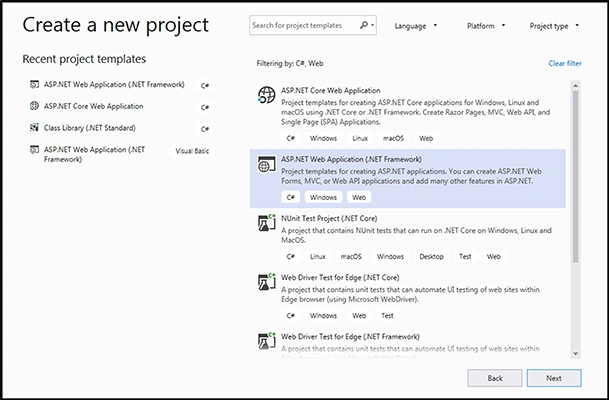
Step 1. Create ASP.NET Web Project in Visual Studio 2019.
We have to create web project in Visual Studio as given in the below image. Choose ASP.Net Web Application from the menu.
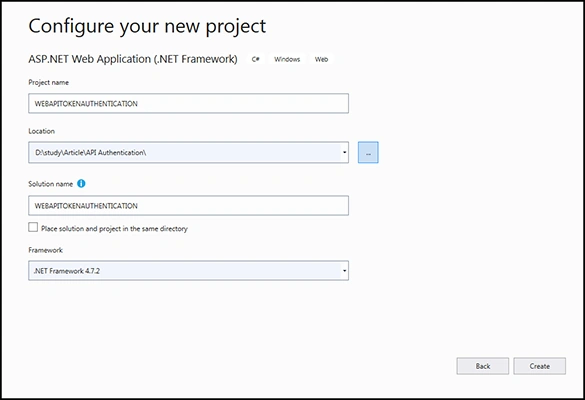
Give the project name as WEBAPITOKENAUTHENTICATION.
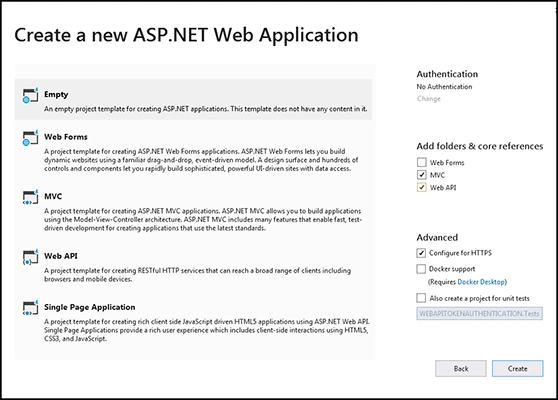
Now choose the empty template and check the "MVC" and "Web API" on the right hand side.
Step 2. Addition Of References
In this step,we have to add Nuget References like the below image.
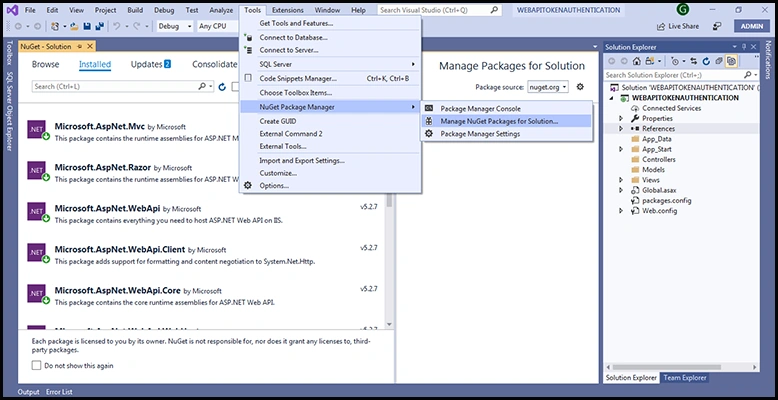
Here we have to add the following references.
- Microsoft.Owin.Host.SystemWeb
- Microsoft.Owin.Security.OAuth
- Microsoft.Owin.Cors
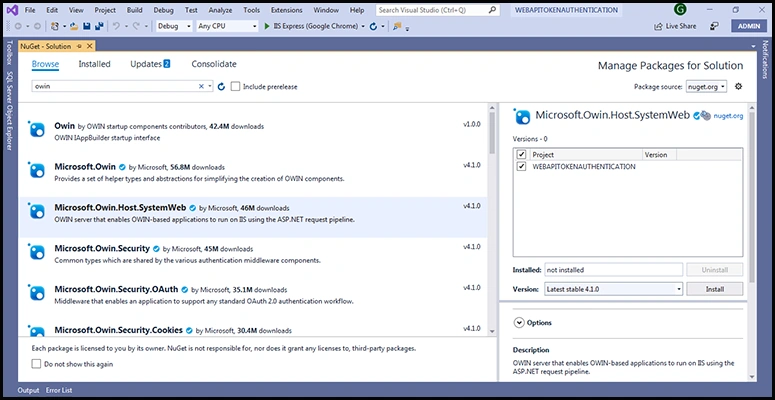
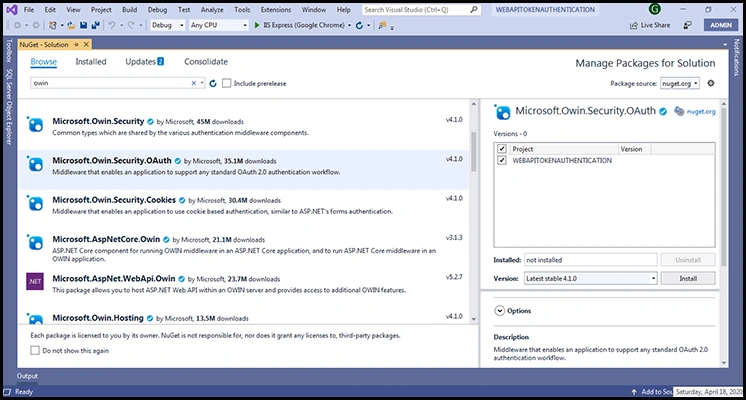
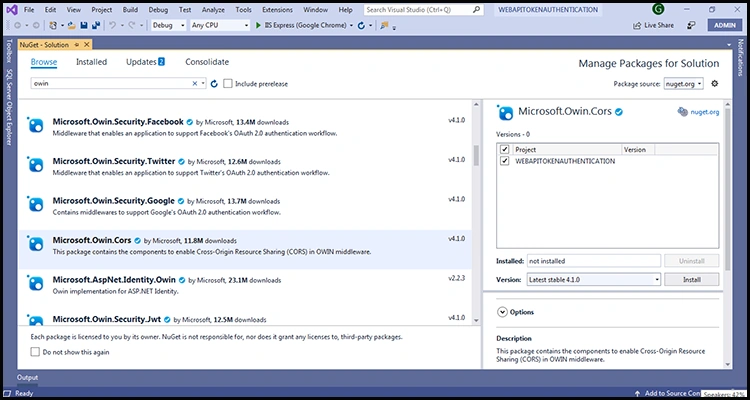
Step 3. Create APIAUTHORIZATIONSERVERPROVIDER.cs Class File
Now, let's create the class file to provide credentials to access data depending on username, password, and roles.
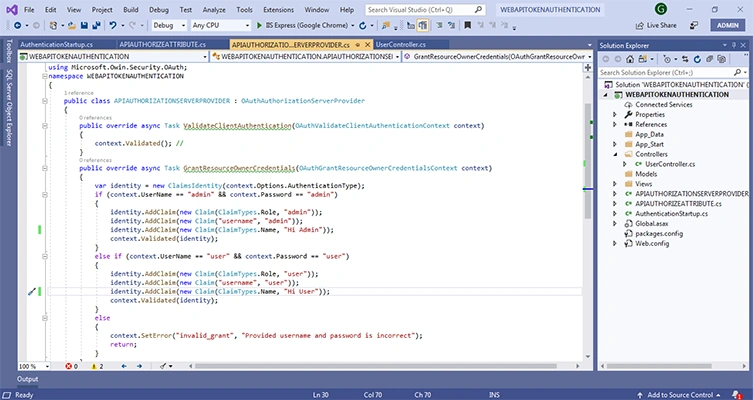
Code is given below
public class ApiAuthorizationServerProvider : OAuthAuthorizationServerProvider
{
    public override async Task ValidateClientAuthentication(OAuthValidateClientAuthenticationContext context)
    {
        context.Validated();
    }

    public override async Task GrantResourceOwnerCredentials(OAuthGrantResourceOwnerCredentialsContext context)
    {
        var identity = new ClaimsIdentity(context.Options.AuthenticationType);

        if (context.UserName == "admin" && context.Password == "admin")
        {
            identity.AddClaim(new Claim(ClaimTypes.Role, "admin"));
            identity.AddClaim(new Claim("username", "admin"));
            identity.AddClaim(new Claim(ClaimTypes.Name, "Hi Admin"));
            context.Validated(identity);
        }
        else if (context.UserName == "user" && context.Password == "user")
        {
            identity.AddClaim(new Claim(ClaimTypes.Role, "user"));
            identity.AddClaim(new Claim("username", "user"));
            identity.AddClaim(new Claim(ClaimTypes.Name, "Hi User"));
            context.Validated(identity);
        }
        else
        {
            context.SetError("invalid_grant", "Provided username and password are incorrect");
            return;
        }
    }
}
Step 4. Create a AuthenticationStartup.cs Class File
Here, we need to create a new class file to implement the code configuration provider and create an instance of class APIAUTHORIZATIONSERVERPROVIDER.
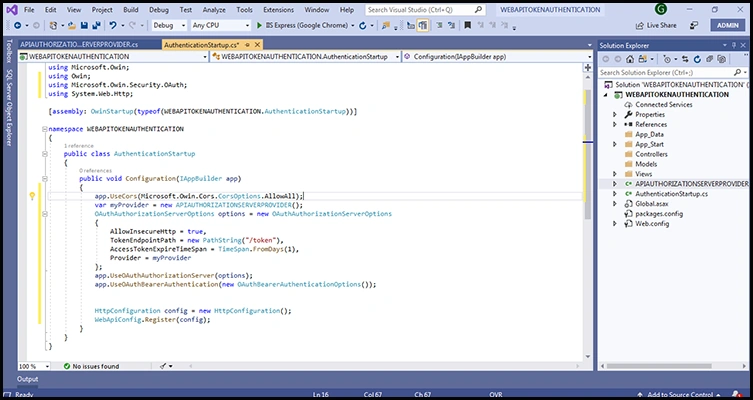
Code is given below.
public class AuthenticationStartup
{
    public void Configuration(IAppBuilder app)
    {
        app.UseCors(Microsoft.Owin.Cors.CorsOptions.AllowAll);

        var myProvider = new ApiAuthorizationServerProvider();

        var options = new OAuthAuthorizationServerOptions
        {
            AllowInsecureHttp = true,
            TokenEndpointPath = new PathString("/token"),
            AccessTokenExpireTimeSpan = TimeSpan.FromDays(1),
            Provider = myProvider
        };

        app.UseOAuthAuthorizationServer(options);
        app.UseOAuthBearerAuthentication(new OAuthBearerAuthenticationOptions());

        var config = new HttpConfiguration();
        WebApiConfig.Register(config);
    }
}
Step 5. Create a APIAUTHORIZEATTRIBUTE.cs Class File.
We need to create this class to handle unauthorized access to resources and show the proper message.
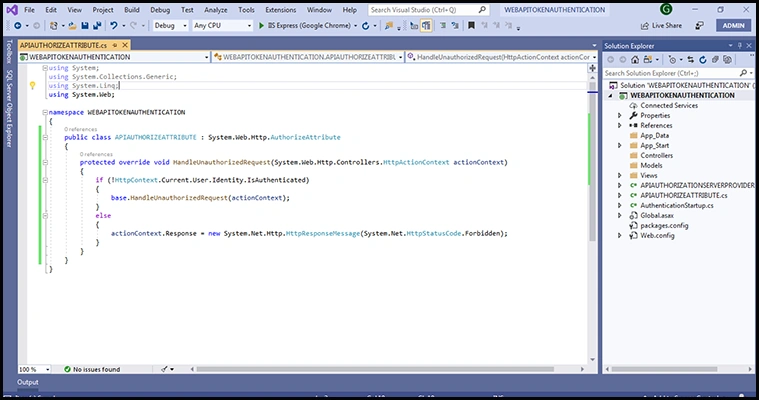
Code is given below.
public class ApiAuthorizeAttribute : System.Web.Http.AuthorizeAttribute
{
    protected override void HandleUnauthorizedRequest(System.Web.Http.Controllers.HttpActionContext actionContext)
    {
        if (!HttpContext.Current.User.Identity.IsAuthenticated)
        {
            base.HandleUnauthorizedRequest(actionContext);
        }
        else
        {
            actionContext.Response = new System.Net.Http.HttpResponseMessage(System.Net.HttpStatusCode.Forbidden);
        }
    }
}
Step 6. Create a controller with name UserController
Now we have to create an empty web api controller with name usercontroller. In this controller, we will write the actions with different authorization and roles.
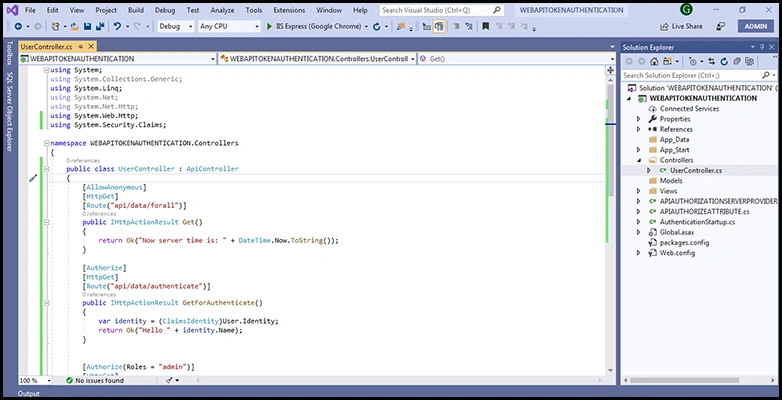
The first action "Get" will be available for anonymous users .No authetication or token is needed for this.
[AllowAnonymous]
[HttpGet]
[Route("api/data/forall")]
public IHttpActionResult Get()
{
    return Ok("Now server time is: " + DateTime.Now.ToString());
}
The second action "GetForAuthenticate" only allows the authorized user to access it.
[Authorize]
[HttpGet]
[Route("api/data/authenticate")]
public IHttpActionResult GetForAuthenticate()
{
    var identity = (ClaimsIdentity)User.Identity;
    return Ok("Hello " + identity.Name);
}
The third action "GetForAdmin" checks authorization and allows only admins to access it.
[Authorize(Roles = "admin")]
[HttpGet]
[Route("api/data/authorize")]
public IHttpActionResult GetForAdmin()
{
    var identity = (ClaimsIdentity)User.Identity;
    var roles = identity.Claims
        .Where(c => c.Type == ClaimTypes.Role)
        .Select(c => c.Value);

    return Ok("Hello " + identity.Name + " Role: " + string.Join(",", roles.ToList()));
}
Step 7. Accessing the controller using Postman
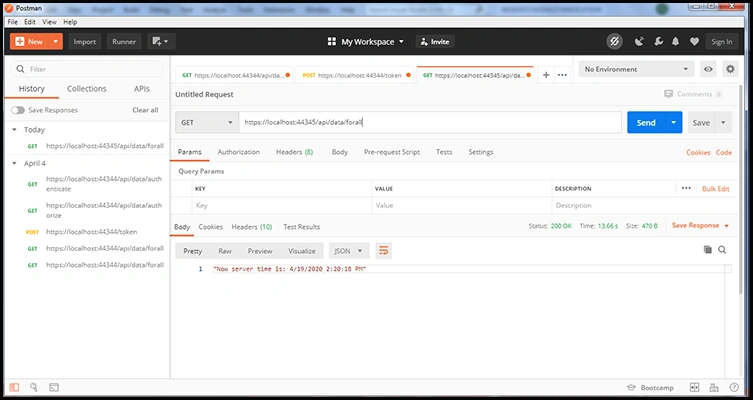
Now we have to access the controller. For that purpose, we are using postman to get data.I n case ofthe first action "Get",we can access the data without generating a token as no authorization is needed for it, by just sending GET request for route "api/data/forall".
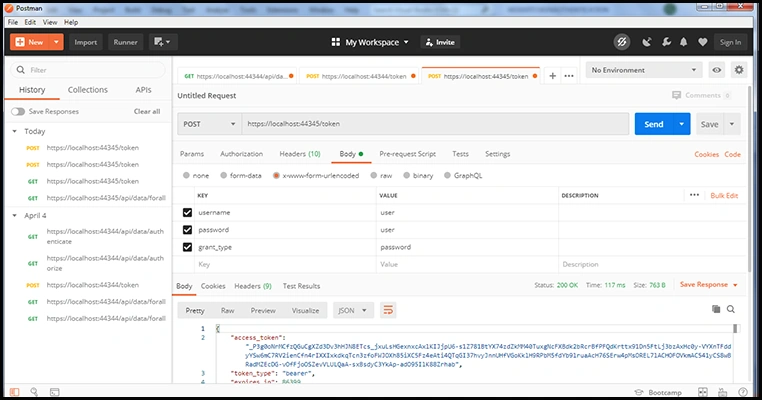
But for the rest of the actions, we have to generate a token using credentials. So we have to do post request for the token.
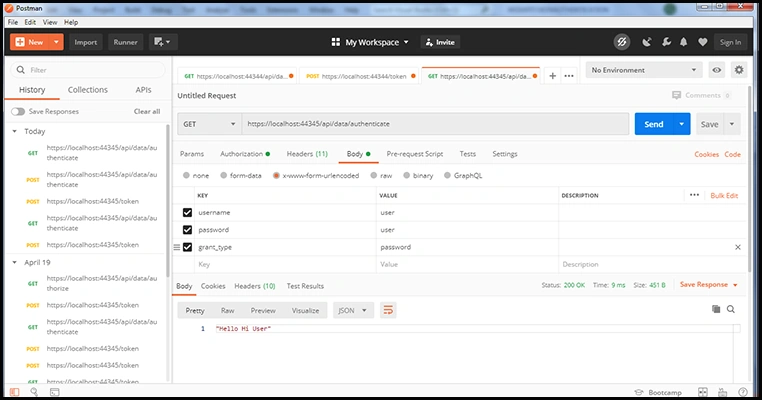
Now once the token is generated for the "user" now we can easily access the actions by using the user token.
Similarly, we can access the action as "admin" by generating token as admin and then using it.
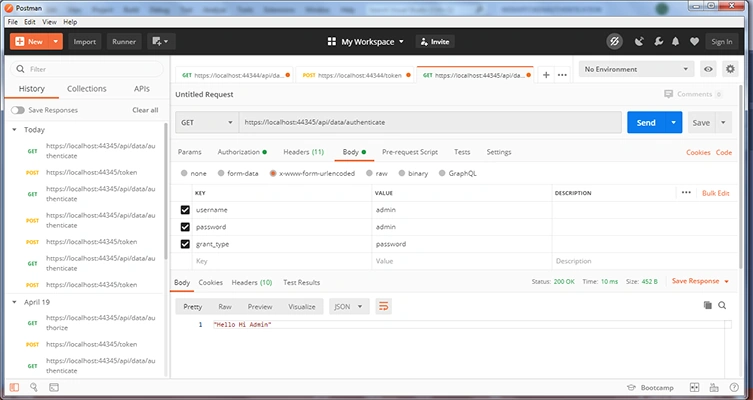
In the same way, the other actions can be accessed by user or admin depending on the way the token is generated.
sinoj APosted Nov 21, 2024, 1:29 PM
404 error pls help on this
sinoj APosted Nov 21, 2024, 1:29 PM
Got The resource cannot be found.
DhanuOPPosted Jan 18, 2024, 11:08 AM
Is this Above tutorial is Applicable for .Net Framework Web Api without Entity Framework Reply Please i want to implement i am beginner ,Thank u SIR
Michael MeyerPosted Jan 12, 2024, 6:24 AM
Hey, loved your Demo. But always get the message { error": "unsupported_grant_type" }. What am I missing?
Faisal zubiarPosted Oct 29, 2023, 5:37 PM
Unable to generate token with postman , having error of resource not found.
amol patePosted Oct 12, 2023, 9:44 AM
<add key="owin:AutomaticAppStartup" value="false" />
amol patePosted Oct 12, 2023, 9:44 AM
Hey man, nice article but you forgot to mention the web.config changes as below
Muhammad AhmerPosted May 22, 2023, 8:11 AM
I had generated token what's the next step to get the data please reply ASAP Gaurav Karroy
Martino LuccarelliPosted Jan 6, 2023, 8:57 AM
Very Good, but I have 2 error: HttpContent don't containt definition for Current and WebApiConfig don't exists. How can I solve? thank you
Yogesh ShankarPosted Nov 29, 2022, 9:46 AM
Hi I have this error, Server Error in '/' Application.The following errors occurred while attempting to load the app.- No assembly found containing an OwinStartupAttribute.- No assembly found containing a Startup or [AssemblyName].Startup class. To disable OWIN startup discovery, add the appSetting owin:AutomaticAppStartup with a value of "false" in your web.config. To specify the OWIN startup Assembly, Class, or Method, add the appSetting owin:AppStartup with the fully qualified startup class or configuration method name in your web.config. Description: An unhandled exception occurred during the execution of the current web request. Please review the stack trace for more information about the error and where it originated in the code. Exception Details: System.EntryPointNotFoundException: The following errors occurred while attempting to load the app. - No assembly found containing an OwinStartupAttribute. - No assembly found containing a Startup or [AssemblyName].Startup class. To disable OWIN startup discovery, add the appSetting owin:AutomaticAppStartup with a value of "false" in your web.config. To specify the OWIN startup Assembly, Class, or Method, add the appSetting owin:AppStartup with the fully qualified startup class or configuration method name in your web.config. Source Error: An unhandled exception was generated during the execution of the current web request. Information regarding the origin and location of the exception can be identified using the exception stack trace below.
Scott ThompsonPosted Oct 28, 2022, 4:07 AM
I have the application working adding a sql server look-up in the GrantResourceOwnerCredentials method. How would I go about hosting the application so it can be accessed from the internet?
siva kumarPosted Jan 17, 2022, 3:26 PM
Hai im facing this error config.Register(config); ====>('HttpConfiguration' does not contain a definition for 'Register' and no accessible extension method 'Register' accepting a first argument of type 'HttpConfiguration' could be found (are you missing a using directive or an assembly reference?) WEBAPITOKENAUTHENTICATION )
jai seelanPosted Dec 30, 2021, 4:55 PM
I have add the following lines in webapiconfig register method. Config.SuppressDefaultHostAuthentication(); config.Filters.Add(new HostAuthenticationFilter(OAuthDefaults.AuthenticationType)); but i have getting error message "No OWIN authentication manager is associated with the request". Can you please guide? Thanks
Kruti DavePosted Nov 6, 2021, 6:14 PM
I have implemented the same, but got 404 in Token API, So I made the following changes..Add the following lines in webapiconfig register method. Config.SuppressDefaultHostAuthentication(); config.Filters.Add(new HostAuthenticationFilter(OAuthDefaults.AuthenticationType)); Add following line before namespace in AuthenticationStartup.cs [assembly: OwinStartup(typeof(WEBAPITOKENAUTHENTICATION.AuthenticationStartup))]
David SmithPosted Oct 20, 2021, 8:36 PM
I am having the same issue....When i use /token in postman return: The resource cannot be found. Token URL not calling for unknown reason, when i can this URL on my local machine: http://localhost:1234/token. Can you please guide?
Zarqa BukhariPosted Oct 20, 2021, 6:43 AM
When i use /token in postman return: The resource cannot be found. Token URL not calling for unknown reason, when i can this URL on my local machine: http://localhost:3244/token. Can you please guide?
Shashank SoodPosted Oct 2, 2021, 6:15 PM
Gaurav Karroy Can we implement okta using the same?
Ramdas ChavanPosted Aug 5, 2021, 11:23 AM
Very Good explanation !!!
VIkram SinghPosted Jun 5, 2021, 11:25 AM
Thanks for this, I have one question can we revoke the access token?
Ali ElashryPosted May 31, 2021, 7:25 PM
Please reply me
Ali ElashryPosted May 31, 2021, 7:25 PM
When i use /token in postman return 404 not found
no noPosted May 12, 2021, 5:33 PM
Great example. Could you show how to use Postman to call the last two Get calls for the "user" and "admin" once you have gotten a valid token? I have tried but keep getting "Message": "Authorization has been denied for this request." Thanks
mohd. nadeemshaikhPosted Apr 27, 2021, 7:32 AM
Hey Gaurav Karroy, My token post method is not getting called, am I missing something?
Sai RayPosted Mar 25, 2021, 5:46 AM
Hi Gaurav, Need help on the application which connect both Angular and WebAPI2 with Token with Azure active directory
sourabh singhPosted Oct 21, 2020, 12:38 AM
How to add expiry time of token or validation one token can use only one time
Dattatray ArsulePosted Jul 22, 2020, 7:37 AM
I had generated the token. however when I select Authorization as OAuth2.0, I did not see generated token to there
Dattatray ArsulePosted Jul 22, 2020, 7:36 AM
When I select the GET, body section disabled. How it is enabled in you screenshot?
David MccarterPosted Jun 8, 2020, 11:37 AM
Just a tip, run your example code through StyleCop to make sure it adhears to common coding standards. For example this is incorrect casing for a class name: public class APIAUTHORIZATIONSERVERPROVIDER.