

I am writing this article to give you a basic idea of consuming a Web API from Yahoo Weather and display it in the Console.
Let us create a project with Console App template.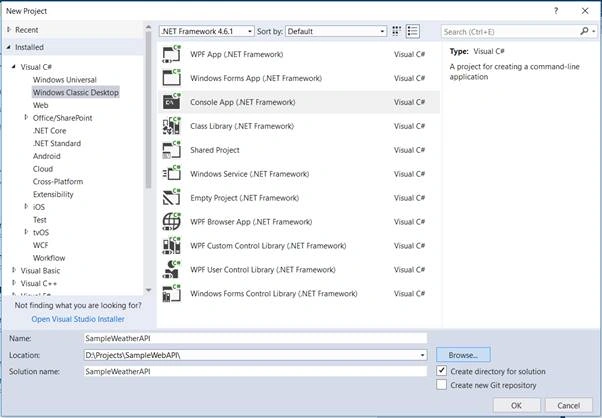
Add a class and name it as WeatherReport.
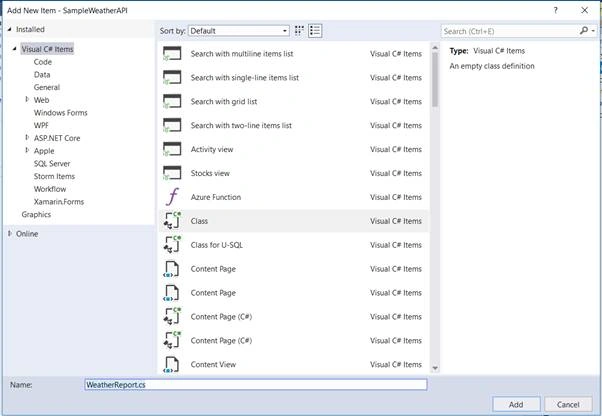
Add the following properties in WeatherReport class.
- public class WeatherReport {
- public string date {
- get;
- set;
- }
- public long temp {
- get;
- set;
- }
- public string text {
- get;
- set;
- }
- }
Get woeid (Where on earth ID) of your city using this link (Just remove Hyderabad and keep your city name). For Hyderabad, the woeid is 2295414 which I read from the response of the below API call.
https://www.metaweather.com/api/location/search/?query=hyderabad.
The response of the above link will look like this -
- [{
- "title": "Hyderabad",
- "location_type": "City",
- "woeid": 2295414,
- "latt_long": "17.508829,78.434578"
- }]
Now, let us use a wonderful Free API for weather updates and put it in our code. I used Yahoo API (since it is Free for developers) and passed the woeid 2295414 in the query.
- static void Main(string[] args)
- {
- HttpClient client = new HttpClient();
- client.BaseAddress = new Uri("https://query.yahooapis.com/v1/public/yql?q=select%20item%20from%20weather.forecast%20where%20woeid%20in%20(2295414%20)&format=json");
- client.DefaultRequestHeaders.Accept.Clear();
- client.DefaultRequestHeaders.Accept.Add(new System.Net.Http.Headers.MediaTypeWithQualityHeaderValue("application/json"));
- GetWeather(client).Wait();
- }
- static async Task GetWeather(HttpClient cons)
- {
- using (cons)
- {
- HttpResponseMessage res = await cons.GetAsync("");
- res.EnsureSuccessStatusCode();
- if (res.IsSuccessStatusCode)
- {
- string weather = await res.Content.ReadAsStringAsync();
- JObject jobj= JObject.Parse(weather);
- JToken jToken = jobj.First;
- string WeatherState = jToken.First["results"]["channel"]["item"]["condition"].ToString();
- WeatherReport report = Newtonsoft.Json.JsonConvert.DeserializeObject<WeatherReport>(WeatherState);
- Console.WriteLine("\n");
- Console.WriteLine("Weather Station: Hyderabad" );
- Console.WriteLine("Temperature Details");
- Console.WriteLine("-----------------------------------------------------------");
- Console.WriteLine("Temperature (in deg. C): "+ (report.temp-32)*0.55);// Converted from Fahrenheit to Celsius
- Console.WriteLine("Weather State: " + report.text);
- Console.WriteLine("Applicable Time: " + report.date);
- Console.ReadLine();
- }
- }
- }
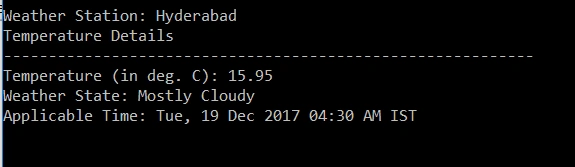
When we run the above code, the output will be something like this.
Weather Station: Hyderabad
Temperature Details
-----------------------------------------------------------
Temperature (in deg. C): 16.5
Weather State: Mostly Cloudy
Applicable Time: Tue, 19 Dec 2017 03:30 AM IST
We can get more details from JSON and display it on our Console. Here is how the JSON will look like.
- {
- "query": {
- "count": 1,
- "created": "2017-12-18T23:34:41Z",
- "lang": "en-US",
- "results": {
- "channel": {
- "units": {
- "distance": "mi",
- "pressure": "in",
- "speed": "mph",
- "temperature": "F"
- },
- "title": "Yahoo! Weather - Hyderabad, Telangana, IN",
- "link": "http://us.rd.yahoo.com/dailynews/rss/weather/Country__Country/*https://weather.yahoo.com/country/state/city-2295414/",
- "description": "Yahoo! Weather for Hyderabad, Telangana, IN",
- "language": "en-us",
- "lastBuildDate": "Tue, 19 Dec 2017 05:04 AM IST",
- "ttl": "60",
- "location": {
- "city": "Hyderabad",
- "country": "India",
- "region": " Telangana"
- },
- "wind": {
- "chill": "61",
- "direction": "23",
- "speed": "7"
- },
- "atmosphere": {
- "humidity": "59",
- "pressure": "954.0",
- "rising": "0",
- "visibility": "16.1"
- },
- "astronomy": {
- "sunrise": "6:41 am",
- "sunset": "5:46 pm"
- },
- "image": {
- "title": "Yahoo! Weather",
- "width": "142",
- "height": "18",
- "link": "http://weather.yahoo.com",
- "url": "http://l.yimg.com/a/i/brand/purplelogo//uh/us/news-wea.gif"
- },
- "item": {
- "title": "Conditions for Hyderabad, Telangana, IN at 04:30 AM IST",
- "lat": "17.418409",
- "long": "78.450012",
- "link": "http://us.rd.yahoo.com/dailynews/rss/weather/Country__Country/*https://weather.yahoo.com/country/state/city-2295414/",
- "pubDate": "Tue, 19 Dec 2017 04:30 AM IST",
- "condition": {
- "code": "27",
- "date": "Tue, 19 Dec 2017 04:30 AM IST",
- "temp": "61",
- "text": "Mostly Cloudy"
- },
- "forecast": [{
- "code": "34",
- "date": "19 Dec 2017",
- "day": "Tue",
- "high": "82",
- "low": "62",
- "text": "Mostly Sunny"
- }, {
- "code": "32",
- "date": "20 Dec 2017",
- "day": "Wed",
- "high": "81",
- "low": "60",
- "text": "Sunny"
- }, {
- "code": "32",
- "date": "21 Dec 2017",
- "day": "Thu",
- "high": "82",
- "low": "58",
- "text": "Sunny"
- }, {
- "code": "32",
- "date": "22 Dec 2017",
- "day": "Fri",
- "high": "82",
- "low": "59",
- "text": "Sunny"
- }, {
- "code": "32",
- "date": "23 Dec 2017",
- "day": "Sat",
- "high": "83",
- "low": "57",
- "text": "Sunny"
- }, {
- "code": "32",
- "date": "24 Dec 2017",
- "day": "Sun",
- "high": "80",
- "low": "63",
- "text": "Sunny"
- }, {
- "code": "32",
- "date": "25 Dec 2017",
- "day": "Mon",
- "high": "81",
- "low": "59",
- "text": "Sunny"
- }, {
- "code": "32",
- "date": "26 Dec 2017",
- "day": "Tue",
- "high": "81",
- "low": "61",
- "text": "Sunny"
- }, {
- "code": "34",
- "date": "27 Dec 2017",
- "day": "Wed",
- "high": "81",
- "low": "62",
- "text": "Mostly Sunny"
- }, {
- "code": "32",
- "date": "28 Dec 2017",
- "day": "Thu",
- "high": "79",
- "low": "60",
- "text": "Sunny"
- }],
- "description": "<![CDATA[<img src=\"http://l.yimg.com/a/i/us/we/52/27.gif\"/>\n<BR />\n<b>Current Conditions:</b>\n<BR />Mostly Cloudy\n<BR />\n<BR />\n<b>Forecast:</b>\n<BR /> Tue - Mostly Sunny. High: 82Low: 62\n<BR /> Wed - Sunny. High: 81Low: 60\n<BR /> Thu - Sunny. High: 82Low: 58\n<BR /> Fri - Sunny. High: 82Low: 59\n<BR /> Sat - Sunny. High: 83Low: 57\n<BR />\n<BR />\n<a href=\"http://us.rd.yahoo.com/dailynews/rss/weather/Country__Country/*https://weather.yahoo.com/country/state/city-2295414/\">Full Forecast at Yahoo! Weather</a>\n<BR />\n<BR />\n<BR />\n]]>",
- "guid": {
- "isPermaLink": "false"
- }
- }
- }
- }
- }
- }
Dinesh KumarPosted Nov 25, 2020, 1:31 AM
WebException: The remote name could not be resolved: 'query.yahooapis.com' given error .
Dinesh KumarPosted Nov 25, 2020, 1:31 AM
Sample Code is not working..
KingSauny AdamsonPosted Oct 20, 2018, 2:26 PM
How can you print out the forecast ?
Sagar Pandurang KapPosted Dec 22, 2017, 4:42 AM
Very well implemented..