

While working on client server environment, security of the data or message is very important. Before doing anything or transmitting your data please ensure security measures have been taken. Need to do all the efforts to incorporate security.
Now we are going to talk about WCF security. The inbuilt provision is provided by Microsoft from version .Net framework 3.0 onwards.
Windows Communication Foundation (WCF) is a secure, reliable, and scalable messaging platform for the .NET Framework 3.0
As WCF supports various protocols i.e. TCP, HTTP, and MSMQ, user must be sure enough to take necessary steps to guard your message and also must establish security policies for protecting messages and for authenticating and authorizing calls. WCF provides a very easy and rich configurable environment to implement security.
WCF supports following securities:
- Message
- Transport
- TransportWithMessageCredential
Message Security
Message security uses the WS-Security specification to secure messages. The message is encrypted using the certificate and can now safely travel over any port using plain http. It provides end-to-end security. Because message security directly encrypts and signs the message, having intermediaries does not break the security. Message security can be used when the client is deployed on internet.
Transport Security
Transport security is a protocol implemented security so it works only point to point. As security is dependent on protocol, it has limited security support and is bounded to the protocol security limitations. Typically, you can use transport security when your client is deployed within an intranet, as it provides point-to-point security and better performance compared to message security.
TransportWithMessageCredential
This we can call a mixture of both Message and Transport security implementation. Credentials are passed with the message and message protection and server authentication are provided by the transport layer.
Implementation of TransportWithMessageCredential
Step 1: Create certificate
- We need to create both Server and Client certificates.
makecert.exe -sr CurrentUser -ss My -a sha1 -n CN=CertTestServer -sky exchange –pe
makecert.exe -sr CurrentUser -ss My -a sha1 -n CN=CertTestClient -sky exchange –pe
- In order to do so, you need to install SDK tools from Microsoft. If you have already installed, you may find makecert.exe in "C:\Program Files\Microsoft SDKs\Windows\v5.1\Bin".
- Both the certificates are created but they are not under trusted category. For that Open Microsoft Management Console. Go to Run --> execute "MMC".
- Now console is opened, go to File --> Click on "Add/Remove Snap-in" --> now select Certificates on left pane and click "Add" button.
- Now, certificates were added to console view. There will be different categories of certificates. If you open Personal folder, we can find the certificates we created in earlier steps. Copy them to Trusted People folder. Close the console.
Step 2: Web.config configuration
- <bindings>
- <wsHttpBinding>
- <binding name="wsHttpEndpointBinding">
- <security mode="TransportWithMessageCredential">
- <message clientCredentialType="Certificate" /> //user can use username as well
- </security>
- </binding>
- </wsHttpBinding>
- </bindings>
- <behaviors>
- <serviceBehaviors>
- <behavior name="MessageSecurity.Service1Behavior">
- <!-- To avoid disclosing metadata information, set the value below to false and remove the metadata endpoint above before deployment -->
- <serviceMetadata httpGetEnabled="true" />
- <!-- To receive exception details in faults for debugging purposes, set the value below to true. Set to false before deployment to avoid disclosing exception information -->
- <serviceDebug includeExceptionDetailInFaults="false" />
- <serviceCredentials>
- <clientCertificate>
- <authentication certificateValidationMode="PeerTrust" />
- </clientCertificate>
- <serviceCertificate findValue="CertTestServer" storeLocation="CurrentUser" storeName="TrustedPeople" x509FindType="FindBySubjectName" />
- <userNameAuthentication userNamePasswordValidationMode="Custom" customUserNamePasswordValidatorType="MessageSecurity.AuthenticationHelper,MessageSecurity " />
- </serviceCredentials>
- <!--<serviceDebug includeExceptionDetailInFaults="False"/>-->
- </behavior>
Step 3: Code IService1 (interface)
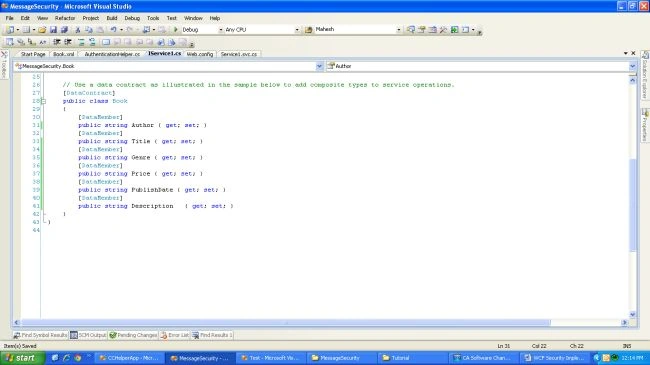
- public class Service1: IService1
- {
- #region IService1 Members
- public List < Book > GetAllBooks()
- {
- List < Book > lstBook = new List < Book > ();
- //Checking for authorization
- if (OperationContext.Current.ServiceSecurityContext.PrimaryIdentity.IsAuthenticated == false)
- {
- throw new SecurityException();
- } else
- {
- //Using LINQ to read the XML
- var xdoc = XDocument.Load(@"D:\Nishant\Project\MessageSecurity\MessageSecurity\Book.xml");
- //Getting all details of Book....
- var units = from u in xdoc.Descendants("book")
- select new
- {
- Id = (string) u.Element("author"),
- Title = (string) u.Element("title"),
- Genre = (string) u.Element("genre"),
- Price = (string) u.Element("price"),
- PublishDate = (string) u.Element("publishdate"),
- Description = (string) u.Element("description")
- };
- //Looping and storing the same in Book object
- foreach(var unit in units)
- {
- // GOD IntelliSense!!!!!! saves us..(:
- Book book = new Book();
- book.Author = unit.Id;
- book.Title = unit.Title;
- book.Genre = unit.Genre;
- book.Price = unit.Price;
- book.PublishDate = unit.PublishDate;
- book.Description = unit.Description;
- //Adding the book to list of books....
- lstBook.Add(book);
- }
- }
- return lstBook;
- }
- public string GetData(int value)
- {
- return string.Format("Comunication through Message Security: {0}", value);
- }#
- endregion
- }
- ServiceReference2.Service1Client objservice = new Test.ServiceReference2.Service1Client();
- ServiceReference2.Book[] lstBook = objservice.GetAllBooks();
Aman UllahPosted Oct 5, 2021, 3:59 AM
Where did you provide certificate from client side call? inomplete example
Sonu ChaudharyPosted Apr 4, 2016, 12:50 PM
good one
Ankur MistryPosted Dec 1, 2015, 1:32 AM
good one
Nishant MittalPosted Nov 16, 2015, 4:53 AM
Thanks All :)
Gowtham RajamanickamPosted Nov 14, 2015, 12:49 AM
good
Harshad PansuriyaPosted Nov 13, 2015, 10:59 PM
Nice one
Banketeshvar NarayanPosted Nov 13, 2015, 4:52 PM
Nice Article
Santhakumar MunuswamyPosted Nov 13, 2015, 10:00 AM
Good one
Nishant MittalPosted Nov 13, 2015, 5:01 AM
Many Thanks Sibeesh Venu
Sibeesh VenuPosted Nov 13, 2015, 3:53 AM
Nice
Nishant MittalPosted Nov 13, 2015, 3:13 AM
Thanks Guys
Ajay GandhiPosted Nov 13, 2015, 1:53 AM
Nice
Humayun Kabir MamunPosted Nov 13, 2015, 1:08 AM
Nice...
Nishant MittalPosted Nov 13, 2015, 12:38 AM
Thanks Raja :)
Raja TPosted Nov 13, 2015, 12:37 AM
Nice Sir,Thanks For Sharing..