

Introduction
I have read several WCF Rest services articles and found that it is difficult to understand the concept for new learners, hence I am trying to create simple WCF REST Service sample and going to explain how it is going to access the service using windows application.
RESTful service follows the REST (Representational State Transfer) architectural style. WCF service will allows to make calls and exchange the data using SOAP protocol over different protocols (HTTP, TCP, MSMQ etc..) and it uses the complex mechanism like SOAP for communication.
The REST service is simple to use it uses the HTTP protocol for all operations, its lightweight and faster, it uses the .json and .xml formats.
Creating Sample application for WCF REST
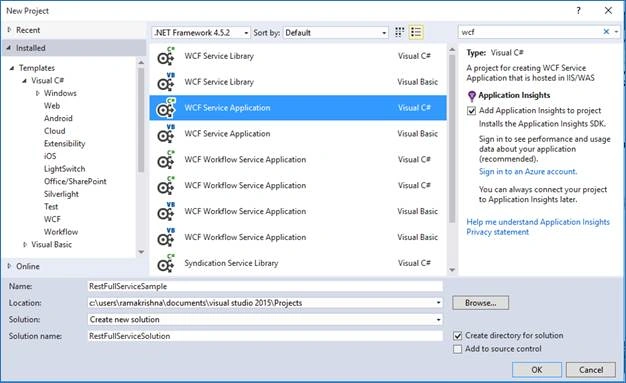
- Open Visual Studio and create new WCF Service Application
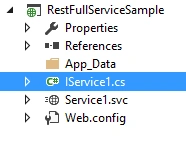
It will create 2 files (Interface and Service), the interface defines the method names as operation contracts, and we can define all our methods here.
It also contains the DataContracts in which we can define our Data members.
Above example define function called GetStudentDetails, it uses the WebGet property to do the REST Service, the WebGet property use to get the details, we can also use the WebInvoke method to do the CRUP operations.- namespace RestFullServiceSample
- {
- // NOTE: You can use the "Rename" command on the "Refactor" menu to change the interface name "IService1" in both code and config file together.
- [ServiceContract]
- public interface IService1
- {
- [OperationContract]
- [WebGet(UriTemplate = "Students", ResponseFormat = WebMessageFormat.Json, RequestFormat=WebMessageFormat.Json)]
- List <Student> GetStudentDetails();
- // TODO: Add your service operations here
- }
- // Use a data contract as illustrated in the sample below to add composite types to service operations.
- [DataContract]
- public class Student
- {
- [DataMember]
- public string ID { get; set; }
- [DataMember]
- public string Name { get; set; }
- }
- }
UriTemplate:
REST service mainly depending on the service URL to fetch the data, we can define any name here and the service can access using the URI.
ResponseFormat and RequestFormat:
It defines in which format data should be transformed, we can select XML or JSON formats here.
- Implement this interface methods in service file (Service1.svc file).
I have added my own custom code to return the student details.- public class Service1 : IService1
- {
- public List<Student> GetStudentDetails()
- {
- List<Student> stuList = new List<Student>();
- stuList.Add(new Student { ID = "123", Name = "Ramakrishna" });
- return stuList;
- }
- }
- Configure the Service behavior and endpoint behavior in web.config file
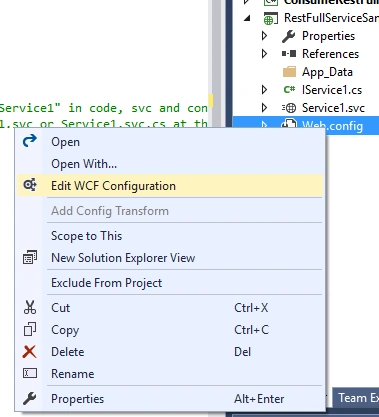
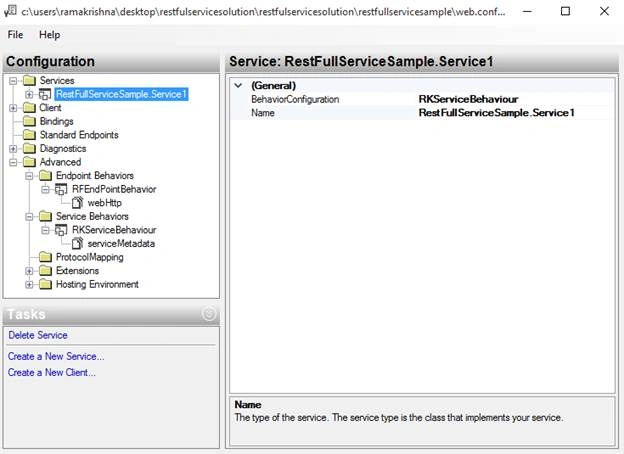
- <system.serviceModel>
- <services>
- <service name="RestFullServiceSample.Service1">
- <endpoint address="" binding="webHttpBinding" bindingConfiguration="" behaviorConfiguration="RFEndPointBehavior"
- contract="RestFullServiceSample.IService1" />
- </service>
- </services>
- <behaviors>
- <endpointBehaviors>
- <behavior name="RFEndPointBehavior" >
- <webHttp helpEnabled="true"/>
- </behavior>
- </endpointBehaviors>
- </behaviors>
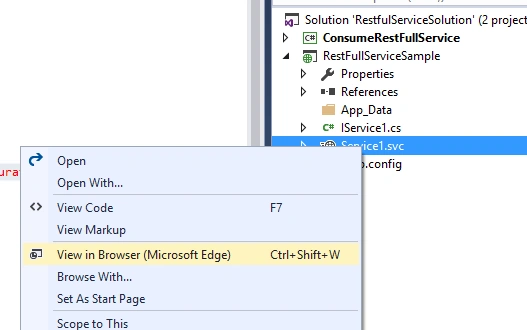
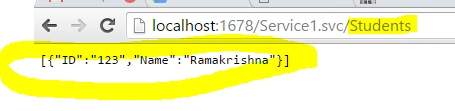
- Browse the service and test whether you are able to access the student details using web URI which is mentioned in the interface file.
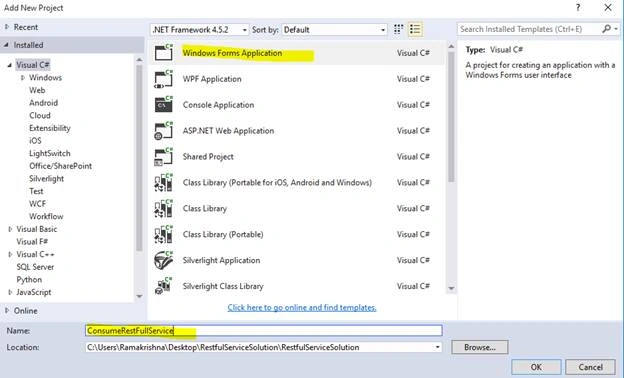
- Create Windows application to access the WCF Rest service.
- Access the Rest service methods using its url.
- private void btnBind_Click(object sender, EventArgs e)
- {
- WebClient proxy = new WebClient();
- proxy.DownloadStringAsync(new Uri("http://localhost:1678/Service1.svc/Students"));
- proxy.DownloadStringCompleted +=proxy_DownloadStringCompleted;
- }
- void proxy_DownloadStringCompleted(object sender, DownloadStringCompletedEventArgs e)
- {
- Stream stream = new MemoryStream(Encoding.Unicode.GetBytes(e.Result));
- DataContractJsonSerializer obj = new DataContractJsonSerializer(typeof(List<Student> ));
- List<Student> result = obj.ReadObject(stream) as List<Student>;
- label1.Text = result[0].ID.ToString();
- label2.Text = result[0].Name.ToString();
- }
- Run the windows application and call the WCF Rest service,
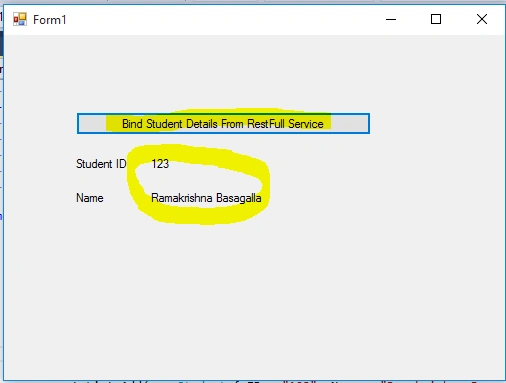
Hope this article helps you in understanding the simple WCF Rest service.
Read more articles on WCF:
Vimal ChowdhryPosted Nov 25, 2023, 1:36 AM
Good article that is also easy to understand
Senthilkumar SvPosted Mar 16, 2020, 11:17 AM
Much appreciated Ramakrishna for your efforts. It looks you have created the HTTP service through WCF platform. This is just like a capability as if creating a Web API. There are more to it if the service is to be an RESTFUL. As per RichardSon model, it should pass his Level 3 constraint to qualify for the RESTFUL service.
Mageshwaran RPosted Aug 9, 2019, 1:01 AM
Easy Understanding..
Bhavesh JadavPosted Sep 13, 2018, 7:47 AM
Good explanation with an example, thanks for sharing it.
Ramakrishna BasagallaPosted May 12, 2016, 6:22 AM
Thanks Mamun and Hari
Hari ShankerPosted May 12, 2016, 12:48 AM
Nice
Humayun Kabir MamunPosted Apr 28, 2016, 1:55 PM
Nice...
Ramakrishna BasagallaPosted Apr 28, 2016, 12:34 AM
Thanks Sonu and Rahul
Rahul Kumar SaxenaPosted Apr 27, 2016, 1:27 PM
Good Show
Sonu ChaudharyPosted Apr 27, 2016, 8:03 AM
thanks
Ramakrishna BasagallaPosted Apr 27, 2016, 1:50 AM
Thanks all for your feedback
Kumaresh RajalingamPosted Apr 26, 2016, 9:55 PM
Nice share
Vignesh ManiPosted Apr 26, 2016, 4:47 PM
nice
Gowtham KPosted Apr 26, 2016, 1:13 PM
Nice Share:)