
You can download .NET SDK beta 1 from MSDN site. Once you will install .NET SDK in your system. You can get IL disassemble tool as named ILDasm.exe in directory C:\Program Files\Microsoft.NET\FrameworkSDK\bin (Windows OS).
This question raise in mind of programmer "Why should I use ILDASM tool?"
Answer of this question I found in the tutorial supplied with .NET SDK as "The ILDSAM tool parses any .NET Framework EXE/DLL module and shows the information in a human-readable format. It allows user to see the pseudo assembly language for .NET". IL disassmeber tool shows not only namespace but also types including their interfaces.
As its name suggests, it is Intermediate language, so it has its own specification. User can also write program using this intermediate language, its very similar to assembly language of olden days.
I will use one simple example and use ILDASM.exe
C# Hello World Program
using System;
class HelloWorld
{
static void Main()
{
Console.WriteLine("Hello, world!");
}
}
Complier it on command line by using csc HelloWorld.cs
HelloWorld.exe will be generated
Again use command ildasm Helloworld.exe
You will get a screen like this.
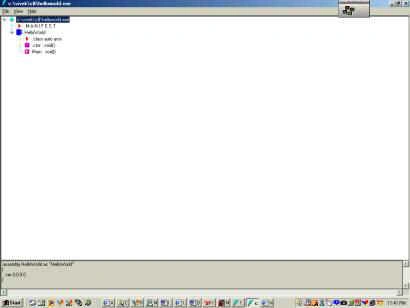
Here you can see all of Symbols. The table below explains what each graphic symbol means:
Some of them you can find in HelloWorld's members.
| Symbol | Meaning |
 |
More info |
 |
Namespace |
 |
Class |
 |
Value type |
 |
Interface |
 |
Method |
 |
Static Method |
 |
Field |
 |
Static Field |
 |
Event |
 |
Property |
The tree in this window shows that manifest information contained inside HelloWorld.exe. By double-clicking on any of the types in the tree, you can see more information about the type.
Double-clicking the ".class public auto ansi" entry shows the following information:
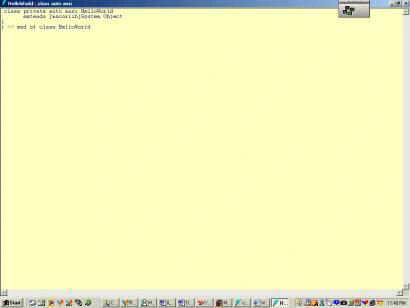
User can easily see that the HelloWorld type is derived from the System. Object type.
The first method, .ctor, is a constructor. This particular type has just one constructor but other types may have several constructors each with a different signature. If you double-click on the constructor method, a new window appears showing the IL (intermediate language) contained within the method:
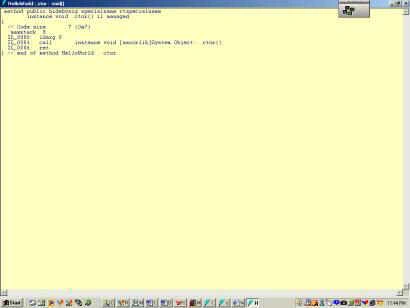
It is easy to understand it. Once you make it practice to read it, It will appear not tough task.
The Common Language Runtime is stack based. So, in order to perform any operation, the operands are first pushed onto a virtual stack and then the operator executes. The operator grabs the operands off the stack, performs the desired operation and places the result back on the stack. At any one time, this method will have no more than 8 operands pushed onto the virtual stack. We can tell this by looking at the ".maxstack" attribute ( Maximum Stack size ) that appears just before the IL code.
In the above code maxstack is shown as 8.
Lets examine the IL code :
IL_0000: ldarg.0 : Load Object this pointer in stack
IL_0001: call instance void [mscorlib]System.Object::.ctor()
IL_0006: return the value loaded in stack
If user make a double click on main: void()
It will appear like this
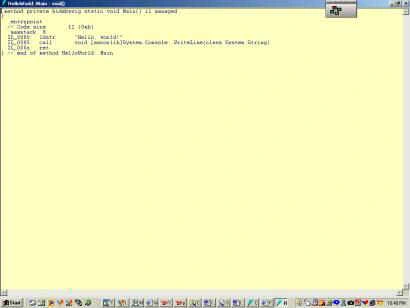
If we will examine IL Code:
IL_0000: ldstr "Hello, world!"
IL_0005: call void [mscorlib]System.Console::WriteLine(class System.String)IL_000a: ret
LDSTR: Load String .
First line indicate load String in stack.
Second Line indicate call method System.Console:: WriteLine as fetch the value from stack put in this method and again put the result in stack.
Third line shows fetch the final value from stack and return it.
There are some advance option are also available. The extra options are enabled by running ILDASM with the /ADV ("ADVanced") command-line switch. When /ADV is specified, ILDASM enables additional command-line switches
For the user convenience I will summarize some basic instructions here below.
| INSTUCTIONS | MEANING |
| LDC | This instruction pushes a hard coded number on the stack |
| LDARG and LDARGA | Load argument and load argument address, respectively |
| LDLOC and LDLOCA | Load local variable and load local variable address, respectively |
| LDFLD and LDSFLD | Load Object Field and Load Static Field of a Class, respectively |
| LDELEM | Load an element of an array |
| LDLEN | Load the length of an array |
| STARG | Store a value in an argument slot |
| STELEM | Store an element of an array |
| STFLD | Store into a field of an object |
| CEQ | Compare equal |
| CGT | Compare greater than |
| CLT | Compare less than |
| BR | Unconditional branch |
| BRFALSE and BRTRUE | Branch on false and branch on true, respectively |
| CONV | Data conversion |
| NEWARR | Create a zero-based, one-dimensional array |
| NEWOBJ | Create a new object |
| BOX | Convert value type to object reference |
| UNBOX | Convert boxed value type to its raw form |
| CALL and CALLVIRT | Call a method and call a method associated at runtime with an object, respectively |
If you have some question Please write me at [email protected]
Emmy DickensPosted Dec 22, 2011, 12:03 AM
good post