
Introduction
Before moving further, let us look at the previous articles of the series,
- Voice of a Developer: JavaScript Data Types - Part One
- Voice of a Developer: JavaScript Objects - Part Two
- Voice of a Developer: JavaScript Engines - Part Three
- Voice of a Developer: JavaScript Common Mistakes - Part Four
- Voice of a Developer: Editors - Part Five
- Voice of a Developer: VSCode - Part Six
- Voice of a Developer: Debugging Capabilities of VSCode - Part Seven
- Voice of a Developer: JavaScript OOP - Part Eight
- Voice of a Developer: JavaScript Useful Reserved Keywords - Part Nine
- Voice of a Developer: JavaScript Functions - Part Ten
- Voice of a Developer: JavaScript Functions Invocations - Part Eleven
- Voice of a Developer: JavaScript Anonymous Functions - Part Twelve
- Voice of a Developer: JavaScript Pure And Impure Function - Part Thirteen
- Voice of a Developer: JavaScript Closures - Part Fourteen
- Voice of a Developer: JavaScript Currying - Part Fifteen
- Voice of a Developer: JavaScript Chaining - Part Sixteen
- Voice of a Developer: JavaScript Array Methods - Part Seventeen
- Voice of a Developer: JavaScript ECMAScript 6 - Part Eighteen
- Voice of a Developer: JavaScript ECMAScript 6 Features v1 - Part Nineteen
- Voice of a Developer: JavaScript ECMAScript 6 Features v2 - Part Twenty
- Voice of a Developer: JavaScript Web Workers - Part Twenty One
- Voice of a Developer: JavaScript JSLint v1 - Part Twenty-Two
- Voice of a Developer: JavaScript JSLint v2 - Part Twenty Three
- Voice of a Developer: XMLHttpRequest API - Part Twenty Four
- Voice of a Developer: Web Storage API - Part Twenty-Five
- Voice of a Developer: Application Cache API - Part Twenty-Six
- Voice of a Developer: Javascript WebSocket - Part Twenty-Seven
- Voice of a Developer: Parse JSON - Part Twenty-Eight
- Voice of a Developer: Save Coding Time With Lodash.js - Part Twenty Nine
- Voice of a Developer: ChakraCore JavaScript Engine by Microsoft - Part Thirty
- Voice of a Developer: JavaScript Web App Performance Best Practices - Part 31
- Voice of a Developer: ECMAScript Promises - Part Thirty-Two
- Voice of a Developer: Browser Runtime - Part Thirty-Three
- Voice of A Developer: JavaScript Unit Test - Part Thirty-Four
- Voice Of A Developer: Decoupling Your Application - Part Thirty-Five
- Voice Of A Developer: Adding WinJS To Your Web App - Part Thirty-Six
JavaScript
Javascript is the language of the Web. This series of articles will talk about my observations learned during my decade of software development experience with Javascript. What mistakes a developer generally makes and what differences they should be aware of.
In computer programming, there are two prominent terms, scalar and vector. I am sure these terms must have brought back memories of our computer science/engineering memories.
Computer science is new in comparison to other science streams like Physics or Chemistry. Many computer science concepts are driven by other streams of science. I find the roots of Vectors in Physics. Physics describes how any quantity is either a vector or a scalar. Let’s look at the differences
Flashback
Physics
| Scalar | Vector |
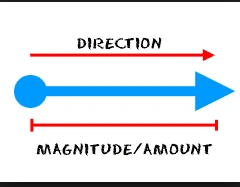
| Any quantity that can be defined by magnitude (or numerical value) is called a scalar. | Any quantity that can be described by the magnitude and a direction is called vector. |
| Example: Speed is scalar | Example: Velocity is a vector |
 |
 |
Computer Science
| Scalar | Vector |
| The term comes from linear algebra, where we differentiate between a single number OR value with a matrix. | A vector is a dynamic array, which can hold any object, and you can resize it. It has an index and can be accessed by the iterator |
| A single value | A one-dimensional array |
| Update the value | Add or remove elements |
| Ex- int a = 10; | Ex- var vector = [];
|
Vectors in HTML5

Source: https://www.svgimages.com/
- <!--?xml version="1.0" standalone="no"?-->
- <svg
- xmlns="http://www.w3.org/2000/svg" width="273.000000pt" height="300.000000pt" viewBox="0 0 273.000000 300.000000" preserveAspectRatio="xMidYMid meet">
- <g transform="translate(0.000000,300.000000) scale(0.100000,-0.100000)" fill="#070707" stroke="none">
- <path style="position: relative;" d="M545 2873 c-167 -35 -350 -177 -419 -324 -37 -78 -66 -211 -66 -304
- 0 -137 54 -321 132 -451 69 -116 238 -297 453 -484 145 -127 319 -301 398
- -397 113 -138 144 -197 197 -363 62 -196 99 -339 107 -414 7 -70 15 -59 38 54
- 37 189 103 405 161 525 34 71 65 115 149 210 144 162 385 406 465 470 83 66
- 267 257 326 338 53 71 101 163 135 257 20 58 23 83 23 225 0 142 -2 167 -23
- 225 -95 266 -234 392 -480 435 -149 26 -260 15 -414 -40 -140 -51 -224 -126
- -295 -261 -71 -138 -79 -272 -22 -385 24 -46 106 -121 168 -151 56 -27 165
- -30 223 -5 48 20 113 79 133 121 18 37 21 131 7 169 -21 55 -106 106 -176 107
- l-40 0 53 -36 c109 -73 108 -163 -3 -238 -69 -47 -140 -32 -209 45 l-38 42 4
- 76 c8 126 62 207 179 265 91 45 161 59 283 54 88 -3 110 -8 169 -35 113 -54
- 209 -159 236 -261 39 -143 30 -280 -25 -400 -58 -125 -116 -194 -405 -482
- -273 -272 -291 -292 -382 -430 -107 -163 -202 -342 -212 -401 -4 -21 -10 -39
- -13 -39 -4 0 -17 32 -30 72 -62 198 -251 469 -478 688 -479 460 -548 561 -561
- 813 -5 94 -3 116 17 175 43 129 118 215 236 269 49 22 76 27 164 31 164 6 280
- -28 378 -113 125 -108 134 -252 22 -347 -58 -50 -107 -58 -168 -26 -121 62
- -120 187 2 253 47 25 46 35 -4 35 -83 0 -157 -62 -181 -151 -11 -40 -10 -55 5
- -101 31 -101 119 -159 252 -166 73 -4 88 -1 135 21 30 14 63 34 74 44 74 65
- 117 180 117 308 0 73 -4 93 -30 147 -33 71 -120 171 -197 228 -140 104 -372
- 146 -570 103z" id="node1" class="node"></path>
- </g>
- <g transform="translate(0.000000,300.000000) scale(0.100000,-0.100000)" fill="#A2A2A2" stroke="none"></g>
- </svg>
- Overview of Scalable Vector Graphics (SVG)
- Scalable Vector Graphics - Rectangle
- Scalable Vector Graphics - Circle
- Scalable Vector Graphics - Ellipse
- Scalable Vector Graphics - Line
- Scalable Vector Graphics - Polyline
- Scalable Vector Graphics - Polygon
- Scalable Vector Graphics - Path 1
- Scalable Vector Graphics - Path 2
- Scalable Vector Graphics - Path 3
- Scalable Vector Graphics - Text 1
- Scalable Vector Graphics - Text 2
- Scalable Vector Graphics - Filters 1
- Scalable Vector Graphics - Filters 2
- Scalable Vector Graphics - Filters 3
- Scalable Vector Graphics - Filters 4
Create SVG graphics
There is a < 1-min interesting exercise to do.
I created an SVG file and you can copy and paste the below in notepad/editor and save as .svg file.
- <svg
- xmlns="http://www.w3.org/2000/svg"
- xmlns:xlink="http://www.w3.org/1999/xlink" width="1620px" height="850px" viewBox="0 0 1620 850" preserveAspectRatio="xMidYMid meet" >
- <defs id="svgEditorDefs">
- <polygon id="svgEditorShapeDefs" fill="khaki" stroke="black" style="vector-effect: non-scaling-stroke; stroke-width: 1px;"/>
- </defs>
- <rect id="svgEditorBackground" x="0" y="0" width="1620" height="850" style="fill: none; stroke: none;"/>
- <text fill="black" x="219" y="83" id="e1_texte" style="font-family: Arial; font-size: 20px;">hello
- <tspan x="219" dy="1.25em">world</tspan>
- </text>
- <path d="M0,-2v-2l-4,4l4,4v-2h4v-4Z" stroke="black" id="e2_shape" style="vector-effect: non-scaling-stroke; stroke-width: 1px;" fill="khaki" transform="matrix(4.25 0 0 4.25 317 88)"/>
- </svg>
Now, open in any browser and it shows,

Vectors in JavaScript
This is a JavaScript 2D vector maths library for Node.js and the browser.
This library can be used in both NodeJS and the browser. As we’re focusing on frontend I will show you Browser examples.
Please set up a frontend web app using node/npm OR you can download the code shown above from my GitHub Repository.
Add Angular Controller and view either manually OR my preferred way,
Prerequisite
- yo angular: controller victor

- yo angular: view victor

Install VictorJS,
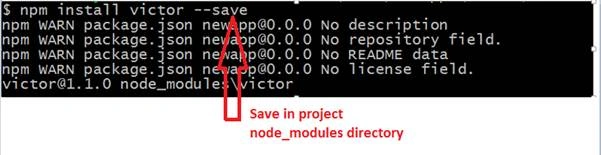
Install javascript libraries
- <script src="./bower_components/victor/build/victor.js"></script>
- 'use strict';
- angular.module('NewAppApp', ['winjs', 'ngRoute'])
- .config(function($routeProvider)
- {
- $routeProvider
- .when('/',
- {
- templateUrl: 'views/main.html',
- controller: 'MainCtrl'
- })
- .when('/victor',
- {
- templateUrl: 'views/victor.html',
- controller: 'VictorCtrl'
- })
- .otherwise
- ({
- redirectTo: '/'
- });
- });

- 'use strict';
- angular.module('NewAppApp')
- .controller('VictorCtrl', function($scope)
- {
- var vec = new Victor(10, 20);
- $scope.x = vec.x; // will fetch 10
- $scope.y = vec.y; // will fetch 20
- });
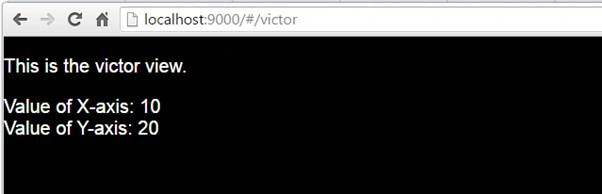
- <p>This is the victor view.</p>
- <div>Value of X-axis: {{x}}</div>
- <div>Value of Y-axis: {{y}}</div>
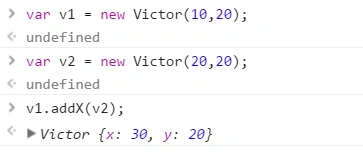
- addX: to add values of X-axis in two vectors,
- subtract: to subtract values from two vectors
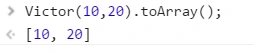
- toArray: converts a vector into a one-dimensional array,
Santhakumar MunuswamyPosted Jun 25, 2016, 2:16 AM
Thank you for nice article
Vignesh ManiPosted Jun 20, 2016, 6:45 AM
Nice