

Introduction
In October 2025, Microsoft announced a new preview feature for Visual Studio: “Planning in Visual Studio”. Microsoft for Developers. The idea gives developers and teams a way to work with the built-in AI assistant (GitHub Copilot with Visual Studio integration) in a structured, multi-step manner, rather than just one-off prompts.
Imagine you’re tackling a complex coding task: refactoring a large module, modernizing an older codebase, or creating a new feature that touches many parts of your system. With prompting alone, you might say: “Copilot, refactor module X.” But you know things will surface: you’ll uncover dependencies, you’ll need to research, you’ll iterate, and adjust the plan. That’s what this feature aims to help with.
How it works
When you ask Copilot to handle a multi-step task, the Planning system automatically decides whether it’s simple (quick answer) or complex (needs planning).
For complex tasks, it generates a Markdown plan file (example, in %TEMP%\VisualStudio\copilot-vs-plan\) that lays out the task, research steps, execution steps, and progress tracking.
As Copilot works, it updates (or revises) the plan, adapting to new context, results, and maybe failures.
You can review what’s been done and what remains. The plan becomes transparent: you see progress, you see what’s next.
This turns Copilot more from “here’s a code snippet” into “here’s a plan, execute step-by-step, adjust as you go”.
Why this matters
There are a few tangible benefits:
Better predictability and consistency: With a plan generated, Copilot isn’t just improvising; it follows a structure. Microsoft reported that with planning, large models (like GPT-5, Claude Sonnet 4) showed around ~15% higher success and ~20% more tasks resolved in their internal benchmarks.
Transparency for you: You can open the Markdown plan, see what Copilot is doing, intervene if needed, and adjust the plan mid-way (with limitations). It reduces the “black box” feel.
More suitable for large tasks: For “big” work large codebases, many dependencies, multi-step workflows, this is a better fit than a single prompt.
Foundation for planning-driven development: Microsoft calls this the “foundation of planning-driven development in Visual Studio.”
Getting started
Here are some practical points:
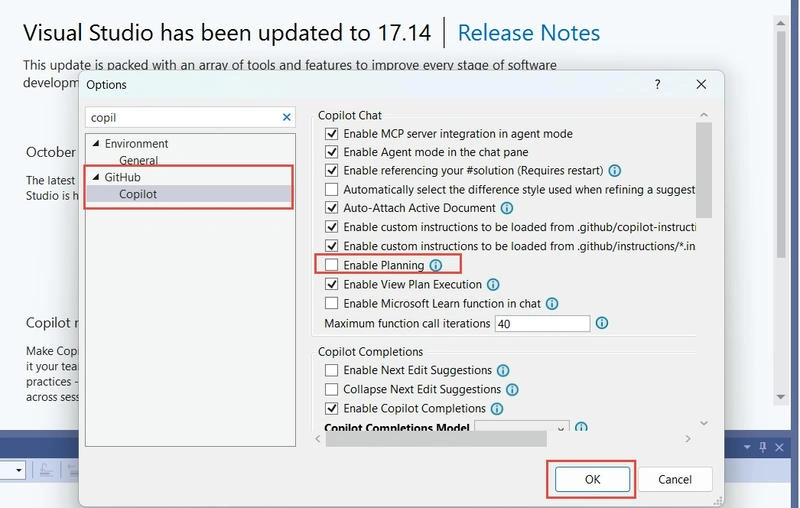
This feature is a public preview. It’s in Visual Studio 2022 version 17.14. You might need to turn it on via: Tools → Options → GitHub → Copilot → Enable Planning.
The Markdown plan file is generated in a temp folder by default. If you want to save/edit it long-term or commit it to your repo, you’ll need to move it.
If you edit the plan while an operation is running, your changes might not take effect immediately stop the response, make edits, and restart.
Because it’s a preview, you might hit rough edges.
How does this tie to your work?
Given your background (you mentioned you’re working with .NET 8 Web APIs, CQRS, Azure services, MongoDB, scheduling with Quartz.NET, React front-end), here are some thoughts on how you might use this:
If you’re tackling a large refactor or introducing the scheduling subsystem (e.g., the Quartz scheduler, MongoDB interactions, deploying to Azure App Service) you could have Copilot generate a plan: research step (understand existing modules), design step (break down tasks by domain), execution steps (implement, test, deploy), review step (integration, monitoring).
Since you use multiple projects and cross-cutting concerns (frontend + backend + infra), the planning feature could help you keep track of dependencies and order of operations rather than giving prompts piecemeal.
Because you deploy to Azure and use DevOps, you might integrate the plan file into your repo so the team sees the plan, progress is tracked, and you get more visibility.
In unit-testing or multi-room booking scenarios (you mentioned multi-room booking, complex DTOs), you could ask Copilot to plan “create end-to-end tests for multi-room booking scenario” and it can build step by step: design DTOs, mock repos, validate booking id logic, integration tests, edge cases.
Limitations
Being a preview, it may have bugs or limitations (users in comments reported e.g., plan file not updating, difficulty finding it, issues when running tasks).
It’s not a silver bullet replacing architecture or human planning; you still need to review the generated plan and decide if the steps make sense for your context.
If you change the plan while execution is running, the changes may not immediately be honoured, so you might want to pause and revise.
You’ll want to manage how you store the plan file (temp vs repo), given your team workflow, version control, and branching strategy.
Because you’re working with a lot of moving pieces (Azure, front/back end, scheduling, NoSQL, etc.), you’ll still need to coordinate manually some parts that the Copilot planning helps, but domain knowledge and architecture decisions remain with you.
Recommendation of Using it
I see this as a useful evolution of AI-assisted development in Visual Studio. For developers working on projects like (multi-layered, microservices, scheduling, cross-project dependencies), it offers a new way to engage with Copilot in Agent mode: more structured, more visible, more amenable to team workflows.
Here’s how I’d recommend adopting it:
Try it on a new smaller project first, for example, create a new feature in your booking system, and ask Copilot to plan it. Learn how the plan file is generated, how you can edit it, and how progress is tracked.
Once comfortable, roll it into larger tasks: redesigning your scheduling module, integrating a new service, refactoring the multi-room logic.
Commit the plan file into your repo (if appropriate), so you have visibility in version control, maybe tie it to an issue board or backlog item.
Review generated plans carefully; treat them as drafts you refine rather than cast-in-stone directives.
Provide feedback to Microsoft (via Developer Community) as you hit issues since it’s preview, your real-world experience helps improve it.
Note: At the time of this article's writing, this feature is in preview and works in Copilot in Agent mode.
For more details on Agent mode, you can refer to the previous article here.
Conclusion
The “Planning in Visual Studio” feature marks a shift from ad-hoc prompt use of AI to structured, plan-oriented workflows inside the IDE. For developers working on complex systems like yourself with .NET, scheduling, Azure, MongoDB, React whatever it offers a promising way to coordinate AI assistance across larger tasks. While still in preview and not a substitute for human judgement and architecture design, it’s a tool that can increase predictability, transparency and efficiency.y and efficiency.
Reference
Join the conversation! Your thoughts help the community grow.