

In the article Using Data Annotations to validate models I showed that it is possible to maintain validations in attributes.
In this article I will show how to apply these validations on the client side.
By default, when you create a standard MVC project, it creates an entire initial structure for you, including the setup of the scripts. To enable client-side validation you need two keys under appSettings in your web.config file (that are set by default in the standard template):
- <add key="ClientValidationEnabled" value="true" />
- <add key="UnobtrusiveJavaScriptEnabled" value="true" />
- @Scripts.Render("~/bundles/jquery")
- @Scripts.Render("~/bundles/jqueryval")
With the setup ready we can start coding. I will create a model with some data annotations as in the following:
- public class Game
- {
- [Required]
- [StringLength(5)]
- public string Name { get; set; }
- [Required]
- [StringLength(5)]
- public string Genre { get; set; }
- [Range(13, 40)]
- public string Age { get; set; }
- }
- @using (Html.BeginForm())
- {
- <div>
- <div>
- @Html.LabelFor(o => o.Name)
- @Html.TextBoxFor(o => o.Name)
- <br />
- @Html.ValidationMessageFor(o => o.Name)
- </div>
- <br />
- <div>
- @Html.LabelFor(o => o.Genre)
- @Html.TextBoxFor(o => o.Genre)
- <br />
- @Html.ValidationMessageFor(o => o.Genre)
- </div>
- <br />
- <div>
- @Html.LabelFor(o => o.Age)
- @Html.TextBoxFor(o => o.Age)
- <br />
- @Html.ValidationMessageFor(o => o.Age)
- </div>
- <br />
- <br />
- <input type="submit" value="Submit" />
- </div>
- }
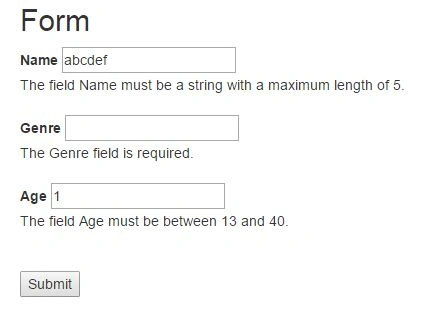
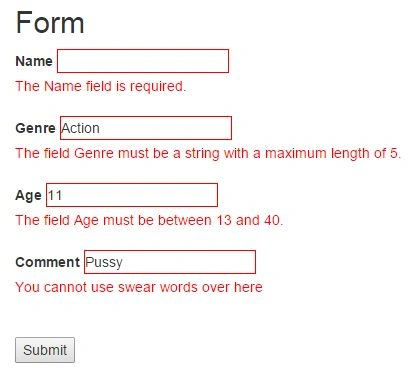
The object being validated receives the class input-validation-error that can be styled. And the error message receives a field-validation-error that can also be styled. For example, if we want to display a Red border and Red message:
- .input-validation-error
- {
- border: 1px solid red;
- }
- .field-validation-error
- {
- color: red;
- }
To make a custom validation and allow it to run on the client side we must create a new attribute that inherits from the ValidationAttribute and implementsIClientValidatable interface. For example:
- public class NoSwearWords : ValidationAttribute, IClientValidatable
- {
- protected override ValidationResult IsValid(object value,
- ValidationContext validationContext)
- {
- string val = value as string ?? "";
- bool valid = !new string[] { "Pus**", "F**k" }
- .Any(o => val.Contains(o));
- if (!valid)
- return new ValidationResult(
- base.FormatErrorMessage(base.ErrorMessage));
- return null;
- }
- // client-side
- public IEnumerable<ModelClientValidationRule>
- GetClientValidationRules(ModelMetadata metadata
- , ControllerContext context)
- {
- var rule = new ModelClientValidationRule();
- rule.ValidationType = "noswearwords";
- rule.ErrorMessage = "You cannot use swear words over here";
- yield return rule;
- }
- }
I will decorate the property Comment with it as in the following:
- [NoSwearWords]
- public string Comment { get; set; }
- <script type="text/javascript">
- $.validator.addMethod("noswearwords",
- function (value, element, param) {
- return !/Pus**|F**k/i.test(value);
- });
- $.validator.unobtrusive.adapters.add("noswearwords", {},
- function (options) {
- options.rules["noswearwords"] = true;
- options.messages["noswearwords"] = options.message;
- });
- </script>
NitinPosted Jun 1, 2015, 9:49 AM
nice