

This is one of the new features of SQL Server 2016. Before this article, I would like you to go through one of the previous articles on the Split_String function in SQL Server 2016.
I hope you love this new feature of SQL Server. Let’s move on to the ISJSON() function.
What is JSON?
JSON (JavaScript Object Notation) is a text based format, used for data exchange. It is lightweight compared to XML and thus is preferred as a best choice to transfer the data across the devices. It is open and readable. We can parse JSON by JavaScript implementations. Because of a few of these features, the developers prefer JSON over XML these days.
JSON Syntax
Here, I will show what JSON looks like:
- {"students":[
- {"Name":"James", "Age":27},
- {"Name":"John Doe", "Age":28},
- {"Name":"John Smith", "Age":29}
- ]}
Let us see how this function works. Open SQL Server 2016 and write the following script in the Query Editor.
- DECLARE @JSONINPUT NVARCHAR(4000)
- SET @JSONINPUT = N'{"students":[
- {"Name":"James", "Age":27},
- {"Name":"John Doe", "Age":28},
- {"Name":"John Smith", "Age":29}
- ]}'
- IF (ISJSON(@JSONINPUT) = 1)
- BEGIN
- PRINT 'This is JSON!!'
- END
- ELSE
- BEGIN
- PRINT 'NOT a JSON!!'
- END
- GO
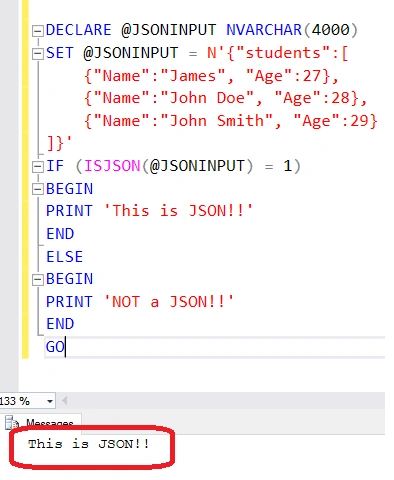
Thus, we get the expected output. Let us make some modifications to JSON that we have passed as an input to the function. I’ll remove one of the brackets from JSON and check for the output. Let us see what happens:
- DECLARE @JSONINPUT NVARCHAR(4000)
- SET @JSONINPUT = N '{"students":[
- {
- "Name": "James",
- "Age": 27
- },
- {
- "Name": "John Doe",
- "Age": 28
- }, "Name": "John Smith", "Age": 29
- }]
- }
- '
- IF(ISJSON(@JSONINPUT) = 1)
- BEGIN
- PRINT 'This is JSON!!'
- END
- ELSE
- BEGIN
- PRINT 'NOT a JSON!!'
- END
- GO
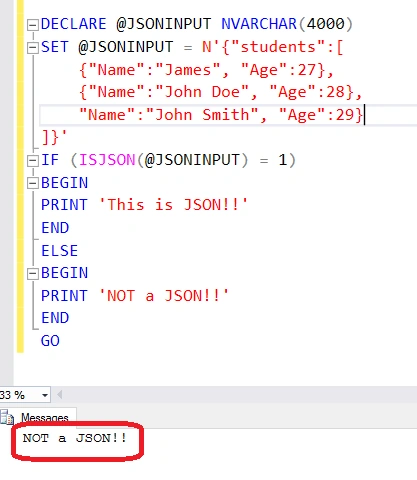
Since JSON is not valid, the function returns an invalid JSON message. This validates the functionality of ISJSON() function in SQL Server 2016.
Let us pass null into the function and check what will be the output:
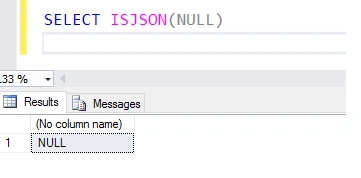
We get null as the output. For null, this function will return null as the output.
Summary
In this post, we saw a very new feature i.e., ISJSON() function and how it can be used. This is very helpful for the developers as the same functionality can be used in SQL itself.
Ming HsuehPosted Jan 19, 2022, 1:19 AM
What is the best way to determine why ISJSON() fails? I have a table where ISJSON(<fieldname>) shows "0" in the grid, but when I copy and paste the string from the grid and do a SELECT ISJSON('string') it shows "1" Can't for the life of me figure out why. When the string is copied out of the grid it works everywhere, so something causes the test to fail with the string in the table.
Ravi KandelPosted Jul 14, 2016, 12:06 PM
Thanks for sharing.
Vignesh ManiPosted Jul 4, 2016, 11:11 AM
Nice
Gagan SharmaPosted Jul 4, 2016, 3:14 AM
Nice
RajaPosted Jul 4, 2016, 12:38 AM
Nice Share....
Anil Kumar MurmuPosted Jul 4, 2016, 12:33 AM
Nice article nitin ..I have a question. Say I have validated the json input by ISJSON() Function..but then if I need to access the 1st or 2nd json object . How to do this??
Prasanna MuraliPosted Jul 3, 2016, 11:13 AM
Nice one...
kalu singh raoPosted Jul 3, 2016, 4:24 AM
Nice...
Guest UserPosted Jul 2, 2016, 9:06 PM
Nice to know this! it's a good move by SQL Server considering popularity graph of JSON format