

Abstract
WebForms Core introduces a novel command-based architecture that replaces traditional DOM diffing with a Command Flow model. Instead of synchronizing UI state through virtual DOM comparisons or RESTful data contracts, WebForms Core transmits compact semantic commands from server to client.
This article demonstrates how WebForms Core can be used in Go (Golang) to manage structured and unstructured data—including INI, Text, JSON, XML, and Variables—using the Format Storage abstraction
Architectural Overview
WebForms Core operates on three fundamental principles:
Command Flow instead of Diffing
Unified Format Storage for multiple data models
Client-side interpretation of server commands
This design eliminates the need for:
REST / GraphQL endpoints
Virtual DOM
Client-side state duplication
The server remains the single source of truth, while the client acts as an interpreter and executor.
By transmitting only semantic UI commands instead of full state representations, WebForms Core significantly reduces network payload size, eliminates client–server state mirroring, and enables deterministic UI updates with minimal synchronization overhead.
Format Store Abstraction
Format Store provides a unified, extensible mechanism for managing structured and semi-structured data formats, including:
JSON
XML
INI
Plain Text
Variables
GraphQL-compatible structures
Each format is manipulated through a consistent command interface, allowing format-agnostic UI rendering and data querying.
The Format Store feature is introduced in version 2 of the WebForms Core technology.
Core Go Example Explained
HTTP Server and WebForms Initialization
func main() {
	http.Handle("/script/", http.StripPrefix("/script/", http.FileServer(http.Dir("script"))))
	http.HandleFunc("/", handleForm)
	http.ListenAndServe(":8080", nil)
}
The Go application acts as a pure command generator:
No REST endpoints
No JSON APIs
No client-side framework dependency
The server returns:
Static HTML
A WebForms command stream injected via ExportToHtmlComment
Creating and Using JSON Format Storage
form := new(webforms.WebForms)
fe := &webforms.Fetch{}
form.CreateFormatStorage("fs_json", "{}")
"FormatStorage" is an abstract, named container for structured data.
Here, "fs_json" is initialized as a JSON object.
Adding and Updating JSON Data
form.AddJSON("fs_json", "user.name", "Adriano")
form.AddJSON("fs_json", "user.age", "30")
form.AddJSON("fs_json", "settings.theme", "dark")
Key characteristics:
Path-based addressing ("user.name")
Automatic object creation
No schema declaration required
Updating values:
form.UpdateJSON("fs_json", "user.age", "31")
form.UpdateJSON("fs_json", "settings.theme", "light")
Deleting and Querying JSON
form.DeleteJSON("fs_json", "settings.theme")
form.SetValue("query", fe.FormatStoreByJSONQuery("fs_json", "user.name"))
The Fetch engine extracts data from the storage without exposing it directly to JavaScript.
Rendering Without Manual DOM Access
form.SetText("<textarea>", fe.FormatStore("fs_json"));The selector-based targeting allows bulk UI updates without diffing or virtual DOM logic.
Full code
package main

import (
	"fmt"
	"your-project-name/webforms"
	"net/http"
)

func main() {
	http.Handle("/script/", http.StripPrefix("/script/", http.FileServer(http.Dir("script"))))
	http.HandleFunc("/", handleForm)
	http.ListenAndServe(":8080", nil)
}

func handleForm(w http.ResponseWriter, r *http.Request) {
	form := new(webforms.WebForms)

	//JSON
	// Create a JSON storage
	form.CreateFormatStorage("fs_json", "{}")
	fe := &webforms.Fetch{}

	// Add values
	form.AddJSON("fs_json", "user.name", "Adriano")
	form.AddJSON("fs_json", "user.age", "30")
	form.AddJSON("fs_json", "settings.theme", "dark")

	// Output
	form.SetText("<textarea>", fe.FormatStore("fs_json"))

	// Update existing value
	form.UpdateJSON("fs_json", "user.age", "31")
	form.UpdateJSON("fs_json", "settings.theme", "light")

	// Output after update
	form.SetText("<textarea>1", fe.FormatStore("fs_json"))

	// Delete one field
	form.DeleteJSON("fs_json", "settings.theme")

	// Output after delete
	form.SetText("<textarea>2", fe.FormatStore("fs_json"))

	// Fetch a JSON value: user.name
	form.SetValue("query", fe.FormatStoreByJSONQuery("fs_json", "user.name"))

	// Set width and height
	form.SetWidthInt("<textarea>*", 500)
	form.SetHeightInt("<textarea>*", 50)

	fmt.Fprint(w, `<!DOCTYPE html>
<html>
<head>
  <title>Using WebForms Core</title>
  <script type="module" src="/script/web-forms.js"></script>
</head>
<body>
	<h1>WebForms Core in GO</h1>
	<h2>Format Storage:</h2>
    <main>
		Output:
		<br/>
		<textarea></textarea>
		<br/>
		Output after update:
		<br/>
		<textarea></textarea>
		<br/>
		Output after delete:
		<br/>
		<textarea></textarea>
		<br/>
		<b>JSON Query: </b>
		<br/>
		<input type="text" id="query" />
    </main>
</body>
</html>` + form.ExportToHtmlComment(true))
}
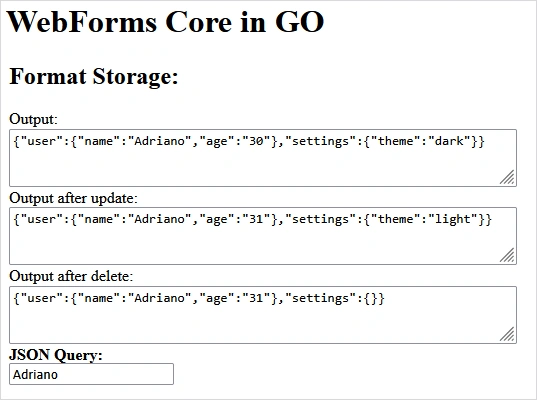
In the above code, first a JSON data type is created and its value is given and its result is placed in the first textarea.
Then the update operation is performed and its result is inserted in the second textarea.
Finally, the delete operation is performed and the result of this action is displayed in the third textarea.
In addition, using the key (user.name), a specific value is fetched from the JSON and the value is placed in an input field with the ID "query".
The image below is a screenshot of the output of the above codes.
Other formats and capabilities
INI Format Storage
INI is treated as a structured format with sections and keys.
form.CreateFormatStorage("fs_ini", "[INI-example]")

form.AddINI("fs_ini", "Theme", "Dark")
form.AddINI("fs_ini", "App.Version", "1.0.0")
form.AddINI("fs_ini", "App.Name", "MyApp")

form.UpdateINI("fs_ini", "Theme", "Light")
form.DeleteINI("fs_ini", "App.Name")

form.SetText("query", fe.FormatStoreByINI("fs_ini", "Theme"))

form.SetText("<textarea>", fe.FormatStore("fs_ini"))
Explanation
INI is parsed and modified client-side
Supports hierarchical keys
No serialization/deserialization roundtrip
Text Format Storage
form.CreateFormatStorage("fs_text", "Text Example")

form.AddTextLine("fs_text", 1, "Line 1")
form.AddTextLine("fs_text", 2, "Line 2")
form.AddTextLine("fs_text", 3, "Line 3")

form.UpdateTextLine("fs_text", 1, "Updated Line 2")
form.UpdateTextLine("fs_text", -1, "Updated Last Line")

form.DeleteTextLine("fs_text", 0)
form.DeleteTextLine("fs_text", -1)

form.SetText("query", fe.FormatStoreByText("fs_text", 1))

form.SetText("<textarea>", fe.FormatStore("fs_text"))
Explanation
Line-based addressing
Negative indices supported
Ideal for logs, scripts, and raw text editors
Advanced JSON (Arrays & Nested Structures)
form.CreateFormatStorage("fs_json", "{}")

form.AddJSON("fs_json", "items[0]", "Apple")
form.AddJSON("fs_json", "items[1]", "Orange")
form.AddJSON("fs_json", "items[2]", "Banana")

form.AddJSON("fs_json", "user.hobbies[0]", "Music")
form.AddJSON("fs_json", "user.hobbies[1]", "Game")

form.UpdateJSON("fs_json", "items[1]", "Orange Updated")
form.DeleteJSON("fs_json", "user.hobbies[0]")

form.SetText("query", fe.FormatStoreByJSONQuery("fs_json", "items[2]"))

form.SetText("<textarea>", fe.FormatStore("fs_json"))
Explanation
Array indexing via path syntax
Nested arrays and objects supported
Query engine abstracts traversal
XML Format Storage
form.CreateFormatStorage("fs_xml", "<root></root>")

form.AddXML("fs_xml", "/root", "User")
form.AddXML("fs_xml", "/root/User", "Name", "Ali")
form.AddXML("fs_xml", "/root/User", "Age", "30")

form.AddXML("fs_xml", "/root/User", "@Gender", "Male")

form.UpdateXML("fs_xml", "/root/User/Name", "Sara")
form.UpdateXML("fs_xml", "/root/User/@Gender", "Female")

form.DeleteXML("fs_xml", "/root/User/Age")
form.DeleteXML("fs_xml", "/root/User/@Gender")

form.SetText("query", fe.FormatStoreByXMLQuery("fs_xml", "/root/User/Name"))

form.SetText("<textarea>", fe.FormatStore("fs_xml"))
Explanation
XPath-like addressing
Unified command model for elements and attributes
Client-side XML interpreter
Variables (State Without JSON)
form.AddVariable("fs_Counter", "10")
form.AddVariable("fs_Message", "Hello")

form.UpdateVariable("fs_Message", "Hello World")

form.IncreaseVariable("fs_Counter", 5)
form.DecreaseVariable("fs_Counter", 3)

form.DeleteVariable("fs_Message")

form.SetValue("txtCounter", fe.FormatStoreByVariable("fs_Counter"))
Explanation
Lightweight state containers
Arithmetic operations without JS
Ideal for counters, flags, and transient state
Sending Format Storage data with SendBack mechanism
One of the new features of version 2 of WebForms Core technology is the "SendBack" mechanism.
The "SendBack" method removes dependency on the "application/x-www-form-urlencoded" content type by enabling structured command-based data submission. This mechanism supports advanced scenarios such as:
GraphQL payload construction
Complex state synchronization
Framework-independent front-end communication
Example:
form.SetSendEvent("Button1", "onclick", fe.FormatStore("fs_json"), "/api/json", "PUT", false, "JSON")In this example, the "SetSendEvent" method shows how sending data from the UI to the server can be done without writing a single line of JavaScript. By simply defining a high-level directive, the developer specifies that when a DOM event occurs (such as "onclick" on a button), the content of a specified Format Store ("fs_json") is read, serialized into a structured form (here JSON), and sent to a specified server route using the specified HTTP method. All the usual steps, including collecting data, constructing the payload, setting headers, and executing the request, are automatically performed by WebForms Core.
The highlight of this approach is the complete removal of the dependency on custom JavaScript. In traditional architectures, sending data always requires hand-coding with "fetch" or similar libraries and maintaining state synchronization logic with the UI. In contrast, WebForms Core uses a declarative-like model to define the event, data, and destination in a single statement. This not only greatly reduces complexity, but also results in code that is more readable, maintainable, and independent of front-end frameworks—a feature that is of great scientific and practical importance for designing scalable and stable web systems.
How to use WebForms Core technology?
Two steps are required:
On the client side: Add the WebFormsJS script to your HTML page.
<script type="module" src="/script/web-forms.js"></script>Get the WebFormsJS script from the following link: https://github.com/webforms-core/Web_forms/
On the server side: Import the WebForms class for your programming language.
Get the WebForms class associated with the server programming language from the following link: https://github.com/webforms-core/Web_forms_classes
Conclusion
Unlike component-based frameworks such as React or Blazor, WebForms Core does not rely on client-side state reconciliation.
WebForms Core introduces a novel paradigm for web application architecture, where UI state, data manipulation, and rendering are unified under a compact command language.
Its Go implementation demonstrates that this model is language-agnostic, scalable, and suitable for modern high-performance web systems.
Join the conversation! Your thoughts help the community grow.