
Introduction
In this post, I will show you how to use JQXTreeview Plugin with ASP.NET MVC 4, using C# and Entity framework, JSON.
What is JqxTree?
jqxTree represents a highly configurable jQuery Tree widget, which displays the hierarchical data, such as a table of contents in a tree structure.
jqxTree can be generated from the lists and standard anchor tags, which are properly recognized by the search engines. As a result, all the content accessible through this widget will be automatically indexed and ranked with no extra effort required from the Web developer.
Before starting, we need to download the following libraries from jqwidgets.
- <link href="~/Content/jqx.base.css" rel="stylesheet" />
- <script src="~/Scripts/jquery-1.7.1.min.js"></script>
- <script src="~/Scripts/demos.js"></script>
- <script src="~/Scripts/jqxcore.js"></script>
- <script src="~/Scripts/jqxdata.js"></script>
- <script src="~/Scripts/jqxbuttons.js"></script>
- <script src="~/Scripts/jqxscrollbar.js"></script>
- <script src="~/Scripts/jqxpanel.js"></script>
- <script src="~/Scripts/jqxtree.js"></script>
Create Table
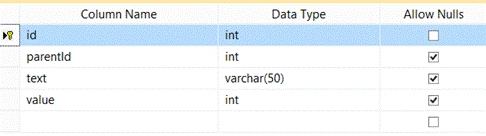
You will find the table, given below, used in our Application:
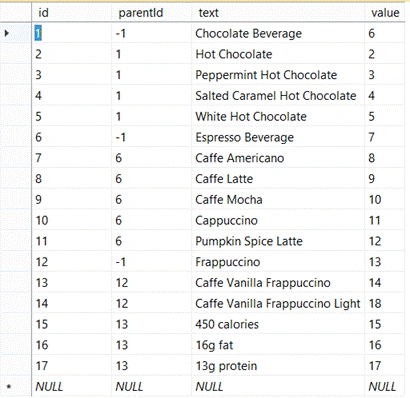
After creating the table, you can fill it, using the data rows, as shown below:
Create your MVC application
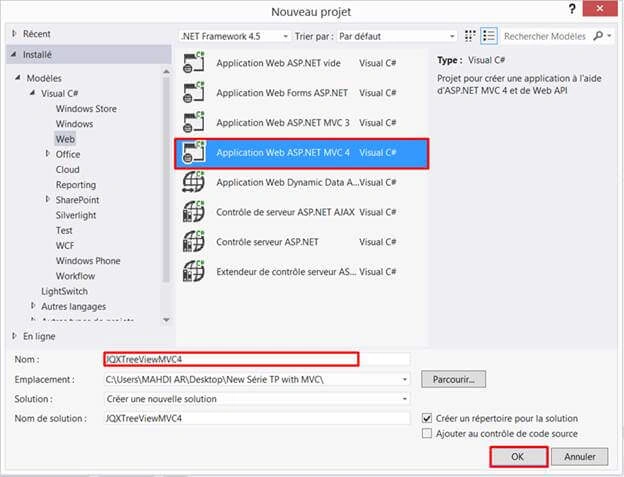
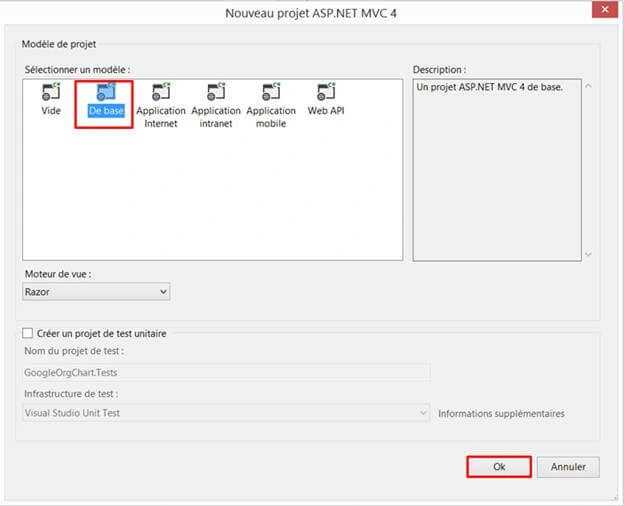
Open Visual Studio. Click on File > New > Project and name your project, as shown below:
Creating ADO.NET Entity Data Model
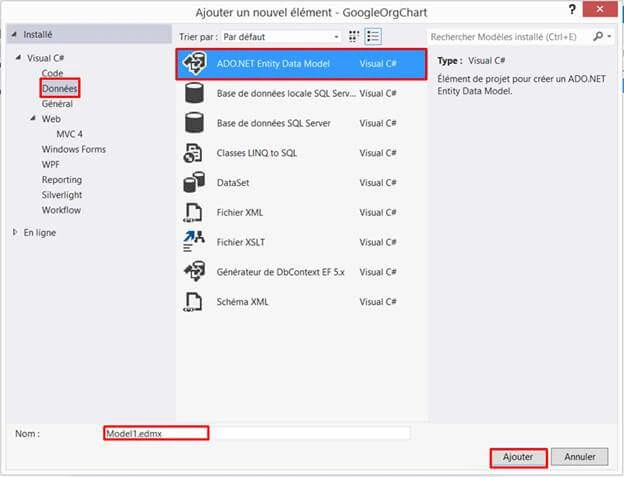
Right click on the project name. Click Add > Add New Item. In the dialog box displayed, select Data > click Add button.
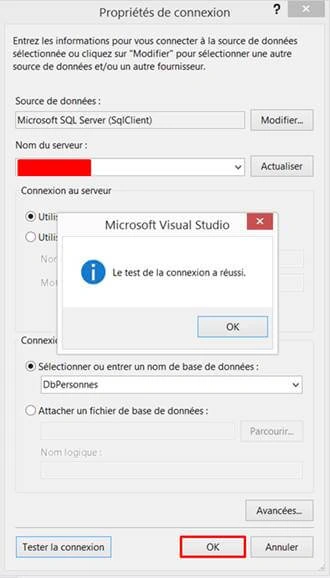
After clicking Next button, the dialog box will be displayed, as shown below. You need to choose your Server name and select your database.
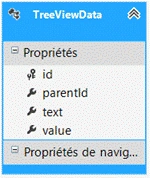
Finally, we see that EDMX model generates TreeViewData class.
Create a controller
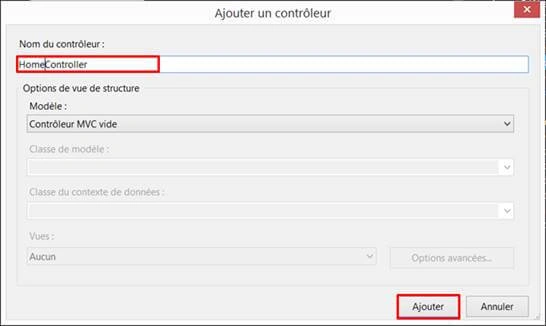
Now, we proceed to create a controller. Right click on controller folder > Add > Controller > Enter Controller name (‘Home Controller’).
HomeController.cs
- using System;
- using System.Collections.Generic;
- using System.Linq;
- using System.Web;
- using System.Web.Mvc;
- namespace JQXTreeViewMVC4.Controllers
- {
- public class HomeController: Controller {
- //DbContext
- private DbPersonnesEntities db = new DbPersonnesEntities();
- //
- // GET: /Home/
- public ActionResult Index() {
- return View();
- }
- public JsonResult GetDataTreeView() {
- var DbResult = from d in db.TreeViewData
- select new {
- d.id,
- d.parentId,
- d.text,
- d.value
- };
- return Json(DbResult, JsonRequestBehavior.AllowGet);
- }
- }
- }
Creating a strongly typed view
We are going to create a strongly typed view.
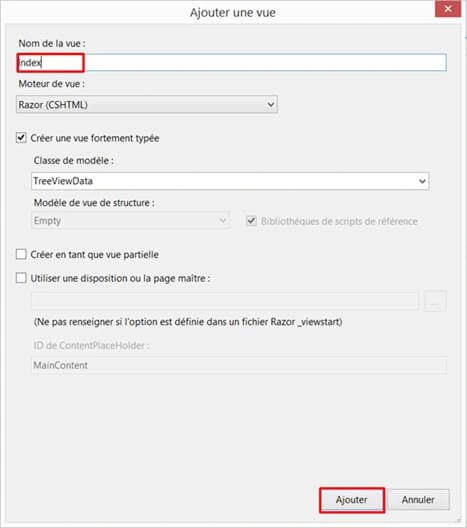
Index.cshtml
- @model JQXTreeViewMVC4.TreeViewData
- @{
- Layout = null;
- }
- <!DOCTYPE html>
- <html>
- <head>
- <meta name="viewport" content="width=device-width" />
- <title>Index</title>
- <link href="~/Content/jqx.base.css" rel="stylesheet" />
- <script src="~/Scripts/jquery-1.7.1.min.js"></script>
- <script src="~/Scripts/demos.js"></script>
- <script src="~/Scripts/jqxcore.js"></script>
- <script src="~/Scripts/jqxdata.js"></script>
- <script src="~/Scripts/jqxbuttons.js"></script>
- <script src="~/Scripts/jqxscrollbar.js"></script>
- <script src="~/Scripts/jqxpanel.js"></script>
- <script src="~/Scripts/jqxtree.js"></script>
- </head>
- <body>
- <div id='content'>
- <script type="text/javascript">
- $(document).ready(function () {
- // prepare the data
- var source =
- {
- datatype: "json",
- datafields: [
- { name: 'id' },
- { name: 'parentId' },
- { name: 'text'},
- { name: 'value'}
- ],
- id: 'id',
- url: 'Home/GetDataTreeView',
- async: false
- };
- // create data adapter.
- var dataAdapter = new $.jqx.dataAdapter(source);
- // perform Data Binding.
- dataAdapter.dataBind();
- // get the tree items. The first parameter is the item's id. The second parameter is the parent item's id. The 'items' parameter represents
- // the sub items collection name. Each jqxTree item has a 'label' property, but in the JSON data, we have a 'text' field. The last parameter
- // specifies the mapping between the 'text' and 'label' fields.
- var records = dataAdapter.getRecordsHierarchy('id', 'parentId', 'items', [{ name: 'text', map: 'label' }]);
- $('#jqxWidget').jqxTree({ source: records, width: '300px' });
- });
- </script>
- <div id='jqxWidget'></div>
- </div>
- </body>
- </html>
Siva KumarPosted Jun 26, 2018, 4:30 AM
Its very use full please update source code
RakeshPosted Jul 31, 2016, 2:20 AM
Good one
Bhavik PatelPosted Jul 31, 2016, 2:15 AM
Nice
Vignesh ManiPosted Jul 30, 2016, 8:19 PM
Nice
Prasanna MuraliPosted Jul 30, 2016, 10:45 AM
Nice one..