
Introduction
Stored procedures (sprocs) in SQL Server are generally an ordered series of Transact-SQL statements bundled into a single logical unit. They allow for variables and parameters, as well as selection and looping constructs. A key point is that sprocs are stored in the database rather than in a separate file. In this article, we will learn how to use stored procedures in an ASP.NET application.
Advantages of stored procedures over inline SQL queries include,
- Referred to using short names rather than a long string of text; therefore, less network traffic is required to run the code within the sproc.
- Pre-optimized and precompiled, so they save an incremental amount of time with each sproc call/execution.
- Encapsulate a process for added security or to simply hide the complexity of the database.
- Can be called from other sprocs, making them reusable and reducing code size.
- Stored procedures are executed on the database server and can be better for performance.
- Stored procedures are also secure and do not expose database details in application.
Parameterization
A stored procedure gives us some procedural capability, and also gives us a performance boost by using mainly two types of parameters,
- Input parameters
- Output parameters
From outside the sproc, parameters can be passed in either by position or reference.
Declaring Parameters in SQL Server Stored Procedures
To declare parameters in a SQL Server stored procedure, you will need,
- The name
- The datatype
- The default value
- The direction
The syntax is,
@parameter_name [AS] datatype [= default|NULL] [VARYING] [OUTPUT|OUT]
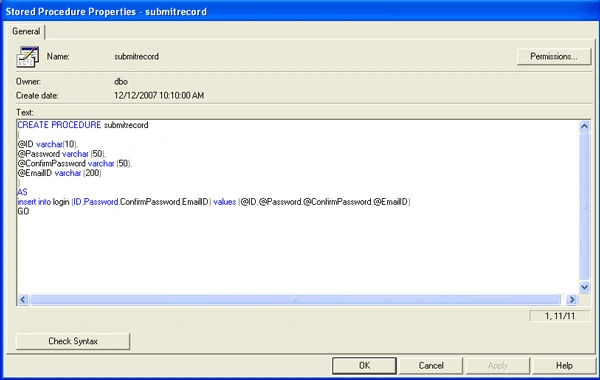
Let's now create a stored procedure named "Submitrecord".
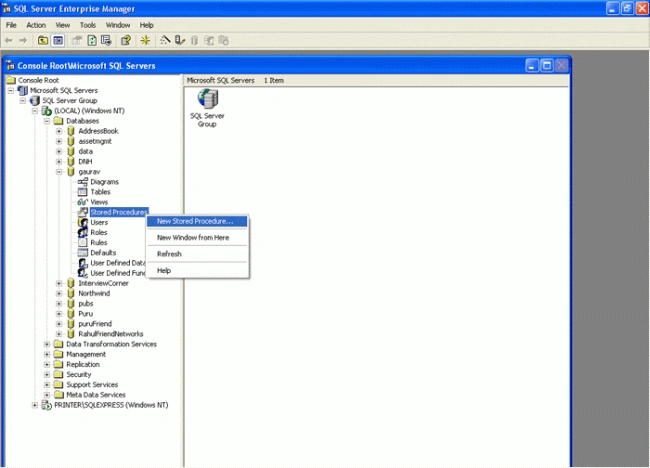
First open Microsoft SQL Server -> Enterprise Manager, then navigate to the database in which you want to create the stored procedure and select New Stored Procedure.
Stored Procedure.aspx page code
<%@ Page Language="C#" AutoEventWireup="true" CodeFile="Default.aspx.cs" Inherits="_Default" %>
<!DOCTYPE html PUBLIC "-//W3C//DTD XHTML 1.0 Transitional//EN" "http://www.w3.org/TR/xhtml1/DTD/xhtml1transitional.dtd">
<html xmlns="http://www.w3.org/1999/xhtml">
   <head runat="server">
        <title>Store Procedure</title>
   </head>
   <body>
        <form id="form1" runat="server">
            <div>
                <asp:Label ID="Label1" runat="server" Text="ID"></asp:Label>
                <asp:TextBox ID="TextBox1" runat="server"></asp:TextBox><br /><br />
                <asp:Label ID="Label2" runat="server" Text="Password"></asp:Label>
                <asp:TextBox ID="TextBox2" runat="server"></asp:TextBox><br /><br />
                <asp:Label ID="Label3" runat="server" Text="Confirm Password"></asp:Label>
                <asp:TextBox ID="TextBox3" runat="server"></asp:TextBox><br /><br />
                <asp:Label ID="Label4" runat="server" Text="Email ID"></asp:Label>
                <asp:TextBox ID="TextBox4" runat="server"></asp:TextBox><br /><br /><br />
                <asp:Button ID="Button1" runat="server" Text="Submit Record" OnClick="Button1_Click" /> </div>
        </form>
    </body>
</html>
using System;
using System.Data;
using System.Configuration;
using System.Web;
using System.Web.Security;
using System.Web.UI;
using System.Web.UI.WebControls;
using System.Web.UI.WebControls.WebParts;
using System.Web.UI.HtmlControls;
using System.Data.SqlClient;
public partial class _Default: System.Web.UI.Page {
    DataSet ds = new DataSet();
    SqlConnection con;
    //Here we declare the parameter which we have to use in our application
    SqlCommand cmd = new SqlCommand();
    SqlParameter sp1 = new SqlParameter();
    SqlParameter sp2 = new SqlParameter();
    SqlParameter sp3 = new SqlParameter();
    SqlParameter sp4 = new SqlParameter();
    protected void Page_Load(object sender, EventArgs e) {}
    protected void Button1_Click(object sender, EventArgs e) {
        con = new SqlConnection("server=(local); database= gaurav;uid=sa;pwd=");
        cmd.Parameters.Add("@ID", SqlDbType.VarChar).Value = TextBox1.Text;
        cmd.Parameters.Add("@Password", SqlDbType.VarChar).Value = TextBox2.Text;
        cmd.Parameters.Add("@ConfirmPassword", SqlDbType.VarChar).Value = TextBox3.Text;
        cmd.Parameters.Add("@EmailID", SqlDbType.VarChar).Value = TextBox4.Text;
        cmd = new SqlCommand("submitrecord", con);
        cmd.CommandType = CommandType.StoredProcedure;
        con.Open();
        cmd.ExecuteNonQuery();
        con.Close();
    }
}
When we run the application, the window will look like this,
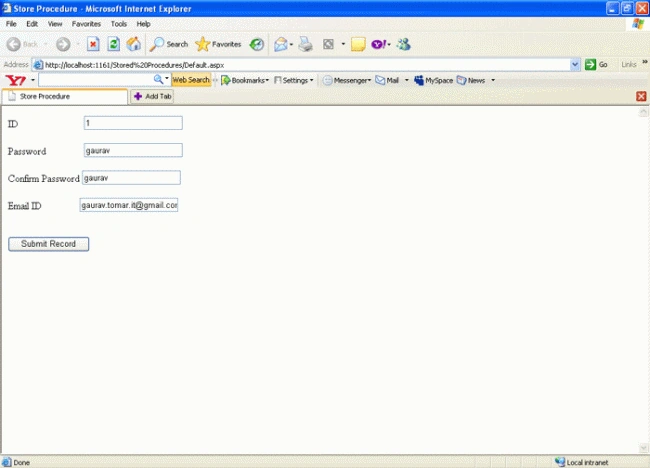
After clicking the submit button the data is appended to the database as seen below in the SQL Server table record:

Summary
In this article, we learned how to execute a SQL Server stored procedure from an ASP.NET Web application.
Check out SQL and SQL Server categories of C# Corner to learn about these technologies and get code samples.
Dharmendra Kumar PanditPosted Feb 15, 2020, 12:34 AM
Well article
jyotsna chavanPosted Jan 21, 2019, 6:24 AM
I got the error in this code. there is a connectionstring error ( Cannot open database "xyz" requested by the login. The login failed.Login failed for user 'sa'. )
KOTRA RAGHAVENDRAPosted Nov 12, 2018, 3:00 AM
In b\w drop downlist is there means how todo
Anupam ModakPosted Sep 2, 2018, 8:35 AM
Big Thanks !!
Ramesh PalaniappanPosted Aug 24, 2016, 10:16 AM
Nice
kalu singh raoPosted Jul 3, 2016, 8:44 AM
Nice...
Muhammad Waqar tahirPosted Nov 27, 2013, 1:12 AM
very good.
Santosh YadavPosted Mar 31, 2013, 11:07 AM
Good attempt.
Fincy PhilipeditedPosted Nov 12, 2012, 9:29 AMEdited Nov 12, 2012, 9:32 AM
Fist call the stored procedure then pass the parameters.Otherwise it will throw exception ....Thankyou.
ram sharmaPosted Aug 27, 2012, 1:47 PM
write these two line after connection string cmd = new SqlCommand("submitrecord", con); cmd.CommandType = CommandType.StoredProcedure;
anil babuPosted Aug 17, 2012, 6:39 AM
I have a table 7 columns, I am using gridview control Display all record In pageload? After I am inserting a record time just I am insert 4 columns only remaing columns leav it i am not insert dada? How to restrict that using ASP.NET Gridview ?
siva anandPosted May 3, 2012, 6:38 AM
not working check the code ...
christo rajPosted Mar 28, 2012, 3:31 AM
Its very useful for all beginers
Abdul KAPosted Mar 20, 2012, 12:21 PM
Thank you very much
abhishek sPosted Jan 25, 2012, 3:05 AM
i hv read ur article on stored procedures,its great. but i need .net code for "when i registered in c#-sharpcorner,within a seconds i got a mail by [email protected]. with username & password " so i want to know / code example for how can we send mail to registered users ? please i need an example for the above question and more examples on wcf
Rinku GuptaPosted Jul 16, 2011, 6:14 AM
how to use stroed procedure using sqldatareader to have one input value and retrieve column in gridview like dept_no as int input and value like name,sal,job etc
chirag makwanaPosted Jan 1, 2011, 2:13 AM
Thanks Gaurav.. Do You tell me How To user More Then One Stored Procedure We Can Use in Asp.Net...
gigi macPosted Dec 23, 2010, 2:55 AM
why you wrote these lines ? SqlCommand cmd = new SqlCommand(); SqlParameter sp1 = new SqlParameter(); SqlParameter sp2 = new SqlParameter(); SqlParameter sp3 = new SqlParameter(); SqlParameter sp4 = new SqlParameter();
Srinu BoddetiPosted Dec 13, 2010, 2:07 AM
thanks for giving this oppurtunity
Mani maranPosted Nov 11, 2010, 9:21 AM
Dear Gaurav, plz say how to write the coding .. i mean Commands, Connections .. Instead of SQL.. Whether it is same or Different. i'm using SQLite Database
Manas MohapatraPosted Oct 29, 2010, 2:03 AM
Very Nice Description
guriagPosted Jul 2, 2010, 2:58 AM
very nice and simple work
Tom ChauPosted Mar 26, 2010, 5:13 PM
how come sql parameters variables sp1...sp4 never used? can someone give an example of how to use them if needed? much thanks.
Jagdeep MankotiaPosted Feb 3, 2010, 1:47 AM
Greate its very usefull for freshers. Written in very simple language easy to understand all programers. Greate work. Well done dude. == Jagdeep Mankotia
pushpendra palPosted May 22, 2009, 3:04 AM
thank you sir. I'm glad because understand stored procedure in very easiet lang. and easily. thanks a lot.
vasu makineniPosted Mar 5, 2009, 6:44 AM
thanks for giving this
Sheetal IllendulaeditedPosted Jan 25, 2009, 11:01 AMEdited Jan 25, 2009, 11:09 AM
Modications to be done to Stored Procedure.aspx ------ using System; using System.Data; using System.Configuration; using System.Web; using System.Web.Security; using System.Web.UI; using System.Web.UI.WebControls; using System.Web.UI.WebControls.WebParts; using System.Web.UI.HtmlControls; using System.Data.SqlClient; public partial class _Default : System.Web.UI.Page { protected void Page_Load(object sender, EventArgs e) { } protected void Button1_Click(object sender, EventArgs e) { SqlConnection con = new SqlConnection("server=(local); database= Sample;uid=sa;pwd=pass"); SqlCommand cmd = new SqlCommand("submitrecord", con); cmd.Parameters.Add("@ID", SqlDbType.VarChar).Value = TextBox1.Text; cmd.Parameters.Add("@Password", SqlDbType.VarChar).Value = TextBox2.Text; cmd.Parameters.Add("@ConfirmPassword", SqlDbType.VarChar).Value=TextBox3.Text; cmd.Parameters.Add("@EmailId", SqlDbType.VarChar).Value = TextBox4.Text; cmd.CommandType = CommandType.StoredProcedure; con.Open(); cmd.ExecuteNonQuery(); con.Close(); } }
ambrish yadavPosted Feb 8, 2008, 11:03 AM
hi gaurav i ambrish i have one problem how we can fill more than two table recored in gridview using corcer give complete code in asp.net with c#.net ok Thanks
Zero Energy HiPosted Feb 3, 2008, 7:13 AM
U R da Man Dude ;) Hope Always Better
deep shigePosted Jan 2, 2008, 5:19 AM
thanx it is very useful for fresher
deep shigePosted Jan 2, 2008, 5:19 AM
thanx it is very useful for fresher
deep shigePosted Jan 2, 2008, 5:19 AM
thanx it is very useful for fresher
posubabu kosuriPosted Jan 1, 2008, 1:13 PM
How to Editing Data in DetailsView
posubabu kosuriPosted Jan 1, 2008, 1:12 PM
Dear Sir....... Iam Working on DetailsView. In That Details View How TOo Edit The Data by Using Commmand field /Hyperlink Field And Another Doubt Is In My Project Is Each ProjectLeadre Has Create Thier Own NewProject And Editing That Project Details If there Is Tasks On The Project. But In My Prject Is Every ProjectLeader Has Seen Another Project Leader Details.and Tasks.. But The Main Thing Is Every Project Leader Has Own Details And Tasks.Onlyyyyyyyyy.... In That Siuations Another Projects Details oor not Visible ........Please Kindly Replied ABout My Question? Sir....... Thanking You Sir.... Your's Sincerely Posubabu.K Trainee Consultant, IBLESOFT PVT LTD
X LeePosted Dec 26, 2007, 9:19 PM
sql procedure is some letters , you can execute it on sql ide like "exec proc_name , arg1,...",then , we can execute procedure in c# like this way, SqlCommand sqlCommand = new SqlCommand(); sqlCommand.CommandText = "exec proc_name , arg1,..."; but this way has a defect that is can not use output argument
Former memberPosted Dec 21, 2007, 4:08 PM
Great work buddy, thanks for us
Manas BeheraPosted Dec 13, 2007, 11:45 PM
The way you described it's gr8...It's very necessary for a fresher........Thanks Manas