

Caching is the process of storing the data in a temporary storage for a specific period of time, so that from the next time onwards, when the data is requested, it can be provided from this temporary storage instead of the database.
What is Redis Cache?
As stated in Redis official site,
“Redis is an open source (BSD licensed), in-memory data structure store, used as database, cache and message broker. It supports data structures such as strings, hashes, lists, sets, sorted sets with range queries, bitmaps, hyperloglogs and geospatial indexes with radius queries. Redis has built-in replication, Lua scripting, LRU eviction, transactions and different levels of on-disk persistence, and provides high availability via Redis Sentinel and automatic partitioning with Redis Cluster.”
Please check more details on the Redis official site here.
Now, we will check, how to implement Redis Cache in Web API.
Prerequisite
I’m creating Web API with MVC 4, using Visual Studio 2010.
To start with, we will first install Redis Client in our system.
Just click this link and download the exe file.
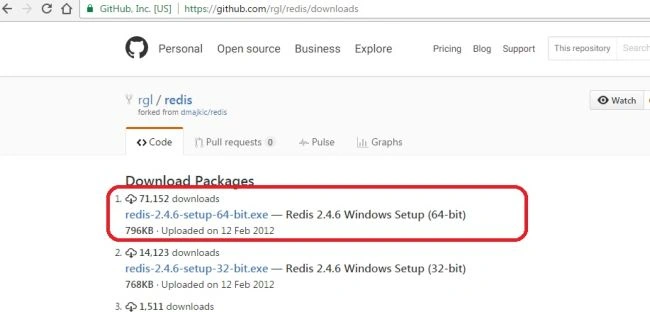
Now, install Redis Client by double clicking the exe file.
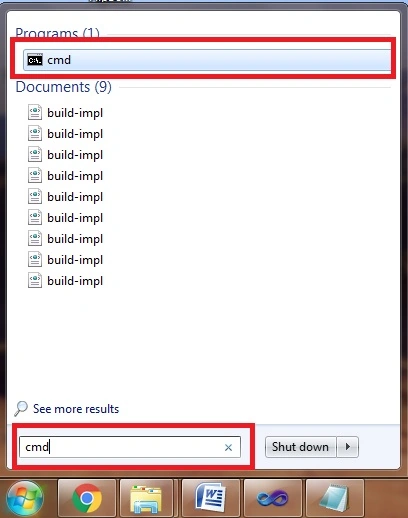
After installation of Redis Client, take command prompt. (Search cmd in search and click the first result, as shown in the image, given below)-
In command prompt, type SET PATH=%PATH%;”c:\Program Files\redis” and press enter.
Now, type redis-server.exe and press enter.
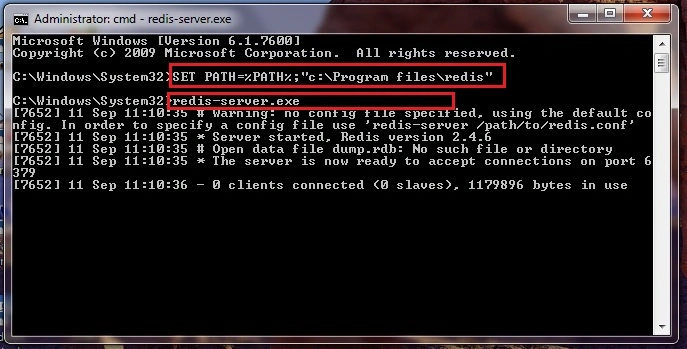
Now, our Redis Server is ready.
Now, we will start creating our Web API and implement Redis Caching in it.
Step 1 - Open Visual Studio 2010 and click New Project. Select “Web” from the left menu and select “ASP.NET MVC 4 Web Application”.
Give name of the project as RedisCaching and click OK.
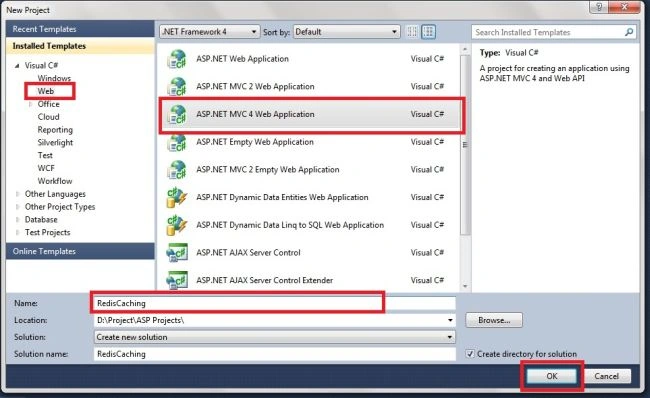
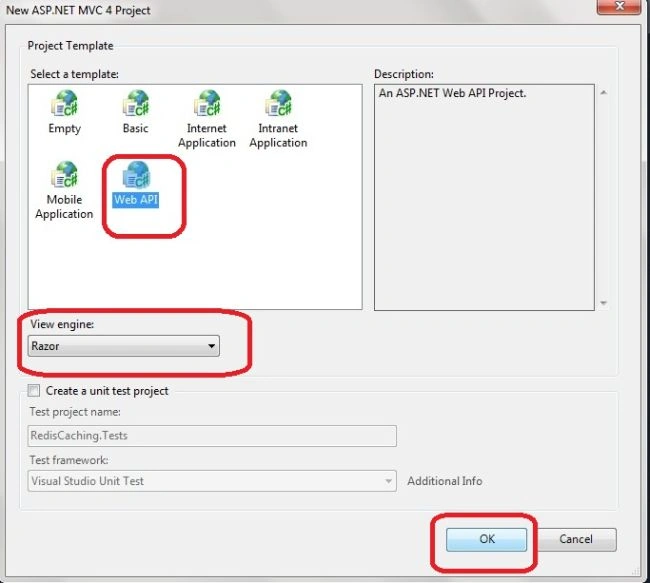
Step 2 - Select “Web API” from Project Template and view Engine as “Razor” and click OK.
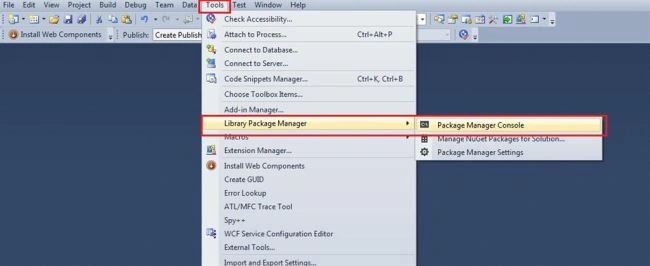
Step 3 - Now, our API is created. Now, go to top menu and click “Tools”.
In the drop down, select “Library Package Manager > Package Manager Console”.
Step 4 - Now, we will get Package Manager Console at the bottom.
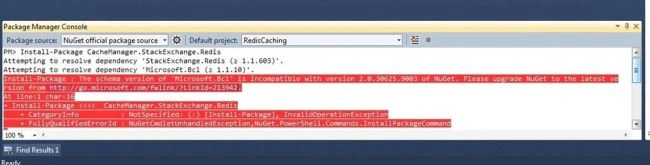
Just type “Install-Package CacheManager.StackExchange.Redis” there and click enter.
You may sometimes get an error, as shown below-
Step 5 - To resolve the error, shown above-
Click Update in the left menu.
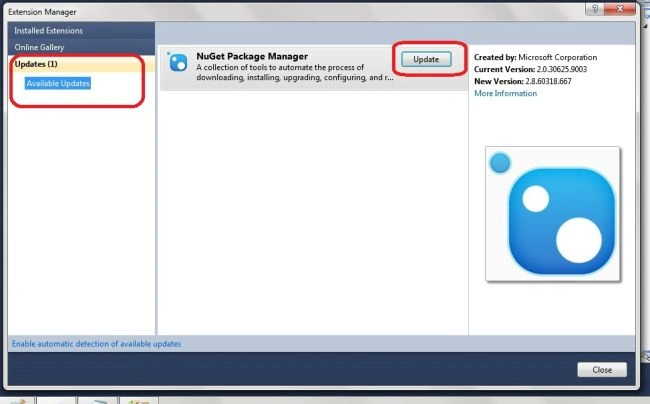
Now, just update the NuGet Package Manager.
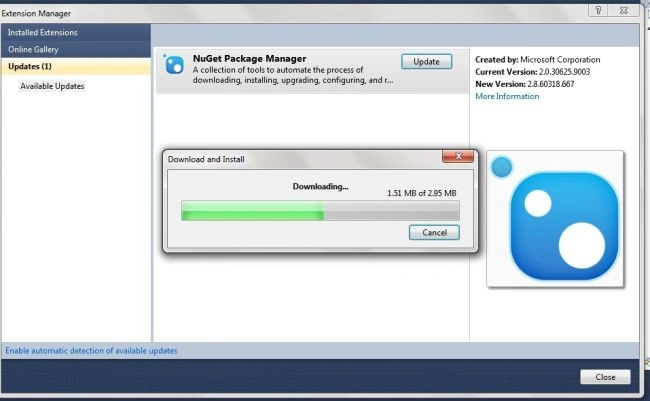
Step 6 - Now, open Package Manager Console, as done in step 3 and run the command, specified in step 4.
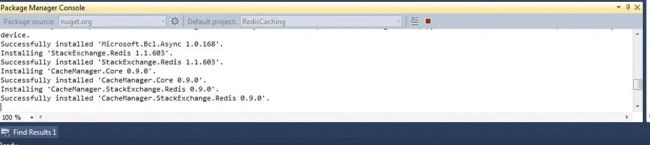
Now, our Redis Cache is successfully installed.
Step 7 - Now, we will create a class in Model Folder as “RedisConnection”.
Add the code, given below, to the class-
- public class RedisConnection
- {
- static RedisConnection()
- {
- RedisConnection.lazyConnection = new Lazy<ConnectionMultiplexer>(() =>
- {
- return ConnectionMultiplexer.Connect("localhost");
- });
- }
- private static Lazy<ConnectionMultiplexer> lazyConnection;
- public ConnectionMultiplexer Connection
- {
- get
- {
- return lazyConnection.Value;
- }
- }
- }
Step 8 - Now, we will add a controller.
Right click Controller folder > Click Add > Click Controller.
Now, give the name as RedisController and click Add.
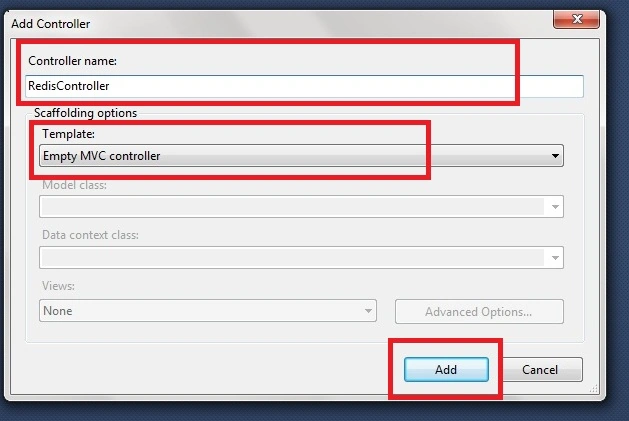
Step 9 - Now, add the code, given below, to our controller-
- public class RedisController : Controller
- {
- RedisConnection obj = new RedisConnection();
- public string GetDatetime()
- {
- string datetime = "";
- //Creating Redis database instance
- IDatabase db = obj.Connection.GetDatabase();
- //Getting value of "datetime" key
- datetime = db.StringGet("datetime");
- //If key not found in Redis database
- if (datetime == null)
- {
- datetime = Convert.ToString(DateTime.Now);
- //Setting value for key with Expiry time of 5 Minutes
- db.StringSet("datetime", datetime, TimeSpan.FromMinutes(5));
- }
- return datetime;
- }
- }
Here, we are creating a method to return the current date & time.
Considering the code, shown above, you can see, we are creating an instance of Redis database. Next, we checked whether the database has a key ”datetime”. If yes, our string datetime will get the corresponding value from Redis database.
If the situation is different, we will add the key “datetime” to database with the current datetime. We have given an expiry time for key as 5 minutes. For the next five minutes, we will get date, which is stored in Redis Cache.
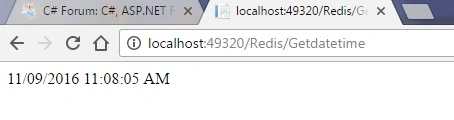
Just Run API. URL format will be http://localhost:{Some number}/Redis/Getdatetime.
While running API URL, shown above, you can see the same date for 5 minutes, after which it gets updated.
Summary
In this API, we learned how to implement Redis Cache with Web API. In the files attached, I have provided the codes to save the datatable as a JSON string in Redis database and retrieve it. The output is in a JSON data.
Midhun TpPosted Sep 24, 2016, 8:31 AM
Thanks Manav :)
Manav PandyaPosted Sep 23, 2016, 1:14 PM
Nice sir ...
Midhun TpPosted Sep 22, 2016, 4:57 AM
Hi, Thanks for your feedback! I have just started working with this Redis caching and I haven't got a scenario to use advanced caching methods yet. Once I get a chance to work with them in an advanced manner like the ones you pointed out, I will definitely write an article for the same.
Former memberPosted Sep 22, 2016, 4:33 AM
Nice but very basic example. suppose u should discuss how to cache 100 or more customer data to cache by redis. 1) show two way to insert multiple customer fetch from db to redis cache through loop. 2) again show without loop how can we cache 100 customer fetch from db to redis cache without loop. 3) when data change in db for customer then how could i invalidate redis cache and reload again customer data from db to redis cache ? 4) what to set as a result redis cache never expire 5) when we fetch customer data from redis cache then how could we use filter. say want to get those customer whose sex is male and location is kolkata if you know how to handle all the above scenario then please guide me or come with new article for advance redis usage. thanks
Midhun TpPosted Sep 22, 2016, 2:05 AM
Thanks Aqib Shehzad
Muhammad Aqib ShehzadPosted Sep 22, 2016, 1:44 AM
Really Useful
Midhun TpPosted Sep 22, 2016, 12:19 AM
Thanks friends
Vivek TripathiPosted Sep 22, 2016, 12:01 AM
Gr8 bro
Bhavik PatelPosted Sep 21, 2016, 11:01 PM
Nice
Vignesh ManiPosted Sep 21, 2016, 4:48 PM
Nice bro