
Introduction
As you know, we have so many ORMs available, such as NHibernate, Entity Framework, Dapper.Net which are used to communicate with the database in order to perform CRUD (Create, Read, Update, Delete), and also retrieve data based on criteria.
In this article, we will learn how we can use NPoco ORM (Object Relational Mapping) to perform CRUD operations. So, let’s discover this simple ORM step by step. I hope you will like it.
Prerequisites
Make sure you have installed Visual Studio 2017 (.Net Framework 4.6.1) and SQL Server.
In this post, we are going to:
- Create application.
- Install NPoco ORM.
- Create Customer controller.
- Do a demo
SQL Database part
Here, you will find the scripts to create the database and table.
Create Database
- USE [master]
- GO
- /****** Object: Database [DbCustomers] Script Date: 2/25/2018 7:45:46 AM ******/
- CREATE DATABASE [DbCustomers]
- CONTAINMENT = NONE
- ON PRIMARY
- ( NAME = N'DbCustomers', FILENAME = N'c:\Program Files (x86)\Microsoft SQL Server\MSSQL11.MSSQLSERVER\MSSQL\DATA\DbCustomers.mdf' , SIZE = 4096KB , MAXSIZE = UNLIMITED, FILEGROWTH = 1024KB )
- LOG ON
- ( NAME = N'DbCustomers_log', FILENAME = N'c:\Program Files (x86)\Microsoft SQL Server\MSSQL11.MSSQLSERVER\MSSQL\DATA\DbCustomers_log.ldf' , SIZE = 1024KB , MAXSIZE = 2048GB , FILEGROWTH = 10%)
- GO
- ALTER DATABASE [DbCustomers] SET COMPATIBILITY_LEVEL = 110
- GO
- IF (1 = FULLTEXTSERVICEPROPERTY('IsFullTextInstalled'))
- begin
- EXEC [DbCustomers].[dbo].[sp_fulltext_database] @action = 'enable'
- end
- GO
- ALTER DATABASE [DbCustomers] SET ANSI_NULL_DEFAULT OFF
- GO
- ALTER DATABASE [DbCustomers] SET ANSI_NULLS OFF
- GO
- ALTER DATABASE [DbCustomers] SET ANSI_PADDING OFF
- GO
- ALTER DATABASE [DbCustomers] SET ANSI_WARNINGS OFF
- GO
- ALTER DATABASE [DbCustomers] SET ARITHABORT OFF
- GO
- ALTER DATABASE [DbCustomers] SET AUTO_CLOSE OFF
- GO
- ALTER DATABASE [DbCustomers] SET AUTO_CREATE_STATISTICS ON
- GO
- ALTER DATABASE [DbCustomers] SET AUTO_SHRINK OFF
- GO
- ALTER DATABASE [DbCustomers] SET AUTO_UPDATE_STATISTICS ON
- GO
- ALTER DATABASE [DbCustomers] SET CURSOR_CLOSE_ON_COMMIT OFF
- GO
- ALTER DATABASE [DbCustomers] SET CURSOR_DEFAULT GLOBAL
- GO
- ALTER DATABASE [DbCustomers] SET CONCAT_NULL_YIELDS_NULL OFF
- GO
- ALTER DATABASE [DbCustomers] SET NUMERIC_ROUNDABORT OFF
- GO
- ALTER DATABASE [DbCustomers] SET QUOTED_IDENTIFIER OFF
- GO
- ALTER DATABASE [DbCustomers] SET RECURSIVE_TRIGGERS OFF
- GO
- ALTER DATABASE [DbCustomers] SET DISABLE_BROKER
- GO
- ALTER DATABASE [DbCustomers] SET AUTO_UPDATE_STATISTICS_ASYNC OFF
- GO
- ALTER DATABASE [DbCustomers] SET DATE_CORRELATION_OPTIMIZATION OFF
- GO
- ALTER DATABASE [DbCustomers] SET TRUSTWORTHY OFF
- GO
- ALTER DATABASE [DbCustomers] SET ALLOW_SNAPSHOT_ISOLATION OFF
- GO
- ALTER DATABASE [DbCustomers] SET PARAMETERIZATION SIMPLE
- GO
- ALTER DATABASE [DbCustomers] SET READ_COMMITTED_SNAPSHOT OFF
- GO
- ALTER DATABASE [DbCustomers] SET HONOR_BROKER_PRIORITY OFF
- GO
- ALTER DATABASE [DbCustomers] SET RECOVERY SIMPLE
- GO
- ALTER DATABASE [DbCustomers] SET MULTI_USER
- GO
- ALTER DATABASE [DbCustomers] SET PAGE_VERIFY CHECKSUM
- GO
- ALTER DATABASE [DbCustomers] SET DB_CHAINING OFF
- GO
- ALTER DATABASE [DbCustomers] SET FILESTREAM( NON_TRANSACTED_ACCESS = OFF )
- GO
- ALTER DATABASE [DbCustomers] SET TARGET_RECOVERY_TIME = 0 SECONDS
- GO
- ALTER DATABASE [DbCustomers] SET READ_WRITE
- GO
Create Table
After creating the database, we will move on to creating the customers table.
Customers Table
- USE [DbCustomers]
- GO
- /****** Object: Table [dbo].[Customers] Script Date: 2/25/2018 7:46:32 AM ******/
- SET ANSI_NULLS ON
- GO
- SET QUOTED_IDENTIFIER ON
- GO
- SET ANSI_PADDING ON
- GO
- CREATE TABLE [dbo].[Customers](
- [CustomerID] [int] IDENTITY(1,1) NOT NULL,
- [CustomerName] [varchar](50) NULL,
- [CustomerEmail] [varchar](50) NULL,
- [CustomerCountry] [varchar](50) NULL,
- CONSTRAINT [PK_Customers] PRIMARY KEY CLUSTERED
- (
- [CustomerID] ASC
- )WITH (PAD_INDEX = OFF, STATISTICS_NORECOMPUTE = OFF, IGNORE_DUP_KEY = OFF, ALLOW_ROW_LOCKS = ON, ALLOW_PAGE_LOCKS = ON) ON [PRIMARY]
- ) ON [PRIMARY]
- GO
- SET ANSI_PADDING OFF
- GO
Create application
Open Visual Studio and select File >> New Project.
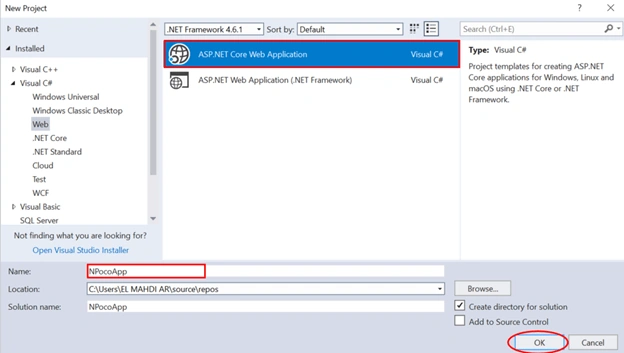
The "New Project" window will pop up. Select ASP.NET Core Web Application, name your project, and click OK.
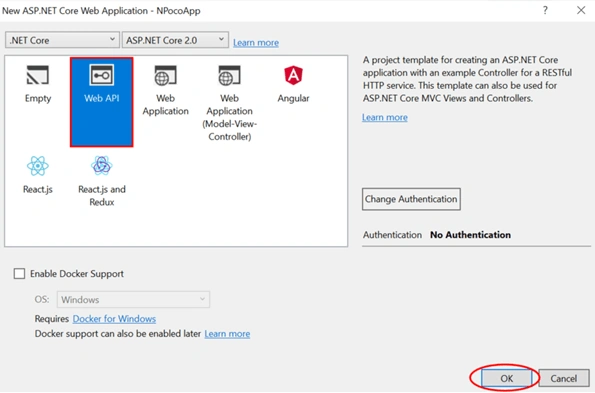
Next, a new dialog will pop up for selecting the template. We are going choose Web API template and click Ok.
Once our project is created, the next step is to install NPoco ORM.
Installing NPoco ORM
In solution explorer, right click on References >> Manage NuGet Packages.
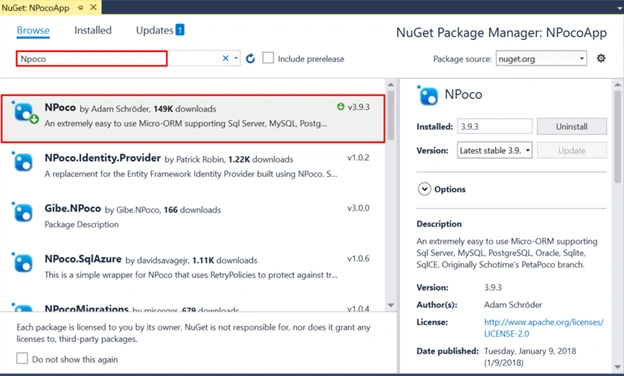
Now, type NPoco in search input and then click on Install button.
After that, we need to create Customer Model that is used to map results.
Customer.cs
- using NPoco;
- using System;
- using System.Collections.Generic;
- using System.Linq;
- using System.Threading.Tasks;
- namespace NPocoApp.Models
- {
- [TableName("Customers")]
- [PrimaryKey("CustomerID")]
- public class Customer
- {
- public int CustomerId { get; set; }
- public string CustomerName { get; set; }
- public string CustomerEmail { get; set; }
- public string CustomerCountry { get; set; }
- }
- }
Now, we are creating ICustomerRepository interface.
To do that, right-click on project name >> Add >> New Item >> Selecting Interface.
ICustomerRepository.cs
- using NPocoApp.Models;
- using System;
- using System.Collections.Generic;
- using System.Linq;
- using System.Threading.Tasks;
- namespace NPocoApp
- {
- public interface ICustomerRepository
- {
- IList<Customer> GetAllCustomers();
- Customer GetCustomerById(int idCustomer);
- void AddCustomer(Customer customer);
- void UpdateCustomer(int id, Customer customer);
- void DelecteCustomer(int idCustomer);
- }
- }
Next, we will add CustomerRepository class which implements ICustomerRepository interface.
CustomerRepository.cs
- using NPoco;
- using NPocoApp.Models;
- using System;
- using System.Collections.Generic;
- using System.Data.SqlClient;
- using System.Linq;
- using System.Threading.Tasks;
- namespace NPocoApp
- {
- public class CustomerRepository : ICustomerRepository
- {
- //Connection Object
- IDatabase connection = new Database(@"Data Source=.;Initial Catalog=DbCustomers;Integrated Security=True;", DatabaseType.SqlServer2012, SqlClientFactory.Instance);
- public IList<Customer> GetAllCustomers()
- {
- string query = "SELECT * FROM Customers";
- IList<Customer> customerList = connection.Fetch<Customer>(query);
- return customerList;
- }
- public Customer GetCustomerById(int idCustomer)
- {
- Customer customer = connection.SingleById<Customer>(idCustomer);
- return customer;
- }
- public void AddCustomer(Customer customer)
- {
- connection.Insert<Customer>(customer);
- }
- public void UpdateCustomer(int id, Customer customer)
- {
- customer.CustomerId = id;
- connection.Update(customer);
- }
- public void DelecteCustomer(int idCustomer)
- {
- connection.Delete<Customer>(idCustomer);
- }
- }
- }
As you can see, we created connection object by using Database class which accepts a connection string, database type, and database provider. After that, we proceeded to perform CRUD operations. Note that IDatabase provides all necessary methods to perform CRUD operations.
I’d like to point out, NPoco works by mapping the column names to the property names on the customer object. This is a case insensitive match.
By default no mapping is required. It will be assumed that the table name will be the class name and primary key will be ‘id’. If its not specified, we can use the attributes which are offered by NPoco ORM.
Create a controller
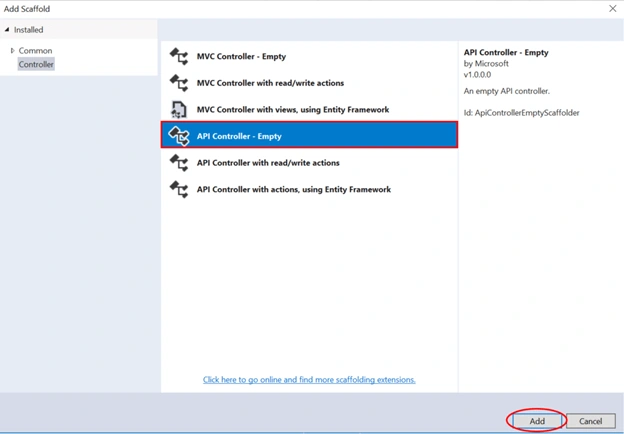
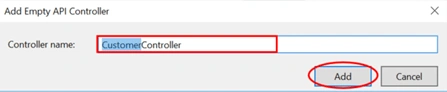
Now, we are going to create a controller. Right click on the controllers folder> > Add >> Controller>> selecting API Controller – Empty >> click Add. In the next dialog, name the controller as CustomerController and then click Add.
CustomerController.cs
- using System;
- using System.Collections.Generic;
- using System.Linq;
- using System.Threading.Tasks;
- using Microsoft.AspNetCore.Http;
- using Microsoft.AspNetCore.Mvc;
- using NPocoApp.Models;
- namespace NPocoApp.Controllers
- {
- [Produces("application/json")]
- [Route("api/Customer")]
- public class CustomerController : Controller
- {
- private readonly ICustomerRepository _customerRepository = new CustomerRepository();
- public IList<Customer> GetCustomers()
- {
- return _customerRepository.GetAllCustomers();
- }
- [HttpGet("{id}")]
- public Customer GetCustomerById(int id)
- {
- return _customerRepository.GetCustomerById(id);
- }
- [HttpPost]
- public void AddCustomer([FromBody]Customer customer)
- {
- _customerRepository.AddCustomer(customer);
- }
- [HttpPut("{id}")]
- public void UpdateCustomer(int id, [FromBody]Customer customer)
- {
- _customerRepository.UpdateCustomer(id, customer);
- }
- [HttpDelete("{id}")]
- public void DeleteCustomer(int id)
- {
- _customerRepository.DelecteCustomer(id);
- }
- }
- }
Demo
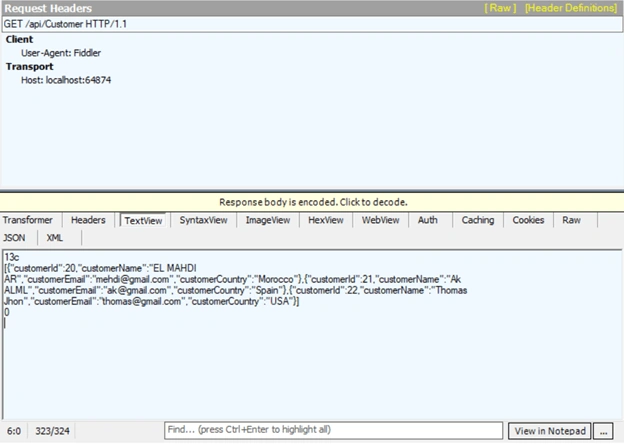
Now, we are ready. We can run and test our API. Note, I used the Fiddler tool in order to test CRUD operations.
As you can see below, GetCustomers method returns all data rows from customers table.
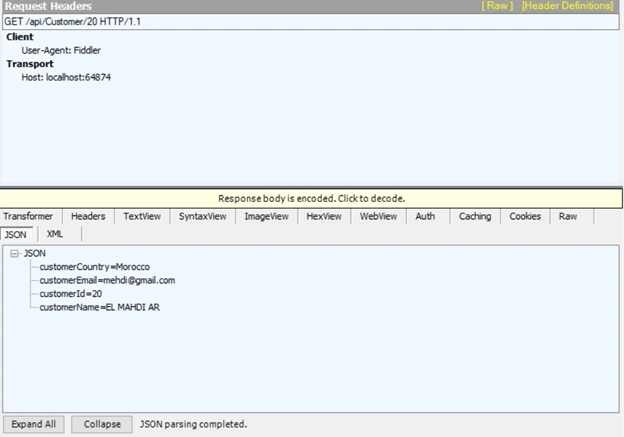
Here, GetCustomerById method gets customer object based on the provided id parameter.
Now, we will test AddCustomer method which accepts customer object as parameter and insert it into customers table.
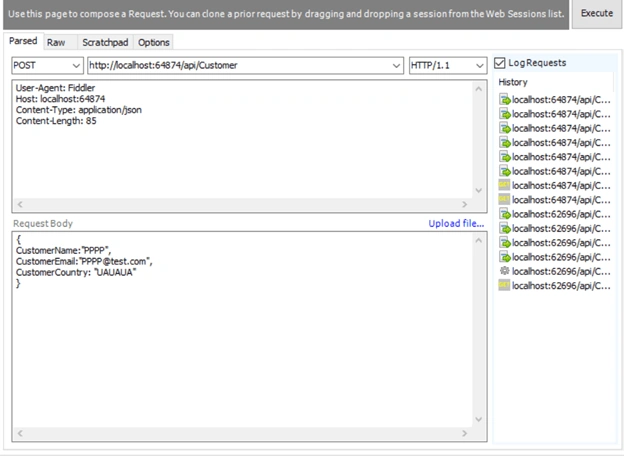
When we refresh customers table, we can see that customer data has been inserted successfully.
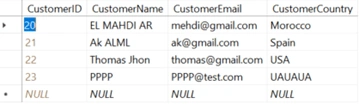
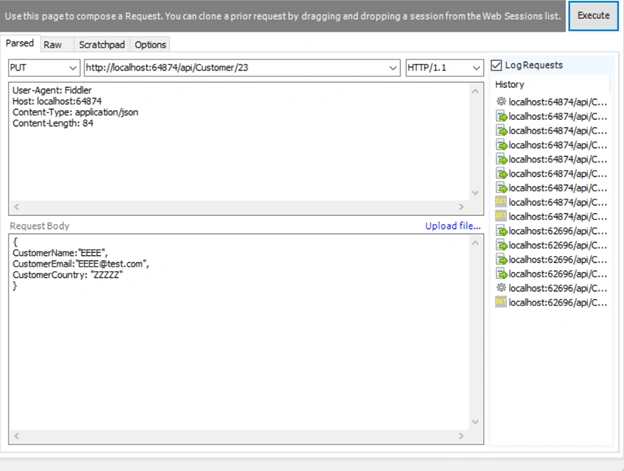
Here, UpdateCustomer method is used to update customer data.
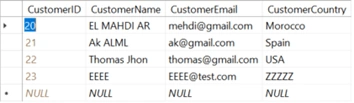
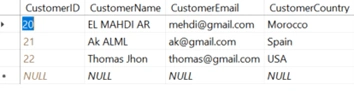
When we refresh customers table, we can see that customer has been updated successfully.
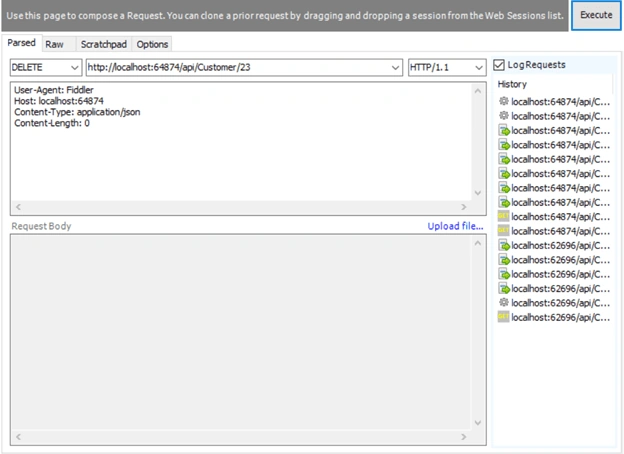
Finally, we have DeleteCustomer method which is used to delete customer data.
When we refresh customers table, we can see that customer has been deleted successfully.
That’s all. Please leave your feedback and queries in the comments box.
Tridip BhattacharjeePosted Feb 28, 2018, 2:16 AM
Nice article but is it ORM. ORM always generate sql from high level instruction using LINQ which EF does we know but here you show we have to write sql to fetch data. can't we fetch data without sql? string query = "SELECT * FROM Customers"; IList<Customer> customerList = connection.Fetch<Customer>(query);
Sagar Pandurang KapPosted Feb 27, 2018, 10:49 PM
Nicely explained......
Naresh SinghalPosted Feb 27, 2018, 10:20 PM
Very Good Explained... El Mahdi Archane