

In this article,
- Setup Environment.
- Overview on ASP.NET.
- Start with .NET Core 1.0.
- Explore Initial Template (Empty).
- How to Add MVC6.
- AngularJS2.
- Manage Client-side Dependencies.
- Use Package Manager (NPM).
- Use Task Runner.
- Bootstrapping, using Type Script
- Build & run Application
Setup Environment
Prerequisites: The following prerequisites are needed.
- Visual Studio 2015
- ASP.NET Core 1.0
Visual Studio 2015: If you already have a copy of Visual Studio 2015 installed, you may update Visual Studio 2015 with Update 3.
Or
Download Visual Studio Community 2015 for free.
.NET Core Downloads:
You may download one of these:
- .NET Core SDK (Software Development Kit/Command Line Interface) tools.
- .NET Core 1.0.0 - VS 2015 Tooling Preview 2 (Run apps with the .NET Core runtime).
We are all set to go. Before we dive into our main topic, let’s get an overview on ASP.NET.
Overview on ASP.NET
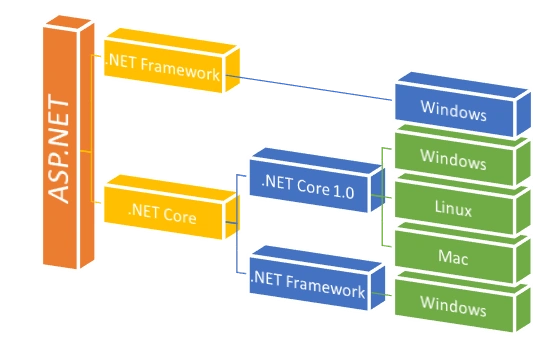
Let’s differentiate both.
.NET Framework
- Developed and run on Windows platform only.
- Built on the .NET Framework runtime.
- Supported (MVC, Web API & SignalR) Dependency Injection (DI).
- MVC & Web API Controller are separated.
.Net Core
- Open Source.
- Developed & run on Cross Platform.
- Built on the .NET Core runtime & also on .NET Framework.
- Facility of dynamic compilation.
- Built in Dependency Injection (DI).
- MVC & Web API Controller are unified, Inherited from same base class.
- Smart tooling (Bower, NPM, Grunt & Gulp).
- Command-line tools.
Start with .NET Core 1.0
Let’s create a new project with Visual Studio 2015 > File > New > Project.
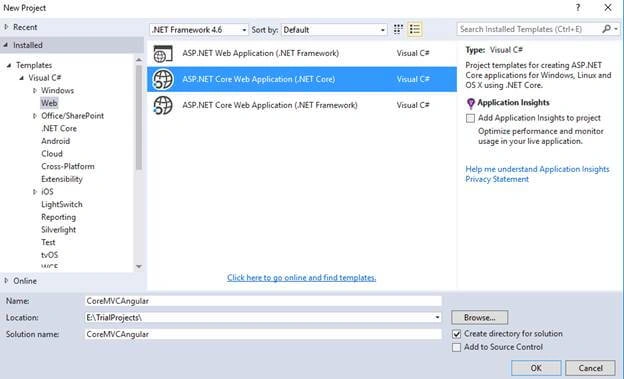
Choose empty template and click OK.
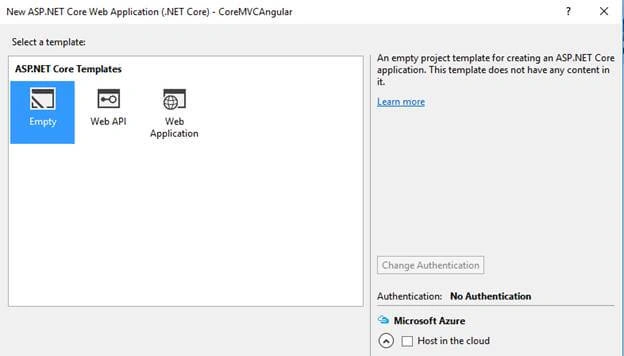
Visual Studio will create a new project of ASP.NET Core empty project.
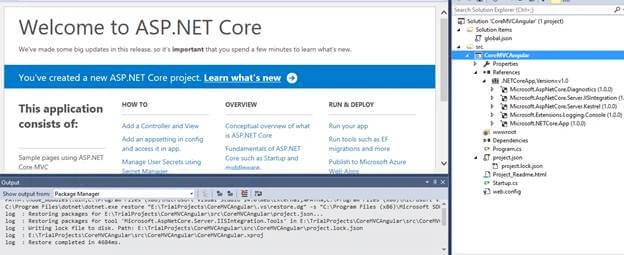
We will now explore all initial files one by one.
Explore Initial Template
Those marked from Solution Explorer are going to be explored, one by one.
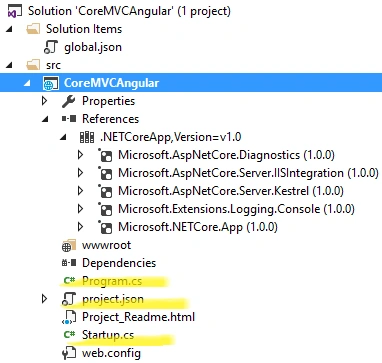
First of all, we know about program.cs file. Let’s concentrate on it.
Program.cs: Here, we have sample piece of code. Let’s get explanation.
- namespace CoreMVCAngular
- {
- public class Program
- {
- public static void Main(string[] args) {
- var host = new WebHostBuilder().UseKestrel().UseContentRoot(Directory.GetCurrentDirectory()).UseIISIntegration().UseStartup < Startup > ().Build();
- host.Run();
- }
- }
- }
HTTP servers
- Microsoft.AspNetCore.Server.Kestrel (cross-platform)
- Microsoft.AspNetCore.Server.WebListener (Windows-only)
.UseContentRoot(Directory.GetCurrentDirectory()) : Application base path that specifies the path to the root directory of the Application.
.UseIISIntegration() : For hosting in IIS and IIS Express.
.UseStartup<Startup>() : Specifies the Startup class.
.Build() : Build the IWebHost, which will host the app & manage incoming HTTP requests.
Startup.cs
This is the entry point of every .NET Core Application. It provides services, that the Application required.
- namespace CoreMVCAngular
- {
- public class Startup
- {
- // This method gets called by the runtime. Use this method to add services to the container.
- // For more information on how to configure your application, visit http://go.microsoft.com/fwlink/?LinkID=398940
- public void ConfigureServices(IServiceCollection services) {}
- // This method gets called by the runtime. Use this method to configure the HTTP request pipeline.
- public void Configure(IApplicationBuilder app, IHostingEnvironment env, ILoggerFactory loggerFactory) {}
- }
- }
IApplicationBuilder defines a class, which provides the mechanisms to configure an Application's request.
We can add MVC (middleware) to the request pipeline by using “Use” extension method. Later, we will use it.
ConfigureServices is an extension method, which is configured to use the several services.
Project.json: This is where our Application dependencies are listed i.e by name & version. This file also manages runtime, compilation settings.
Dependencies: All Application dependencies can add new dependencies, if required, intellisense will help up to include with the name & version.
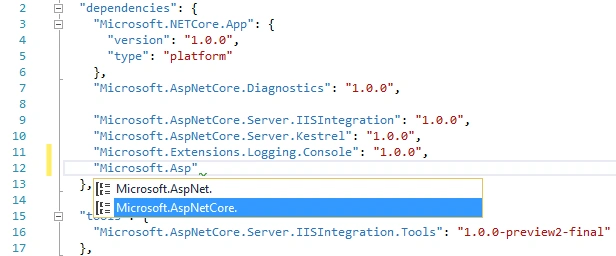
After saving changes, it will automatically restore the dependencies from NuGet.
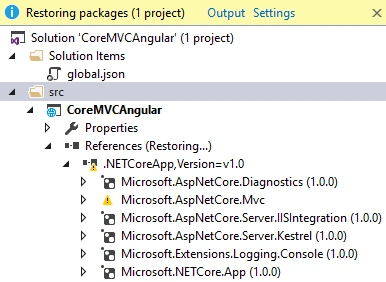
- "dependencies": {
- "Microsoft.NETCore.App": {
- "version": "1.0.0",
- "type": "platform"
- },
- "Microsoft.AspNetCore.Diagnostics": "1.0.0",
- "Microsoft.AspNetCore.Server.IISIntegration": "1.0.0",
- "Microsoft.AspNetCore.Server.Kestrel": "1.0.0",
- "Microsoft.Extensions.Logging.Console": "1.0.0",
- "Microsoft.AspNetCore.Mvc": "1.0.0"
- },
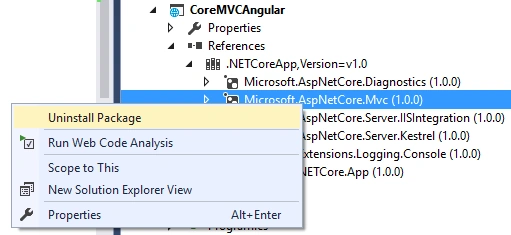
Tools: This section manages and lists command line tools. We can see IISIntegration.Tools is added by default, which is a tool that contains dotnet publish iis command for publishing the Application on IIS.
- "tools": {
- "Microsoft.AspNetCore.Server.IISIntegration.Tools": "1.0.0-preview2-final"
- },
- “netcoreapp1 .0”.
- "frameworks": {
- "netcoreapp1.0": {
- "imports": ["dotnet5.6", "portable-net45+win8"]
- }
- },
- "buildOptions": {
- "emitEntryPoint": true,
- "preserveCompilationContext": true
- },
- "runtimeOptions": {
- "configProperties": {
- "System.GC.Server": true
- }
- },
- "publishOptions": {
- "include": ["wwwroot", "web.config"]
- },
- "scripts": {
- "postpublish": ["dotnet publish-iis --publish-folder %publish:OutputPath% --framework %publish:FullTargetFramework%"]
- }
It’s time to add MVC6. In .NET Core 1.0 MVC & Web API are unified, and become a single class, which inherits from the same base class.
Let’s add MVC Service to our Application. Open project.json to add new dependencies in it. In dependencies section, add two dependencies.
- "Microsoft.AspNetCore.Mvc": "1.0.0",
- "Microsoft.AspNetCore.StaticFiles": "1.0.0"
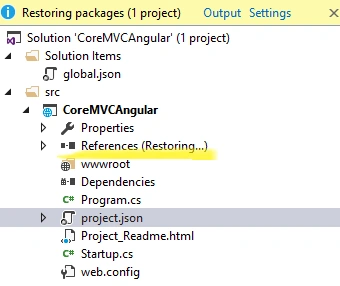
It will start restoring the packages automatically.
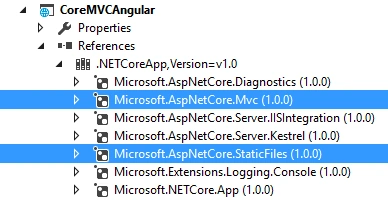
Now let’s add MVC (midleware) to request pipeline in Config method at startup class.
- public void Configure(IApplicationBuilder app, IHostingEnvironment env, ILoggerFactory loggerFactory) {
- loggerFactory.AddConsole();
- if (env.IsDevelopment()) {
- app.UseDeveloperExceptionPage();
- }
- //app.UseStaticFiles();
- app.UseMvc(routes => {
- routes.MapRoute(name: "default", template: "{controller=Home}/{action=Index}/{id?}");
- });
- }
- public void ConfigureServices(IServiceCollection services) {
- services.AddMvc();
- }
Let’s add MVC folder structure to our sample Application. We have added view files in the views folder & MVC controller in Controllers folder like old MVC Application.
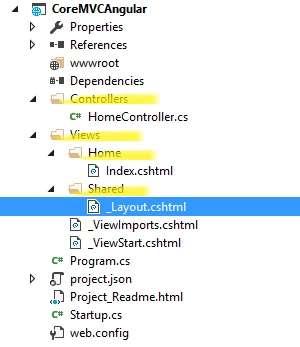
Here, you may notice that there is a new file in the views folder “_ViewImports.cshtml”. This file is responsible for setting up the namespaces, which can be accessed by the views in the project, which was previously done by the Web.config file in the views folder.
We are almost done. Let’s modify our view content with welcome message. Now, run the Application. You can see welcome message appears in the home page.

Output

AngularJS2
AngularJS2 is a modern Client end JavaScript Framework for the Application development. This JavaScript framework is totally new & written, based on TypeScript.
We will follow the steps, given below, to learn, how we install it to our Application,
- Manage Client-side Dependencies
- Use Package Manager (NPM).
- Use Task Runner.
- Bootstrapping using Type Script.
Client-side Dependencies: We need to add a JSON config file for Node Package Manager(NPM). Click add > New Item > Client- Side > npm Configuration File and click OK.
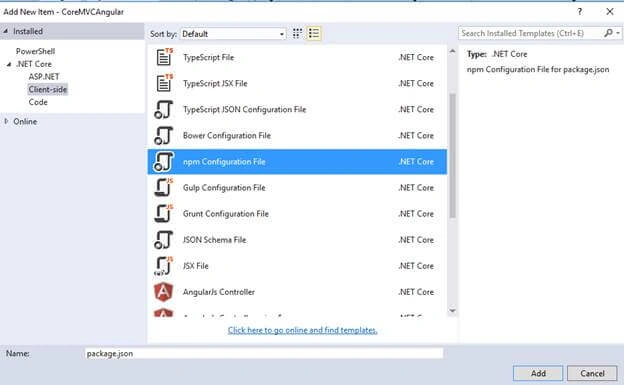
Open our newly added npm config file and modify the initial settings.
Package.json
- {
- "version": "1.0.0",
- "name": "asp.net",
- "private": true,
- "Dependencies": {
- "angular2": "2.0.0-beta.9",
- "systemjs": "0.19.24",
- "es6-shim": "^0.33.3",
- "rxjs": "5.0.0-beta.2"
- },
- "devDependencies": {
- "gulp": "3.8.11",
- "gulp-concat": "2.5.2",
- "gulp-cssmin": "0.1.7",
- "gulp-uglify": "1.2.0",
- "rimraf": "2.2.8"
- }
- }
- Es6-shim is a library, which provides compatibility on old environment.
- Rxjs provides more modular file structure in a variety of formats.
- SystemJS enables System.import TypeScript files directly.
As you can see, there are two different type objects; one is dependencies, which are used for the production purposes & the other one is devDependencies for development related things, like gulp is to run different tasks.
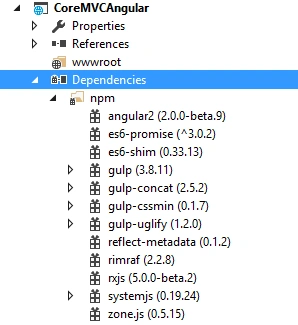
Click save. It will restore automatically. Here, we have all our required packages in the Dependencies section.
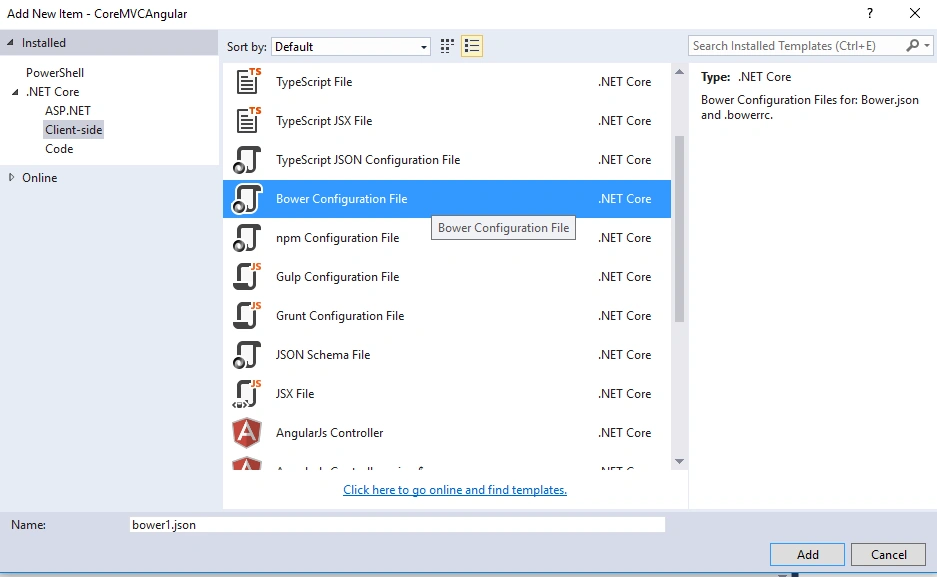
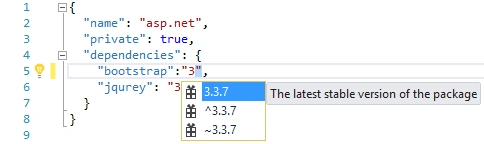
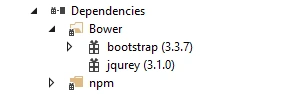
- Manage html, css, js component
- Load minimal resources
- Load with flat dependencies
- Install dependencies recursively
- Load nested dependencies
- Manage NodeJS module
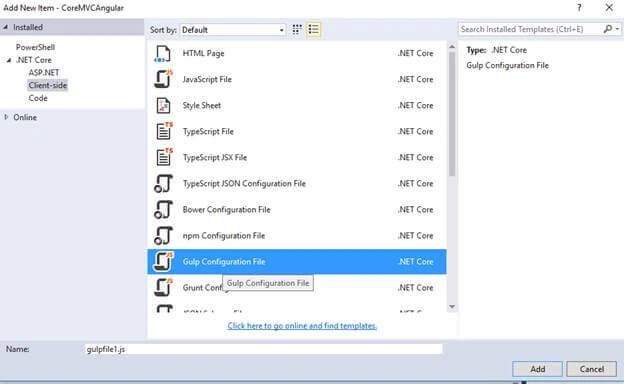
Gulp.json
- /*
- This file in the main entry point for defining Gulp tasks and using Gulp plugins.
- Click here to learn more. http://go.microsoft.com/fwlink/?LinkId=518007
- */
- "use strict";
- var gulp = require("gulp");
- var root_path = {
- webroot: "./wwwroot/"
- };
- //library source
- root_path.nmSrc = "./node_modules/";
- //library destination
- root_path.package_lib = root_path.webroot + "lib-npm/";
- gulp.task("copy-systemjs", function() {
- return gulp.src(root_path.nmSrc + '/systemjs/dist/**/*.*', {
- base: root_path.nmSrc + '/systemjs/dist/'
- }).pipe(gulp.dest(root_path.package_lib + '/systemjs/'));
- });
- gulp.task("copy-angular2", function() {
- return gulp.src(root_path.nmSrc + '/angular2/bundles/**/*.js', {
- base: root_path.nmSrc + '/angular2/bundles/'
- }).pipe(gulp.dest(root_path.package_lib + '/angular2/'));
- });
- gulp.task("copy-es6-shim", function() {
- return gulp.src(root_path.nmSrc + '/es6-shim/es6-sh*', {
- base: root_path.nmSrc + '/es6-shim/'
- }).pipe(gulp.dest(root_path.package_lib + '/es6-shim/'));
- });
- gulp.task("copy-rxjs", function() {
- return gulp.src(root_path.nmSrc + '/rxjs/bundles/*.*', {
- base: root_path.nmSrc + '/rxjs/bundles/'
- }).pipe(gulp.dest(root_path.package_lib + '/rxjs/'));
- });
- gulp.task("copy-all", ["copy-rxjs", 'copy-angular2', 'copy-systemjs', 'copy-es6-shim']);
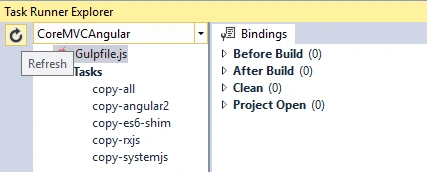
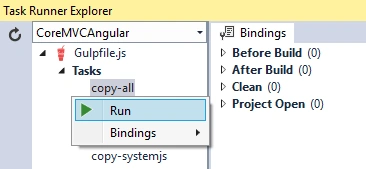
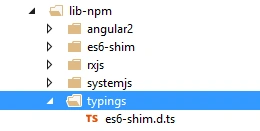
Right click on copy-all & click run.
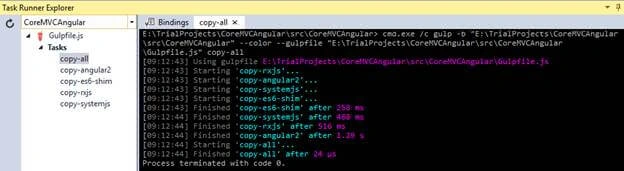
Task run & finish.
Bootstrapping with TypeScript
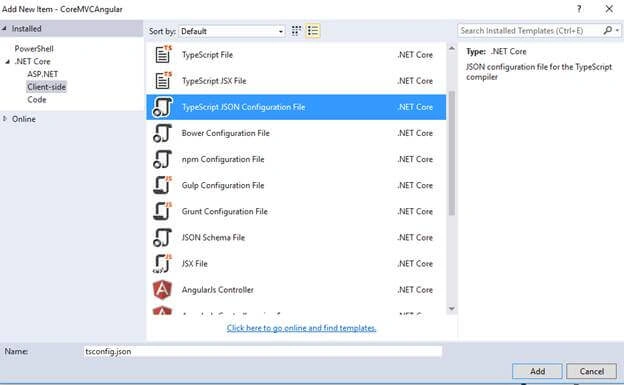
tsConfig.json
- {
- "compilerOptions": {
- "noImplicitAny": false,
- "noEmitOnError": true,
- "removeComments": false,
- "sourceMap": true,
- "target": "es5",
- //add this to compile app component
- "emitDecoratorMetadata": true,
- "experimentalDecorators": true,
- "module": "system",
- "moduleResolution": "node"
- },
- "exclude": ["node_modules", "wwwroot/lib"]
- }
noEmitOnError : Do not emit outputs, if any errors were reported.
Target : Specify ECMAScript target version: ‘es5’ (default), ‘es5’, or ‘es6’.
experimentalDecorators : Enables an experimental support for ES7 decorators.
Get more details on Compiler option here.
Create an app folder for .ts file in wwwroot folder.
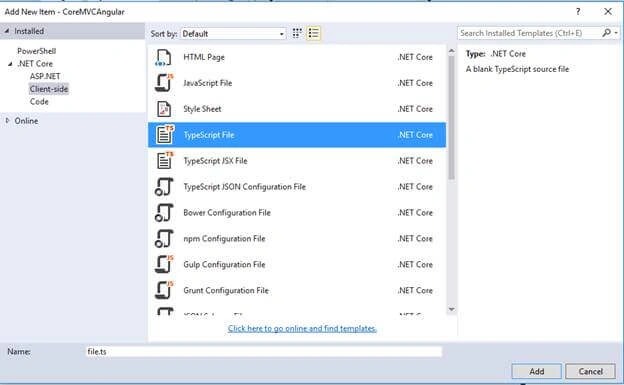
In Solution Explorer, you may add the files, given below.
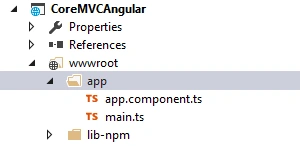
In main.ts code snippet, bootstrap AngularJS with importing the component.
- import {bootstrap} from 'angular2/platform/browser';
- import {AppComponent} from './app.component';
- import {enableProdMode} from 'angular2/core';
- enableProdMode();
- bootstrap(AppComponent);
import {Component} from 'angular2/core';
- @Component({
- selector: 'core-app',
- template: '<h3>Welcome to .NET Core 1.0 + MVC6 + Angular 2</h3>'
- })
- export class AppComponent {}
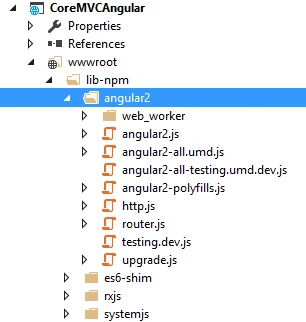
Now, we will add the reference to our layout page.
- <!DOCTYPE html>
- <html>
- <head>
- <meta name="viewport" content="width=device-width" />
- <title>@ViewBag.Title</title>
- <script src="~/lib-npm/es6-shim/es6-shim.js"></script>
- <script src="~/lib-npm/angular2/angular2-polyfills.js"></script>
- <script src="~/lib-npm/systemjs/system.src.js"></script>
- <script src="~/lib-npm/rxjs/Rx.js"></script>
- <script src="~/lib-npm/angular2/angular2.js"></script>
- </head>
- <body>
- <div> @RenderBody() </div> @RenderSection("scripts", required: false) </body>
- </html> Index.cshtml @{ ViewData["Title"] = "Home Page"; }
- <core-app>
- <div>
- <p><img src="~/img/ajax_small.gif" /> Please wait ...</p>
- </div>
- </core-app> @section Scripts {
- <script>
- System.config({
- packages: {
- 'app': {
- defaultExtension: 'js'
- }
- },
- });
- System.import('app/main').then(null, console.error.bind(console));
- </script> }
app.UseStaticFiles();
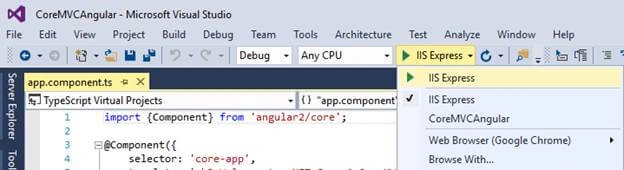
Build & run application
Finally, build & run the Application.
Output
Here, we can see our app is working with AngularJS2.

maifs maifsPosted Apr 3, 2017, 12:57 PM
When i try to run the application, I am facing exception in browser's console. Please specify a ShareThis Publisher Key For help, contact [email protected] util.js:211 Google Maps API warning: SensorNotRequired https://developers.google.com/maps/documentation/javascript/error-messages#sensor-not-required aB.j @ util.js:211 http://localhost:5000/Home/Default Failed to load resource: the server responded with a status of 500 (Internal Server Error) zone.js:388 Unhandled Promise rejection: Failed to load /Home/Default ; Zone: <root> ; Task: Promise.then ; Value: Failed to load /Home/Default undefined consoleError @ zone.js:388 zone.js:390 Error: Uncaught (in promise): Failed to load /Home/Default at resolvePromise (zone.js:468) at resolvePromise (zone.js:453) at zone.js:502 at ZoneDelegate.invokeTask (zone.js:265) at Zone.runTask (zone.js:154) at drainMicroTaskQueue (zone.js:401) at XMLHttpRequest.ZoneTask.invoke (zone.js:339)
maifs maifsPosted Apr 3, 2017, 12:56 PM
Import { Component, OnInit } from '@angular/core';import { IndexService } from './index.service'; @Component({ templateUrl: '/Home/Default', //styleUrls: ['app/default/index.component.css'], providers: [IndexService] }) export class IndexComponent implements OnInit { pageTitle: string = 'Sign Up'; imageWidth: number = 50; imageMargin: number = 2; showImage: boolean = false; listFilter: string; errorMessage: string; constructor(private _indexService: IndexService) { } toggleImage(): void { this.showImage = !this.showImage; } ngOnInit(): void { //this._companyService.getCompanies() // .subscribe(companies => this.companies = companies, // error => this.errorMessage = <any>error); } onRatingClicked(message: string): void { this.pageTitle = 'Sign Up: ' + message; } onSignUpClicked(indexService: IndexService): void { //this._companyService.saveCompanySignUp(company).subscribe( // (data) => { // this.company = data; // console.log("Item " + this.company.Id + " has been added."); // //this.router.navigate([""]); // }, // (error) => console.log(error) //); } } public IActionResult Default() { return View(); }
maifs maifsPosted Apr 3, 2017, 12:56 PM
My tried code is :
maifs maifsPosted Apr 3, 2017, 12:55 PM
Hi Shashangka. Thank you for such nice material. Shashangka. I am calling an Asp.net mvc view from index.component.ts (typescrpt file). it takes me into the debugger but then throw an exception in browser console.
vinayak ghantiPosted Mar 6, 2017, 9:50 PM
Hi Shashangka Shekhar thanks for your article i have a doubt currently i have one web application with asp.net mvc 3 razor view engine now i want to move it to asp.net mvc 5 and angular 2 can we add angular 2 on top of our current view engine ? or it its something to rewrite with .html with angular 2 let me know
Ambi GosPosted Oct 14, 2016, 5:57 PM
Me to.. Getting please Wait :(
Matthew PhillipsPosted Sep 19, 2016, 6:15 AM
All I get is 'Please wait ...'
Lass SantinPosted Sep 10, 2016, 7:10 PM
I could not download CoreMVCAngular2.zip
Ahamed ImranPosted Sep 4, 2016, 12:12 AM
The code and description and Angular 2 and NPM respectively is quite outdated. The latest Angular 2 release is at rc6 which is much more stable than the beta version that you have included. Also it was the previous NPM version (version 2x) which didn't support flat hierarchy. But from NPM 3+ onwards you get that too.There's almost no reason to stick with Bower anymore.
Thanvan HaiPosted Aug 31, 2016, 4:48 AM
Very good article
Anu VPosted Aug 22, 2016, 12:00 AM
Nice.
Shiv Shankar MaitiPosted Aug 20, 2016, 8:27 PM
Hi Shashangka, It is a very nice elaborate article. Can you please publish an article which will contain 3 tire architecture along with the current content?
Ritesh SinghPosted Aug 19, 2016, 1:39 PM
Great
Mahfuz BappyPosted Aug 16, 2016, 12:40 AM
Rich article . Thanks bro
Prasanna MuraliPosted Aug 5, 2016, 11:44 AM
Nice one...
Arweb AroshanzamirPosted Aug 5, 2016, 5:58 AM
Nice Article.. thanks for sharing
Hariharan KrishnamoorthiPosted Aug 5, 2016, 2:38 AM
Very useful article Shashagka.
Bhavik PatelPosted Aug 5, 2016, 12:06 AM
Nice
Manas MohapatraPosted Aug 4, 2016, 9:02 AM
Very good article. Thanks for the effort.
Thiruppathi RPosted Aug 4, 2016, 1:22 AM
Nice Article..
VenkatPosted Aug 3, 2016, 9:52 AM
Nice one...
Bikesh SrivastavaPosted Aug 3, 2016, 2:44 AM
Nice one
kalu singh raoPosted Aug 3, 2016, 2:03 AM
Good one
Vignesh ManiPosted Aug 2, 2016, 4:17 PM
Nice one
Vincent Maverick DuranoPosted Aug 2, 2016, 12:13 PM
Good post there, but I don't see the use of MVC 6 here and the benefits of using it. You can simply use a plain HTML file to work with Angular. MVC 6 would only make sense if you are using the Web API part of it. Also Angular is in RC release now. You should check that out.