
What we going to make is a linked list. Yeah I know there is a class which does the same as a linked list called ArrayList, but we (as a diehard C# programmer) want absolute control and knowledge of what we use.
First what is a linked list?
A linked list is a dynamically sized array. An array has a size and you have to deal with it you cant just resize an array. Unlike an array a linked list has no absolute size. It can hold as many variables as you want it to.
When to use linkedlist?
In circumstances where you dont know how many variables you want to add. For example it could be just 1 or it could be 1000. In such a situation its stupid to make an array of 10000 it would be a waist of memory.
Now a design of our classes LinkedList and Node.
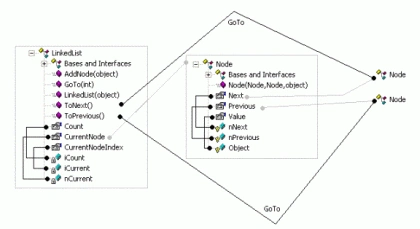
Note: Prefix i is for an integer and a prefix n is for a Node.
In the Node class there is a Previous and a Next Node. Because of that all Nodes are linked to eachother (thats why they called it a linkedlist).
Here is the Node class
public class Node
{
    protected Node nPrevious;
    protected Node nNext;
    protected object Object;
    #region Properties
    public object Value
    {
        get
        {
            return Object;
        }
        set
        {
            Object = value;
        }
    }
    public Node Previous
    {
        get
        {
            return nPrevious;
        }
        set
        {
            nPrevious = value;
        }
    }
    public Node Next
    {
        get
        {
            return nNext;
        }
        set
        {
            nNext = value;
        }
    }
    #endregion
    public Node(Node PrevNode, Node NextNode, object obj)
    {
        nPrevious = PrevNode;
        nNext = NextNode;
        Object = obj;
    }
}
As you can see there isnt much of a surprise if you studied the class design.
Next thing the LinkedList class.
public class LinkedList
{
    int iCount = 1;
    int iCurrent = 0;
    Node nCurrent;
    #region Properties
    /// <summary>
    /// Give back how many nodes there are.
    /// </summary>
    public int Count
    {
        get
        {
            return iCount;
        }
    }
    /// <summary>
    /// Gives back the current Node
    /// </summary>
    public Node CurrentNode
    {
        get
        {
            return nCurrent;
        }
    }
    /// <summary>
    /// Keeps track of the index where you are
    /// </summary>
    public int CurrentNodeIndex
    {
        get
        {
            return iCurrent;
        }
    }
    #endregion
    /// <summary>
    /// Default and only Constructor
    /// SetUp our LinkedList
    /// </summary>
    /// <param name="obj">Value for the first Node</param>
    public LinkedList(object obj)
    {
        nCurrent = new Node(null, null, obj);
        nCurrent.Next = null;
        nCurrent.Previous = null;
    }
    /// <summary>
    /// This function will add another Node
    /// </summary>
    /// <param name="obj">Value for the added Node</param>
    public void AddNode(object obj)
    {
        if (nCurrent.Next == null)
        {
            nCurrent = nCurrent.Next = new Node(nCurrent, null, obj);
        }
        else
        {
            nCurrent = nCurrent.Next = new Node(nCurrent, nCurrent.Next, obj);
        }
        iCount++;
        iCurrent++;
    }
    /// <summary>
    /// Goes to the next Node
    /// </summary>
    public void ToNext()
    {
        // Checks whether the Next Node is null
        // if so it throws an exception.
        // You can also do nothing but I choos for this.
        if (nCurrent.Next == null)
        {
            throw new Exception("There is no next node!");
        }
        else // If everything is OK
        {
            nCurrent = nCurrent.Next;
            iCurrent++;
        }
    }
    /// <summary>
    /// Goes to the previous Node
    /// </summary>
    public void ToPrevious()
    {
        // Look at ToNext();
        if (nCurrent.Previous == null)
        {
            throw new Exception("There is no previous node!");
        }
        else
        {
            nCurrent = nCurrent.Previous;
            iCurrent--;
        }
    }
    /// <summary>
    /// Goes to the index you fill in
    /// </summary>
    /// <param name="index">Index Where to go?</param>
    public void GoTo(int index)
    {
        if (iCurrent < index)
        {
            ToNext();
        }
        else if (iCurrent > index)
        {
            ToPrevious();
        }
    }
}
Conclusion
It isn't hard to make a linked list and I guess most programmers are already familiar with linked lists. And for the C++ programmers out there you see without pointers :p ( I just hate pointers)
Vahid ChowdharyPosted May 5, 2016, 7:46 AM
how to find the index of a particular node?
Tamus RoyceeditedPosted Dec 10, 2010, 2:10 AMEdited Dec 10, 2010, 2:16 AM
// 1. Recursion can blow the stack on large linked lists. // 2. Where is iCurrent changing? This will blow the stack. // "Blowing the stack" is where a function calls itself too many times. // <summary> // Iterates to the index you specify. // </summary> public void GoTo(int index) { while (iCurrent < index) { ToNext(); iCurrent += 1; } // End while while (iCurrent > index) { ToPrev(); iCurrent -= 1; } // End while } // End GoTo() Method
samPosted Nov 20, 2010, 10:59 AM
so i think the goto should be: /// <summary> /// Goes to the index you fill in /// </summary> /// <param name="index">Index Where to go?</param> public void GoTo(int index) { if (iCurrent < index) { ToNext(); GoTo(index); } else if (iCurrent > index) { ToPrevious(); GoTo(index); } }
Mahesh ChandPosted Aug 25, 2010, 9:28 AM
You can also use LinkedList<T> generic class available in C# 2.0 or later versions.
MemorandisPosted May 27, 2010, 8:18 PM
That implementation is indeed a linked list, but a linked list is not an "array," dynamically-sized or otherwise, and ArrayList is not a linked list. In fact, C# uses LinkedList to represent a linked list. The difference is that dynamically-sized arrays are still contiguous in memory and linked lists are not. This will make insertion and deletion faster with linked lists but retrieving an element faster with ArrayList.
Anand VijayPosted Feb 25, 2010, 8:09 PM
why would you not use a struct and define Node as a class? I'm trying to understand when to use a struct vs when to use a class.
Anuradha KrishnamurthyPosted Oct 8, 2008, 7:26 AM
say for ex iCurrent = 5 We call GoTo(3); Now shudn't be ToPrevious() called twice? code should be as below: if( iCurrent > index ) { while( iCurrent - index) { ToPrevious(); index++; } } Similarly for other condition.
HamidPosted Feb 26, 2008, 3:14 AM
Hi, would you help me to write a sortable binding list? in fact i want to have a class that be able to bind to datagridview and be sortable thank you for sharing