

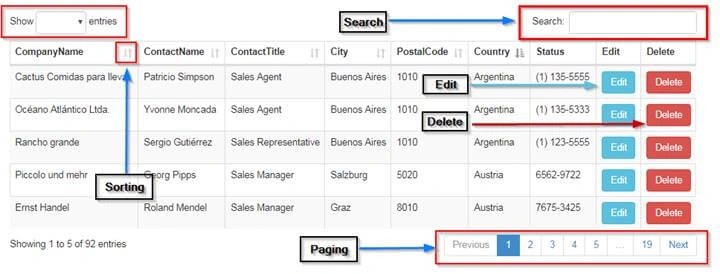
What is DataTables?
DataTables is a plug-in for the jQuery Javascript library. It is a highly flexible tool, based upon the foundations of progressive enhancement, and will add advanced interaction controls to any HTML table.
Referenced from - https://datatables.net/
Pre prerequisite for Application
- Visual Studio 2012 / 2013 / 2015 / 2017
- Entity Framework 5 and above
- SQL Server 2008
Let’s start with database part first.
Database Part
I am using the “Northwind” database, and in that, it has the “Customers” table.
You can download the Northwind database from below link:
https://github.com/Microsoft/sql-server-samples/tree/master/samples/databases/northwind-pubs
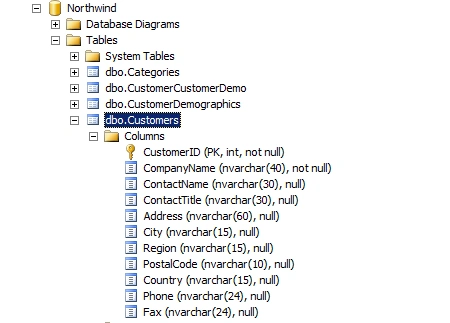
Next, we are going to create an ASP.NET MVC5 Web application.
Creating ASP.NET MVC5 Web Application
Open New Visual Studio 2015 IDE.
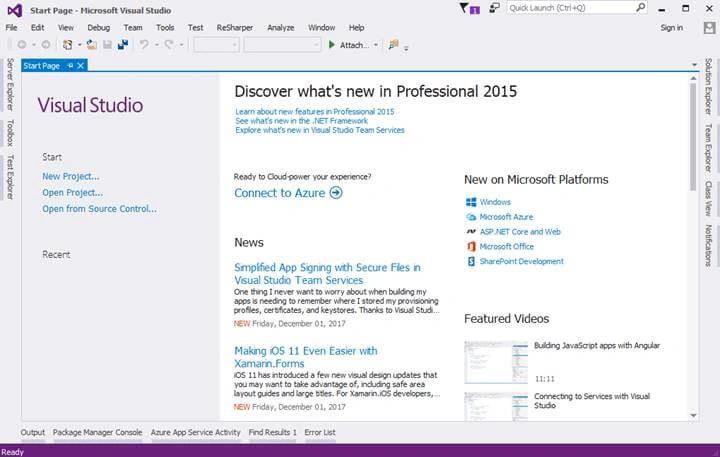
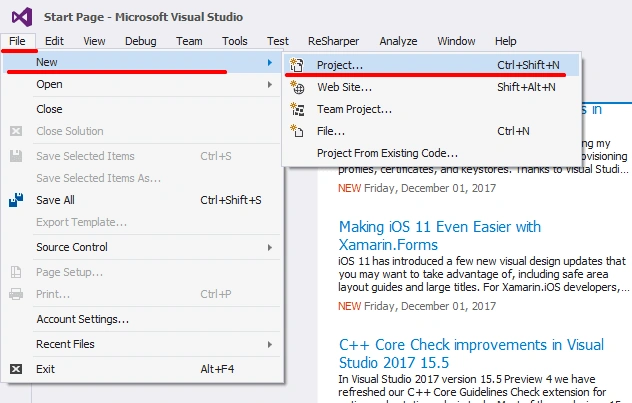
After opening IDE just, next we are going to create MVC project for doing that just click File - inside that New - Project.
After choosing a project, a new dialog will pop up with the name “New Project”. In that, we are going to choose Visual C# Project Templates - Web - ASP.NET Web Application. Then, we are going to name the project as “DemoDatatables”.
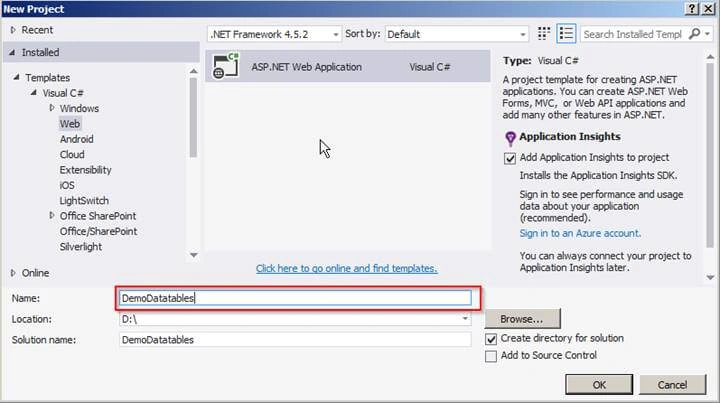
After naming the project we are going click on OK button to create a project.
A new dialog will pop up for choosing templates for Creating “ASP.NET Web Application;” in that template, we are going to Create MVC application. That's why we are going to choose “MVC template” and next click on OK button to create a project.
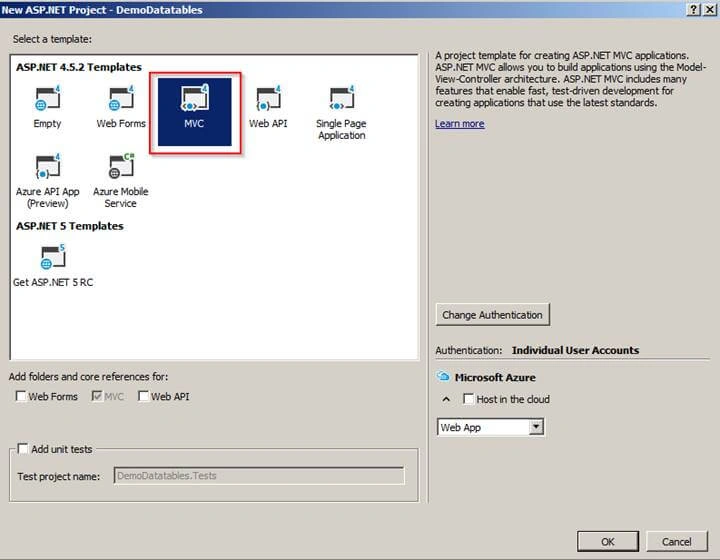
After clicking on OK button it will start to create a project.
Project Structure
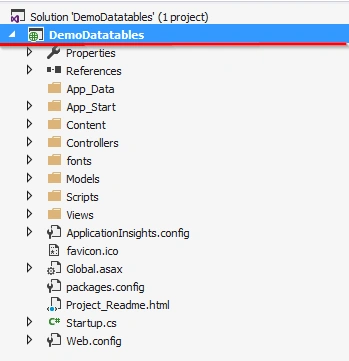
After creating project next, we are going to create Model.
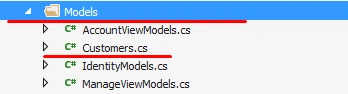
Creating Customer Model
We are going to add Customer Model to the Models folder.
Code Snippet
[Table("Customers")]
public class Customers
{
    [Key]
    public int? CustomerID { get; set; }
    [Required(ErrorMessage = "Required CompanyName")]
    public string CompanyName { get; set; }
    [Required(ErrorMessage = "Required ContactName")]
    public string ContactName { get; set; }
    [Required(ErrorMessage = "Required ContactTitle")]
    public string ContactTitle { get; set; }
    public string Address { get; set; }

    [Required(ErrorMessage = "Required City")]
    public string City { get; set; }
    public string Region { get; set; }

    [Required(ErrorMessage = "Required PostalCode")]
    public string PostalCode { get; set; }

    [Required(ErrorMessage = "Required Country")]
    public string Country { get; set; }

    [Required(ErrorMessage = "Required Phone")]
    public string Phone { get; set; }
    public string Fax { get; set; }
}
After adding model next, we are going to use Entity framework for accessing database to doing that we need to setup DbContext class.
What is DbContext?
DbContext is an important part of Entity Framework.
It is a bridge between your domain or entity classes and the database.
DbContext is the primary class that is responsible for interacting with data as an object.
Referenced from here.
Setting up DbContext Class
In this part, we are first going to create a class with name “DatabaseContext” and this class will be inheriting from “DbContext” class.
We are going create this class in Model Folder.
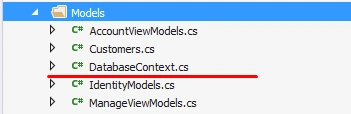
Note: “DBConnection” is Connection string name.
What is DBSet?
Referenced from here.
DBSet class represents an entity set that is used for creating, read, update, and delete operations. A generic version of DBSet (DbSet<TEntity>) can be used when the type of entity is not known at build time.
After adding “DatabaseContext” class next we are going to inherit this class with “DbContext” class.
After inheriting class next in constructor we are going to create a connection for doing that we need to pass connection string name to “DbContext” class, we are passing connection string name as DBConnection.
After passing connection string next we are going to declare DbSet in “DbContext” class which will help us to perform create, read, update, and delete operations.
Code Snippet
namespace DemoDatatables.Models
{
    public class DatabaseContext : DbContext
    {
        public DatabaseContext() : base("DBConnection")
        {

        }
        public DbSet<Customers> Customers {get; set;}
    }
}
Connection string in Web.config file
<connectionStrings>
<addname="DBConnection"
connectionString="Data Source=####; initial catalog=Northwind; user id=sa; password=Pass####;"
providerName="System.Data.SqlClient" />
</connectionStrings>
Next, we are going to add a controller.
Adding DemoController
In this part, we are going to add a new controller with the name “Demo”.
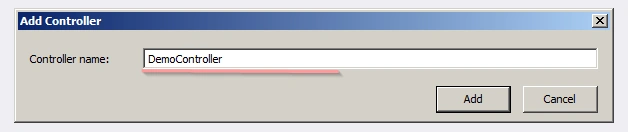
After we have clicked on Add button, it has created DemoController in Controller folder, as shown in the below view.
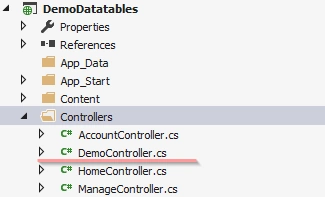
After adding DemoController next we are going to download DataTables Scripts and add it to project.
Getting DataTables Scripts
The following Javascript library files are used in this example,
- http://ajax.googleapis.com/ajax/libs/jquery/1.11.1/jquery.min.js
- https://cdn.datatables.net/1.10.15/js/jquery.dataTables.min.js
- https://cdn.datatables.net/1.10.15/js/dataTables.bootstrap4.min.js
The following CSS files are used in this example,
Bootstrap v3.3.7
https://getbootstrap.com/docs/3.3/getting-started/
DataTables CSS files
- https://cdn.datatables.net/1.10.15/css/dataTables.bootstrap.min.css
- https://cdn.datatables.net/responsive/2.1.1/css/responsive.bootstrap.min.css
After completing with downloading script and css next we are going to add ShowGrid Action Method in DemoController.
Adding ShowGrid Action Method in Demo Controller
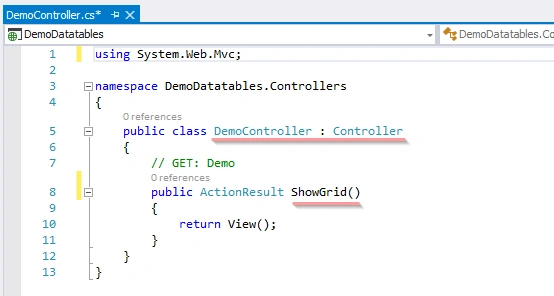
After adding Action Method now let add View with name “ShowGrid”.
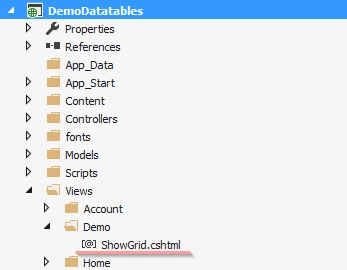
Adding DataTables Grid Scripts and Css on ShowGrid View
In first step we are going to add Script and Css reference.
<script src="//ajax.googleapis.com/ajax/libs/jquery/1.11.1/jquery.min.js"></script>
<link href="~/Content/bootstrap.css" rel="stylesheet" />

<link href="https://cdn.datatables.net/1.10.15/css/dataTables.bootstrap.min.css" rel="stylesheet" />
<link href="https://cdn.datatables.net/responsive/2.1.1/css/responsive.bootstrap.min.css" rel="stylesheet" />

<script src="https://cdn.datatables.net/1.10.15/js/jquery.dataTables.min.js"></script>
<script src="https://cdn.datatables.net/1.10.15/js/dataTables.bootstrap4.min.js "></script>
After adding Script and CSS reference next we are going to add DataTables Markup.
Adding DataTables Markup
It is simple Html Table in that we are going to add columns headers (“<th>”) with all the columns names which we want to display on the grid.
After adding Markup next, we are going to add DataTables function to Create DataTables.
<div class="container">
    <br />
    <div style="width:90%; margin:0 auto;">
        <table id="demoGrid" class="table table-striped table-bordered dt-responsive nowrap" width="100%" cellspacing="0">
            <thead>
          <tr>
            <th>CustomerID</th>
            <th>CompanyName</th>
            <th>ContactName</th>
            <th>ContactTitle</th>
            <th>City</th>
            <th>PostalCode</th>
            <th>Country</th>
            <th>Phone</th>
            <th>Edit</th>
            <th>Delete</th>
        </tr>
            </thead>
        </table>
    </div>
</div>
Adding DataTables Function to create DataTables
Code Snippet
<script>

    $('#demoGrid').dataTable({
    });
</script>
DataTables Options
All definitions are taken from https://datatables.net website.
- Processing - Enable or disable the display of a 'processing' indicator when the table is being processed (e.g. a sort).
- server Side - Server-side processing - where filtering, paging, and sorting calculations are all performed by a server.
- Filter - this option is used for enabling and disabling of search box
- orderMulti - When ordering is enabled (ordering), by default DataTables allows users to sort multiple columns by shift-clicking upon the header cell for each column. Although this can be quite useful for users, it can also increase the complexity of the order, potentiality increasing the processing time of ordering the data. Therefore, this option is provided to allow this shift-click multiple column abilities
- Ajax - Ajax request is made to get data to DataTables.
- columnDefs - Set column definition initialisation properties.
- Columns - Set column specific initialisation properties.
After completing with an understanding of options or properties next we are going to set it.
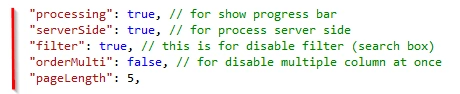
We are going to set “processing” option to true to display processing bar, after that, we are going to set the “serverSide” option to true because we are going to do paging and filtering at serverSide.
Next options after “serverSide” option are “filter.” We are going to use the search box; that's why we have set this property to true, “orderMulti” is also set to false because we do not want to sort multiple columns at once.
DataTables Options snapshot
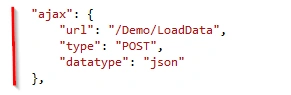
Ajax Option
And the main option is Ajax which we are going to use for calling an Action Method for getting data to bind DataTables Grid the data is in Json format. For that we are going to pass URL: -"/Demo/LoadData”, this request is Post request. And data type we are going to set as Json.
We are going to call LoadData Action Method which is under Demo Controller which I will explain in upcoming steps.
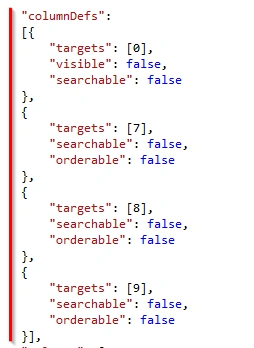
columnDefs Option
After setting Ajax we have a “columnDefs” option which I have used for hiding Primary key of the table (“CustomerID”) and which should also be not searchable.
columns Option
Finally, the second to last option is columns which are used for initialization of DataTables grid. Add that property which you need to render on the grid, which must be defined in this columns option.
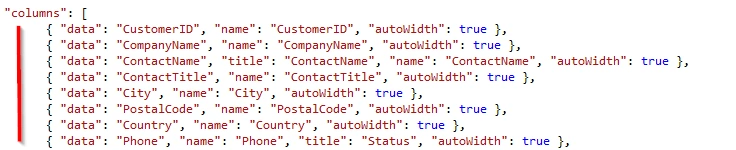
Render buttons in Columns
At last, we need to render button in the grid for editing data and deleting data.
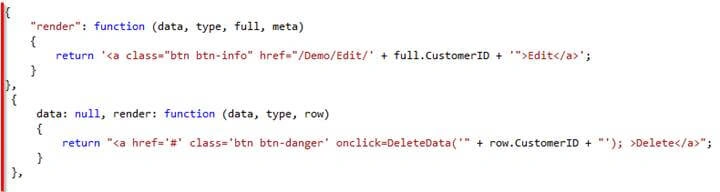
Finally, on click of the delete button, we can call a custom function to delete data as I have created “DeleteData” function.
Complete code Snippet of ShowGrid View
@{
    Layout = null;
}

<!DOCTYPE html>
<html>
<head>
    <meta name="viewport" content="width=device-width" />
    <title>ShowGrid</title>
    <script src="//ajax.googleapis.com/ajax/libs/jquery/1.11.1/jquery.min.js"></script>
    <link href="~/Content/bootstrap.css" rel="stylesheet" />

    <link href="https://cdn.datatables.net/1.10.15/css/dataTables.bootstrap.min.css" rel="stylesheet" />
    <link href="https://cdn.datatables.net/responsive/2.1.1/css/responsive.bootstrap.min.css" rel="stylesheet" />

    <script src="https://cdn.datatables.net/1.10.15/js/jquery.dataTables.min.js"></script>
    <script src="https://cdn.datatables.net/1.10.15/js/dataTables.bootstrap4.min.js "></script>

    <script>
        $(document).ready(function () {
            $("#demoGrid").DataTable({

                "processing": true, // for show progress bar
                "serverSide": true, // for process server side
                "filter": true, // this is for disable filter (search box)
                "orderMulti": false, // for disable multiple column at once
                "pageLength": 5,

                "ajax": {
                    "url": "/Demo/LoadData",
                    "type": "POST",
                    "datatype": "json"
                },

                "columnDefs":
                [{
                    "targets": [0],
                    "visible": false,
                    "searchable": false
                },
                {
                    "targets": [7],
                    "searchable": false,
                    "orderable": false
                },
                {
                    "targets": [8],
                    "searchable": false,
                    "orderable": false
                },
                {
                    "targets": [9],
                    "searchable": false,
                    "orderable": false
                }],

                "columns": [
                      { "data": "CustomerID", "name": "CustomerID", "autoWidth": true },
                      { "data": "CompanyName", "name": "CompanyName", "autoWidth": true },
                      { "data": "ContactName", "title": "ContactName", "name": "ContactName", "autoWidth": true },
                      { "data": "ContactTitle", "name": "ContactTitle", "autoWidth": true },
                      { "data": "City", "name": "City", "autoWidth": true },
                      { "data": "PostalCode", "name": "PostalCode", "autoWidth": true },
                      { "data": "Country", "name": "Country", "autoWidth": true },
                      { "data": "Phone", "name": "Phone", "title": "Status", "autoWidth": true },
                      {
                          "render": function (data, type, full, meta)
                          { return '<a class="btn btn-info" href="/Demo/Edit/' + full.CustomerID + '">Edit</a>'; }
                      },
                       {
                           data: null, render: function (data, type, row) {
                               return "<a href='#' class='btn btn-danger' onclick=DeleteData('" + row.CustomerID + "'); >Delete</a>";
                           }
                       },
                ]
            });
        });
    </script>

</head>
<body>
    <div class="container">
        <br />
        <div style="width:90%; margin:0 auto;">
            <table id="demoGrid" class="table table-striped table-bordered dt-responsive nowrap" width="100%" cellspacing="0">
                <thead>
                    <tr>
                        <th>CustomerID</th>
                        <th>CompanyName</th>
                        <th>ContactName</th>
                        <th>ContactTitle</th>
                        <th>City</th>
                        <th>PostalCode</th>
                        <th>Country</th>
                        <th>Phone</th>
                        <th>Edit</th>
                        <th>Delete</th>
                    </tr>
                </thead>
            </table>
        </div>
    </div>
</body>
</html>
After completing with initialization of DataTables grid next we are going to create LoadData Action Method.
Adding LoadData Action Method to Demo Controller
Here we are going to Add Action Method with name LoadData. In this action method, we are going to get all Customer records from the database to display and on the basis of the parameter we are going sort data, and do paging with data.
We are doing paging and filtering of data on the server side; that why we are using IQueryable which will execute queries with filters on the server side.

For using OrderBy in the query we need to install System.Linq.Dynamic package from NuGet packages.
Snapshot while adding System.Linq.Dynamic package from NuGet packages
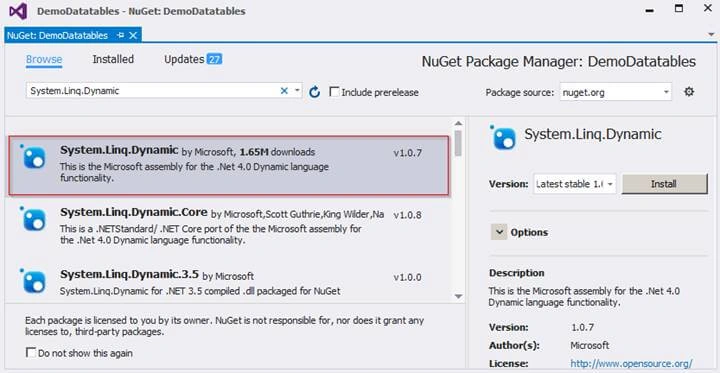
After adding the package, next, we see the complete code snippet and how to get data and do paging and filtering with it.
Complete code Snippet of LoadData Action Method
All processes are step by step with comments; so it's easy to understand.
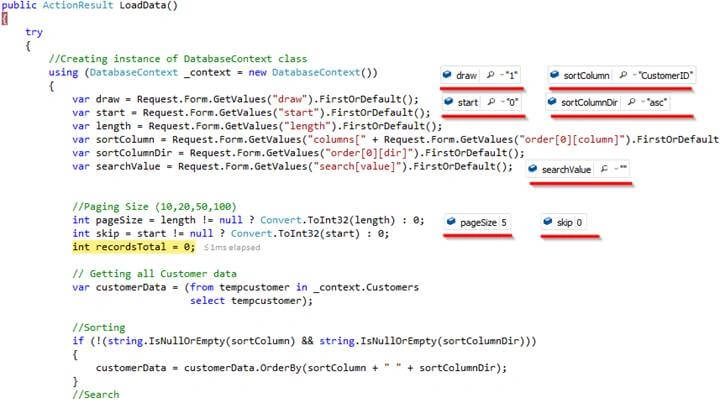
All Request.Form.GetValues parameters value will get populated when AJAX post method gets called on a load of if you do paging or sorting and search.
Code Snippet
public ActionResult LoadData()
{
    try
    {
        var draw = Request.Form.GetValues("draw").FirstOrDefault();
        var start = Request.Form.GetValues("start").FirstOrDefault();
        var length = Request.Form.GetValues("length").FirstOrDefault();
        var sortColumn = Request.Form.GetValues("columns[" + Request.Form.GetValues("order[0][column]").FirstOrDefault() + "][name]").FirstOrDefault();
        var sortColumnDir = Request.Form.GetValues("order[0][dir]").FirstOrDefault();
        var searchValue = Request.Form.GetValues("search[value]").FirstOrDefault();


        //Paging Size (10,20,50,100)
        int pageSize = length != null ? Convert.ToInt32(length) : 0;
        int skip = start != null ? Convert.ToInt32(start) : 0;
        int recordsTotal = 0;

        // Getting all Customer data
        var customerData = (from tempcustomer in _context.Customers
                            select tempcustomer);

        //Sorting
        if (!(string.IsNullOrEmpty(sortColumn) && string.IsNullOrEmpty(sortColumnDir)))
        {
            customerData = customerData.OrderBy(sortColumn + " " + sortColumnDir);
        }
        //Search
        if (!string.IsNullOrEmpty(searchValue))
        {
            customerData = customerData.Where(m => m.CompanyName == searchValue);
        }

        //total number of rows count
        recordsTotal = customerData.Count();
        //Paging
        var data = customerData.Skip(skip).Take(pageSize).ToList();
        //Returning Json Data
        return Json(new { draw = draw, recordsFiltered = recordsTotal, recordsTotal = recordsTotal, data = data });

    }
    catch (Exception)
    {
        throw;
    }
}
Complete code Snippet of DemoController
using DemoDatatables.Models;
using System;
using System.Linq;
using System.Web.Mvc;
using System.Linq.Dynamic;
using System.Data.Entity;

namespace DemoDatatables.Controllers
{
    public class DemoController : Controller
    {
        // GET: Demo
        public ActionResult ShowGrid()
        {
            return View();
        }

        public ActionResult LoadData()
        {
            try
            {
                //Creating instance of DatabaseContext class
                using (DatabaseContext _context = new DatabaseContext())
                {
                    var draw = Request.Form.GetValues("draw").FirstOrDefault();
                    var start = Request.Form.GetValues("start").FirstOrDefault();
                    var length = Request.Form.GetValues("length").FirstOrDefault();
                    var sortColumn = Request.Form.GetValues("columns[" + Request.Form.GetValues("order[0][column]").FirstOrDefault() + "][name]").FirstOrDefault();
                    var sortColumnDir = Request.Form.GetValues("order[0][dir]").FirstOrDefault();
                    var searchValue = Request.Form.GetValues("search[value]").FirstOrDefault();


                    //Paging Size (10,20,50,100)
                    int pageSize = length != null ? Convert.ToInt32(length) : 0;
                    int skip = start != null ? Convert.ToInt32(start) : 0;
                    int recordsTotal = 0;

                    // Getting all Customer data
                    var customerData = (from tempcustomer in _context.Customers
                                        select tempcustomer);

                    //Sorting
                    if (!(string.IsNullOrEmpty(sortColumn) && string.IsNullOrEmpty(sortColumnDir)))
                    {
                        customerData = customerData.OrderBy(sortColumn + " " + sortColumnDir);
                    }
                    //Search
                    if (!string.IsNullOrEmpty(searchValue))
                    {
                        customerData = customerData.Where(m => m.CompanyName == searchValue);
                    }

                    //total number of rows count
                    recordsTotal = customerData.Count();
                    //Paging
                    var data = customerData.Skip(skip).Take(pageSize).ToList();
                    //Returning Json Data
                    return Json(new { draw = draw, recordsFiltered = recordsTotal, recordsTotal = recordsTotal, data = data });
                }
            }
            catch (Exception)
            {
                throw;
            }
        }
    }
}
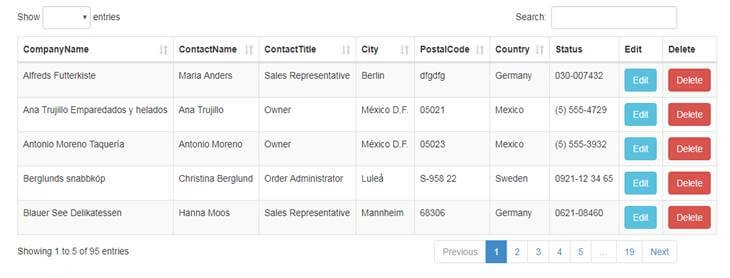
Save the entire Source code and run the application.
Run Application
To access the application, enter URL - http://localhost:#####/demo/showgrid .
“#####” is localhost port number.
Real-time Debugging Snapshot
In this section, you can see what values are populated when post method gets called.
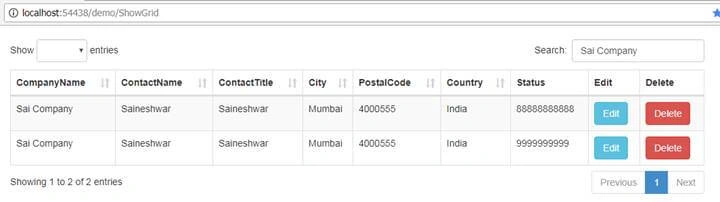
Search with DataTables grid
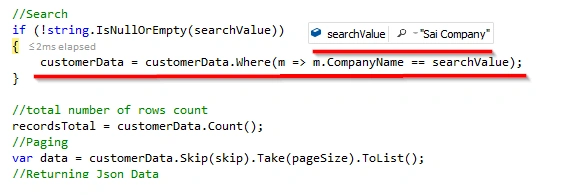
In this section we have implemented a search for only Companyname column, if you want to add another column just use or condition (“||”) with it.

Adding more columns to search

Snapshot while Search Data
Debugging View of Search
After completing with search Implementation next we are going to work on Edit Button of DataTables Grid.
Edit Event in DataTables grid
In this section first we are going add Edit Action Method in Demo Controller which will handle edit request and it will take Customer ID as input from which we are going to get details of that customer.
Code Snippet of Edit Action Method
[HttpGet]
public ActionResult Edit(int? ID)
{
    try
    {
        using (DatabaseContext _context = new DatabaseContext())
        {
            var Customer = (from customer in _context.Customers
                            where customer.CustomerID == ID
                            select customer).FirstOrDefault();

            return View(Customer);
        }
    }
    catch (Exception)
    {
        throw;
    }
}
After having a look on Edit action method next let’s see how to render Edit link (button).
Below is syntax for rendering Edit button

Finally, you can see Edit View below.
Edit View
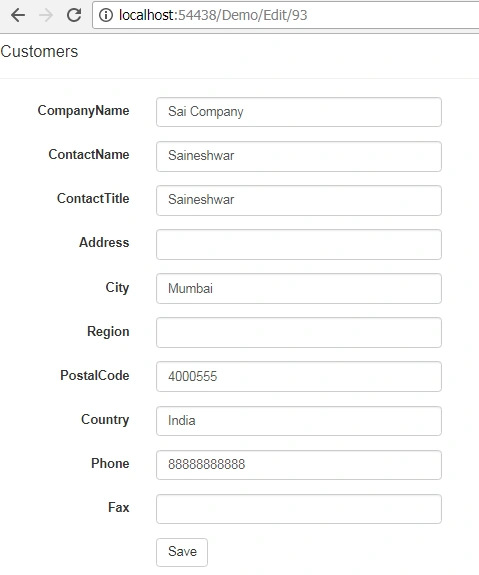
After completing with Edit part next we are going to have a look at delete part.
Delete Event in DataTables grid
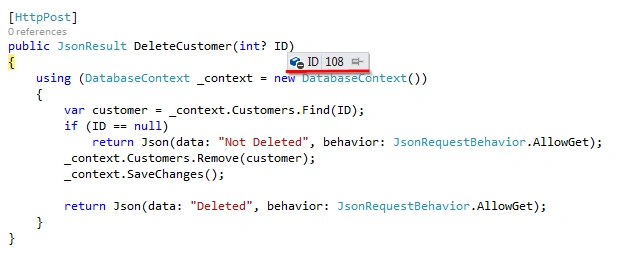
In this section first we are going add DeleteCustomer Action Method in DemoController which will handle delete request and it will take Customer ID (“ID”) as input from which we are going to delete customer data.
Code Snippet of DeleteCustomer
[HttpPost]
public JsonResult DeleteCustomer(int? ID)
{
    using (DatabaseContext _context = new DatabaseContext())
    {
        var customer = _context.Customers.Find(ID);
        if (ID == null)
            return Json(data: "Not Deleted", behavior: JsonRequestBehavior.AllowGet);
        _context.Customers.Remove(customer);
        _context.SaveChanges();

        return Json(data: "Deleted", behavior: JsonRequestBehavior.AllowGet);
    }
}
After having a look on DeleteCustomer action method next let’s see how to render delete link (button).
Below is syntax for rendering Delete button

Now you can see that we are generating simple href button and on that button, we have added an onclick event to call DeleteData function which we have not created yet, so let’s create DeleteData function.
Code Snippet
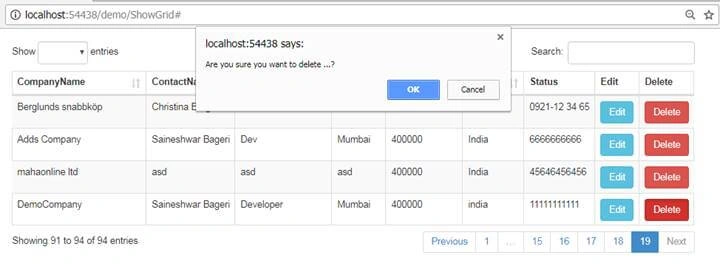
In this part when user clicks on Delete button DeleteData function will get called and first thing it will show is confirmation alert ("Are you sure you want to delete ...?") if you click on ok (confirm) button then it will call Delete function. This function takes CustomerID as input, next we are generating URL of DeleteCustomer Action Method and passing it as ajax post request and along with it we are passing Customer ID as parameter.
If data is deleted, then we are going to get “Deleted” as a response from Deletecustomer Action Method, finally, we show alert to the user and reload grid.
<script>

    function DeleteData(CustomerID) {
        if (confirm("Are you sure you want to delete ...?")) {
            Delete(CustomerID);
        }
        else {
            return false;
        }
    }
    function Delete(CustomerID) {
        var url = '@Url.Content("~/")' + "Demo/DeleteCustomer";
        $.post(url, { ID: CustomerID }, function (data) {
            if (data == "Deleted") {
                alert("Delete Customer !");
                oTable = $('#demoGrid').DataTable();
                oTable.draw();
            }
            else {
                alert("Something Went Wrong!");
            }
        });
    }
</script>
Snapshot while deleting customer
Debugging View while deleting customer
Finally, we have learned how to use jQuery DataTables Grid with ASP.NET CORE MVC. I hope you enjoyed the article.
Xich LePosted Jan 31, 2025, 2:50 AM
It's great post! very helpful! Thanks a lot!
ALi ShahPosted Aug 13, 2024, 7:56 PM
Where is sql db script ?
AKSHAYPosted Jun 24, 2023, 12:21 PM
Thanks for the article, but the source code is not present in the rar file.
Kieran CaulfieldPosted May 27, 2022, 9:27 AM
Thanks for this, it has been a great help. Just some updates or things to bear in mind if you use the VS 2022 with latest MVC and Asp.Net: Use npm to install packages as NuGet isn't as good, so "npm install @types/jquery -D" and "npm install @types/node --save-dev" (this caused my Publish errors) and Updated the BundleConfig.cs file to replace "new BundleScript" with "new Bundle", otherwise you will get runtime issues. Other than that I'm very pleased with the results, running on SQL Server table with 100,000 records with no real response issues.
Hari MukkaPosted Jan 20, 2022, 6:52 PM
Severity Code Description Project File Line Suppression StateError CS0246 The type or namespace name 'DbContext' could not be found (are you missing a using directive or an assembly reference?) DemoDatatables \DemoDatatables\Models\DatabaseContext.cs 9 Active
Ajitkumar RajputPosted Jul 27, 2021, 5:24 AM
How to pass parameter on "ajax": { "url": "/Demo/LoadData", "type": "POST", "datatype": "json" },
Kashyap ParikhPosted May 19, 2021, 1:33 AM
How to display date in the grid?
Kashyap ParikhPosted May 19, 2021, 1:33 AM
How to display date in the grid ?because json will return some miscellaneous date.
William OniszkoPosted Apr 5, 2021, 8:27 PM
I like this tutorial. But i dont know what to do with some of the files (.css, .js, etc.) when the project already creates newer versions of them. and .net should be backwards compatible for most things, but it fails to recognize namespaces far too often. any advice?
Nelson RodPosted Mar 29, 2021, 9:34 PM
The sort icon is not displaying right on the title of the columns. It displays a small square. Any ideas to fix it?
Christian MünsterPosted Mar 10, 2021, 3:26 PM
What happened to the Source code? your RAR only contains one file.
Tahir AlviPosted Jan 22, 2021, 8:57 AM
Great piece of article on a very commonly used topic. Everything is working except the Sort/Order by. I have updated my code as //Sorting if (!string.IsNullOrEmpty(sortColumn) && !string.IsNullOrEmpty(sortColumnDir)) { if (sortColumnDir.ToString() == "desc") itemData.Items = (from i in itemData.Items orderby sortColumn descending select i).ToList(); else itemData.Items = (from i in itemData.Items orderby sortColumn ascending select i).ToList(); }
Muhammad NaufalPosted Jul 13, 2020, 12:16 AM
Where was edit view?
Juado UsurpadorPosted Aug 13, 2019, 8:16 PM
Hi Saineshwar, for me it is displaying raw json data all over, it is not rendering grid control any idea why ?
Pankajkumar PatelPosted Jul 27, 2019, 2:56 AM
I was using old version of datatable and now working on new latest version. And I was getting many issues for those. This will help lot to make all workable. Thank for such nice article.
Saineshwar BageriPosted May 15, 2019, 10:31 PM
Download example from this https://github.com/saineshwar/DataTablesGridExample
Sheikh FareethPosted May 14, 2019, 12:48 AM
Dear Sir, can you please share the nested Grid view with using Three tables and all three tables should edit delete option in mvc.net 5 and my email id is [[email protected]]
Sheikh FareethPosted May 14, 2019, 12:39 AM
Dear Sir, can you please share the nested Grid view with using Three tables and all three tables should edit delete option in mvc.net 5
Bee MinPosted May 8, 2019, 5:35 AM
I'm trying to change the connection string but it's doesn't working? can you help me
Bee MinPosted May 8, 2019, 4:22 AM
Many thanks :D
Ashish KaundalPosted Apr 30, 2019, 4:59 AM
Hi Saineshwar: i get this error:'IFormCollection' does not contain a definition for 'GetValues' and no accessible extension method 'GetValues' accepting a first argument of type 'IFormCollection' could be found (are you missing a using directive or an assembly reference?) (CS1061) [LeadManagement] in controller
Alejandro AguileraPosted Apr 1, 2019, 4:25 PM
Hi Saineshwar: I am trying to download the code and I get this error page: "Too many requests Sorry, this link has been automatically turned off for now. Learn more about traffic limits." Can you help me please?
Alejandro AguileraPosted Apr 1, 2019, 4:23 PM
Hi Saineshwar!
Nguyen Huu ThinPosted Mar 26, 2019, 10:39 AM
Thank Saineshwar very much :)
Tên Họ VàPosted Mar 24, 2019, 9:10 PM
Thanks you !
Prasad RayaproluPosted Feb 18, 2019, 2:24 AM
HI Sai, Could you please update the full project Source code link it would be helpful to all
quarterhorsesPosted Feb 6, 2019, 4:14 PM
Looks like you exceeded your drop box limit. Do you have another location to download the sourcecode>
sunny kumarPosted Jan 24, 2019, 4:41 AM
No property or field 'MeetingIDasc' exists in type 'MeetingDetail'' getting this typep of error
Aisza AmosPosted Jan 1, 2019, 8:54 PM
Hi, I followed this, post for the Index to retrieve and display the data in the grid, but when I changed the call type from POST to GET, it doesn't work anymore. Any thoughts on this? Thank you.
Chandan KumarPosted Sep 14, 2018, 6:10 AM
Why Not Its Updating Data??? this error is showing while updating. Server Error in '/' Application.The resource cannot be found. Description: HTTP 404. The resource you are looking for (or one of its dependencies) could have been removed, had its name changed, or is temporarily unavailable. Please review the following URL and make sure that it is spelled correctly. Requested URL: /Demo/Edit/2
Steve WengPosted Aug 20, 2018, 9:46 AM
Hi, I managed to run your tutorial but when i run http://localhost:10372/Demo/ShowGrid , it says "No data available in table". I do have records in my Customer table
mani pathakPosted Aug 14, 2018, 6:04 AM
Hi Sai, Quite well written but When I do initialize the var draw = Request.Form.GetValues("draw").FirstOrDefault(); var start = Request.Form.GetValues("start").FirstOrDefault(); var length = Request.Form.GetValues("length").FirstOrDefault(); var sortColumn = Request.Form.GetValues("columns[" + Request.Form.GetValues("order[0][column]").FirstOrDefault() + "][name]").FirstOrDefault(); var sortColumnDir = Request.Form.GetValues("order[0][dir]").FirstOrDefault(); var searchValue = Request.Form.GetValues("search[value]").FirstOrDefault(); //Paging Size (10,20,50,100) int pageSize = length != null ? Convert.ToInt32(length) : 0; int skip = start != null ? Convert.ToInt32(start) : 0; getting the error message as "An exception of type 'System.ArgumentNullException' occurred in System.Core.dll but was not handled in user code ".
Cemal GUNESPosted Jul 24, 2018, 3:19 AM
Can you upload your Northwind database bak.
Neal RogersPosted Jun 7, 2018, 5:23 AM
Where do the Request.Form values come from? Your Demo works , but when I try it in a different project these are missing/null and an exception is thrown. Thx
jerateep SaeleePosted Jun 5, 2018, 3:17 AM
How to export copy, excel, pdf, printTry the steps. data = customerData.Skip (skip) .Take (pageSize) .ToList (); If pageSize = 10 Export data is only 10 rows. I know how to loop (data = customerData.Skip (skip) .Take (pageSize) .ToList ();) Thank You
Ansar ShaikPosted May 9, 2018, 1:54 AM
If i'm mentioning Layout, its giving error. example: @{ Layout = "~/Views/Shared/_Layout.cshtml"; }
Navnath UgalePosted Apr 21, 2018, 11:59 PM
Very nice article thanks sir.
Minh MinhPosted Apr 12, 2018, 10:47 AM
Hello, please help me with this error: Uncaught TypeError: Cannot read property 'style' of undefined at Ha (jquery.dataTables.min.js:62) at ha (jquery.dataTables.min.js:48) at e (jquery.dataTables.min.js:93) at HTMLTableElement.<anonymous> (jquery.dataTables.min.js:93) at Function.each (jquery.min.js:2) at m.fn.init.each (jquery.min.js:2) at m.fn.init.m [as dataTable] (jquery.dataTables.min.js:82) at m.fn.init.h.fn.DataTable (jquery.dataTables.min.js:167) at HTMLDocument.<anonymous> (Attendance:257) at j (jquery.min.js:2)
Keith LofyPosted Apr 9, 2018, 3:54 PM
I'm not trying to be critical, just trying to help those following me. You need to add the following action:[HttpPost] [ValidateAntiForgeryToken] public ActionResult Edit([Bind(Include = "CustomerID,CompanyName,ContactName,ContactTitle,Address,City,Region,PostalCode,Country,Phone,Fax")] Customers customer) { if (ModelState.IsValid) { db.Entry(customer).State = EntityState.Modified; db.SaveChanges(); return RedirectToAction("ShowGrid"); } return View(customer); }
Keith LofyPosted Apr 8, 2018, 5:23 PM
You need to change your Search sting from "==" to .contains for it to work correctly. Like this: if (!string.IsNullOrEmpty(searchValue)) { customerData = customerData.Where(m => m.CompanyName.Contains(searchValue) || m.ContactName.Contains(searchValue) || m.Country.Contains(searchValue)); }
shobha avalPosted Apr 3, 2018, 3:03 AM
I want to display layout. How do i implement it having jquery datatable?
Broad RiverPosted Mar 25, 2018, 11:40 AM
This is a great article. Thanks for posting. I was following the article, but I am stuck here. var draw = Request.Form.GetValues("draw").FirstOrDefault(); I am not getting any value to Request.Form. Am I missing anything? Please let me know.
Morteza SadeghiPosted Mar 17, 2018, 8:28 AM
This article is very good but has one error.when get all customer data,not used the tolist() method.
Rupesh SahuPosted Mar 1, 2018, 12:09 PM
Gud one .. thank you
Tridip BhattacharjeePosted Jan 16, 2018, 6:47 AM
This is not clear -- "targets": [0], "visible": false, "searchable": false what is "targets": [0] or "targets": [7] what is "visible": false ? what is "searchable": false
Shamkant sapkalePosted Jan 9, 2018, 12:51 AM
Nice and Easy to understand..
Hiten PandyaPosted Jan 1, 2018, 11:44 PM
Nice Explanation straight and simple...... Thanks for sharing...
Suraj KumarPosted Dec 31, 2017, 11:54 AM
One of the great article of data table and MVC CRUD.