
Introduction
In many applications, it is a compulsory requirement to include custom fonts. The type of the fonts to be used depends on the requirement of the application. This article gives a detailed explanation of using custom fonts in Xamarin forms applications.
Step 1
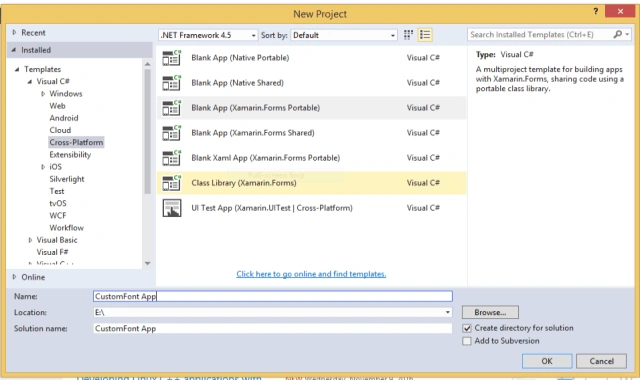
Select "New project" at the left side of Visual Studio. A pop up window listing out different projects will be opened.
Select "Cross-Platform" at the left side and then select Blank App (Xamarin.Forms Portable), as shown in the figure.
Rename the application "CustomFont App". Then click "OK" so that a new project with name "CustomFont App" is created.
Step 2
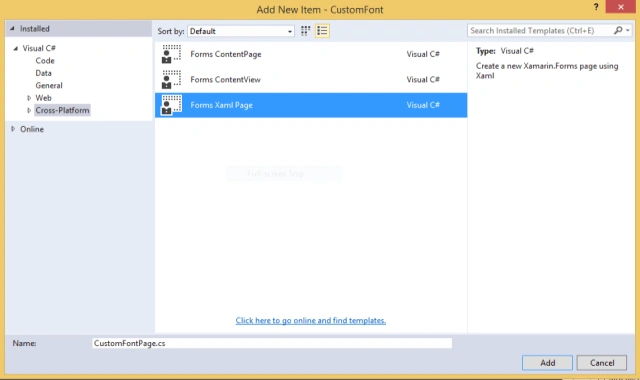
Open the Solution Explorer. Right click on the portable project, add a click on "Add a new item", so that a popup window is opened as shown.
Select Cross-platform and select "Forms Xaml Page" and rename the page as "CustomFontPage".
Then, click on "Add" Button so that an XAML page with the name "CustomFontPage" is created.
Step 3
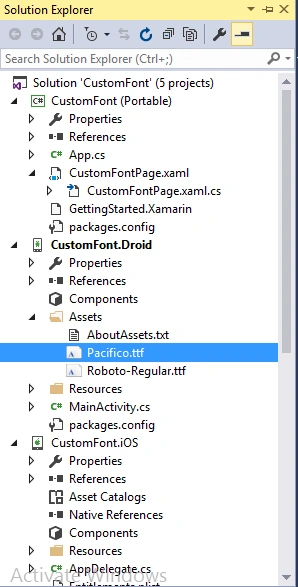
Download .ttf files from font specifying websites ex: "www.fontsquirrel.com". and place the .ttf files in the assets folder of the Android project as shown in the below screen shot.
Step 4
Add the following lines of code in .xaml page of CustomFontPage.
Then, click on "Add" Button so that an XAML page with the name "CustomFontPage" is created.
Step 3
Download .ttf files from font specifying websites ex: "www.fontsquirrel.com". and place the .ttf files in the assets folder of the Android project as shown in the below screen shot.
Step 4
Add the following lines of code in .xaml page of CustomFontPage.
- <StackLayout>
- <Label Text="Default Font" TextColor="Black" FontSize="25" ></Label>
- <Label Text="Pacifico Font" TextColor="Black" FontSize="25" FontFamily="Pacifico.ttf#Pacifico"></Label>
- <Label Text="Roboto-Regular Font" TextColor="Black" FontSize="25" FontFamily="Roboto-Regular.ttf#Roboto-Regular"></Label>
- </StackLayout>

Step 5
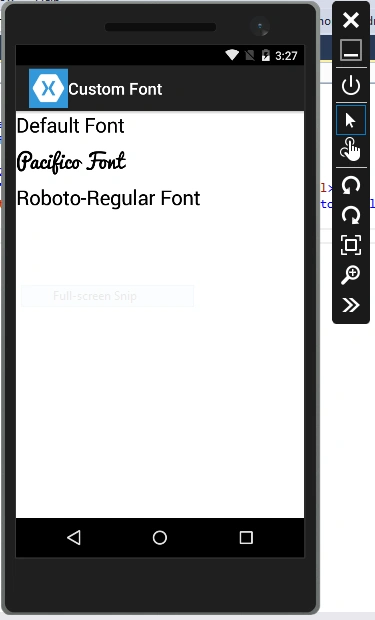
The final output is shown in the screen shot.
hariprasad gudimallaPosted Dec 19, 2016, 11:02 AM
I will post an article regarding Custom fonts in IOS ASAP.
hariprasad gudimallaPosted Dec 19, 2016, 10:39 AM
Hi Fabio, for IOS, add .ttf files under the resources folder of IOS, then go to the properties of .ttf files, change the "Copy to output directory" option to "copy always". 2. Open the info.plist file in editor view and paste the following code <key>UIAppFonts</key> <array> <string>(your downloaded ttf file name).ttf</string> </array>. 3. In xaml file, set the font family by using On platform property for the label .
hariprasad gudimallaPosted Dec 13, 2016, 8:17 PM
Hi Fabio Silva Lima, is your question is how to configure custom fonts in IOS app ?
Fabio Silva LimaPosted Dec 12, 2016, 8:00 PM
Good do you know how to configure the iOS app?