
Purpose
The following small application is designed to allow testing created reports with XML feeds used as data sources. The program checks that fields in report match to the fields in XML and then shows the report with loaded data in the report viewer.
How to Use
1. Fill the following fields Path to Report and Path to XML file: The Path to Report textbox serves for entering the path to a report. (ex: CROrdersManifest.rpt)
The Path to XML file allows to enter the path to the XML feed. (ex: XMLOrdersManifest.xml)
Both files are stored in the root of the application.
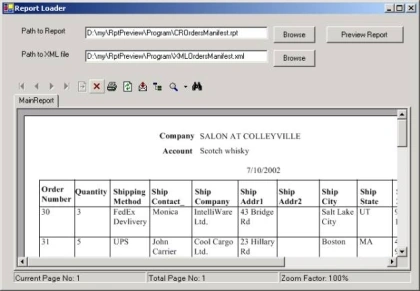
Note: Browse buttons open a standard File Open dialog
2. Click Preview Report
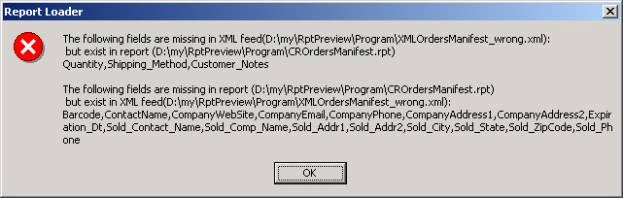
Note: The program checks that specified report and XML match to each other- i.e. they contain the same fields. If the program finds inconsistence it reports about it as it is shown below:
Advice
In order to get XML file use WriteXml method of dataset class. Like the following:
OrderDataSet.WriteXml("C:\Inetpub\wwwroot\UniversalTicketSystem\Docs\USPS.xml")
Having created XML file you can allow designers to create reports without permanent access to your database.
Implementation details
//initializing
DataSet dtsData=new DataSet();
ReportDocument oRpt=new ReportDocument();
//try to load the specified report file
oRpt.Load(this.txtReportPath.Text, OpenReportMethod.OpenReportByTempCopy);
//try to load data for the report
dtsData.ReadXml(this.txtXMLPath.Text);
string missingInSource, missingInReport;
//checks that fields in XML file match to the fields specified in the report file
bool fieldsMissing = !CheckMissingFields(oRpt,dtsData,out missingInSource, out missingInReport);
//informs about the result of checking
ShowMissingFields(missingInSource,missingInReport);
if (!fieldsMissing)
{
oRpt.SetDataSource(dtsData);
cRVOrder.ReportSource=oRpt;
}
Nhat TongPosted May 2, 2012, 5:42 AM
Hi, I have a question about crystal report in visual studio 2008. I use object crystal report viewer for show my report: crystalReportViewer.ReportSource = reportDocument; crystalReportViewer.ParameterFieldInfo = report.ParameterFields; crystalReportViewer.Refresh(); When I change parameter of report on user interface , memory of program is increase about 3-5 MB. How can I clean old data before change parameter ? I don't know where is data of report. Thanks so much!
firas sgharPosted Apr 28, 2012, 12:50 AM
Thankns I have two tables (invoice product) I get to implement the report with your tutorial (thanks) but with two table I shows an error( System.Nullable<>.) . I created a datable and I put the fields without success, please help me .
Chaya BentoraPosted Dec 28, 2010, 12:24 PM
Hi, I defined a path to the report to come to take his data from the database Access. I spent the entire project folder to another computer but the computer does not recognize this path so the report will not appear in running the program. (Visual Studio asks password) How can I change the path so that I could see the report listed? Thank you, Chaya