

Introduction
This is a simple article for beginners for developing with HTML 5 that help you understand how to use the Three.js file used in HTML 5 application to build 3D web applications using HTML only. We
know that HTML is an acronym for "HyperText Markup Language" used to
display data in a browser. The Three.js in HTML 5 is mainly used developed animated or 3D
application. HTML 5 is the advanced version of HTML. The Three.js file is mainly
used to develop 3D applications. Three.js is a lightweight 3D engine with the purpose of just enough abstraction over these new browser features to make it easy to
render compelling 3D scenes using JavaScript. Three.js allows you to choose
between a Canvas renderer and a WebGL renderer. The WebGL renderer is many times
faster but does not run in as many browsers. The renderer is a normal HTML
element and so you can overlay it with other HTML elements.
- Scene : Scene is provide the standard choice chosen the Canvas and WebGl.
- Camera : In camera we have define the inner height inner width of the windows.
- Render : We set the all functionality of 3D application.
- Materials : Materials is a one of the most useful parts of Three.js. In this part we create the faces separately and add them to the scene.
Step 2 :
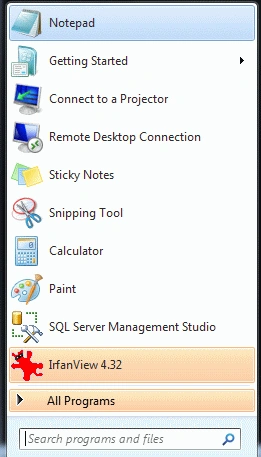
Open Notepad
- Click->Start button->Notepad
- Give the file a name of your choice
- Click New button->save
- There the name is "Hunter.html"
Step 3 :
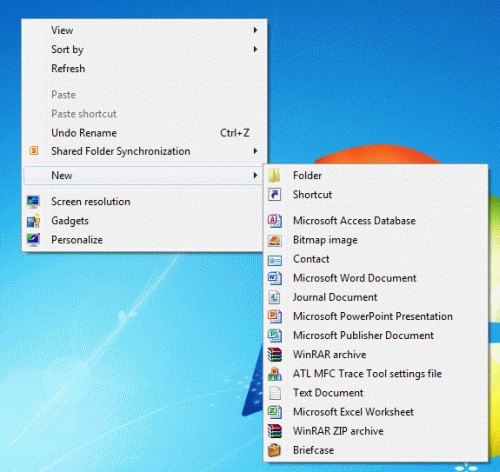
Create a Folder
- Right-click of Desktop Screen-> New-> Folder
- Name of Folder is "Manish"
- Finally, all HTML files and related sources are saved in that folder
Step 4: Use the RequestAnimFrame to set
the time related to make changes after some time:
Code
- WINDOW.requestAnimFrame = (function (callback) {
- return WINDOW.requestAnimationFrame ||
- WINDOW.webkitRequestAnimationFrame ||
- WINDOW.mozRequestAnimationFrame ||
- WINDOW.oRequestAnimationFrame ||
- WINDOW.msRequestAnimationFrame ||
- function (callback) {
- WINDOW.setTimeout(callback, 2000 / 60);
- };
- })();
Code
- function Manish(Lt, Aspeed, t) {
- var D = new D();
- var T = D.getT();
- var TTD = T - Lt;
- var AngleChange = Aspeed * TD * 2 * Math.PI / 1000;
- three.Cub.rotation.y += AngleChange;
- Lt = T;
- three.R.render(t.scene, t.camera);
- requestAnimFrame(function () {
- Manish(Lt, Aspeed, three);
- });
- }
Step 6 :
Define a function with the name onlode; in the function, we define the
scene, material, render and camera:
Code
- window.onload = function () {
- var Aspeed = 0.2;
- var Lt = 0;
- var R = new THREE.WebGLR();
- R.setSize(window.innerWidth, window.innerHeight);
- document.body.appendChild(R.domElement);
- var Cam = new THREE.PerspectiveCamera(45, window.innerWidth / window.innerHeight, 1, 1000);
- Cam.position.z = 900;
- var scene = new THREE.Scene();
- var Mat = new THREE.MeshLambertMat({
- color: 0x00FF99
- });
- var Cub = new THREE.Mesh(new THREE.CubGeometry(300, 300, 300), Mat);
- Cub.overdraw = true;
- scene.add(Cub);
- var AL = new THREE.AL(0x555555);
- scene.add(AL);
- var DirLet = new THREE.DirLet(0xffffff);
- DirLet.position.set(1, 1, 1).normalize();
- scene.add(DirLet);
- var three = {
- R: R,
- Cam:Cam,
- scene: scene,
- Cub: Cub
- };
- Manish(Lt, Aspeed, three);
- };
Step 7:
Use the Three.js file in an HTML 5 application.
The complete application is given below:
Code
- <html>
- <head>
- <title>Tom application</title>
- <meta charset="utf-8">
- <meta name="viewport" content="width=device-width, user-scalable=no, Min-scale=1.0, Max-scale=1.0">
- <style>
- body {
- font-family: Monospace;
- background-color:#FF9999;
- margin: 0px;
- overflow: hidden;
- }
- </style>
- </head>
- <body>
- <script src="http://www.html5canvastutorials.com/libraries/Three.js"></script>
- <script>
- window.requestAnimFrame = (function (callback) {
- return window.requestAnimationFrame ||
- window.webkitRequestAnimationFrame ||
- window.mozRequestAnimationFrame ||
- window.oRequestAnimationFrame ||
- window.msRequestAnimationFrame ||
- function (callback) {
- window.setTout(callback, 1000 / 60);
- };
- })();
- function Manish(Lt, Aspeed, t) {
- var D = new D();
- var T = D.getT();
- var TD = T - Lt;
- var AngleChange = Aspeed * TD * 2 * Math.PI / 1000;
- three.Cub.rotation.y += AngleChange;
- Lt = T;
- three.R.render(t.scene, t.camera);
- requestAnimFrame(function () {
- Manish(Lt, Aspeed, t);
- });
- }
- window.onload = function () {
- var Aspeed = 0.2;
- var Lt = 0;
- var R = new THREE.WebGLR();
- R.setSize(window.innerWidth, window.innerHeight);
- document.body.appendChild(R.domElement);
- var Cam = new THREE.PerspectiveCamera(45, window.innerWidth / window.innerHeight, 1, 1000);
- Cam.position.z = 900;
- var scene = new THREE.Scene();
- var Mat = new THREE.MeshLambertMat({
- color: 0x00FF99
- });
- var Cub = new THREE.Mesh(new THREE.CubGeometry(300, 300, 300), Mat);
- Cub.overdraw = true;
- scene.add(Cub);
- var AL = new THREE.AL(0x555555);
- scene.add(AL);
- var DirLet = new THREE.DirLet(0xffffff);
- DirLet.position.set(1, 1, 1).normalize();
- scene.add(DirLet);
- var three = {
- R: R,
- Cam:Cam,
- scene: scene,
- Cub: Cub
- };
- Manish(Lt, Aspeed, three);
- };
- </script>
- </body>
- </html>
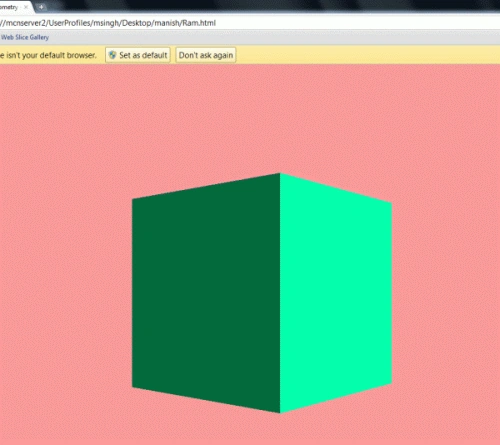
Output
Gowtham RajamanickamPosted Apr 11, 2015, 1:12 PM
well explained
Jawed MohammedPosted Jan 17, 2012, 3:03 AM
Good one Manish.. i would love to give a try to this apps. Thanks for sharing!!