

Introduction
In this post, we will learn how to create a PDF file from the data and export it using Crystal Reports in MVC.NET.
Prerequisites
- Visual Studio
- SQL Server
- Crystal Report (Download from here)
Step 1. Create Crystal report
In an MVC.NET project, on the root, create a folder for reports. Then, right-click on that folder and select a new item. After that, create a Crystal Report file by following the below steps.
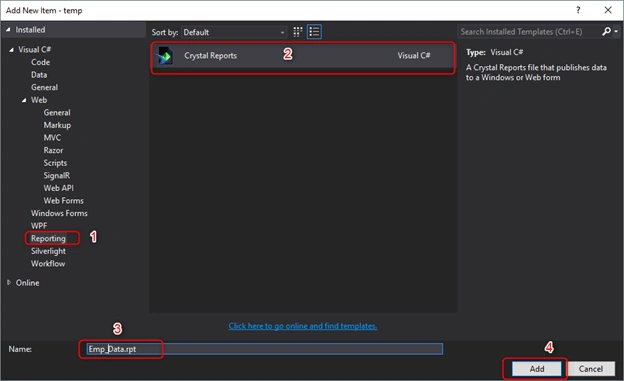
After clicking on the "Add" button, a new popup will open. In there, apply the below steps.
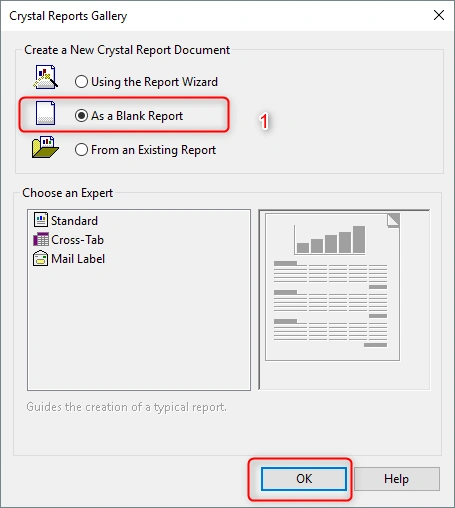
The Crystal Report will open like in the below image.
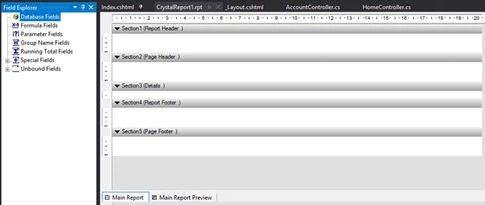
Then, you need to set the table into Crystal Report for displaying records. For that, follow the below steps.
Step 2. Set Table
Right-click "Database Fields" from the Field Explorer and select the "Database Expert" option.
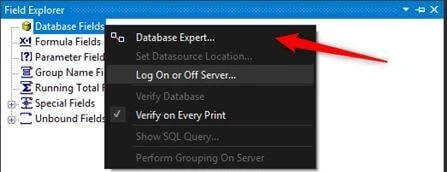
A new popup will open; apply the following steps.
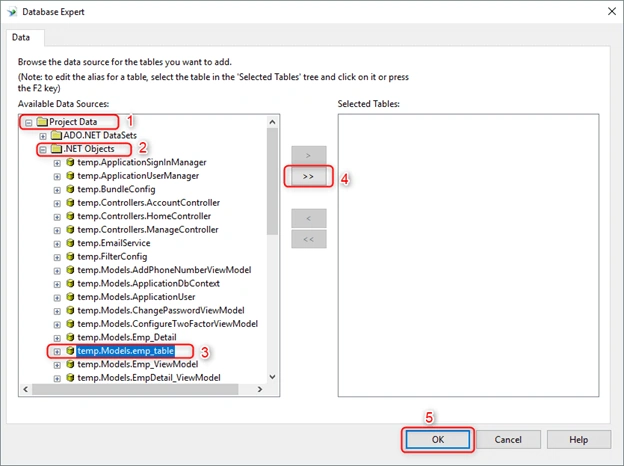
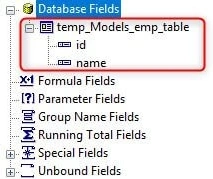
On clicking OK, you will see the selected tables in Database Fields.
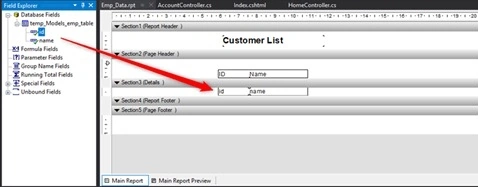
After that, you need to drag fields to the report that you want to display in the PDF file, as shown below.
Step 3. Create a method in the controller
Create a method for returning the PDF file from Crystal Report.
using CrystalDecisions.CrystalReports.Engine;
using System;
using System.Collections.Generic;
using System.Data;
using System.IO;
using System.Linq;
using System.Text.RegularExpressions;
using System.Web;
using System.Web.Mvc;
using System.Xml.Linq;
using temp.Models;
namespace temp.Controllers
{
    public class HomeController : Controller
    {
        public ActionResult Index()
        {
            return View();
        }
        public ActionResult Download_PDF()
        {
            empEntities context = new empEntities();

            ReportDocument rd = new ReportDocument();
            rd.Load(Path.Combine(Server.MapPath("~/Report"), "Emp_Data.rpt"));
            rd.SetDataSource(context.emp_table.Select(c => new
            {
                id = c.id,
                name = c.name
            }).ToList());
            Response.Buffer = false;
            Response.ClearContent();
            Response.ClearHeaders();
            rd.PrintOptions.PaperOrientation = CrystalDecisions.Shared.PaperOrientation.Landscape;
            rd.PrintOptions.ApplyPageMargins(new CrystalDecisions.Shared.PageMargins(5, 5, 5, 5));
            rd.PrintOptions.PaperSize = CrystalDecisions.Shared.PaperSize.PaperA5;
            Stream stream = rd.ExportToStream(CrystalDecisions.Shared.ExportFormatType.PortableDocFormat);
            stream.Seek(0, SeekOrigin.Begin);
            return File(stream, "application/pdf", "CustomerList.pdf");
        }
    }
}
Here, I am creating a Download_PDF() method for returning the PDF file using Crystal Report.
ReportDocument rd = new ReportDocument();
It will create a Crystal Report's object "rd" and using this object, load the Crystal Report like below.
rd.Load(Path.Combine(Server.MapPath("~/Report"), "Emp_Data.rpt"));
Here, "context" is my entity's object and I will get the emp_table's data using this object by just using the below code.
context.emp_table.Select(c => new
{
    id = c.id,
    name = c.name
}).ToList()
and finally, this line returns the PDF file.
return File(stream, "application/pdf", "CustomerList.pdf");
Step 4. Call the method of Download PDF from the view side

<a href="Home/Download_PDF/" target="_blank" class="btn btn-primary" style="margin-top:20px;">Download_PDF</a>
Here, I have set the button "Download PDF" and on clicking it, the PDF file gets downloaded.
Output
Workfor Digi2iPosted Sep 10, 2021, 7:12 AM
How can I print it directly Instead of download ?
Vũ HoàiPosted Aug 4, 2021, 3:07 AM
How to get fields of type datetime and bool
Mutahhar HanifPosted Aug 18, 2020, 10:53 AM
Is there anyway to use crystal report in MVC without installing runtime?
ZIAD ABUQASEMPosted May 23, 2020, 9:57 PM
How can i use stored procedures and pass parameters to crystal report from the controller can you post the code thank you
You ZahPosted Feb 5, 2020, 9:36 PM
In step of select project opject for Crystal report , error appear that's failed to connect database , I am using visual studio 2019
Eric LeducPosted Sep 9, 2019, 12:18 PM
Really use full. I can now do that in production easy ...
Amanpreet SinghPosted Jun 20, 2019, 11:19 AM
Can you please share downloadable code.
Talaviya BhavdipPosted Mar 6, 2019, 9:56 PM
Nice article Kaushik Dudhat