

Introduction
Recently, while working on a project, I struggled in blocking the user interaction when calling the API. I tried to use third party components for a spinner but it won't look good with Angular Material design. So, finally, I solved it by using Angular Dialog as a spinner and disabled the "Close" button. Every developer knows that spinner is a very significant component in SPA and is used on almost every screen we develop. So, I implemented a reusable component.
Step 1 - Create a Spinner Component
Create a component by name SpinnerComponent, as shown below.
or
If you are using Angular CLI, use the following command.
ng g component spinner-view
The structure looks like below.
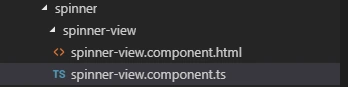
Open the component file and import MatDialogRef, MAT_DIALOG_DATA from @angular/material package. Here, we need to install Angular Material before importing this.
- import { MatDialogRef, MAT_DIALOG_DATA} from '@angular/material';
- constructor(public dialogRef: MatDialogRef<SpinnerComponent>
- , @Inject(MAT_DIALOG_DATA) public data: any) {}
- }
- import {Component, Inject} from '@angular/core';
- import { MatDialogRef, MAT_DIALOG_DATA} from '@angular/material';
- @Component({
- selector: 'spinner-view',
- templateUrl: 'spinner-view.component.html',
- })
- export class SpinnerComponent {
- constructor(public dialogRef: MatDialogRef<SpinnerComponent>
- , @Inject(MAT_DIALOG_DATA) public data: any) {}
- }
- <mat-spinner [diameter]="50" style="margin: 0 auto;"></mat-spinner>
- <span>{{data}}</span>
Import the MatDialogModule, MatProgressSpinnerModule in Appmodule.
- import {
- MatDialogModule,
- MatProgressSpinnerModule,
- } from '@angular/material';
- ......
- imports: [
- MatDialogModule,
- MatProgressSpinnerModule,
- ],
Create an export Injectable class with the name spinner.service.ts. Import MatDialog from @angular/material and create a varable in constructor. Also, implement the stop and start methods like below.
- import { EventEmitter, Injectable } from '@angular/core';
- import { Event, NavigationEnd, Router } from '@angular/router';
- import { MatDialog, MatDialogRef } from '@angular/material';
- import { SpinnerComponent } from './spinner-view/spinner-view.component';
- @Injectable()
- export class SpinnerService {
- constructor(private router: Router, private dialog: MatDialog) {
- }
- start(message?): MatDialogRef<SpinnerComponent> {
- const dialogRef = this.dialog.open(SpinnerComponent,{
- disableClose: true ,
- data: message == ''|| message == undefined ? "Loading..." : message
- });
- return dialogRef;
- };
- stop(ref:MatDialogRef<SpinnerComponent>){
- ref.close();
- }
- }
Step 4 - Usage
Let us see how to use this while calling the APIs.
Import the spinner service in the component where you want to use the spinner.
- import { SpinnerService } from './../../services/spinner/spinner.service';
- constructor(private spinnerService: SpinnerService) {
- }
Use spinner service like below while calling the API.
- var spinnerRef = this.spinnerService.start();
- this.YourService.YourAPi().pipe(finalize(() => {
- this.spinnerService.stop(spinnerRef);
- })).subscribe(res => {
- }, err => {
- }
- )
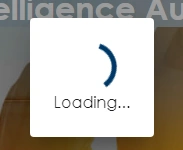
Step 5 - Customize loading text
Pass the text to the start method of spinner service to get a customized text with spinner like below.
- var spinnerRef = this.spinnerService.start("Customized loading text here");
Summary
In this article, I discussed how we can create a spinner reusable service in Angular Material using Angular Material Dialog. We also saw how to pass our own loading text to the spinner. I hope this article helps you all.
Join the conversation! Your thoughts help the community grow.