

Introduction
As nodejs.org suggests:
The URL module provides utilities for URL resolution and parsing. It can be accessed using:
- var url = require('url');
By using URL module, it provides us with so many properties to work with.
These all are listed below:
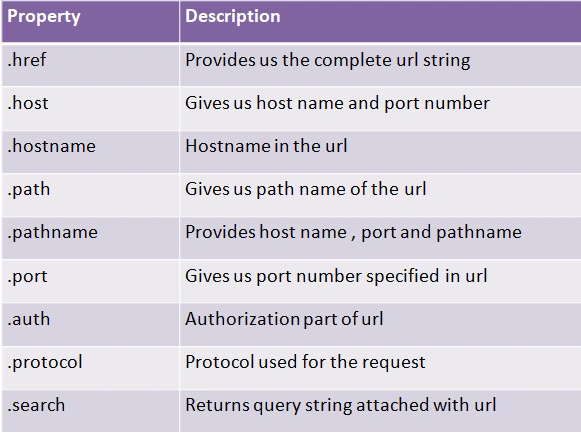
As you can see in the above screen, there are various properties used for URL module.
Below is the snippet to check the URL properties with URL : localhost:4200.
MyApp.js
- var http = require('http');
- var url = require('url');
- http.createServer(function (req, res) {
- var queryString = url.parse(req.url, true);
- console.log(queryString);
- }).listen(4200);
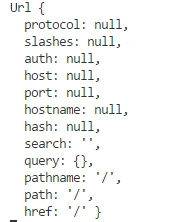
Because we do not have a path attached to URL, now I'm writing text within my URL like below:
- http://localhost:4200/manav
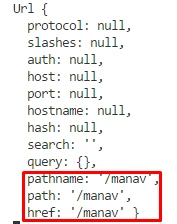
So now, I got my complete pathname along with href as well as the path name and other properties with null values.
href
Href property returns the complete URL along with all search terms and other information as well.
href.js
- var http = require('http');
- var url = require('url');
- http.createServer(function (req, res) {
- // Parsing url
- var queryString = url.parse(req.url,true);
- // Accessing href property of an URL
- console.log("Complete href is :-"+queryString.href);
- }).listen(4200);

If we change our URL to www.customway.com/abc.html:
- var http = require('http');
- var url = require('url');
- http.createServer(function (req, res) {
- var queryString = url.parse(req.url,true);
- queryString.href = "www.customway.com/abc.html";
- console.log("Complete href is :-"+queryString.href);
- }).listen(4200);

So in this way we can get href from the requested URL
host and hostname
Host property of a URL module provides the host associated with URL.
host.js
- var http = require('http');
- const { URL } = require('url');
- http.createServer(function (req, res) {
- var queryString = url.parse(req.url,true);
- // Prints the host
- console.log("Host is :-"+queryString.host);
- // Prints the host name
- console.log("Host name is :-"+queryString.hostname);
- }).listen(4200);
After executing the above snippet you may get output like this:

What is the difference between host and hostname?
There is one major difference between both of them, that is that host includes the port name along with hostname, where hostname property does not include the port number.
Now I'm going to create a new URL using the below snippet:
- var http = require('http');
- const { URL } = require('url');
- http.createServer(function (req, res) {
- const queryString = new URL('https://www.customway.com:11/c#corner');
- console.log("Host is :-"+queryString.host);
- console.log("Host name is :-"+queryString.hostname);
- }).listen(4200);

The host includes the port number, whereas hostname does not contain port number along with URL.
Pathname and Searchparam
Path and pathname is the combination of pathname with URL and also contains a search term along with the URL
Let's say we have URL with multiple search parameters like :
- www.demo.com/test1/test2/test3?qstring=value
In above url:
- path = /test1/test2/test3
- Search param = qstring=value
In the same way we can get this via URL module property; find the snippet below :
path.js
- var http = require('http');
- const { URL } = require('url');
- http.createServer(function (req, res) {
- const queryString = new URL('https://www.customway.com/test/test1/test2/test3?username=manav');
- console.log("Path name is :-"+queryString.pathname);
- console.log("Search Parameter is :-"+queryString.searchParams);
- }).listen(4200);
Now execute it by writing node path.js, and you will get output like this:

This way you can access the complete path along with search parameters.
Search
Search property is the same as searchParams that we have seen before
But the main difference is search property includes [?] along with all search parameters
search.js
- var http = require('http');
- const { URL } = require('url');
- http.createServer(function (req, res) {
- const queryString = new URL('https://www.customway.com?username=manav&password=123');
- console.log("Search terms are :-"+queryString.search);
- }).listen(4200);

As you can see both of my search terms were included along with [?] symbol
Port
Port property of a URL module returns the port associated with a URL.
port.js
- var http = require('http');
- const { URL } = require('url');
- http.createServer(function (req, res) {
- const queryString = new URL('https://www.customway.com:4200');
- console.log("Port is :-"+queryString.port);
- }).listen(4200);

Now if I want to change port number, than we can do like this:
- const queryString = new URL('https://www.customway.com:4200');
- queryString.port = '4500'; // changed port number to 4500
- console.log("Port is :-"+queryString.port);
- Port is :- 4500
Protocol
Protocol property is used to get specific protocols used for any request.
protocol.js
protocol.js
- var http = require('http');
- const { URL } = require('url');
- http.createServer(function (req, res) {
- const queryString = new URL('https://www.customway.com');
- console.log("Protocol used :-"+ queryString.protocol);
- }).listen(4200);

Hash
Hash property of a URL returns decorated with [#] sybmol.
Sometimes, we have pages with multiple div, and we have provided ids along with #name, so in a node, we can also access hash fragment portion attached to URL.
hash.js
- var http = require('http');
- const { URL } = require('url');
- http.createServer(function (req, res) {
- const queryString = new URL('https://www.customway.com#manav');
- console.log("Hash Fragment Is :-"+ queryString.hash);
- }).listen(4200);

Conclusion
So far we have covered many properties of a URL module which are:
- href
- host
- hostname
- pathname
- queryParams
- port
- protocol
- hash
By using these properties you can perform plenty of operations with your node.js application specific to URL.
To follow my other node.js articles you can go through the following links:
I hope you have learned something from this article, Thanks for reading.
Pankaj S YPosted Oct 8, 2021, 11:53 AM
Can the domain name section of URL in browser's address bar be changed ? Just to show to the user. For example www.abc.net to www.xyz.com
Dharmraj ThakurPosted Apr 6, 2018, 6:00 AM
Well explained brother........