

This article describes for you the basic use of generic handler and how to upload multiple files using generic handler in Silverlight.
What is Generic Handler? Generic handlers have an extension of ASHX. They're equivalent to custom handlers written in C Sharp or Visual Basic.NET in that they contain classes that fully implement IHttpHandler. They're convenient in the same way ASPX files are convenient. You simply surf to them and they're compiled automatically.
First of all make a new Silverlight project.
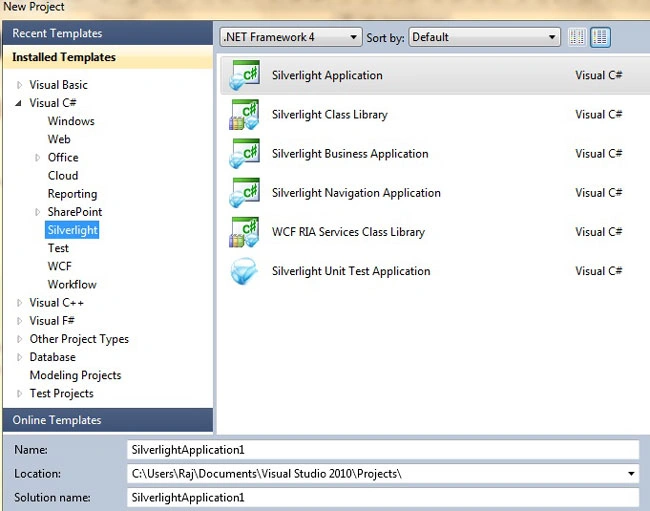
Image 1.
Now right click on web project and click "Add New Item" and add a Generic Handler"
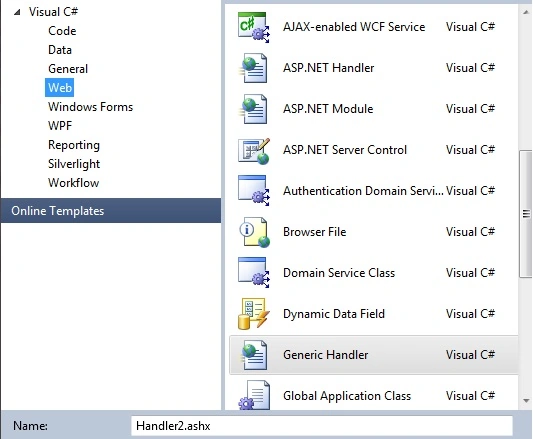
Image 2.
By default Generic Handler has this code.
public class Handler2 : IHttpHandler
{
public void ProcessRequest(HttpContext context)
{
context.Response.ContentType = "text/plain";
context.Response.Write("Hello World");
}
public bool IsReusable
{
get
{
return false;
}
}
}
Change ProcessRequest method.
public void ProcessRequest(HttpContext context)
{
var imageName = context.Request["file"];
string str;
using (StreamReader streamReader = new StreamReader(context.Request.InputStream))
{
str = streamReader.ReadToEnd();
byte[] array = Convert.FromBase64String(str);
using (System.IO.FileStream fileStream = new FileStream(context.Server.MapPath("~/uploadedimages/") + imageName, FileMode.Create))
{
fileStream.Write(array, 0, array.Length);
}
}
}
Now let's add a button MainPage.xaml.
<Grid x:Name="LayoutRoot" Background="Blue">
<Button Content="Browse images" Height="23" HorizontalAlignment="Left" Margin="88,46,0,0" Click="button1_Click" Name="button1" VerticalAlignment="Top" Width="206" />
<TextBlock Height="23" Margin="54,73,54,0" Name="textBlock2" VerticalAlignment="Top" Width="292" Foreground="Red" HorizontalAlignment="Center" />
</Grid>
MainPage.xaml.cs
public partial class MainPage : UserControl
{
int totalFilesToUpload = 0;
int totalFilesUploaded = 0;
public MainPage()
{
InitializeComponent();
}
private void button1_Click(object sender, RoutedEventArgs e)
{
this.textBlock2.Text = string.Empty;
OpenFileDialog openFIleDialog = new OpenFileDialog();
openFIleDialog.Filter = "All Image Files ( JPEG,GIF,BMP,PNG)|*.jpg;*.jpeg;*.gif;*.bmp;*.png|JPEG Files ( *.jpg;*.jpeg )|*.jpg;*.jpeg|GIF Files ( *.gif )|*.gif|BMP Files ( *.bmp )|*.bmp|PNG Files ( *.png )|*.png";
openFIleDialog.FilterIndex = 1;
openFIleDialog.Multiselect = true;
string str = string.Empty;
if (openFIleDialog.ShowDialog() == true)
{
foreach (var file in openFIleDialog.Files)
{
using (System.IO.Stream fileStream = GetFileData(file.OpenRead()))
{
StreamResourceInfo streamResourceFile = new StreamResourceInfo(fileStream, null);
byte[] array = new byte[streamResourceFile.Stream.Length];
streamResourceFile.Stream.Read(array, 0, (int)streamResourceFile.Stream.Length);
str = Convert.ToBase64String(array);
WebClient oWebClient = new WebClient();
string fileName = Guid.NewGuid().ToString().Replace("-", "") + file.Extension;
oWebClient.UploadStringAsync(new Uri("http://localhost:7972/SLFIleUploadUsingHTTPHandler.Web/Handler1.ashx?file=" + fileName), null, str, fileName);
oWebClient.UploadProgressChanged += new UploadProgressChangedEventHandler(oWebClient_UploadtxtProgressChanged);
totalFilesToUpload += 1;
str = string.Empty;
}
}
}
}
System.IO.MemoryStream GetFileData(System.IO.Stream oFileStream)
{
oFileStream.Seek(0, System.IO.SeekOrigin.Begin);
byte[] data = new byte[oFileStream.Length];
oFileStream.Read(data, 0, (int)oFileStream.Length);
return new System.IO.MemoryStream(data);
}
void oWebClient_UploadtxtProgressChanged(object sender, UploadProgressChangedEventArgs e)
{
totalFilesUploaded += 1;
textBlock2.Text = !string.IsNullOrEmpty(textBlock2.Text) ? (int.Parse(textBlock2.Text) + e.BytesSent).ToString() : e.BytesSent.ToString();
if (totalFilesUploaded == totalFilesToUpload)
{
textBlock2.Text = totalFilesUploaded + " files uploaded successfully (" + textBlock2.Text + " bytes sent )";
}
}
}
No run the application and click Browse button and select multiple images to upload.
Mike WelcheditedPosted Oct 29, 2010, 3:04 PMEdited Oct 29, 2010, 3:06 PM
One comment that may be obvious to others but wasn't for me. The uri Uri("http://localhost:7972/SLFIleUploadUsingHTTPHandler.Web/Handler1.ashx?file=" needs to be YOUR OWN URI.. and mine when running from VS2010 was Uri("http://localhost:2426/Handler1.ashx?file=". The code you have above worked except for the uri didn't match my project so.. nothing happened and there was no warning or any kind of error msgs. Great job tho, really helped me. Thanks!