

Introduction
Today, in this article let's play around with one of the interesting and most useful concepts in LINQ to XML.
Question: What is update data to XML using LINQ to XML?
In simple terms "It provides flexibility to update data in XML with the help of a LINQ query."
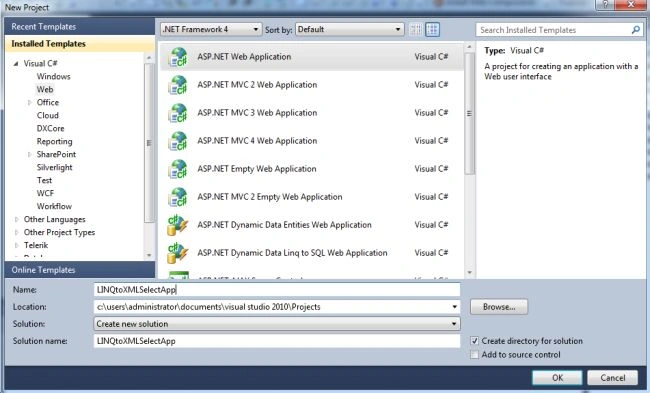
Step 1: Create a new "ASP.NET Web Application"
Step 2: The complete code of Employee.xml looks like this
- <?xml version="1.0" encoding="utf-8"?>
- <Employees>
- <Employee>
- <Id>1</Id>
- <FirstName>Vijay</FirstName>
- <LastName>Prativadi</LastName>
- <Age>26</Age>
- </Employee>
- <Employee>
- <Id>2</Id>
- <FirstName>Sandeep</FirstName>
- <LastName>Reddy</LastName>
- <Age>28</Age>
- </Employee>
- </Employees>
Step 3: The complete code of webform1.aspx looks like this
- <%@ Page Language="C#" AutoEventWireup="true" CodeBehind="WebForm1.aspx.cs" Inherits="LINQtoXMLUpdateApp.WebForm1" %>
- <!DOCTYPE html PUBLIC "-//W3C//DTD XHTML 1.0 Transitional//EN" "http://www.w3.org/TR/xhtml1/DTD/xhtml1-transitional.dtd">
- <html xmlns="http://www.w3.org/1999/xhtml">
- <head id="Head1" runat="server">
- <title></title>
- </head>
- <body>
- <form id="form1" runat="server">
- <center>
- <div>
- <table>
- <tr>
- <td colspan="2" align="center">
- <asp:Label ID="Label1" runat="server" Text="Update Data using LINQ-to-XML" Font-Bold="true"
- Font-Size="Large" Font-Names="Verdana" ForeColor="Maroon"></asp:Label>
- </td>
- </tr>
- <tr>
- <td>
- <asp:Label ID="Label6" runat="server" Text="Please Enter Id" Font-Size="Large" Font-Names="Verdana"
- Font-Italic="true"></asp:Label>
- </td>
- <td>
- <asp:TextBox ID="TextBox4" runat="server"></asp:TextBox>
- </td>
- </tr>
- <tr>
- <td>
- <asp:Label ID="Label2" runat="server" Text="Please Enter FirstName" Font-Size="Large"
- Font-Names="Verdana" Font-Italic="true"></asp:Label>
- </td>
- <td>
- <asp:TextBox ID="TextBox1" runat="server"></asp:TextBox>
- </td>
- </tr>
- <tr>
- <td>
- <asp:Label ID="Label3" runat="server" Text="Please Enter LastName" Font-Size="Large"
- Font-Names="Verdana" Font-Italic="true"></asp:Label>
- </td>
- <td>
- <asp:TextBox ID="TextBox2" runat="server"></asp:TextBox>
- </td>
- </tr>
- <tr>
- <td>
- <asp:Label ID="Label4" runat="server" Text="Please Enter Age" Font-Size="Large" Font-Names="Verdana"
- Font-Italic="true"></asp:Label>
- </td>
- <td>
- <asp:TextBox ID="TextBox3" runat="server"></asp:TextBox>
- </td>
- </tr>
- <tr>
- <td colspan="2" align="center">
- <asp:Button ID="Button1" runat="server" Text="Update Data" Font-Names="Verdana" Width="213px"
- BackColor="Orange" Font-Bold="True" OnClick="Button1_Click" />
- </td>
- </tr>
- <tr>
- <td colspan="2" align="center">
- <asp:Label ID="Label5" runat="server" Font-Bold="true" Font-Names="Verdana"></asp:Label>
- </td>
- </tr>
- </table>
- </div>
- </center>
- </form>
- </body>
- </html>
Step 4: The complete code of webform1.aspx.cs looks like this
- using System;
- using System.Collections.Generic;
- using System.Linq;
- using System.Web;
- using System.Web.UI;
- using System.Web.UI.WebControls;
- using System.Xml.Linq;
- namespace LINQtoXMLUpdateApp
- {
- public partial class WebForm1 : System.Web.UI.Page
- {
- protected void Page_Load(object sender, EventArgs e)
- {
- }
- protected void Button1_Click(object sender, EventArgs e)
- {
- if (string.IsNullOrEmpty(TextBox4.Text) || string.IsNullOrEmpty(TextBox1.Text)|| string.IsNullOrEmpty(TextBox2.Text) || string.IsNullOrEmpty(TextBox3.Text))
- {
- Label5.Text = "Please Enter Some Values";
- Label5.ForeColor = System.Drawing.Color.Red;
- }
- else
- {
- XDocument document = XDocument.Load(Server.MapPath("Employee.xml"));
- var updateQuery = from r in document.Descendants("Employee")where r.Element("Id").Value == TextBox4.Textselect r;
- foreach (var query in updateQuery)
- {
- query.Element("FirstName").SetValue(TextBox1.Text);
- query.Element("LastName").SetValue(TextBox2.Text);
- query.Element("Age").SetValue(TextBox3.Text);
- }
- document.Save(Server.MapPath("Employee.xml"));
- Label5.Text = "Data Updated Successfully";
- Label5.ForeColor = System.Drawing.Color.Green;
- TextBox4.Text = string.Empty;
- TextBox1.Text = string.Empty;
- TextBox2.Text = string.Empty;
- TextBox3.Text = string.Empty;
- }
- }
- }
- }
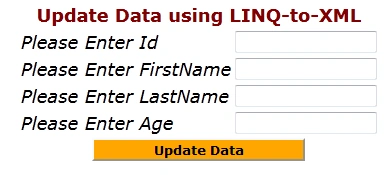
Step 6: The data updating to XML output of the application looks like this
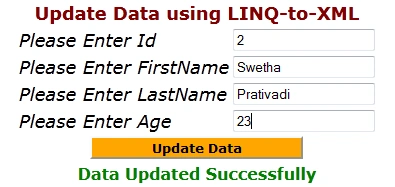
Step 7: The data updated to XML looks like this
- <?xml version="1.0" encoding="utf-8"?>
- <Employees>
- <Employee>
- <Id>1</Id>
- <FirstName>Vijay</FirstName>
- <LastName>Prativadi</LastName>
- <Age>26</Age>
- </Employee>
- <Employee>
- <Id>2</Id>
- <FirstName>Swetha</FirstName>
- <LastName>Prativadi</LastName>
- <Age>23</Age>
- </Employee>
- </Employees>
Join the conversation! Your thoughts help the community grow.