

Introduction
In any SQL Server environment, performance is often a primary concern when dealing with large datasets. One common operation that can sometimes become a bottleneck is the INSERT operation. As data grows in size, so does the time it takes to insert that data, and this can significantly impact system performance and overall user experience. Fortunately, SQL Server provides various techniques and optimizations to help speed up data insertions, one of which is the use of the TABLOCK hint. This simple but powerful approach can dramatically improve the speed of your INSERT operations, especially when working with large datasets or when parallelism is important.
Let’s explore how using the TABLOCK hint works, its benefits, and how you can apply it to your own operations, with examples from the AdventureWorks2022 database.
What is the TABLOCK Hint?
The TABLOCK hint is a table-level lock hint that forces SQL Server to take a schema modification (Sch-M) lock on the target table when performing an INSERT, UPDATE, or DELETE operation. This hint ensures that the table is locked for the duration of the operation, which can help speed up data loading by minimizing logging and reducing contention.
A key benefit of the TABLOCK hint is that it reduces the amount of log space used during the operation, as the minimal logging mechanism is activated. This means that SQL Server does not have to log each individual row insertion, but rather just the metadata for the bulk operation. As a result, this significantly reduces the overhead and speeds up data loading.
Additionally, because the table is locked at the schema level, it allows SQL Server to parallelize the operation, leading to faster execution times. This is particularly useful for large-scale data-loading tasks.
When to Use TABLOCK Hint
The TABLOCK hint is ideal for scenarios where:
- You are inserting a large number of rows into a table.
- You can afford to lock the table for the duration of the operation (i.e., no other transactions need access to the table while the insert is in progress).
- You want to reduce the logging overhead and speed up bulk insertions.
- You want to use parallel insertions to take advantage of SQL Server's ability to use multiple threads for data loading.
It’s also important to note that the TABLOCK hint works well with temporary tables, so you can take advantage of these performance benefits when working with temp tables, often used in ETL processes or batch operations.
Benefits of Using TABLOCK
- Improved Performance: The primary benefit of using the TABLOCK hint is the performance improvement during large INSERT operations. By reducing the amount of logging, SQL Server can insert rows much faster.
- Parallel Insertion: With TABLOCK, SQL Server can use parallelism to load the data, speeding up the operation of systems with sufficient resources.
- Reduced Logging Overhead: Since SQL Server logs less information, the system consumes less log space, which can be crucial when working with large datasets.
- Works with Temp Tables: You can apply TABLOCK to temporary tables as well, giving you the same performance benefits for in-memory operations.
Example
Let’s consider a scenario where we need to insert a large number of rows from the Sales.SalesOrderDetail table into the Sales.SalesOrderDetailTemp table in the AdventureWorks2022 database.
Create table script for Sales.SalesOrderDetailTem
USE [AdventureWorks2022]
GO

DROP TABLE IF EXISTS [Sales].[SalesOrderDetailTemp]
GO

SET ANSI_NULLS ON
GO

SET QUOTED_IDENTIFIER ON
GO

CREATE TABLE [Sales].[SalesOrderDetailTemp](
	[SalesOrderID] [int] NOT NULL,
	[SalesOrderDetailID] [int] NOT NULL,
	[CarrierTrackingNumber] [nvarchar](25) NULL,
	[OrderQty] [smallint] NOT NULL,
	[ProductID] [int] NOT NULL,
	[SpecialOfferID] [int] NOT NULL,
	[UnitPrice] [money] NOT NULL,
	[UnitPriceDiscount] [money] NOT NULL,
	[LineTotal]  [money] NULL,
	[rowguid] [uniqueidentifier] ROWGUIDCOL  NOT NULL,
	[ModifiedDate] [datetime] NOT NULL,
 CONSTRAINT [PK_SalesOrderDetailTemp_SalesOrderID_SalesOrderDetailTempID] PRIMARY KEY CLUSTERED
(
	[SalesOrderID] ASC,
	[SalesOrderDetailID] ASC
)WITH (PAD_INDEX = OFF, STATISTICS_NORECOMPUTE = OFF, IGNORE_DUP_KEY = OFF, ALLOW_ROW_LOCKS = ON, ALLOW_PAGE_LOCKS = ON, OPTIMIZE_FOR_SEQUENTIAL_KEY = OFF) ON [PRIMARY]
) ON [PRIMARY]
GO
Without the TABLOCK hint, this operation may take a considerable amount of time, especially when the table is large and the database is under load.
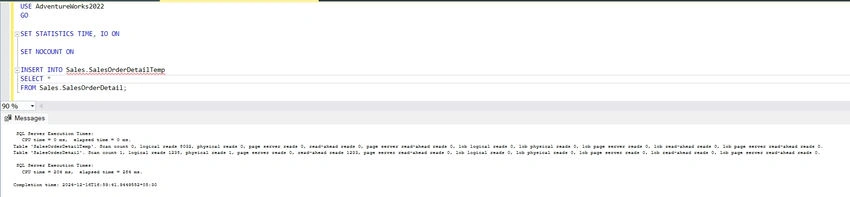
Here’s a basic example of how you can speed up the INSERT operation by using the TABLOCK hint.
USE AdventureWorks2022
GO

SET STATISTICS TIME, IO ON

SET NOCOUNT ON

INSERT INTO Sales.SalesOrderDetailTemp
SELECT *
FROM Sales.SalesOrderDetail;
Output
Truncate the table.
USE AdventureWorks2022
GO

TRUNCATE TABLE Sales.SalesOrderDetailTemp
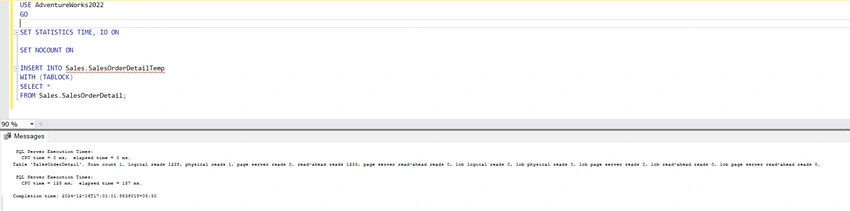
Now, let’s modify the query to use the TABLOCK hint.
USE AdventureWorks2022
GO

SET STATISTICS TIME, IO ON

SET NOCOUNT ON

INSERT INTO Sales.SalesOrderDetailTemp
WITH (TABLOCK)
SELECT *
FROM Sales.SalesOrderDetail;
Output
Comparison
Execution 1 (without TABLOCK) took longer, with higher CPU and elapsed time (204 ms and 284 ms), indicating a slower operation. Execution 2 (with TABLOCK) performed better, completing in 125 ms CPU time and 157 ms elapsed time, making the TABLOCK version more efficient in this case.
Considerations When Using TABLOCK
While the TABLOCK hint can greatly improve performance, it’s important to be aware of some considerations:
- Table Locking: The TABLOCK hint locks the entire table for the duration of the operation. This means that other transactions cannot access the table until the INSERT operation is complete, so be sure that this behavior aligns with your application’s requirements.
- Transaction Log Growth: Although TABLOCK reduces the amount of logging, it still logs certain details of the operation. If you’re inserting a massive amount of data, you may need to monitor transaction log growth and ensure that you have enough log space available.
- Not Suitable for OLTP Workloads: The TABLOCK hint is more suited to batch operations or bulk-loading scenarios. It may not be appropriate for transactional systems that require frequent concurrent access to the table.
Conclusion
If you are working with large datasets and want to speed up your INSERT operations in SQL Server, the TABLOCK hint can be a game-changer. By reducing logging overhead and enabling parallel insertions, it helps improve performance and can significantly reduce the time it takes to load data.
Join the conversation! Your thoughts help the community grow.