

What is Unity Catalog?
Unity Catalog is a unified governance solution for all data and AI assets in our lakehouse on any cloud, including files, tables, machine learning models, and dashboards.
What can be achieved with the help of Unity Catalog?
With Unity Catalog, admins and data stewards manage users and their access to data centrally across all workspaces in an Azure Databricks account. Users in different workspaces can share access to the same data, depending on privileges granted centrally in Unity Catalog.
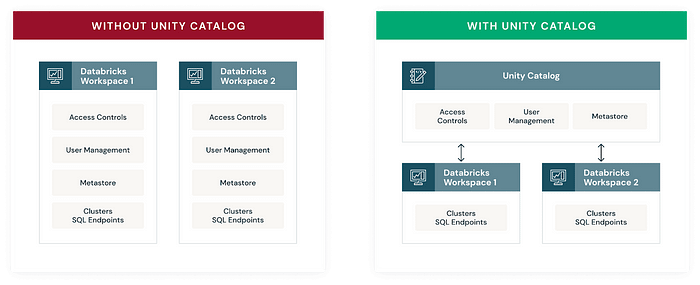
Source: Databricks
Key features of Unity Catalog include,
- Define once, secure everywhere
Unity Catalog offers a single place to administer data access policies that apply across all workspaces and personas.
- Standards-compliant security model
Unity Catalog’s security model is based on standard ANSI SQL and allows administrators to grant permissions in their existing data lake using familiar syntax at the level of catalogs, databases (also called schemas), tables, and views.
- Built-in auditing
Unity Catalog automatically captures user-level audit logs that record access to our data.
Unity Catalog object model
In Unity Catalog, the hierarchy of primary data objects flows from metastore to table.
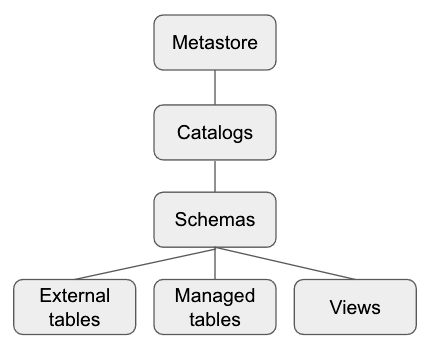
Source: Databricks
- Metastore: The top-level container for metadata. Each metastore exposes a three-level namespace (
catalog.schema.table) that organizes our data. - Catalog: The first layer of the object hierarchy is used to organize our data assets.
- Schema: Also known as databases, schemas are the second layer of the object hierarchy and contain tables and views.
- Table: The lowest level in the object hierarchy, tables can be external (stored in external locations in cloud storage of choice) or managed tables (stored in a storage container in cloud storage that we create expressly for Databricks). We can also create read-only Views from tables.
Metastore
Metastore in the unity catalog is a top-level container. When an administrator configures the metastore, it should specify the storage account, Owner to give access to metastore and enable delta sharing to allow secure data transfer. Each metastore that is configured will assign to databricks workspace.
This unity catalog metastore is distinct from the metastore included in Databricks workspaces created before Unity Catalog was released. If your workspace includes a legacy Hive metastore, the data in that metastore is available in Unity Catalog in a catalog named
hive_metastore.
Once we create the Unity Catalog metastore, we can assign workspace to the metastore.
We can add the existing workspaces to the metastore and the new workspaces that are being created. We can enable the Unity Catalog option and select the respective metastore during the workspace creation process.
Catalogs
A catalog is the first layer of Unity Catalog’s three-level namespace. It’s used to organize our data assets.
Users can see all catalogs on which they have been assigned the USAGE data permission.
Schemas
A schema (also called a database) is the second layer of Unity Catalog’s three-level namespace. A schema organizes tables and views.
To access (or list) a table or view in a schema, users must have the USAGE data permission on the schema and its parent catalog and the SELECT permission on the table or view.
Tables
A table resides in the third layer of Unity Catalog’s three-level namespace. It contains rows of data.
To create a table, users must have CREATE and USAGE permissions on the schema and the USAGE permission on its parent catalog.
To query a table, users must have the SELECT permission on the table and the USAGE permission on its parent schema and catalog.
A table can be managed or external.
Points to be Noted before creating Metastore
- Databricks account admin can only create a metastore and assign a metastore admin. In AAD, Global administrators are the default databricks account that can delegate it to other group/user.
- A cluster to access Unity Catalog should set its access mode to either a single user or shared access mode and Databricks runtime version to Runtime: 11.1 (Scala 2.12, Spark 3.2.1) or higher.
Unity Catalog quota
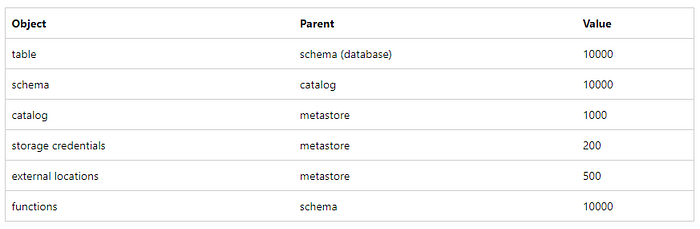
Unity Catalog enforces resource quotas on all securable objects. Limits respect the same hierarchical organization throughout Unity Catalog.
We need to contact our Databricks Provider account representative if we expect to exceed these resource limits.
Join the conversation! Your thoughts help the community grow.