

Introduction
There are three different test frameworks which are supported by the unit test with asp.net core: MSTest, xUnit, and NUnit, which allow us to test our code in a consistent way. In this article, I will explain about the unit test in asp.net core using MSTest.
To demonstrate the example of the unit test, I have created an MVC project, solution and unit test project by using CLI (Command Line Interface). To create the MVC and Test project, I am following the steps given below.
Create Solution file using the following command. This command creates the empty solution.
- dotnet new sln -n MVCUnittest
Create MVC Project: Using the following command, MVC project will be created
- >dotnet new MVC
Adding this project to solution: Using the following command we can add project to solution
- >dotnet sln add Unittest\Unittest.csproj
Create MsTest Project: Using the following command, we can create an MSTest project.
- >dotnet new mstest
This command creates MSTest Project and the generated template configures test runner into .csproj file
- <ItemGroup>
- <PackageReference Include="Microsoft.NET.Test.Sdk" Version="15.3.0" />
- <PackageReference Include="MSTest.TestAdapter" Version="1.1.18" />
- <PackageReference Include="MSTest.TestFramework" Version="1.1.18" />
- </ItemGroup>
- using Microsoft.VisualStudio.TestTools.UnitTesting;
- namespace Testproject
- {
- [TestClass]
- public class UnitTest1
- {
- [TestMethod]
- public void TestMethod1()
- {
- }
- }
- }
The TestClass attribute denotes the class which contains unit tests and TestMethod attribute denotes that a method is a test method.
Adding test project to solution
Adding test project to solution
- >dotnet sln add TestProject\Testproject.csproj
To demonstrate the concept, I have created a method within HomeController class (GetEmployeeName). This method accepts empId as a parameter and based on this, it will return the name of the employee or "Not Found" hard code string.
HomeController
- public string GetEmployeeName(int empId)
- {
- string name;
- if (empId == 1)
- {
- name = "Jignesh";
- }
- else if (empId == 2)
- {
- name = "Rakesh";
- }
- else
- {
- name = "Not Found";
- }
- return name;
- }
In the following test method, I have passed a hardcoded value and checked the result using Assert class.
Unittest1.cs
- using Microsoft.VisualStudio.TestTools.UnitTesting;
- using Unittest.Controllers;
- namespace TestProject1
- {
- [TestClass]
- public class UnitTest1
- {
- [TestMethod]
- public void TestMethod1()
- {
- HomeController home = new HomeController();
- string result = home.GetEmployeeName(1);
- Assert.AreEqual(result, "Jignesh");
- }
- }
- }
The final step is to run the Unit test. Using the following command, we can run all our test cases.
- >dotnet test
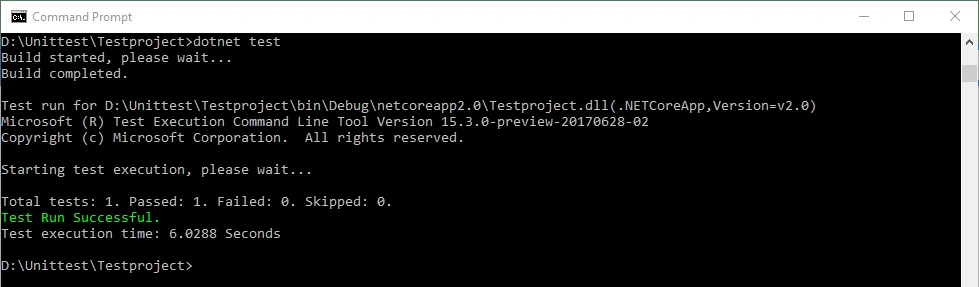
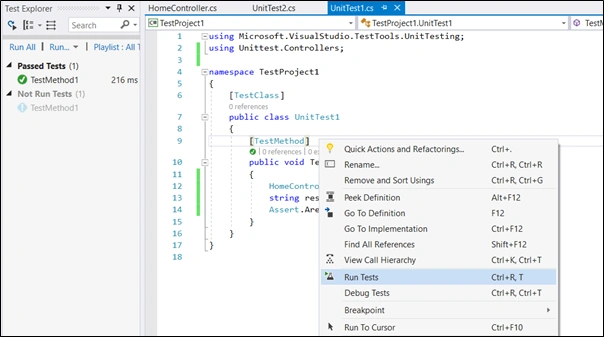
We also run all test cases or individual tests within Visual Studio using Test Explore.
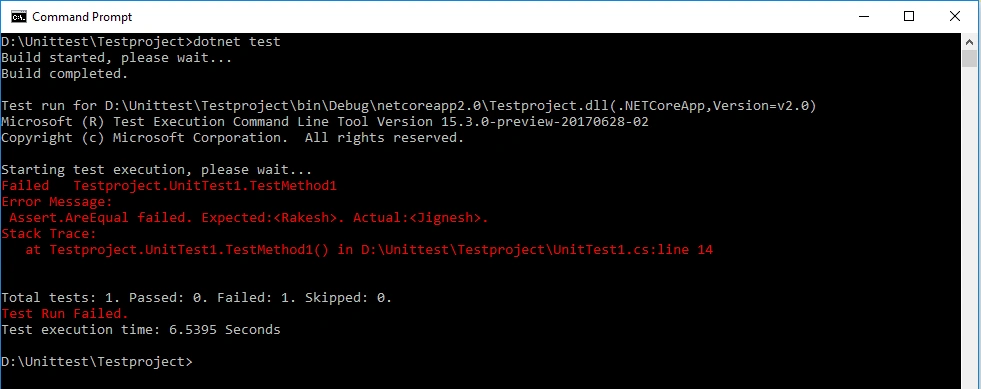
In the preceding example, my test result (actual) is matched with the expected result. In the following example, my actual result is not matched with the expected result.
- [TestMethod]
- public void TestMethod2()
- {
- HomeController home = new HomeController();
- string result = home.GetEmployeeName(2);
- Assert.AreEqual(result, "Jignesh");
- }
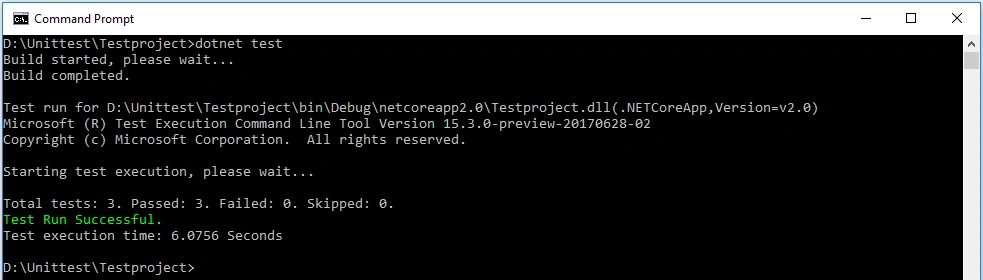
To unit test every block of code, we require more test data. We can add more test methods using TestMethod attribute, but it is a very tedious job. The MSTest project is also supported with another attribute which enables us to write a suite for a similar test. DataTestMethod attributes represent a suite of tests which executes the same code with different input arguments. A DataRow attribute can be used for specifying the values for those inputs. Instead of creating a new test, we can use these two attributes: DataTestMethod and DataRow to create a single data-driven test.
- using Microsoft.VisualStudio.TestTools.UnitTesting;
- using Unittest.Controllers;
- namespace TestProject1
- {
- [TestClass]
- public class UnitTest2
- {
- [DataTestMethod]
- [DataRow(1, "Jignesh")]
- [DataRow(2, "Rakesh")]
- [DataRow(3, "Not Found")]
- public void TestMethod1(int empId, string name)
- {
- HomeController home = new HomeController();
- string result = home.GetEmployeeName(empId);
- Assert.AreEqual(result, name);
- }
- }
- }
Unit test with ILogger
The .net core support built-in dependency injection. So, whatever services we want to use during the execution of the code are injected as a dependency. One of the best examples is ILogger service. Using the following code, we can configure ILogger service in our asp.net core project.
Configure ILogger in Program.cs
- using Microsoft.AspNetCore;
- using Microsoft.AspNetCore.Hosting;
- using Microsoft.Extensions.Logging;
- namespace Unittest
- {
- public class Program
- {
- public static void Main(string[] args)
- {
- BuildWebHost(args).Run();
- }
- public static IWebHost BuildWebHost(string[] args) =>
- WebHost.CreateDefaultBuilder(args)
- .ConfigureLogging((hostingContext, logging) =>
- {
- logging.AddConfiguration(hostingContext.Configuration.GetSection("Logging"));
- logging.AddConsole();
- logging.AddDebug();
- })
- .UseStartup<Startup>()
- .Build();
- }
- }
- using Microsoft.AspNetCore.Mvc;
- using Microsoft.Extensions.Logging;
- namespace Unittest.Controllers
- {
- public class TestController : Controller
- {
- private readonly ILogger _logger;
- public TestController(ILogger<TestController> logger)
- {
- _logger = logger;
- }
- public string GetMessage()
- {
- _logger.LogDebug("Index Method Called!!!");
- return "Hi! Reader";
- }
- }
- }
Unit Test Method
For unit test controller which have the dependency on ILogger service, we have to pass ILogger object or null value to the constructor. To create these type of dependencies, we can create an object of a service provider and help with the service provided, we can create the object of such services.
In the following code, I have created service provider object and created the ILogger object.
- [TestMethod]
- public void TestMethod4()
- {
- var serviceProvider = new ServiceCollection()
- .AddLogging()
- .BuildServiceProvider();
- var factory = serviceProvider.GetService<ILoggerFactory>();
- var logger = factory.CreateLogger<TestController>();
- TestController home = new TestController(logger);
- string result = home.GetMessage();
- Assert.AreEqual(result, "Hi! Reader");
- }
Summary
A unit test is a code that helps us in verifying the expected behavior of the other code in isolation. Here “In isolation" means there is no dependency between the tests. This is a better idea to test the application code before it goes for quality assurance (QA).
Shivangi PatelPosted Nov 19, 2018, 7:46 PM
My code is. driver.FindElement(By.ClassName("IBM")).Click();(but this is not returni g any result. Can you please help me
Shivangi PatelPosted Nov 19, 2018, 7:43 PM
My code is
Shivangi PatelPosted Nov 19, 2018, 7:43 PM
In my application i have one search pleace where i enter text and click method but i am not getting result
Shivangi PatelPosted Nov 19, 2018, 7:42 PM
Currently i am working on project and i have just started automation with visual studio c# . Unit testing with MS test framework.
Shivangi PatelPosted Nov 19, 2018, 7:41 PM
Hello, I am shivangi patel. I need help for writing code.
Tridip BhattacharjeePosted Apr 26, 2018, 6:57 AM
Jignesh: thanks for nice article. will you please post an article on unit test EF based repository in memory instead of mock library. thanks
Tridip BhattacharjeePosted Apr 26, 2018, 5:12 AM
Without using dotnet cli how can we create test project with IDE?
Tridip BhattacharjeePosted Feb 12, 2018, 2:55 AM
Please show how we can test EF data access code using mstest.
Tridip BhattacharjeePosted Feb 8, 2018, 2:54 AM
I have one request. sir can you please write step-by-step article on in-memory repository testing in asp.net mvc5.