

Introduction
This article explains Unit Testing in Web API 2. Here we create a Web API application with a Unit Test Project. You can create a Unit Test Project or you can also add a Unit Test Project to an existing project.
Use the following procedure to create the Unit Test application.
Step 1
Create the application:
- Start Visual Studio 2013.
- From the Start window select "New Project".
- Select "Installed" -> "Template"-> "Visual C#" -> "Web" and select the "ASP.NET Web Application".
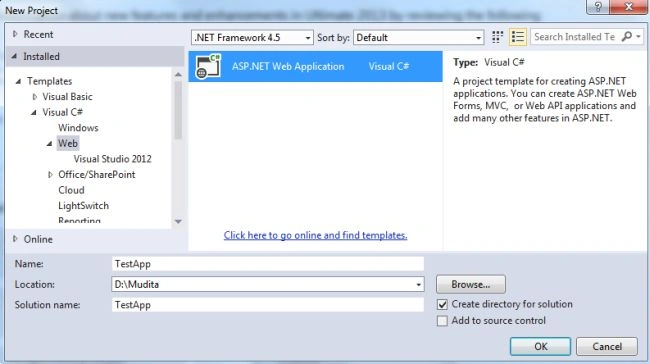
- Click on the "OK" button.
- From the ASP.NET project window select "Empty" and check "Web API" and select "Unit Test" project.
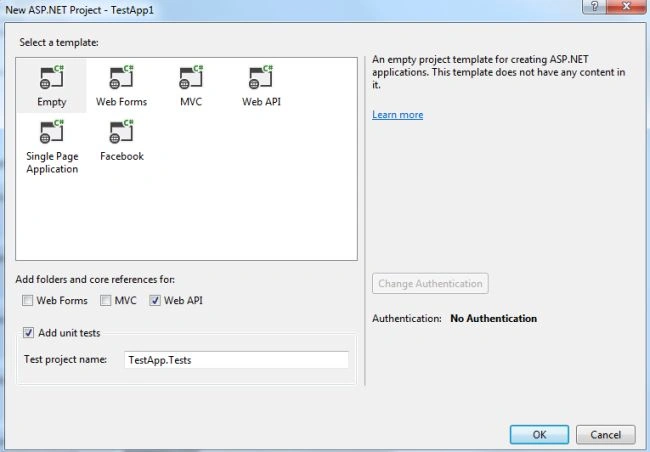
- Click on the "OK" button.
After creating the Unit Test Project you will see two projects added to the Solution Explorer.
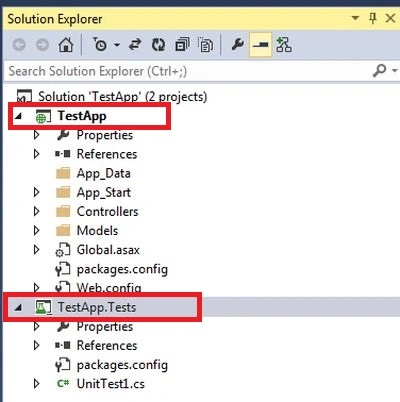
If you want to add the Unit Test Project to an existing application then you need to createit like this:
- In the Solution Explorer.
- Right-click on the Project and select "Add" -> "New Project".
- From the New Project window select "Test" from the left panel and then select Unit Test Project .
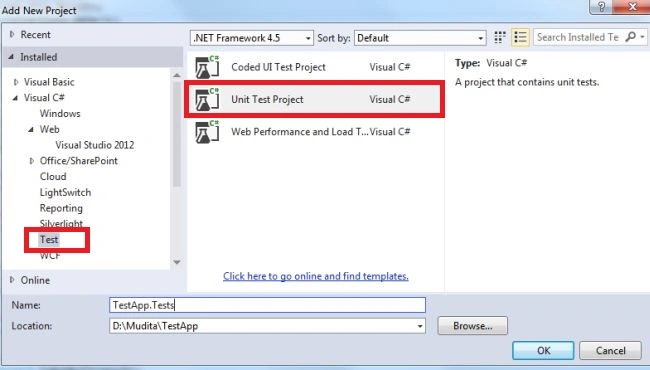
- Click on the "OK" button.
Step 2
Now in the TestApp project add the model class.
- In the "Solution Explorer".
- Right-click on the Model folder.
- Select "Add" -> "Class".
- Select "Installed" -> "Visual C#" and select "Class".
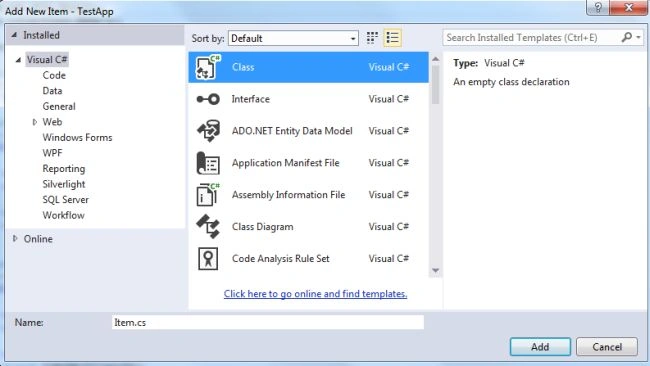
- Click on the "Add" button.
Add the following code:
- using System;
- using System.Collections.Generic;
- using System.Linq;
- using System.Web;
- namespace TestApp.Models
- {
- public class Item
- {
- public int ID { get; set; }
- public string Name { get; set; }
- public decimal Cost { set; get; }
- }
- }
Now add the Web API2 Controller.
- Right-click on the Controller folder then select "Add" -> "New Scaffolded Item".
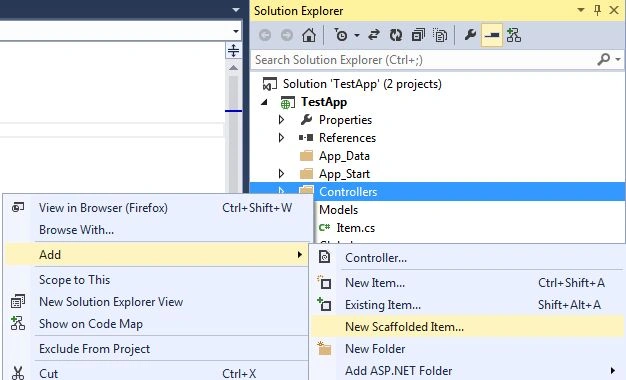
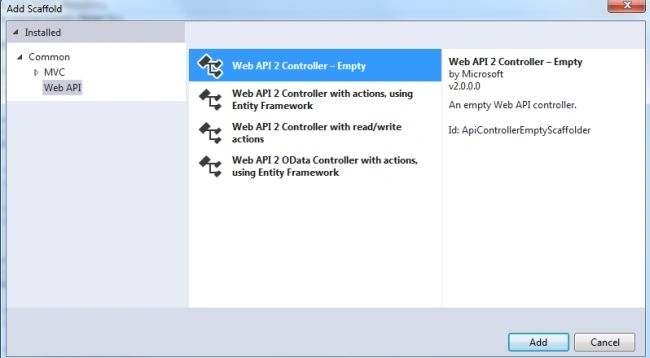
- Then select "Web API2 Controller- Empty".
- Change the name.
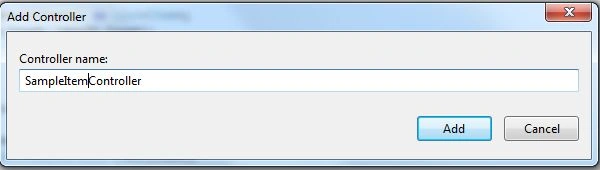
- Click on the "Add" button.
Add the following Code:
- using System;
- using System.Collections.Generic;
- using System.Linq;
- using System.Net;
- using System.Net.Http;
- using System.Web.Http;
- using TestApp.Models;
- namespace TestApp.Controllers
- {
- public class SampleItemController : ApiController
- {
- List<Item> items = new List<Item>();
- public SampleItemController() { }
- public SampleItemController(List<Item> items)
- {
- this.items = items;
- }
- public IEnumerable<Item> GetAllItems()
- {
- return items;
- }
- public IHttpActionResult GetItem(int id)
- {
- var item = items.FirstOrDefault((p) => p.ID == id);
- if (item == null)
- {
- return NotFound();
- }
- return Ok(item);
- }
- }
- }
Now add the Microsoft ASP.NET Web API2 Core package.
- Right-click on the "TestApp.Tests" project.
- Select "Manage NuGet Packages".

- In the Search box type "asp.net web api".
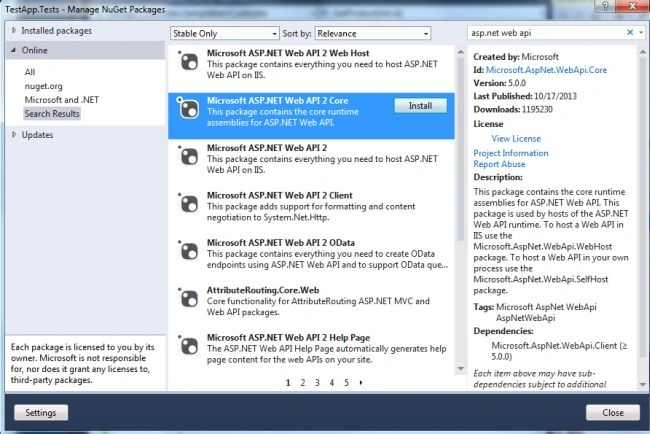
- And install the "Web API2 Core" package.
Step 5
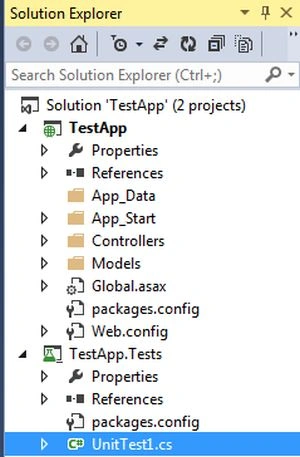
Now create the tests. We will see in the Solution Explorer that an empty UnitTest1.cs file in the TestApp.Tests Project is added automatically. In this file set the class name as "TestSampleItemController" and replace the code with the following:
- namespace TestApp.Tests
- {
- [TestClass]
- public class TestSampleItemController
- {
- [TestMethod]
- public void GetAllItem_ShouldReturnAllItems()
- {
- var testItems = GetTestItems();
- var controller = new SampleItemController(testItems);
- var result = controller.GetAllItems() as List<Item>;
- Assert.AreEqual(testItems.Count, result.Count);
- }
- [TestMethod]
- public void GetItem_ShouldReturnCorrectItem()
- {
- var testItems = GetTestItems();
- var controller = new SampleItemController(testItems);
- var result = controller.GetItem(4) as OkNegotiatedContentResult<Item>;
- Assert.IsNotNull(result);
- Assert.AreEqual(testItems[3].Name, result.Content.Name);
- }
- [TestMethod]
- public void GetItem_ShouldNotFindItem()
- {
- var controller = new SampleItemController(GetTestItems());
- var result = controller.GetItem(999);
- Assert.IsInstanceOfType(result, typeof(NotFoundResult));
- }
- private List<Item> GetTestItems()
- {
- var testItems = new List<Item>();
- testItems.Add(new Item{ ID = 1, Name = "Test1", Cost = 1 });
- testItems.Add(new Item { ID = 2, Name = "Test2", Cost = 3.75M });
- testItems.Add(new Item { ID = 3, Name = "Test3", Cost = 16.99M });
- testItems.Add(new Item { ID = 4, Name = "Test4", Cost = 11.00M });
- return testItems;
- }
- }
- }
Step 6
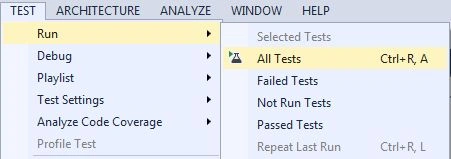
Now we run test from the Menu Bar.
- Go to Menu Bar select "Test" -> "Run" -> "All Tests".
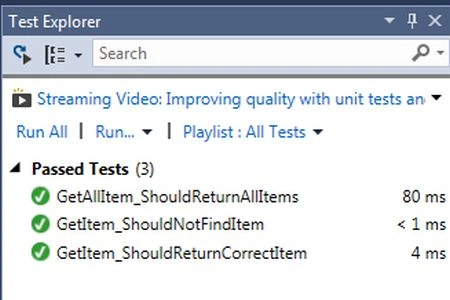
- Open the Test Explorer window to see the results.
Join the conversation! Your thoughts help the community grow.