

Introduction
JavaScript Object Notation, or JSON, is a lightweight data-interchange format that is simple for computers to understand and produce, as well as for people to read and write. It is frequently used for configuration files, data storage, and data exchange between a web application and a server.
What is JSON?
JSON (JavaScript Object Notation) is a text-based data interchange format that is simple for machines to parse and generate and for humans to read and write.
- Usage: As a format for structured data, it is frequently used to transfer data between a web application and a server.
- File Extension: Files with the .json extension are commonly used to store JSON data.
Syntax of JSON
Key-Value Pairs: Key-value pairs are used to represent JSON data, where.
- Strings that are enclosed in double quotes serve as keys.
- Strings, numbers, arrays, booleans, objects, or null can all be considered values.
Objects
Objects are key-value pairs enclosed in curly braces {}.
{
  "name": "Jaimin Shethiya",
  "age": 34
}

{
  "name": "Jaimin Shethiya",
  "age": 34,
  "address": {
    "addressline1": "F-302 Nakshatra Heights",
    "addressline2": "New IPCL road",
    "city": "Vadodara",
    "state": "Gujarat",
    "country": "India",
    "pincode": 390020
  }
}
Arrays
These can hold several values and are enclosed in square brackets [].
{
  "employees": [
    {
      "firstName": "Jaimin",
      "lastName": "Shethiya"
    },
    {
      "firstName": "Tom",
      "lastName": "Jackson"
    },
    {
      "firstName": "Linda",
      "lastName": "Garner"
    }
  ]
}
JSON Data Types
- String: Double quotes surround a string, which is a collection of characters.
- Number: It may be either a floating point or an integer.
- Boolean: Denotes values that are true or false.
- Null: Denotes an empty value.
- Object: A group of key-value correspondences.
- Array: An array is a list of values in order.
JSON to JavaScript Object Conversion
- Parsing: Use JSON.parse() to turn a JSON string into a JavaScript object.
const jsonString = '{ "name": "Jaimin Shethiya", "age": 34 }';
const jsonObject = JSON.parse(jsonString);

console.log(jsonObject);
- Stringifying: Use JSON.stringify() to turn a JavaScript object into a JSON string.
const jsonObject = '{ "name": "Jaimin Shethiya", "age": 34 }';
const jsonString = JSON.stringify(jsonObject);

console.log(jsonString);
Getting to JSON Data
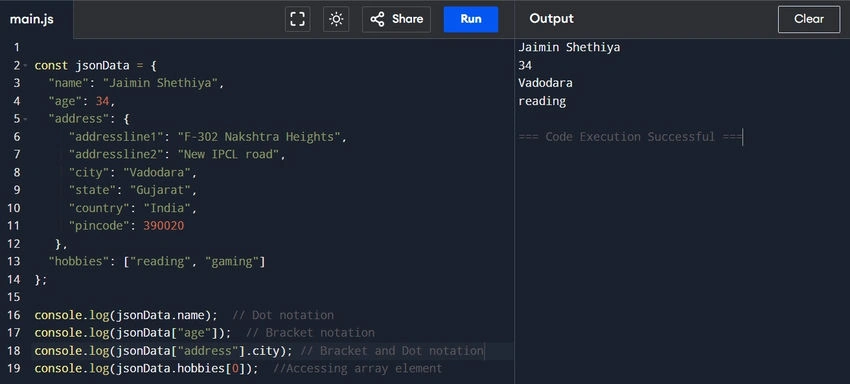
Dot or bracket notation can be used to access data in a JSON object.
const jsonData = {
  "name": "Jaimin Shethiya",
  "age": 34,
  "address": {
    "addressline1": "F-302 Nakshtra Heights",
    "addressline2": "New IPCL road",
    "city": "Vadodara",
    "state": "Gujarat",
    "country": "India",
    "pincode": 390020
  },
  "hobbies": ["reading", "gaming"]
};

console.log(jsonData.name); // Dot notation
console.log(jsonData["age"]); // Bracket notation
console.log(jsonData["address"].city); // Bracket and Dot notation
console.log(jsonData.hobbies[0]); // Accessing array element
Typical Use Cases
- Web APIs: Web APIs frequently send and receive data using JSON.
- Configuration Files: JSON is used by many applications to store configuration information.
- Data Storage: Structured data can be stored in databases using JSON.
Benefits of JSON
- Human-Readable: Both developers and non-developers can easily read and comprehend JSON due to its ease of comprehension.
- Lightweight: Compared to other data formats like XML, JSON files are smaller because of their simple syntax. Faster data transfer may result from this.
- Language Independence: The ability to work with almost any programming language, including JavaScript, Python, Java, C#, and many more, is known as language independence.
- Simple to Parse: JSON data is simple to work with because most programming languages come with built-in libraries or functions to parse it.
- Structured Data: Hierarchical data can be represented using JSON's support for complex data structures, such as arrays and nested objects.
- Widely Supported: JSON is a standard format for data exchange because it is widely used in web APIs and services.
- No Schema Needed: JSON doesn't need a schema, unlike XML, which can streamline development and cut down on overhead.
Negative aspects of JSON
- Restricted Data Types: JSON only supports the following data types: null, strings, numbers, arrays, booleans, and objects. More complicated types, such as dates or binary data, are not natively supported.
- Verbosity: JSON can be verbose, even though it is typically more condensed than XML, particularly for large datasets with numerous nested structures.
- Security Issues: If JSON is not handled correctly, it may be susceptible to attacks like cross-site scripting (XSS) and JSON injection.
- Data Integrity: If the data is not verified before use, inconsistencies may result because JSON does not enforce data types or structures.
- Performance: When using inefficient parsing libraries or very large datasets, JSON parsing may occasionally be slower than other formats.
- Lack of Support for Comments: JSON does not support comments, unlike XML, which can make it more difficult to describe the data structure in the file itself.
Conclusion
For data interchange, JSON is a strong and adaptable format, especially in web applications. It is a popular option due to its simplicity and ease of use, but developers should be mindful of its drawbacks and possible security risks. The particular requirements of your application and the associated trade-offs must be taken into account when selecting a data format.
We learned the new technique and evolved together.
Happy coding!
Join the conversation! Your thoughts help the community grow.