

Introduction
In this article, we will learn about hashmap and its internal workings. HashMap is one of the most commonly used data structures in Java for storing key-value pairs. It provides an average time complexity of O(1) for basic operations like get, put, remove, and containsKey. This efficiency is achieved through an underlying data structure called a hash table. A HashMap in Java is part of the java.util package and is used to store mappings of key-value pairs. It allows for the storage and retrieval of data in a very efficient manner. The key features of a HashMap include.
- No Duplicate Keys: Each key in a HashMap must be unique.
- Allows Null Values and One Null Key: HashMap permits one null key and multiple null values.
- Unordered: The order of keys can change over time.
Data Structure Behind HashMap: The primary data structure behind a HashMap is a hash table. A hash table uses an array and a linked list (or a balanced tree in case of high collisions) to store key-value pairs. Below is the high-level view of the internal structure.
- Array: The array is the primary storage for the entries.
- Buckets: Each position in the array is called a bucket, which can hold multiple entries in case of collisions.
- Nodes: Each bucket can contain a linked list of nodes, where each node contains a key, value, hash, and a pointer to the next node.
Hash Function
A hash function computes an index (hash code) based on the key, determining the bucket where the entry will be stored. Java uses the key's hashCode() and a series of bitwise operations to distribute the keys uniformly.
Collision Resolution
Collision is a situation where two or more key objects produce the same final hash value and point to the same bucket location or array index. This scenario can occur because according to the equals and hashCode, two different objects in Java can have the same hash code. Java's HashMap resolves collisions using
- Resizing the Hash Table: When the number of entries in the HashMap exceeds a certain threshold (default load factor of 0.75), the HashMap automatically resizes the underlying array by creating a new array with double the capacity of the previous one and redistributing all the entries into the new array.
- Better Hash Function: Java's HashMap uses a hash function that creates keys evenly across the buckets, reducing the collisions.
- Separate Chaining with Red-Black Trees: In Java 8 and later versions, when the number of entries in a single bucket exceeds a certain threshold (default is 8), the HashMap switches from using a linked list to a balanced Red-Black tree for that bucket. This change improves the performance of operations like get() and put() if there are many collisions in a single bucket.
Working of HashMap
- Insertion (put operation)
- Calculate the hash code of the key.
- Determine the index in the array using the hash code.
- If the bucket is empty, create a new node and add it to the bucket.
- If the key already exists, update its value.
- If the key does not exist, add a new node to the end of the list or tree.
- Retrieval (get operation)
- Calculate the hash code of the key.
- Determine the index in the array using the hash code.
- Traverse the linked list or tree in the bucket to find the matching key.
- Return the value if the key is found; otherwise, return null.
Flow Diagram
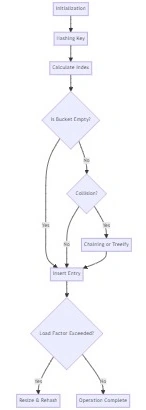
Explanation Of Flow Diagram
- Initialization: The HashMap is initialized.
- Hashing Key: The key is hashed.
- Calculate Index: The hash is used to determine the bucket index.
- Is Bucket Empty?: Checks if the bucket at the calculated index is empty.
- Insert Entry: If the bucket is empty or there is no collision, the entry is inserted.
- Collision?: If there is a collision (i.e., another entry exists at the same index), handle it.
- Chaining or Treeify: Handles the collision using chaining (linked list) or Treeify (convert to a balanced tree).
- Load Factor Exceeded?: Checks if the load factor exceeds the threshold.
- Resize & Rehash: If the load factor is exceeded, the HashMap is resized and entries are rehashed.
- Operation Complete: Marks the completion of the operation.
Example
import java.util.HashMap;
public class HashMapExample {
    public static void main(String[] args) {
        // Creating a HashMap
        HashMap<String, Integer> map = new HashMap<>();

        // Adding elements to the HashMap
        map.put("One", 1);
        map.put("Two", 2);
        map.put("Three", 3);

        // Retrieving elements from the HashMap
        System.out.println("Value for key 'One': " + map.get("One"));
        System.out.println("Value for key 'Two': " + map.get("Two"));

        // Checking if a key exists
        if (map.containsKey("Three")) {
            System.out.println("Key 'Three' is present in the map.");
        }

        // Removing an element from the HashMap
        map.remove("Two");
        System.out.println("Value for key 'Two' after removal: " + map.get("Two"));
    }
}
Summary
The HashMap in Java is a powerful and efficient data structure that uses a hash table to store key-value pairs. By understanding its underlying mechanics, including how it handles hashing, collision resolution, and operations like put and get, you can better utilize this data structure in your applications. The use of linked lists and balanced trees ensures that HashMap maintains high performance even in the presence of collisions.
Join the conversation! Your thoughts help the community grow.