

Introduction
In this article, we will learn the life cycle of the method, Since in React, the Component is the main building block of the application, so it is a must to understand the life cycle processing steps of the components so that we can implement that in our React applications.
React Life Cycle
In React, every component has a life-cycle, a number of different stages it goes through from initializing to destroying. Below are different phases involved in the lifecycle of a react component.
-
Initialization – initial State of the component
-
Mounting - Birth of the Component
-
Updating - Growing of component
-
Unmounting- End of the component
Initialization
This is the initial state of the component. This is the stage where the component is constructed with the provided properties and a default state. This is done in the constructor of the component and the below code shows the initialization phase of a react component.
class Home extends Component {
  constructor(props) {
    super(props)
    this.state = {name: props.val}
    // Don't call anything here, only setstate & bind this
    // Or in rare case, bind props to state here. Lift state up is normally easier.
    // [EXIT] If props comes from Redux, that's ok.
  }
}
Mounting
Mounting is the phase in react lifecycle that comes after the initialization is completed. Mounting occurs when the component is placed on the DOM container and the component is rendered on a web.
Now we will follow the below method
- componentWillMount() - This method is called just before the component is placed on DOM i.e. this function gets called just before the render function is executed for the very first time.
- componentDidMount() - This method is called just after the component is placed on DOM i.e. this function gets called just after the render function is executed for the very first time.
componentWillMount() {
  // This is the only lifecycle hook called on server rendering
  // If subscribe here, on server side will call it and never call unmuount >>> cause memory leak
  console.log('componentWillMount')
}
componentDidMount() {
  // instantiate the network request
  console.log('componentDidMount')
}
Updating
It is not a DOM update only but this is a part of life cycle. It occurs when there are new props, state, and force updates.
- shouldComponentUpdate() - this lifecycle method should be sparingly used, and it exists only for certain performance optimizations. You cannot update component state in shouldComponentUpdate() lifecycle. Anytime setState() called and its component re-render by default.
- componentWillUpdate()
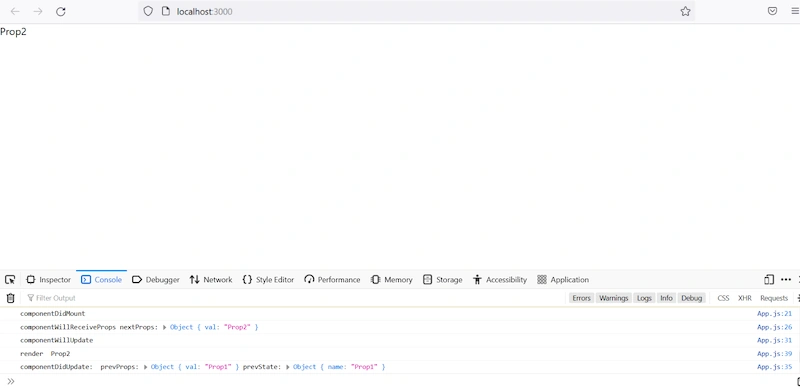
It is called before a component is re-rendered and this method is called before the render function is executed post updation. - componentDidUpdate()
It is called after a component is re-rendered and this method is called after the render function is executed post updation. - ComponentWillReceiveProps()
It is called before componentWillUpdate in React update lifecycle and This function accepts new props which can be identical or different from original props
Unmounting
The component is detached from the DOM container. The following method is below.
- componentWillUnmount() - This function is invoked before a component is finally detached from the DOM container i.e. this method is called when a component is fully removed from the page and this shows the end of its lifecycle.
Now we will start by creating a new project.
Step 1
Create a React project setup using the below commands or however you create your React app.
npx create-react-app projectname
Example,
npx create-react-app sample-lifecyle
Step 2 - Installing React Bootstrap
Open a new terminal and run the following below commands.
Install Boostrap as a dependency in your app
npm install react-bootstrap bootstrap
In App.js we will import bootstrap.min.css
import "bootstrap/dist/css/bootstrap.min.css";
Step 3 - Src/App.js
import React, { Component } from 'react';
class AppCycle extends Component {
  constructor(props) {
    super(props)
    this.state = {name: props.val}
    // Don't call anything here, only setstate & bind this
    // Or in rare case, bind props to state here. Lift state up is normally easier.
    // [EXIT] If props comes from Redux, that's ok.
  }
  componentWillMount() {
    // This is the only lifecycle hook called on server rendering
    // If subscribe here, on server side will call it and never call unmuount >>> cause memory leak
    console.log('componentWillMount')
  }
  componentDidMount() {
    // instantiate the network request
    // subscribe (addEvent)
    console.log('componentDidMount')
  }
  componentWillReceiveProps(nextProps) {
    // update state
    console.log('componentWillReceiveProps nextProps:',nextProps)
    this.setState({name:nextProps.val});
  }
  componentWillUpdate() {
    console.log('componentWillUpdate')
  }
  componentDidUpdate(prevProps, prevState) {
    console.log('componentDidUpdate: ','prevProps:',prevProps, 'prevState:',prevState)
  }
  render() {
    console.log('render ', this.state.name)
    return <div>{this.state.name}</div>
  }
}
class App extends Component {
  constructor() {
    super();
    this.state = {
      name: 'Prop1'
    };
    setTimeout(()=>{
      this.setState({name:'Prop2'})
    },1000);
  }
  render() {
    return (
      <div>
        <AppCycle val={this.state.name}/>
      </div>
    );
  }
}
export default App;
Step 4
Now we will run the application.
Npm run start
On successful execution of the above command, it will show in the browser,
Join the conversation! Your thoughts help the community grow.