

If you are working with Node.js, you have likely come across two important files in your project: package.json and package-lock.json . Both files manage dependencies but serve different purposes. Understanding the distinction is crucial for reliable development and deployment.
1. What is package.json?
package.json is the heart of any Node.js project. It declares your project’s dependencies and provides metadata about your application.
Key Features
Lists dependencies and devDependencies.
Specifies version ranges using semantic versioning (
^,~).Includes project metadata like name, version, scripts, author, and license.
Human-readable and editable.
    {
  "name": "my-app",
  "version": "1.0.0",
  "dependencies": {
    "lodash": "^4.17.21"
  },
  "devDependencies": {
    "jest": "~29.0.0"
  },
  "scripts": {
    "start": "node index.js"
  }
}
Key Point: package.json specifies what versions your project is compatible with , not the exact installed version.
2. What is package-lock.json?
package-lock.json is automatically generated by npm to lock the exact versions of every installed package, including nested dependencies.
Key Features
Records the exact version installed for each package.
Contains resolved URLs and integrity hashes to ensure packages are not tampered with.
Records nested dependencies (dependencies of dependencies).
Not intended for manual editing.
    {
  "name": "my-app",
  "lockfileVersion": 3,
  "dependencies": {
    "lodash": {
      "version": "4.17.21",
      "resolved": "https://registry.npmjs.org/lodash/-/lodash-4.17.21.tgz",
      "integrity": "sha512-xyz"
    }
  }
}
Key Point: package-lock.json ensures that every environment installs exactly the same versions , even if package.json allows ranges.
3. Main Differences Between package.json and package-lock.json
| Feature | package.json | package-lock.json |
|---|---|---|
| Purpose | Declares dependencies and project info | Locks exact versions of installed packages |
| Edited by | Developer | npm automatically |
| Version | Can specify ranges (^, ~) | Exact versions installed |
| Nested dependencies | Not recorded | Fully recorded |
| Effect on installation | npm uses ranges to resolve versions | Ensures consistent installs |
| Human-readable? | Yes | Not really |
4. How npm install Works
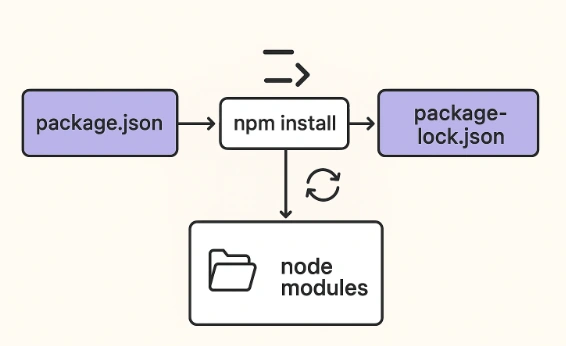
The npm install command is used to install packages based on package.json and package-lock.json.
    # Install all dependencies listed in package.json
npm install

# Install a specific package and save it to dependencies
npm install lodash

# Install a package as a dev dependency
npm install --save-dev jest

# Install a package globally
npm install -g typescript
Process
Reads package.json for dependencies.
Resolves the latest versions allowed by version ranges (if package-lock.json doesn’t exist).
Downloads packages to node_modules.
Updates or creates package-lock.json with exact versions.
5. What Happens If You Delete package-lock.json?
If package-lock.json is deleted and you run:
npm install
npm will resolve latest versions matching the ranges in package.json.
Download new packages and regenerate package-lock.json.
This may result in different versions from the previous install, which could break your code.
Safe scenarios for deleting:
Intentionally updating packages.
Starting a fresh project or refreshing dependencies.
Why are both files important
package.json defines what your project needs.
package-lock.json ensures everyone gets the exact same package versions for consistent development and production environments.
Conclusion
package.json = “What I want” (dependency ranges and project info)
package-lock.json = “Exactly what I got” (locked versions)
Deleting package-lock.json can lead to installing newer package versions, which may cause unexpected issues. Always commit package-lock.json to version control for consistency.
Join the conversation! Your thoughts help the community grow.