

In this article, we will learn what LINQ is and how it works behind the scenes while writing your own LINQ methods.
LINQ stands for Language-Integrated Query. It is one of the most powerful tools in the .NET platform that provides an abstract way of querying data for various data sources. In other words, it abstracts away us from concrete data source dependencies. Every data source has its language and format. But with LINQ in your arsenal, you don’t need to talk to the data source using its language. You use a central language (LINQ in this case) and it acts like an API Gateway to different data sources. LINQ supports common query methods that can be used with various data sources like runtime objects, relational databases, and XML.
A small note before getting started: We will focus on the LINQ to Object, and will talk about other LINQ forms in our next articles.
Language-Integrated Query
LINQ lives in System.Linq.dll and is a query language (library + syntax). The main purpose of it is to provide a consistent, declarative, and type-safe way to query and manipulate data across various sources.
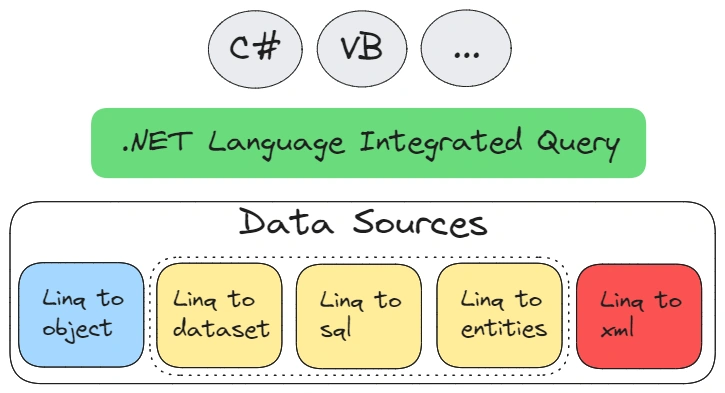
The image above shows how LINQ works within the .NET framework with various data sources.
- LINQ to Objects lets you query collections like arrays and lists in memory using LINQ syntax. It offers powerful filtering, ordering, and grouping capabilities directly on these collections.
- LINQ to Entities is used to query databases through the Entity Framework, an ORM (Object-Relational Mapper). It allows you to write queries in C# instead of SQL, translating them into SQL for database execution.
- LINQ to SQL (old) is a component that provides a runtime infrastructure for managing relational data as objects. It translates LINQ queries into SQL queries to interact directly with the SQL Server database.
- LINQ to DataSet enables querying and manipulating data stored in ADO.NET data sets. It is useful for working with disconnected data that is retrieved from databases and stored in memory.
- LINQ to XML provides the ability to query and manipulate XML data using LINQ. It simplifies working with XML documents by offering a more readable and concise way to handle XML data.
In built-in LINQ there are most common methods for querying from data sources.
- Where: Filters elements based on a predicate.
- Select: Project each element into a new form.
- OrderBy: Sorts elements in ascending/descending order.
- GroupBy: Groups elements that share a common attribute.
- Join: Joins two sequences based on a key.
To view the list, please click here.
So, LINQ is easier than you think because LINQ has two ways of querying data sources.
- Query syntax or language-level syntax: this often called “SQL-like syntax”, and is a declarative way to write LINQ queries.
List<int> numbers = new List<int> { 1, 2, 3, 4, 5, 6, 7, 8, 9, 10 }; var evenNumbers = from num in numbers where num % 2 == 0 select num; foreach (var num in evenNumbers) { Console.WriteLine(num); } - Method syntax: also known as “fluent syntax” or “method chaining”. This syntax is often more concise and can be more powerful when dealing with complex queries.
List<int> numbers = new List<int> { 1, 2, 3, 4, 5, 6, 7, 8, 9, 10 };
var evenNumbers = numbers.Where(num => num % 2 == 0);
foreach (var num in evenNumbers)
{
    Console.WriteLine(num);
}
The design of the LINQ library stands on iteration elements and execution of methods at different times.
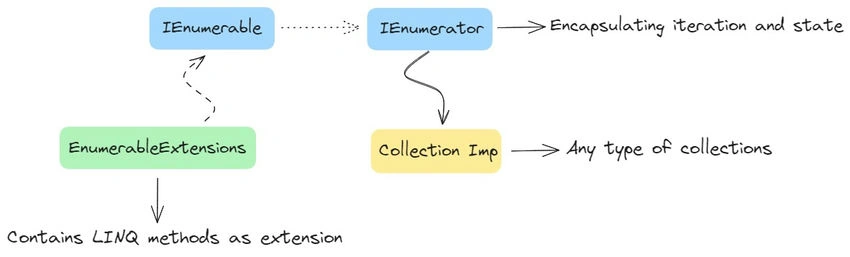
Everything starts with IEnumerable and IEnumerator interfaces.
public interface IEnumerable
{
    IEnumerator GetEnumerator();
}
public interface IEnumerator
{
    object Current { get; }
    bool MoveNext();
    void Reset();
}
These interfaces lead to an iterator pattern which helps to encapsulate the iteration process for all data sources, specifically in LINQ to objects as known collections implement these interfaces. They also provide the contract for the LINQ base.
The LINQ methods are implemented as extension methods. Also, the trick is they are method-based extensible, and not coupled with each other. But everything starts with method syntax and their execution.
Let’s start with one of the popular methods of LINQ which is Where.
public static IEnumerable<TSource> Where<TSource>(this IEnumerable<TSource> source, Func<TSource, bool> predicate)
{
    if (source == null)
    {
        ThrowHelper.ThrowArgumentNullException(ExceptionArgument.source);
    }
    if (predicate == null)
    {
        ThrowHelper.ThrowArgumentNullException(ExceptionArgument.predicate);
    }
    if (source is Iterator<TSource> iterator)
    {
        return iterator.Where(predicate);
    }
    if (source is TSource[] array)
    {
        return array.Length == 0 ?
              Empty<TSource>() :
              new WhereArrayIterator<TSource>(array, predicate);
    }
    if (source is List<TSource> list)
    {
        return new WhereListIterator<TSource>(list, predicate);
    }
    return new WhereEnumerableIterator<TSource>(source, predicate);
}
As you can see the source code above shows the Where extension method with encapsulating Source and Predicate. As defined before, the method helps to filter with custom conditions. So, the method participates as a high-order function and has accepted the delegate for the hiding custom part.
We are closing the critical part, why does the method use the WhereEnumerableIteration class?
Because of the lazy loading, when executing the method chaining (shown below), it helps to avoid immediate loading for optimizing memory and performance. It’s executed in case of need. On the other hand, there are also some methods that execute immediately like ToList, ToArray, Single, etc.
Sample of lazy loading with fluent API.
List<string> strList = new List<string>()
{
    "Rasul",
    "Huseynov",
    "LINQ",
    "Q123"
};
var result = strList.Where(x => x.Contains("Q"))
                    .Select(x => x.Substring(0, 2))
                    .OrderBy(x => x);
foreach (var item in result)
{
    Console.WriteLine(item);
}
Note. Other LINQ providers work through the extended part of IQueryable also with different interfaces, which we will cover in another article.
Writing OWN Methods
In this section, we will extend the LINQ with our own method.
As I mentioned before, everything starts with IEnumerable, so in our case, we want to implement a general filter by choosing the first two elements by condition. It is a little bit easy but the idea is to understand how to extend LINQ by yourself. In our case, we will use method chaining and to avoid loading issues we need to implement our method using lazy loading.
Let’s get started!
Our custom extension is similar to “Where” but it has an item count rule. That means when iterating over data we will take the first two items that match the given condition.
public static class CustomEnumerableExtensions
{
    public static IEnumerable<TSource> FirstTwoItems<TSource>(this IEnumerable<TSource> source, Func<TSource, bool> predicate)
    {
        if (source == null)
            throw new ArgumentNullException(nameof(source));
        if (predicate == null)
            throw new ArgumentNullException(nameof(predicate));

        return new FirstTwoItemsEnumerable<TSource>(source, predicate);
    }
    private sealed class FirstTwoItemsEnumerable<TSource> : IEnumerable<TSource>, IEnumerator<TSource>
    {
        private int _itemCount;
        private int _state;
        private TSource _current;
        private readonly IEnumerable<TSource> _source;
        private readonly Func<TSource, bool> _predicate;
        private IEnumerator<TSource>? _enumerator;
        public FirstTwoItemsEnumerable(IEnumerable<TSource> source, Func<TSource, bool> predicate)
        {
            _source = source;
            _predicate = predicate;
        }
        public TSource Current
        {
            get { return _current; }
        }
        object IEnumerator.Current
        {
            get { return _current; }
        }
        public void Dispose()
        {
            if (_enumerator != null)
            {
                _enumerator.Dispose();
                _enumerator = null;
            }
            _current = default;
            _state = -1;
            _itemCount = 0;
        }
        public IEnumerator<TSource> GetEnumerator()
        {
            var instance = new FirstTwoItemsEnumerable<TSource>(this._source, this._predicate);
            instance._state = 1;
            return instance;
        }
        IEnumerator IEnumerable.GetEnumerator()
        {
            var instance = new FirstTwoItemsEnumerable<TSource>(this._source, this._predicate);
            instance._state = 1;
            return instance;
        }
        public bool MoveNext()
        {
            switch (_state)
            {
                case 1:
                    _enumerator = _source.GetEnumerator();
                    _state = 2;
                    goto case 2;
                case 2:
                    while (_enumerator.MoveNext())
                    {
                        if (_itemCount == 2)
                            break;

                        TSource item = _enumerator.Current;
                        if (_predicate(item))
                        {
                            _itemCount++;
                            _current = item;
                            return true;
                        }
                    }
                    Dispose();
                    break;
            }
            return false;
        }
        public void Reset()
        {
            if (_enumerator != null)
            {
                _enumerator.Dispose();
                _enumerator = null;
            }
            _current = default;
            _state = 1;
            _itemCount = 0;
        }
    }
}
So, for it to be lazy loading, there is a FirstTwoItemsEnumerable wrapper class for managing states.
The implementation of code stands on the default iteration pattern and behaves like other extensions. With this concept, you can write your own methods and use them in case of LINQ to objects is needed.
Sample of usage;
List<string> strList = new List<string>()
{
    "rasul",
    "huseynov",
    "turkey",
    "usa"
};
var result = strList.FirstTwoItems(x => x.Contains("u")).Select(x => x.ToUpper());
foreach (var item in result)
{
    Console.WriteLine(item);
}
Conclusion
LINQ (Language-Integrated Query) is a powerful library of the .NET framework that enables developers to query data in a more intuitive and readable way. By understanding how LINQ works under the hood and learning to write your own LINQ methods, you can harness its full potential to make your code cleaner, more efficient, and easier to maintain.
Through this explanation, we have seen how LINQ makes working with data easier and helps us write clear, simple code. By making your own LINQ methods, you can learn how LINQ works and can create solutions that fit your needs.
Stay tuned!
Join the conversation! Your thoughts help the community grow.