

Many JavaScript frameworks and libraries are currently built to have the developers more productive and to make a significant improvements to JavaScript's robustness. JS developers now have several tools that have emerged to work around Functional Programming (FP).
So, this article introduces one such JavaScript utility called Underscore.js that makes the JS developer's work with Functional Programming easier.
Underscore.js a JavaScript is a kind of utility library that provides many useful and helpful functions to that makes programming and performs various types of operations with some of the common data structures.
Introduction
- It has nothing to do with DOM manipulation (Unlike jQuery).
- No Functionality is specific to web browsers.
The Underscore.js gives us many functions that are around 60 or more that support common data structures used in JavaScript like another array (first, last, without, and so on), collection (as well as more specialized helper functions for binding, templating and so on).
Underscore creates and exposes all its functionality via a single object, in global scope. This object is the titular underscore character ( _ ) that is similar to the dollar ($) symbol for jQuery. And just like jQuery, you can remap this character in case you run into conflicts.
You can download the library from here.
So, for now, we will cover some utility function that works with a very common data structure known as Arrays.
Let's begin using some of the array functions provided by Underscore.js
1. first (head or tail)
Syntax
_.first(array, [n])
Description
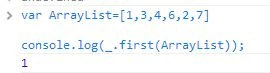
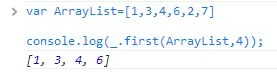
As its name suggests, this method returns the first element of an array. It takes two arguments but the second argument is optional. If we pass the second argument then it will return the first n elements of the array.
Example
With the second argument:
2. last
Syntax
_.last(array, [n])
Description
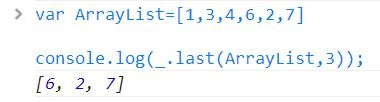
This method is the total reverse of the earlier method. It will return the last element of an array. The second argument is optional; if n is passed then it will return the last n elements of the array. 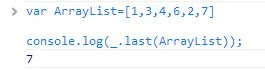
Example
With the second argument:
4. initial
Syntax
_.initial(array, [n])
Description
Returns everything but the last entry of the array. Especially useful on the arguments object. Pass n to exclude the last n elements from the result.
Example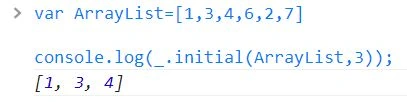
3. rest (tail, drop )
Syntax
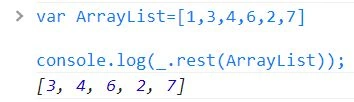
_.rest(array, [index])
Description
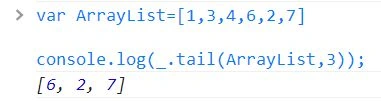
This function returns the rest of the elements in an array. The second parameter is an index to return the values of the array from that index onward.
Example
Suppose you want to get all the array values except the 3 values in the beginning.
 4. compact
Syntax
_.compact(array)
Description
This is an amazing function of Underscore.js. Every time a developer becomes stuck with JS falsy values such as undefined or null. This function surprisingly removes all the falsy values from the given array and returns a copy of the array with all falsy values removed.
In JavaScript false, null, 0," ", undefined, and NaN are all falsy.
Example
4. compact
Syntax
_.compact(array)
Description
This is an amazing function of Underscore.js. Every time a developer becomes stuck with JS falsy values such as undefined or null. This function surprisingly removes all the falsy values from the given array and returns a copy of the array with all falsy values removed.
In JavaScript false, null, 0," ", undefined, and NaN are all falsy.
Example

4. compact
5. without
Syntax
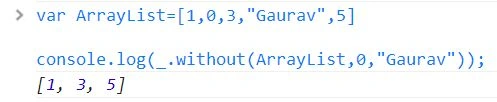
_.without(array, values)
Description
This function is used to remove some of the values that you don't need in the array. This function gives you a replica of the array after removing all the instances of the given values from the array.
Example
 6. uniq (unique)
Description
Another exceptionally useful method is uniq(). This method accepts a single array as an argument and returns an array containing only the unique items from the source array.
6. uniq (unique)
Description
Another exceptionally useful method is uniq(). This method accepts a single array as an argument and returns an array containing only the unique items from the source array.
This method uses the strict equality test (===) in its comparator function to determine whether or not two items are identical.
Example
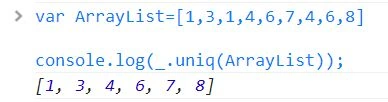 This method can accept a Boolean as the second argument that specifies whether the source array has already been sorted. It has a much faster algorithm to weed out the duplicates. We can pass a transformation function to this method as the third argument. If we were trying to make the method case-insensitive, we could use the following.
Example
This method can accept a Boolean as the second argument that specifies whether the source array has already been sorted. It has a much faster algorithm to weed out the duplicates. We can pass a transformation function to this method as the third argument. If we were trying to make the method case-insensitive, we could use the following.
Example

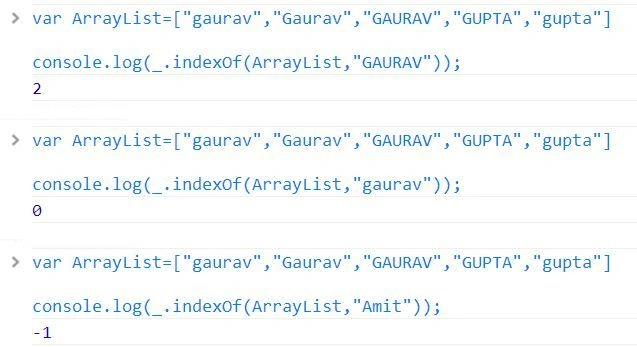
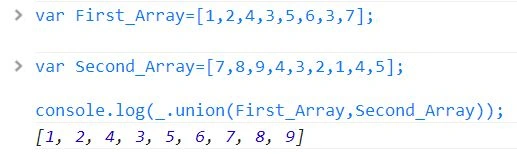
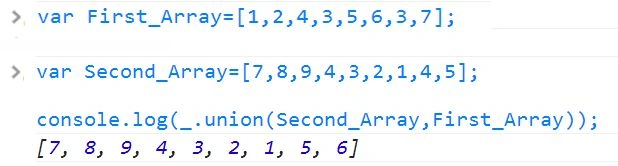
- [start]: The first argument, that is optional and defaults to 0, is the starting number.
- stop: The second argument is the number to stop at.
- [step]: The third argument is the step value.
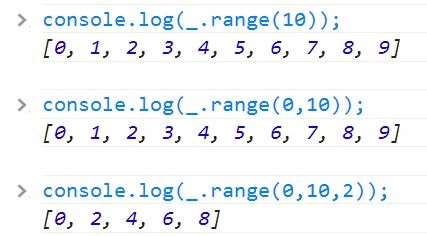

_.zip(*arrays)
Description
The zip() method takes any number of input arrays and returns a number of arrays merged together with the values of each of the arrays with the values at the corresponding position.
Example
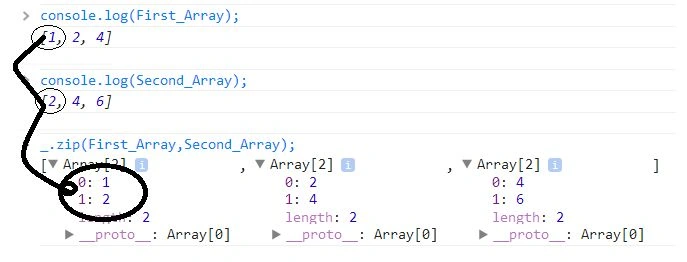 When you see the output of this expression, you'll see that the first array returned contains the items “one” and 1, the second array contains the items “two” and 2, and so on.
Conclusion
Well, that's about it for today. Through this article, we have looked at many methods that are useful for working with an array-like structure. There are many other just as useful methods provided by the Underscore library that may help you. You can see the entire cheat sheet of Underscore.js here.
Join the conversation! Your thoughts help the community grow.