

In this article we are going to learn about a fastest jQuery data grid i.e, igGrid which can be used to bind different types of data sources such as JSON, xml, HTML tables and collections in .NET
Features
- editing
- sorting
- column resizing
- filtering
- paging.
Let's start with a simple demo with binding of JSON data to the igGrid.
Add some dependencies of Ignite UI css and js files.
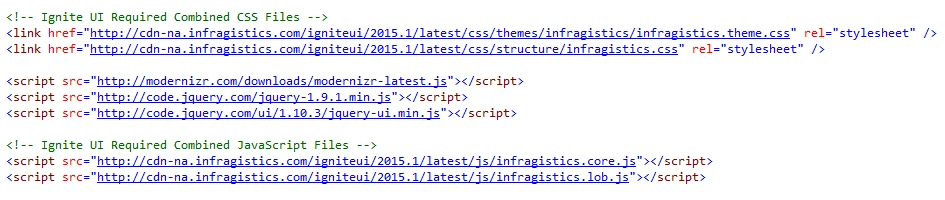
Add html element to show igGrid
- <table id="grid"></table>
Jquery snippet to igGrid binding of JSON data.
- $(function () {
- var data = [
- { "Name": "iShriss", "Age": 25 },
- { "Name": "Bill", "Age": 59 },
- { "Name": "Tim", "Age": 54 },
- { "Name": "Sam", "Age": 36 },
- { "Name": "Mark", "Age": 27 },
- ];
- $("#grid").igGrid({
- columns: [
- { headerText: "Name", key: "Name", dataType: "string" },
- { headerText: "Age", key: "Age", dataType: "number" },
- ],
- width:'250px', //column resizing
- dataSource: data //JSON Array
- });
- });
CSS
- <style>
- #grid_container {
- width: 100%;
- max-width: 560px;
- }
- </style>
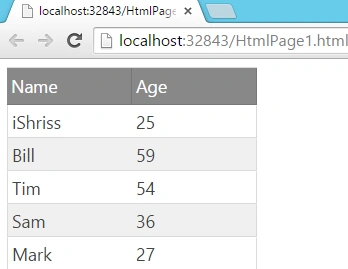
Closure
In this article I have shown the basic (introductory) feature of ui.igGrid in which we bind JSON data. I liked the UI in this grid.
Dinesh GabhanePosted Nov 11, 2019, 1:23 AM
Nice post. Keep it up!!!
Shridhar SharmaPosted Mar 18, 2016, 7:15 AM
Hey Rajbir, you can try it out with adding Infragistics.Web.Mvc assembly in your project.
rajbir thindPosted Mar 18, 2016, 6:06 AM
how can i create crud using this grid
Shridhar SharmaPosted Sep 25, 2015, 10:45 AM
Thanks all for reading :)
Nilesh JadavPosted Sep 25, 2015, 9:42 AM
Nice post sir !!
Saineshwar BageriPosted Sep 25, 2015, 8:33 AM
Nice one
Sibeesh VenuPosted Sep 25, 2015, 3:40 AM
Nice Share :)
Pankaj Kumar ChoudharyPosted Sep 25, 2015, 3:31 AM
Nice Explain..........
Sujeet SumanPosted Sep 25, 2015, 2:49 AM
Nice Article................
Santhakumar MunuswamyPosted Sep 25, 2015, 2:35 AM
Good one
Rajeesh MenothPosted Sep 25, 2015, 2:32 AM
Good One...Thanks for sharing..
Manas MohapatraPosted Sep 25, 2015, 1:48 AM
Good Introduction to igGrid. The article could be more better if you add other functionalities like Sorting, Filtering etc.. :)
Atul RawatPosted Sep 25, 2015, 1:36 AM
nice article sharidhar
Ankit BansalPosted Sep 25, 2015, 1:16 AM
good Shridhar Sharma..