
This page contains a number of C# codes for the Amateur/Beginners in the Visual C# and .Net Platform Environment.
This tutorial will take anyone from scratch to a good Windows Form creator although I am still learning in my spare time.
Source Code
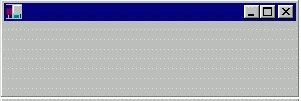
// MyForm1.cs
// This Tutorial will Teach you how to create a Form without Caption Heading
using System;
using System.Drawing;
using System.WinForms;
class MyForm : System.WinForms.Form
{
    public MyForm()
    {
    }
    public static void Main()
    {
        Application.Run(new MyForm());
    }
}
/*
To Compile make a batch File in Dos Mode as compile.bat
csc /r:System.dll /r:System.Drawing.dll /r:System.WinForms.dll
/r:Microsoft.Win32.InterOp.dll /out:MyForm1.exe MyForm1.cs
*/
Output
Source Code
// MyForm2.cs
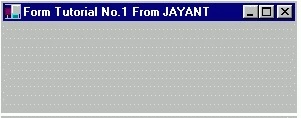
// This Tutorial will Teach you how to create a Form with Caption Heading
using System;
using System.Drawing;
using System.WinForms;
class MyForm : System.WinForms.Form
{
    public MyForm()
    {
        // Text to be Displayed in the Caption-Title Bar
        this.Text = "Form Tutorial No.2 From JAYANT";
    }
    public static void Main()
    {
        Application.Run(new MyForm());
    }
}
/*
To Compile make a batch File in Dos Mode as compile.bat
csc /r:System.dll /r:System.Drawing.dll /r:System.WinForms.dll
/r:Microsoft.Win32.InterOp.dll /out:MyForm2.exe MyForm2.cs
*/
Output
Source Code
// MyForm3.cs
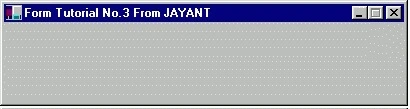
// This Tutorial will Teach you how to create a Form with Added Functionality describing Size
using System;
using System.Drawing;
using System.WinForms;
class MyForm : System.WinForms.Form
{
    public MyForm()
    {
        // Text to be Displayed in the Caption-Title Bar
        this.Text = "Form Tutorial No.3 From JAYANT";
        this.StartPosition = FormStartPosition.CenterScreen;
        this.AutoScaleBaseSize = new Size(5, 13);
        this.ClientSize = new Size(400, 200); // Size except the Title Bar-CaptionHeight
        this.MinTrackSize = new Size(400, (200 + SystemInformation.CaptionHeight));
        this.MaximizeBox = false;
    }
    public static void Main()
    {
        Application.Run(new MyForm());
    }
}
/*
To Compile make a batch File in Dos Mode as compile.bat
csc /r:System.dll /r:System.Drawing.dll /r:System.WinForms.dll
/r:Microsoft.Win32.InterOp.dll /out:MyForm3.exe MyForm3.cs
*/
Output
Source Code
// MyForm4.cs
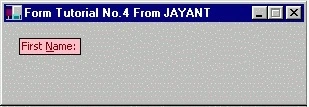
// This Tutorial will Teach you how to create a Form with Label on the Form
using System;
using System.Drawing;
using System.WinForms;
class MyForm : System.WinForms.Form
{
    Label label1;
    public MyForm()
    {
        label1 = new Label();
        label1.UseMnemonic = true;
        label1.Text = "First &Name:";
        label1.Location = new Point(15, 15);
        label1.BackColor = Color.Pink;
        label1.ForeColor = Color.Maroon;
        label1.BorderStyle = System.WinForms.BorderStyle.FixedSingle;
        label1.Size = new Size(label1.PreferredWidth, label1.PreferredHeight + 2);
        // Text to be Displayed in the Caption-Title Bar
        this.Text = "Form Tutorial No.4 From JAYANT";
        this.StartPosition = FormStartPosition.CenterScreen;
        this.AutoScaleBaseSize = new Size(5, 13);
        this.ClientSize = new Size(300, 200); // Size except the Title Bar-CaptionHeight
        this.MinTrackSize = new Size(300, (200 + SystemInformation.CaptionHeight));
        this.AutoScroll = true;
        this.MaximizeBox = false;
        this.Controls.Add(label1);
    }
    public static void Main()
    {
        Application.Run(new MyForm());
    }
}
/*
To Compile make a batch File in Dos Mode as compile.bat
csc /r:System.dll /r:System.Drawing.dll /r:System.WinForms.dll
/r:Microsoft.Win32.InterOp.dll /out:MyForm4.exe MyForm4.cs
*/
Output
source Code
// MyForm5.cs
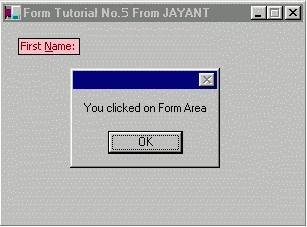
// This Tutorial will Teach Mouse clicking Events and MessageBox (without Title_Heading) calling
using System;
using System.Drawing;
using System.WinForms;
class MyForm : System.WinForms.Form
{
    Label label1;
    public MyForm()
    {
        label1 = new Label();
        label1.UseMnemonic = true;
        label1.Text = "First &Name:";
        label1.Location = new Point(15, 15);
        label1.BackColor = Color.Pink;
        label1.ForeColor = Color.Maroon;
        label1.BorderStyle = System.WinForms.BorderStyle.FixedSingle;
        label1.Size = new Size(label1.PreferredWidth, label1.PreferredHeight + 2);
        // Text to be Displayed in the Caption-Title Bar
        this.Text = "Form Tutorial No.5 From JAYANT";
        this.StartPosition = FormStartPosition.CenterScreen;
        this.AutoScaleBaseSize = new Size(5, 13);
        this.ClientSize = new Size(300, 200); // Size except the Title Bar-CaptionHeight
        this.MinTrackSize = new Size(300, (200 + SystemInformation.CaptionHeight));
        this.AutoScroll = true;
        this.MaximizeBox = false;
        this.Controls.Add(label1);
        this.Click += new EventHandler(clicking);
    }
    public void clicking(object ob, EventArgs e)
    {
        MessageBox.Show("You clicked on Form Area");
    }
    public static void Main()
    {
        Application.Run(new MyForm());
    }
}
/*
To Compile make a batch File in Dos Mode as compile.bat
csc /r:System.dll /r:System.Drawing.dll /r:System.WinForms.dll
/r:Microsoft.Win32.InterOp.dll /out:MyForm5.exe MyForm5.cs
*/
Output
Source Code
// MyForm6.cs
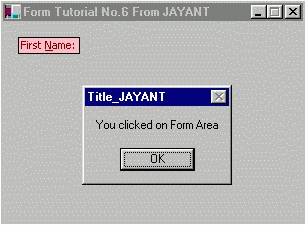
// This Tutorial will Teach Mouse clicking Events and MessageBox (with Title_Heading) calling
using System;
using System.Drawing;
using System.WinForms;
class MyForm : System.WinForms.Form
{
    Label label1;
    public MyForm()
    {
        label1 = new Label();
        label1.UseMnemonic = true;
        label1.Text = "First &Name:";
        label1.Location = new Point(15, 15);
        label1.BackColor = Color.Pink;
        label1.ForeColor = Color.Maroon;
        label1.BorderStyle = System.WinForms.BorderStyle.FixedSingle;
        label1.Size = new Size(label1.PreferredWidth, label1.PreferredHeight + 2);
        // Text to be Displayed in the Caption-Title Bar
        this.Text = "Form Tutorial No.6 From JAYANT";
        this.StartPosition = FormStartPosition.CenterScreen;
        this.AutoScaleBaseSize = new Size(5, 13);
        this.ClientSize = new Size(300, 200); // Size except the Title Bar-CaptionHeight
        this.MinTrackSize = new Size(300, (200 + SystemInformation.CaptionHeight));
        this.AutoScroll = true;
        this.MaximizeBox = false;
        this.Controls.Add(label1);
        this.Click += new EventHandler(clicking);
    }
    public void clicking(object ob, EventArgs e)
    {
        MessageBox.Show("You clicked on Form Area", "Title_JAYANT");
    }
    public static void Main()
    {
        Application.Run(new MyForm());
    }
}
/*
To Compile make a batch File in Dos Mode as compile.bat
csc /r:System.dll /r:System.Drawing.dll /r:System.WinForms.dll
/r:Microsoft.Win32.InterOp.dll /out:MyForm6.exe MyForm6.cs
*/
Output
Source Code
// MyForm7.cs
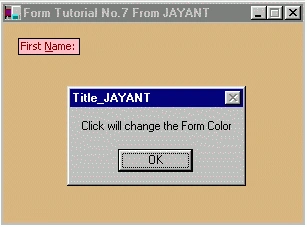
// This Tutorial will Teach Mouse clicking Events and changing the Form colour
using System;
using System.Drawing;
using System.WinForms;
class MyForm : System.WinForms.Form
{
    Label label1;
    public MyForm()
    {
        label1 = new Label();
        label1.UseMnemonic = true;
        label1.Text = "First &Name:";
        label1.Location = new Point(15, 15);
        label1.BackColor = Color.Pink;
        label1.ForeColor = Color.Maroon;
        label1.BorderStyle = System.WinForms.BorderStyle.FixedSingle;
        label1.Size = new Size(label1.PreferredWidth, label1.PreferredHeight + 2);
        // Text to be Displayed in the Caption-Title Bar
        this.Text = "Form Tutorial No.7 From JAYANT";
        this.BackColor = Color.BurlyWood;
        this.StartPosition = FormStartPosition.CenterScreen;
        this.AutoScaleBaseSize = new Size(5, 13);
        this.ClientSize = new Size(300, 200); // Size except the Title Bar-CaptionHeight
        this.MinTrackSize = new Size(300, (200 + SystemInformation.CaptionHeight));
        this.AutoScroll = true;
        this.MaximizeBox = false;
        this.Controls.Add(label1);
        this.Click += new EventHandler(clicking);
    }
    public void clicking(object ob, EventArgs e)
    {
        MessageBox.Show("Click will change the Form Color", "Title_JAYANT");
        this.BackColor = Color.Red;
    }
    public static void Main()
    {
        Application.Run(new MyForm());
    }
}
/*
To Compile make a batch File in Dos Mode as compile.bat
csc /r:System.dll /r:System.Drawing.dll /r:System.WinForms.dll
/r:Microsoft.Win32.InterOp.dll /out:MyForm7.exe MyForm7.cs
*/
Output
Source Code
// MyForm8.cs
// This Tutorial will Teach Mouse clicking Events and
using System;
using System.Drawing;
using System.WinForms;
class MyForm : System.WinForms.Form
{
    Label label1;
    TextBox txtbx1;
    Button btn1;
    Button exit;
    public MyForm()
    {
        label1 = new Label();
        txtbx1 = new TextBox();
        btn1 = new Button();
        exit = new Button();
        label1.UseMnemonic = true;
        label1.Text = "First &Name:";
        label1.Location = new Point(15, 15);
        label1.BackColor = Color.Pink;
        label1.ForeColor = Color.Maroon;
        label1.BorderStyle = System.WinForms.BorderStyle.FixedSingle;
        label1.Size = new Size(label1.PreferredWidth, label1.PreferredHeight + 2);
        txtbx1.Text = "Enter Your Name";
        txtbx1.Location = new Point(15 + label1.PreferredWidth + 5, 15);
        txtbx1.BorderStyle = System.WinForms.BorderStyle.FixedSingle;
        txtbx1.BackColor = Color.LightGray;
        txtbx1.ForeColor = Color.Maroon;
        txtbx1.Size = new Size(90, 20);
        btn1.Text = "&OK";
        btn1.Location = new Point(15 + txtbx1.Location.X + txtbx1.Size.Width, 15);
        btn1.Size = new Size(50, 20);
        exit.Text = "Exit";
        exit.Location = new Point(150, 150);
        exit.Size = new Size(90, 20);
        exit.BackColor = Color.Maroon;
        exit.ForeColor = Color.White;
        // Text to be Displayed in the Caption-Title Bar
        this.Text = "Form Tutorial No.8 From JAYANT";
        this.StartPosition = FormStartPosition.CenterScreen;
        this.AutoScaleBaseSize = new Size(5, 13);
        this.ClientSize = new Size(300, 200); // Size except the Title Bar-CaptionHeight
        this.MinTrackSize = new Size(300, (200 + SystemInformation.CaptionHeight));
        this.AutoScroll = true;
        this.MaximizeBox = false;
        this.Controls.Add(label1);
        this.Controls.Add(txtbx1);
        this.Controls.Add(btn1);
        this.Controls.Add(exit);
        btn1.Click += new EventHandler(Btn_Clicked);
        exit.Click += new EventHandler(Ext_Clicked);
    }
    public void Btn_Clicked(object ob, EventArgs e)
    {
        if (txtbx1.Text == "Enter Your Name")
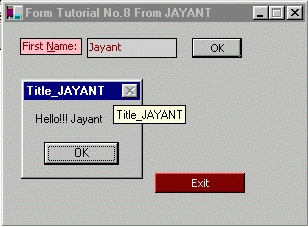
            MessageBox.Show("You Have'nt Entered Your Name", "Title_JAYANT");
        else
            MessageBox.Show("Hello!!! " + txtbx1.Text, "Title_JAYANT");
    }
    public void Ext_Clicked(object ob, EventArgs e)
    {
        Application.Exit();
        // MessageBox not shown because Application.Exit() terminates the application immediately
        // MessageBox.Show("Successfully Closed", "EXIT");
    }
    public static void Main()
    {
        Application.Run(new MyForm());
    }
}
/*
To Compile make a batch File in Dos Mode as compile.bat
csc /r:System.dll /r:System.Drawing.dll /r:System.WinForms.dll
/r:Microsoft.Win32.InterOp.dll /out:MyForm8.exe MyForm8.cs
*/
Output
David WoodPosted Jan 23, 2022, 9:45 AM
Typing most of these properties is something that is not needed, you can do those things in the properties box. I'm wondering which version of Visual Studio you used.
Ronald RobinsonPosted Apr 13, 2020, 2:46 PM
Jayant: I am having trouble running your sample codes. What program do you suggest? Ron R.
Munesh SharmaPosted May 22, 2016, 8:31 PM
nice
kushan rangajeewaPosted Sep 26, 2011, 6:36 AM
thak you verry much....
anoop nPosted Oct 20, 2010, 8:43 PM
login form creation
RichardsonPosted Jun 15, 2010, 3:18 AM
How to connect one windows form to another windows form?
Rajesh SreeramaPosted Jun 10, 2010, 7:46 AM
How to integrate a 3D viewport with windows forms? I have a seperate 3d viewort and want to integrate it with windows form.I am creating a UI and found that windows forms is very useful. Please help m with this.. Thanks
Brendan CunniePosted Dec 7, 2009, 2:19 PM
Great clear article. You may want to remove AutoScaleBaseSize. It's been deprecated. And the image and the title text for "Form Tutorial No.2 From JAYANT" are out of sync.
Madhumita DasPosted Oct 7, 2009, 6:01 AM
Nice article for beginners<?xml:namespace prefix = o ns = "urn:schemas-microsoft-com:office:office" /><o:p></o:p> <o:p></o:p>
GARIMA GIRDHARPosted Feb 18, 2008, 1:57 AM
thanks
sriPosted Nov 12, 2007, 3:10 PM
thank u was really helpful....