

TripleDES Encryption In C#
.NET provides high level classes for various encryption algorithms, both symmetric and asymmetric. Data Encryption Standard (DES) is one of the symmetric encryption algorithms that allows both parties, sender and receiver, to use same key to encrypt and decrypt data.
DES was developed by IBM in 1975. It is considered as an insecure algorithm due to its key size 56 bits and block size 64 bits. However, it successor, Triple DES (3DES) is secure. TripleDES applies DES algorithm 3 times on each block.
TripleDesCryptoServiceProvider class provides the functionality of TripleDES algorithm. This article demonstrates how to use TripleDesCryptoServiceProvider class to apply DES algorithm to encrypt and decrypt data in .NET and C#.
The following steps are required to encrypt data using the TripleDES algorithm.
Step 1
Create TripleDESCryptoServiceProvider,
.NET provides high level classes for various encryption algorithms, both symmetric and asymmetric. Data Encryption Standard (DES) is one of the symmetric encryption algorithms that allows both parties, sender and receiver, to use same key to encrypt and decrypt data.
DES was developed by IBM in 1975. It is considered as an insecure algorithm due to its key size 56 bits and block size 64 bits. However, it successor, Triple DES (3DES) is secure. TripleDES applies DES algorithm 3 times on each block.
TripleDesCryptoServiceProvider class provides the functionality of TripleDES algorithm. This article demonstrates how to use TripleDesCryptoServiceProvider class to apply DES algorithm to encrypt and decrypt data in .NET and C#.
The following steps are required to encrypt data using the TripleDES algorithm.
Step 1
Create TripleDESCryptoServiceProvider,
- TripleDESCryptoServiceProvider tdes = new TripleDESCryptoServiceProvider();
Step 2
Create an Encryptor,
Create an Encryptor,
- ICryptoTransform encryptor = tdes.CreateEncryptor(Key, IV);
Step 3
Create a MemoryStream,
Create a MemoryStream,
- MemoryStream ms = new MemoryStream();
Step 4
Create a CryptoStream from MemoryStream and Encrypter and write it.
Create a CryptoStream from MemoryStream and Encrypter and write it.
- using(CryptoStream cs = new CryptoStream(ms, encryptor, CryptoStreamMode.Write))
- {
- // Create StreamWriter and write data to a stream
- using(StreamWriter sw = new StreamWriter(cs))
- sw.Write(plainText);
- encrypted = ms.ToArray();
- }
The complete code is listed in Listing 1.
- using System;
- using System.IO;
- using System.Security.Cryptography;
- class TripleDESSample {
- public static void Main() {
- Console.WriteLine("Enter text that needs to be encrypted..");
- string data = Console.ReadLine();
- Apply3DES(data);
- Console.ReadLine();
- }
- static void Apply3DES(string raw) {
- try {
- // Create 3DES that generates a new key and initialization vector (IV).
- // Same key must be used in encryption and decryption
- using(TripleDESCryptoServiceProvider tdes = new TripleDESCryptoServiceProvider()) {
- // Encrypt string
- byte[] encrypted = Encrypt(raw, tdes.Key, tdes.IV);
- // Print encrypted string
- Console.WriteLine($ "Encrypted data: {System.Text.Encoding.UTF8.GetString(encrypted)}");
- // Decrypt the bytes to a string.
- string decrypted = Decrypt(encrypted, tdes.Key, tdes.IV);
- // Print decrypted string. It should be same as raw data
- Console.WriteLine($ "Decrypted data: {decrypted}");
- }
- } catch (Exception exp) {
- Console.WriteLine(exp.Message);
- }
- Console.ReadKey();
- }
- static byte[] Encrypt(string plainText, byte[] Key, byte[] IV) {
- byte[] encrypted;
- // Create a new TripleDESCryptoServiceProvider.
- using(TripleDESCryptoServiceProvider tdes = new TripleDESCryptoServiceProvider()) {
- // Create encryptor
- ICryptoTransform encryptor = tdes.CreateEncryptor(Key, IV);
- // Create MemoryStream
- using(MemoryStream ms = new MemoryStream()) {
- // Create crypto stream using the CryptoStream class. This class is the key to encryption
- // and encrypts and decrypts data from any given stream. In this case, we will pass a memory stream
- // to encrypt
- using(CryptoStream cs = new CryptoStream(ms, encryptor, CryptoStreamMode.Write)) {
- // Create StreamWriter and write data to a stream
- using(StreamWriter sw = new StreamWriter(cs))
- sw.Write(plainText);
- encrypted = ms.ToArray();
- }
- }
- }
- // Return encrypted data
- return encrypted;
- }
- static string Decrypt(byte[] cipherText, byte[] Key, byte[] IV) {
- string plaintext = null;
- // Create TripleDESCryptoServiceProvider
- using(TripleDESCryptoServiceProvider tdes = new TripleDESCryptoServiceProvider()) {
- // Create a decryptor
- ICryptoTransform decryptor = tdes.CreateDecryptor(Key, IV);
- // Create the streams used for decryption.
- using(MemoryStream ms = new MemoryStream(cipherText)) {
- // Create crypto stream
- using(CryptoStream cs = new CryptoStream(ms, decryptor, CryptoStreamMode.Read)) {
- // Read crypto stream
- using(StreamReader reader = new StreamReader(cs))
- plaintext = reader.ReadToEnd();
- }
- }
- }
- return plaintext;
- }
- private static void EncryptFile(String inName, String outName, byte[] desKey, byte[] desIV) {
- //Create the file streams to handle the input and output files.
- FileStream fin = new FileStream(inName, FileMode.Open, FileAccess.Read);
- FileStream fout = new FileStream(outName, FileMode.OpenOrCreate, FileAccess.Write);
- fout.SetLength(0);
- //Create variables to help with read and write.
- byte[] bin = new byte[100]; //This is intermediate storage for the encryption.
- long rdlen = 0; //This is the total number of bytes written.
- long totlen = fin.Length; //This is the total length of the input file.
- int len; //This is the number of bytes to be written at a time.
- DES des = new DESCryptoServiceProvider();
- CryptoStream encStream = new CryptoStream(fout, des.CreateEncryptor(desKey, desIV), CryptoStreamMode.Write);
- Console.WriteLine("Encrypting...");
- //Read from the input file, then encrypt and write to the output file.
- while (rdlen < totlen) {
- len = fin.Read(bin, 0, 100);
- encStream.Write(bin, 0, len);
- rdlen = rdlen + len;
- Console.WriteLine("{0} bytes processed", rdlen);
- }
- encStream.Close();
- fout.Close();
- fin.Close();
- }
- }
Listing 1
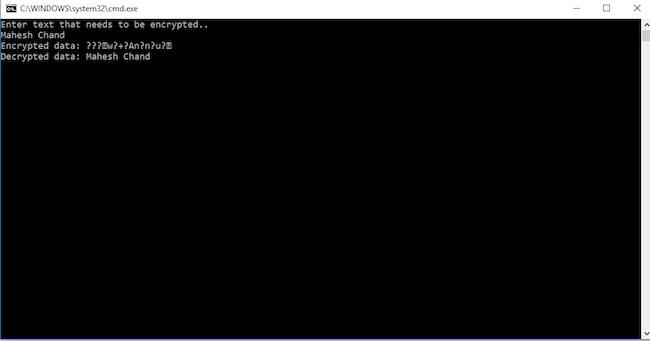
Figure 1
References
- https://en.wikipedia.org/wiki/Data_Encryption_Standard
- https://docs.microsoft.com
Rushi MehtaPosted Sep 5, 2018, 3:26 AM
Very informative article
Mohit KalaPosted Sep 4, 2018, 10:47 PM
Nice Article Sir