

Introduction
Topics is a reusable conversational unit that can be called or accessed across different times, whenever the user is triggered by asking some questions or transferred from other Topics. Here, we are going to see how to trigger the Topic by assigning some phrases in different ways.
What is Generative AI in Copilot Studio?
Generative AI is a new feature introduced in Copilot Studio that enables the agent to choose the best topic, actions, and knowledge for the user queries or answers to the event queries.
By default, Classic orchestration is enabled for all Copilot Studio applications. Because Generative AI orchestration is still in a preview state, even though we can use it, recommendations would include adding some message denoting that the copilot is using the Generative AI feature.
Apply Generative AI feature?
- Navigate to the Copilot Studio Agent.
- On the top right, next to the Publish button, click the Settings button.

- Select "Generative AI" from left navigation.
- Then select the Generative (preview) option and click the Save button to update the agent to use the Generative AI orchestration feature.
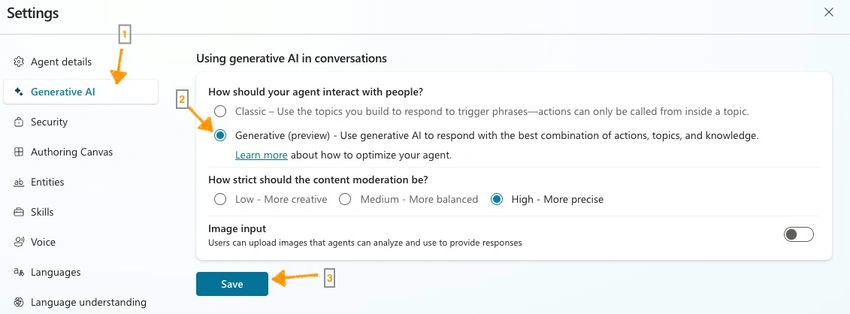
After enabling this, the topics can be triggered based on the topic name and description. But if we use Classic, the topics can be triggered based on the phrases.
As an example, we can create a topic to return the flight status information based on basic flight information.
Classic Orchestration
Trigger Phrases are needed to call the Topic actions to run during the conversation. Phrases can be added to the Topic in below steps,
- Navigate to the topic in Copilot Studio Agent.
- Click Edit under Phrases in Trigger action.
- Add the words or sentences under the Add Phrases section in the Phrases panel.
- Then click the Save button to update the changes to the application.
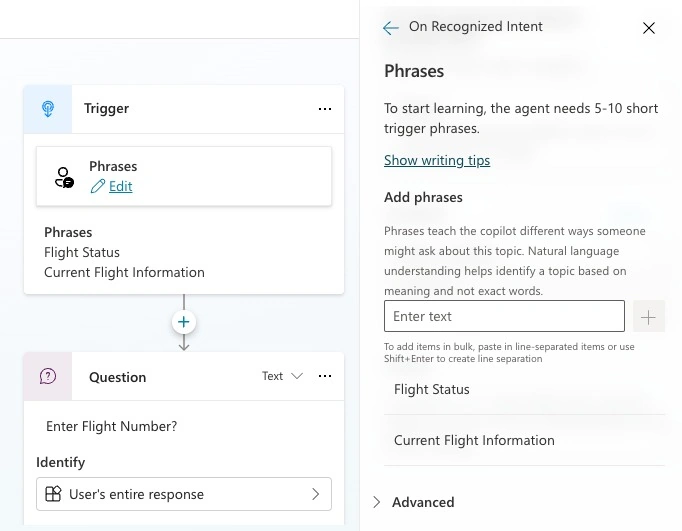
Generative AI Orchestration
Triggering topics usually happens based on the topic name and description provided for the topic. Follow the below steps to add the description,
- Navigate to the Topic or create a new Topic.
- Name the topic as Flight Status Topic.
- In the Trigger action, click on the description box under Describe what the topic does.
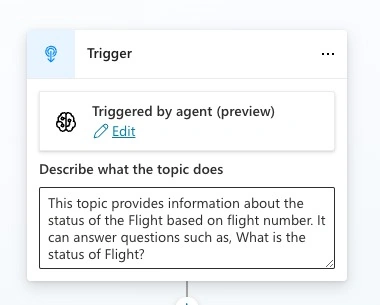
- Enter the information below "This topic provides information about the status of the Flight based on flight number. It can answer questions such as, what is the status of Flight?".
- Then click the Save button on top.
Conclusion
In either case, if you type "Flight Status" or "Can you tell me what the status of the flight is?" it triggers the same topic.
Join the conversation! Your thoughts help the community grow.