

Introduction
In Background Task, generally invoked by one of the systems, devices, audios, toasts, network related events or other (check MSDN more info about the BG task events) events, basically all are related to the system or device events.
Note This article requires the knowledge of background tasks concept. If you don’t have any idea about the background task, I highly recommend you to read the BackgroundTask complete series.
Application Trigger
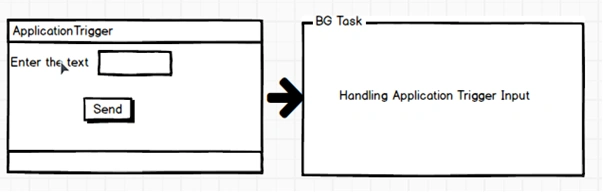
This trigger is used to programmatically invoke a background task.
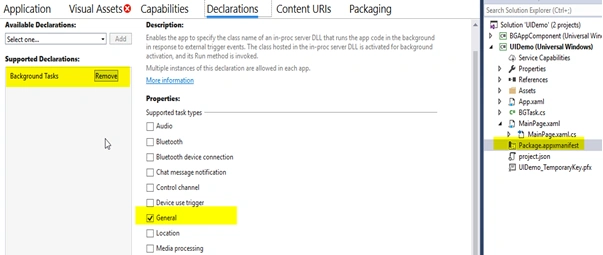
Enable declaration in the Package.appxmanifest in Main application.
Application Trigger is supported by the General task category. This task should be enabled in the Package.appxmainfest file.
- ApplicationTrigger appTrigger;
- appTrigger = new ApplicationTrigger();
- var bgTask = HandlingBgTask.CreateBgTask("TaskApp", "BGAppComponent.BGUIApp", appTrigger);
We can invoke RequestAsync function in two ways.
- With Arguments
- Without Arguments
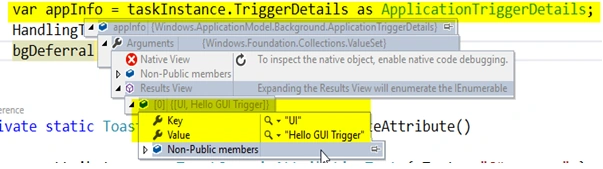
With arguments are using the ValueSet class to pass the arguments to the background Task. Without arguments application input is not required, just call as normal function.
Example
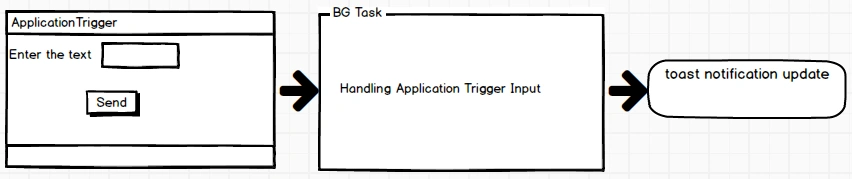
This below example demonstrates if the user enter the information in the text, it will show in the toast popup message via Background Task.
Xaml Code
- <Grid Margin="75" Background="{ThemeResource ApplicationPageBackgroundThemeBrush}">
- <Grid.RowDefinitions>
- <RowDefinition Height="Auto"/>
- <RowDefinition Height="Auto"/>
- </Grid.RowDefinitions>
- <Grid.ColumnDefinitions>
- <ColumnDefinition Width="Auto"/>
- <ColumnDefinition Width="Auto"/>
- </Grid.ColumnDefinitions>
- <TextBlock Grid.Row="0" Grid.Column="0" Text="Enter the Information"/>
- <TextBox Grid.Row="0" Grid.Column="1" x:Name="txtName" PlaceholderText="Send Message"/>
- <Button x:Name="BtnTrigger" Margin="10"
- Grid.Row="1"
- Grid.Column="0"
- Grid.ColumnSpan="2"
- Content="App Trigger" HorizontalAlignment="Center"
- Click="BtnTrigger_Click"/>
- </Grid>
- public void CreateBGApp()
- {
- appTrigger = new ApplicationTrigger();
- var bgTask = HandlingBgTask.CreateBgTask("TaskApp", "BGAppComponent.BGUIApp", appTrigger);
- if (bgTask != null)
- {
- bgTask.Progress += BgTask_Progress;
- bgTask.Completed += BgTask_Completed;
- }
- }
- private async void BtnTrigger_Click(object sender, RoutedEventArgs e)
- {
- var strName = txtName.Text;
- ValueSet value = new ValueSet();
- value.Add("UI", strName);
- var result = await appTrigger.RequestAsync(value);
- }
- public sealed class BGUIApp : IBackgroundTask
- {
- BackgroundTaskDeferral bgDeferral;
- public void Run(IBackgroundTaskInstance taskInstance)
- {
- if (taskInstance == null) return;
- bgDeferral = taskInstance.GetDeferral();
- var appInfo = taskInstance.TriggerDetails as ApplicationTriggerDetails;
- var txtItem = appInfo.Arguments["UI"];
- HandlingToast((string)txtItem);
- bgDeferral.Complete();
- }
- public static void HandlingToast(string textMsg)
- {
- var BindingGeneric = new ToastBindingGeneric()
- {
- Children =
- {
- new AdaptiveText()
- {
- Text = textMsg
- }
- }
- };
- var tostVisual = new ToastVisual { BindingGeneric = BindingGeneric };
- var toastMenu = new ToastContent
- {
- Visual = tostVisual
- };
- ToastNotification toastNotification = new ToastNotification(toastMenu.GetXml());
- ToastNotificationManager.CreateToastNotifier().Show(toastNotification);
- }
- }
Bhavik PatelPosted Dec 11, 2016, 10:58 PM
Great article. nicely explained