
Introduction
Transclusion provides a way to include a part into one or more document by reference. It is very important in "Directive" of AngularJS. It is required in Directive whenever Directive want to replace its original contents with new elements but want to use the original contents somewhere in the new elements.
Transclude allows to pass an entire template, including its scope, to a directive. Doing so gives us the opportunity to pass into arbitrary content and arbitrary scope to a directive. Scope option must be Isolated, {}, or set to true. Just go through the link Isolated Scope In AngularJS for more details about the Isolated Scope.
In Directive, only use transclude : true when you want to create a directive that wraps arbitrary content.
Basic example of Transclude:
.Js file part:
- .directive("myDirective", function() {
- return {
- transclude: true,
- template: "<div>the template</div><div ng-transclude></div>"
- };
- })
- <div my-directive>
- This is my Content.
- </div>
- <div my-directive>
- <div>the template</div>
- <div ng-transclude>This is my Content.</div>
- </div>
See the following code showing another example:
app.js
- var app = angular.module('plunker', []);
- app.directive('mySlideBox', function() {
- return {
- restrict: 'EA',
- scope: {
- title: '@'
- },
- transclude: true,
- template: '<div class="sidebox">\
- <div class="content">\
- <h3 class="header">{{ title }}</h3>\
- <span class="content" ng-transclude>\
- </span>\
- </div>\
- </div>'
- }
- });
- <!doctype html>
- <html ng-app="plunker" >
- <head>
- <meta charset="utf-8">
- <title>AngularJS Example</title>
- <link rel="stylesheet" href="style.css">
- <script>document.write("<base href=\"" + document.location + "\" />");</script>
- <script src="https://ajax.googleapis.com/ajax/libs/jquery/1.8.3/jquery.min.js"></script>
- <script src="https://ajax.googleapis.com/ajax/libs/angularjs/1.0.2/angular.js"></script>
- <script src="app.js"></script>
- </head>
- <body>
- <div my-slide-box title="Employee Names">
- <ul>
- <li>John</li>
- <li>Kapil</li>
- <li>waseem</li>
- </ul>
- </div>
- <div my-slide-box title="My Links">
- <div>
- <a href="">Yahoo</a>
- <a href="">AngularJS</a>
- <a href="">Sports</a>
- <a href="">BBC</a>
- <a href="">Startup</a>
- </div>
- </div>
- </body>
- </html>
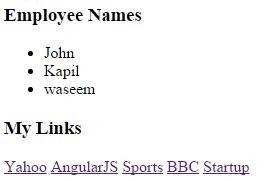
Plunker Link : transclude
Above code explains the AngularJS compiler that where it finds the ng-transclude directive is where it should place the content that it has captured inside the DOM element.
So, if you can seen carefully in the HTML part that I have reused the Directive with the transclusion to provide a secondary element like "My Links" without the need to worry about the styles and layout.
Conclusion
So, Transclusion in the Directive of AngularJS provides a way to place a new content or template into an original content.
ali tauseefPosted Mar 14, 2016, 7:22 AM
I found the article very useful which reveals the power of AngularJS also.
Debasis SahaPosted Nov 23, 2015, 7:12 AM
Good One..
Sibeesh VenuPosted Nov 23, 2015, 4:09 AM
Nice Share
Harshad PansuriyaPosted Nov 23, 2015, 2:53 AM
Nice one
Former memberPosted Nov 23, 2015, 12:31 AM
Thanks
Humayun Kabir MamunPosted Nov 23, 2015, 12:21 AM
Nice...
Mukesh KumarPosted Nov 22, 2015, 11:44 PM
Good Job
Santhakumar MunuswamyPosted Nov 22, 2015, 11:25 AM
Good one