
Introduction
HTML 5 is the latest version of HTML that
introduces several new tags. The <time> tag is also a new tag in HTML5. The time
tag defines date, time or date and time both by using this tag in the HTML
document.
Syntax:
The syntax of <time> tag is as:
<time datetime="value"> Text Here</time>
Example
- Date:
- August 30, 2011 is the latest in the year.
- Date and time:
- Time only:
-
Attributes
HTML tags can contain one or more attributes. Attributes
are added to a tag to provide the browser with more information about how the
tag should appear or behave. Attributes consist of a name and a value separated
by an equals (=) sign, with the value surrounded by double-quotes.
There are 3 kinds of attributes that you can add to your
HTML tags: Element-specific, global, and event handler content attributes. The
attributes that you can add to this tag are listed below.
Element-Specific Attributes
Attributes Introduced by
HTML5
| Attributes | Description |
| Pubdate | Specifies that date and time in the time element is the publication date and time of the document or the nearest ancestor article element. |
| datetime | The datetime attribute Specifies that the date or time for the time element. This attribute is used if no date or time is specified in the element's content. |
Global Attributes
|
HTML5
Global Attributes
|
||
| accesskey | draggable | style |
| class | hidden | tabindex |
| dir | spellcheck | |
| contenteditable | id | title |
| contextmenu | lang | |
Event Handler Content Attributes
Here are the standard HTML 5 event handler content
attributes.
| onabort | onerror* | onmousewheel |
| onblur* | onfocus* | onpause |
| oncanplay | onformchange | onplay |
| oncanplaythrough | onforminput | onplaying |
| onchange | oninput | onprogress |
| onclick | oninvalid | onratechange |
| oncontextmenu | onkeydown | onreadystatechange |
| ondblclick | onkeypress | onscroll |
| ondrag | onkeyup | onseeked |
| ondragend | onload* | onseeking |
| ondragenter | onloadeddata | onselect |
| ondragleave | onloadedmetadata | onshow |
| ondragover | onloadstart | onstalled |
| ondragstart | onmousedown | onsubmit |
| ondrop | onmousemove | onsuspend |
| ondurationchange | onmouseout | ontimeupdate |
| onemptied | onmouseover | onvolumechange |
| onended | onmouseup | onwaiting |
For Example
Pubdate attribute
The pub date attribute specifies that the time element
specifies the publication date of the nearest (closest ancestor) of the time
element.
- <!DOCTYPE HTML>
- <html>
- <body>
- <article>
- <time datetime="2011-01-28" pubdate="pubdate" ></time>
- Article Date.
- </article>
- </body>
- </html>
Datetime Attribute
The DateTime attribute Specifies that the date
or time for the time element.
For Example
- <!DOCTYPE HTML>
- <html>
- <body>
- <div>
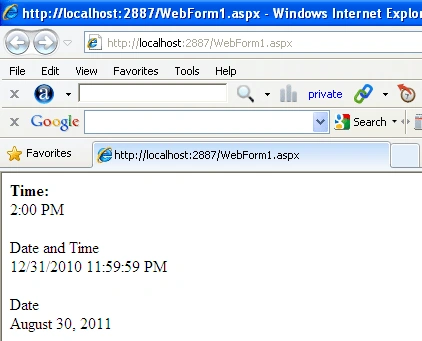
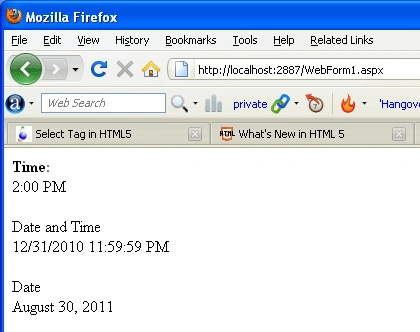
- <strong>Time:</strong>
- <br />
- <time datetime="2:00:00-05:00">2:00 PM</time>
- </div>
- <div >
- <br />
- Date and Time
- <br />
- <time xsi:type="xsd:dateTime"
- datetime="2011-8-30T23:59:59-04:00">12/31/2010 11:59:59 PM</time>
- <br />
- </div>
- <div >
- <br />
- Date
- <br />
- <time datetime="2011-08-30">August 30, 2011</time>
- <br />
- </div>
- </body>
- </html>
Internet explorer
FireFox
Manikavelu VelayuthamPosted Oct 28, 2011, 2:10 AM
Can we specify our own format for the date input type ? something like dd/mm/yyyy or mm/dd/yyyy