

Introduction
Throw and throws are keywords in Java. They are used in exception handling in Java. The main difference between them is that throws is used to declare exceptions while throw is used to throw the exception in Java. There are two type of exceptions in Java, checked exceptions and unchecked exceptions.
Throw
The following describes throw statement in Java:
- The throw statement is used in exception handling in Java.
- It is used to throw an exception in Java.
- An object of a Throwable class or its subclasses is thrown.
- Execution of the program stops when it finds a throw statement and it will immediately go to the catch statement.
- The throw statement can be used anywhere in the program.
- The throw statement can be used with both checked and unchecked exceptions.
- The throw statement is followed by an instance variable in the Java code.
- The throw statement is used inside the method body.
- The throw statement can only throw one exception at a time.
Syntax
public void example()
{
Statements...
if (anythingFalse)
{
throw exception...
}
}
Example
- package demo;
- import java.io.*;
- public class Demo {
- static void allow(int marks) {
- if (marks < 40) {
- throw new ArithmeticException("fail..not allowed");
- } else {
- System.out.println("allowed");
- }
- }
- public static void main(String[] args) {
- allow(35);
- }
- }
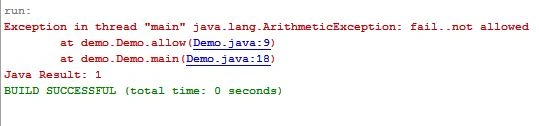
Output
Throws
The following describes the throws clause in Java:
-
The throws clause is also used in exception handling in Java.
-
The throws clause is used to declare the exception(s) in Java.
-
The throws clause provides the information that there may be an exception.
-
Basically throw and throws are used together in Java.
-
Method flexibility is provided by the throws clause by throwing an exception.
-
The throws clause must be used with checked exceptions.
-
The throws clause is followed by the exception class names.
-
The throws clause is used in a method declaration.
-
Using the throws clause, we can declare multiple exceptions at a time.
Syntax
void MethodName() throws ExceptionName
{
Statements...
}
Example
- package demo;
- import java.io.*;
- public class Demo {
- void checkout() throws IOException {
- System.out.println("checking machine");
- }
- public static void main(String[] args) throws IOException {
- Demo check = new Demo();
- check.checkout();
- System.out.println("successfully checked");
- }
- }
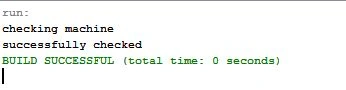
Output
Example of throw and throws together:
- package demo;
- import java.io.*;
- public class Demo {
- void first() throws IOException {
- throw new IOException("error");
- }
- void second() throws IOException {
- first();
- }
- void third() {
- try {
- second();
- } catch (Exception e) {
- System.out.println("work is done");
- }
- }
- public static void main(String[] args) {
- Demo obj = new Demo();
- obj.third();
- System.out.println("all in control");
- }
- }
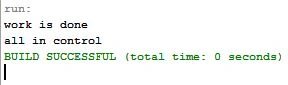
Output
Summary
This article has explained the throw statement and the throws clause in Java. These keywords are very important in exception handling in Java.
Join the conversation! Your thoughts help the community grow.