

Introduction
In this article, we will learn about cursor in the collection framework. If we want to get objects from the collection one by one, we have to use the cursor. Using the cursor, we can retrieve or traverse the object from the collection one by one. There are three cursors in the collection framework-
- Enumeration
- Iterator
- ListIterator
1. Enumeration Cursor
Enumeration is used to retrieve elements from the collection one by one. We can get an enumeration object by using the elements() method.
How to create an enumeration object?
Enumeration e=v.elements();
Here, v is a Vector class object.
Enumeration Methods
There are two methods,
- hasMoreElements() - This method checks whether more elements are present inside the collection or not.
- nextElement() - This method provide next element from collection, if collection have more elements.
Example
import java.util.*;

class abc{
	public static void main(String args[]){
		Vector v=new Vector();
		v.add("Abhishek");
		v.add("Harshit");
		v.add("Shruti");
		v.add("Pranav");
		v.add("Arpit");
		v.add("Ishika");
        //Create enumeration object
		Enumeration e=v.elements();
	    // apply enumeration methods
		while(e.hasMoreElements()){
			System.out.println(e.nextElement());
		}
	}
}
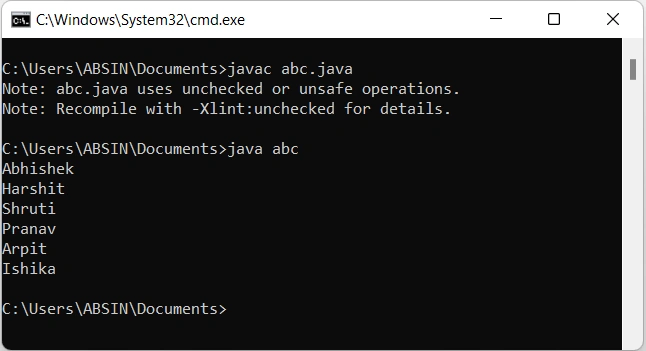
Output
Enumeration Limitations
- Enumeration is not a universal cursor. It is applicable for legacy classes. Vector class is an example of a legacy class.
- We can not perform the remove operation using enumeration.
2. Iterator Cursor
The iterator cursor is introduced to overcome the limitation of the enumeration cursor. An iterator is used to retrieve elements from the collection one by one. The iterator is a universal cursor which means it is applicable for all collection classes.
How to create an Iterator object?
Iterator itr=list.iterator();
Here, the list is an ArrayList class object.
Iterator Methods
There are three methods,
- hasNext() - This method checks whether more elements are present inside the collection or not.
- next() - This method provides the next element from the collection if the collection has more elements.
- remove() - This method removes the elements from the collection.
Example
import java.util.*;

class abc{

	public static void main(String args[]){
		ArrayList list=new ArrayList();
		list.add("Abhishek");
		list.add("Harshit");
		list.add("Shruti");
		list.add("Pranav");
		list.add("Arpit");
		list.add("Ishika");

        //Create iterator object
		Iterator  itr=list.iterator();
	    // apply Iterator  methods
		while(itr.hasNext()){
			String str=String.valueOf(itr.next());
			if(str.equals("Abhishek")){
				// apply remove method
				itr.remove();
			}
			else{
				System.out.println(str);
			}
		}
		// Updated list
		System.out.println("List:"+list);
	}
}
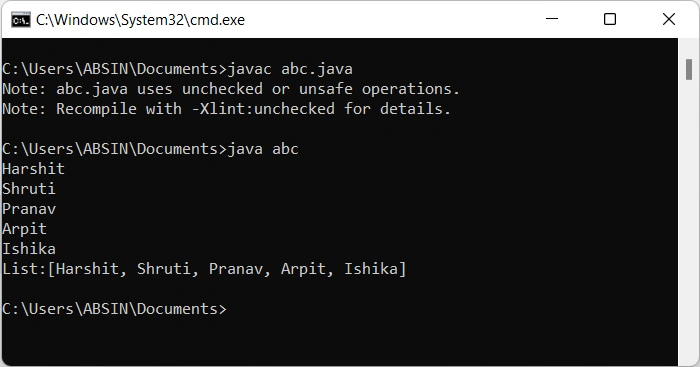
Output
Iterator Limitations
- Iterator is a single-direction cursor. We can move only forward direction using the iterator cursor.
- We can not perform the replacement operation using the iterator.
3. ListIterator Cursor
The listiterator cursor is introduced to overcome the limitation of the iterator cursor. The listiterator is also used to retrieve elements from the collection one by one. The listiterator is a bi-directional cursor which means we can move forward and backward direction.
How to create an Iterator object?
ListIterator itr=list.listIterator();
ListIterator Methods
There are various methods,
- hasNext() - This method checks whether more elements are present inside the collection or not.
- next() - This method provides the next element from the collection if the collection has more elements.
- nextIndex() - This method provides the next element index from the collection if the collection has more elements.
- hasPrevious() - This method checks whether previous elements are present inside the collection or not.
- previous() - This method provides the previous element from the collection if the collection has a previous element.
- previousIndex() - This method provides the previous element index from the collection if the collection has a previous element.
- remove() - This method removes the element from the collection.
- set() - This method is used for replacing the existing element with a new element.
- add() - This method is used to add a new element to the collection.
Example
import java.util.*;

class abc{

	public static void main(String args[]){
		ArrayList list=new ArrayList();
		list.add("Abhishek");
		list.add("Harshit");
		list.add("Shruti");
		list.add("Pranav");
		list.add("Arpit");
		list.add("Ishika");

        //Create ListIterator object
		ListIterator itr=list.listIterator();
	    // ListIterator forward direction methods,remove() and add() method

		System.out.println("List is:");
		while(itr.hasNext()){
			String str=String.valueOf(itr.next());
			System.out.println(str);
			if(str.equals("Abhishek")){
				// remove method
				itr.remove();
			}
			else if(str.equals("Pranav")){
				itr.remove();
				// add method
				itr.add("Reena");
			}
		}

		// Updated list
		System.out.println("List:"+list);

		System.out.println("List is:");
		// ListIterator backward direction methods and add() method
		while(itr.hasPrevious()){
		String str=String.valueOf(itr.previous());
			System.out.println(str);
			if(str.equals("Arpit")){
				// set method
				itr.set("Manu");
			}
		}
		// Updated list
		System.out.println("List:"+list);
	}
}
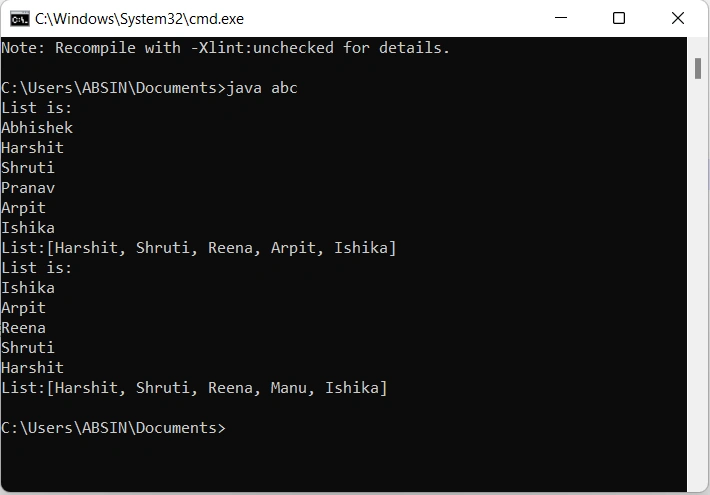
Output
Conclusion
In this article, we have seen how we can use the cursor to retrieve the object from the collection one by one. Thanks for reading and hope you like it. If you have any suggestions or queries on this article, please share your thoughts.
Join the conversation! Your thoughts help the community grow.