

Introduction
CCTV cameras are now everywhere. Large-scale video processing is a grand challenge representing an important frontier for analytics, with videos from factory floors, jewelry showrooms, traffic intersections, police vehicles, and retail shops. It’s the golden era for computer vision, AI, and machine learning – it’s a great time now to extract value from videos to impact science, society, and business!
I would like to share one recent incident that happened in India, Tamil Nadu. One of the famous jewelry stores in Trichy has more than 20 security personnel, and 60 CCTV cameras in surveillance. Two individuals were wearing animal masks and packing all the jewels in a sack, just like a scene from a movie. The burglars entered the showroom by drilling a hole in the wall which was large enough for a man to enter, in the backside of the building. They stole almost 100 kgs of gold which is worth Rs 50 crore.
Video surveillance is incredibly useful for helping track down a suspect. Often burglars are intelligent enough to mask their faces, so facial recognition is not a possibility. However, video surveillance will help identify what the perpetrator looked like by recording height build, hair color, skin color, and the human body and object recognition and it will alert to showroom manager.
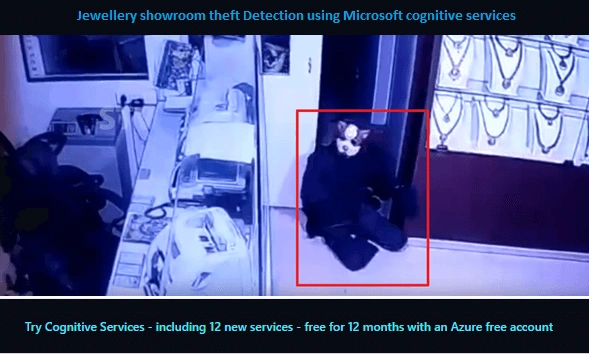
In this article, I will share how to implement computer Vision and Face API Analyze Videos in real-time.
How to use Microsoft cognitive services
Performing real-time analysis on frames taken from a live video stream and identify the face with extracted the content using vision API, the application will follow the below.
- Use Microsoft’s Cognitive Face API to identify sentiment person by person.
- Use Microsoft’s Emotion API to match facial patterns to emotions.
- Extract emotion data using Microsoft’s Vision API.
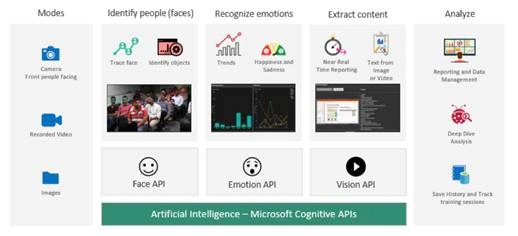
Let's start to implement Live Video analysis, in the following steps
Create a Computer Vision API
The Computer Vision API will help developers to identify the objects with access to advanced algorithms for processing images and returning image metadata information.
Step 1
Microsoft offers Azure cognitive services free for 12 months, it's fantastic news. Create a free trial Azure subscription account from the Azure portal.

Step 2
Create New resource and select the AI+ Machine learning and click on Computer Vision API
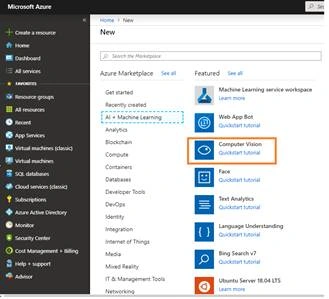
Step 3
After this, fill in the following information for creating Cognitive Service and click on "Create".
- NameMicrosoft recommends a descriptive name for API, for example - <common name><APIName>Account.
- SubscriptionSelect the available Azure subscriptions.
- LocationSelect service locations.
- Pricing tierYou can choose your pricing tier. F0 is free service and S0 is paid service. Based on your usage, you can choose the pricing tier.
- Resource groupSelect the Resource group > confirm the Microsoft notice and click on "Create" again for creating the account.
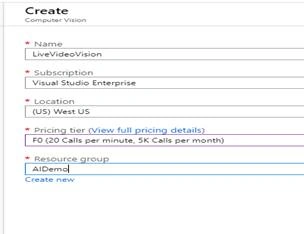
Step 4
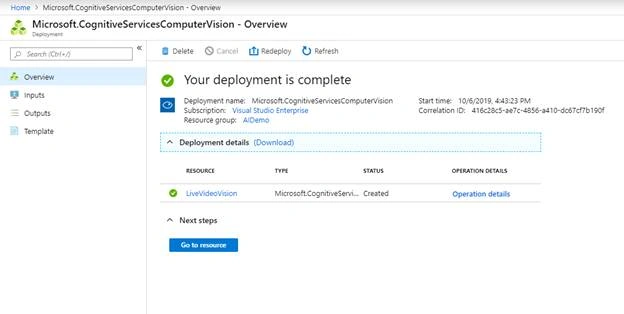
The resource successfully completes after a few minutes and will get a confirmation message, you can click on "Go to Resource" Button.
Step 5
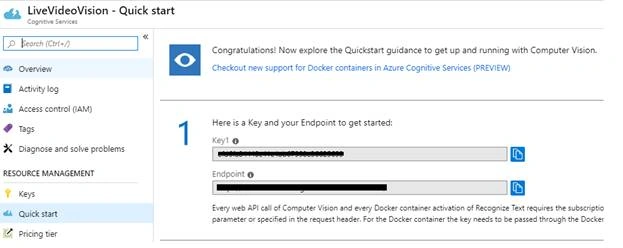
You can capture/copy the Azure commuter vision API Endpoint URL and key from All resources.
Create a Computer Vision API
The Face API will detect one or more human faces in an image and get back face rectangles for where in the image the faces are, along with face attributes which contain machine learning-based predictions of facial features.
Step 1
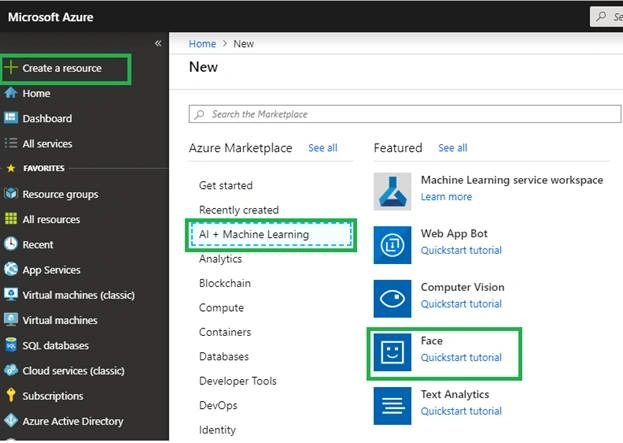
You have already logged in into the Azure portal. Click on Create on resource > Select AI + Machine Learning and click on Face and follow step 3 and step 4.
Step 2
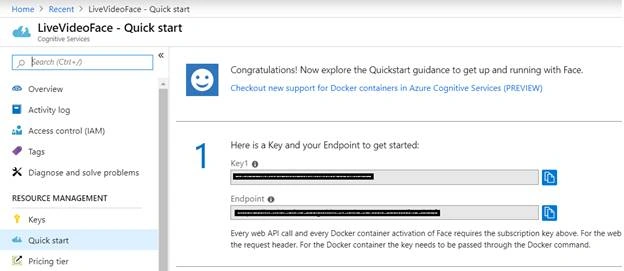
You can capture/copy the Azure Face API Endpoint URL and key from All resources.
Demo Source code
Microsoft created and released a sample POC application for Video Analysis, it lets you download and replace the cognitive service API Endpoint URL and key. Application contains a library, along with two applications, for analyzing video frames from a webcam in near-real-time using APIs from Microsoft Cognitive Services and uses the OpenCvSharp package for webcam support.
Step 1
Open the sample in Visual Studio 2019++.
Step 2
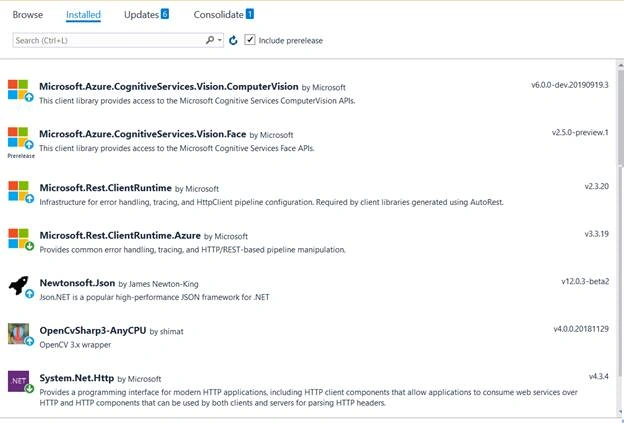
Restore all required nuget packages. Right-click on solutions and select the restored nuget packages.
Step 3
Select the solutions and build the applications. You can change the key and Endpoint URL from the following files.
- For BasicConsoleSample, the Face API key is hard-coded directly in BasicConsoleSample/Program.cs.
- For LiveCameraSample, the keys should be entered into the Settings pane of the app. They will be persisted across sessions as user data. You can also go change the value from the App.config file.
Step 4
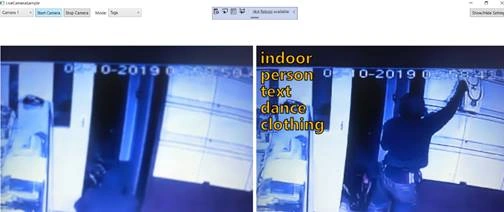
Run the application. Select your camera and Mode of event.
Summary
In this article, you learned how to run real-time analysis on live video streams using the Face, Computer Vision APIs, and how to use Microsoft sample code to get started. Start building your app with free API keys and reference sample code.
Raj KumarPosted Nov 12, 2019, 1:14 PM
Good one, as i am big fan of cognitive services. keep it up.
Vidyadharran GPosted Oct 30, 2019, 12:57 AM
Nice article :) ...Thanks for sharing bro
Sourav Kumar DasPosted Oct 17, 2019, 3:39 AM
Awesome Article Sir.
Sundaram SubramanianPosted Oct 16, 2019, 6:48 AM
In demand :). Thanks for the nice article and explaining the need