

Introduction
In this article, I will explain GUI programming (Tkinter) in Python.
Definition
In Python, Tkinter is used for developing graphical user interfaces (GUIs) websites. Tkinter − Tkinter is the Python interface to the Tk graphical user interfaces (GUIs) toolkit shipped with Python. We will look further into this in the following chapter.
Tkinter Programming
Tkinter is the GUI library for Python. In Python, it is easy to create GUI applications with Tkinter. Tkinter is the object-oriented interface to the Tk, and can be used to create a graphical user interface application using the Tkinter function.
How to Import the Tkinter module
Step 1
Import the tkinter module.
- from tkinter import * # t is a small letter.
Step 2
Create one variable called the Tkinter method.
- a=Tk() #Method T is capital letter.
Step 3
Add output screen title name.
- a.title("c# corner")
Step 4
Enter the mainloop() function in the last step. The mainloop is used to display the output screen for a long time.
- a.mainloop()
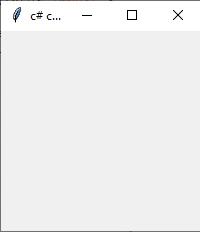
Example of a simple program:
- from tkinter import *
- a=Tk()
- a.title("c# corner")
- a.mainloop()
Output
Option & Description
-
Button-In Python, we use the button widget to display buttons in your application.
-
Canvas-In Python, we use the canvas widget to draw shapes, such as lines, ovals, arcs in your application.
-
Checkbutton-In Python, we use the checkbutton widget to display a number of options as checkboxes. The user can select multiple options at the same time.
-
Entry-In Python, we use the entry widget to display a single-line text field for accepting values from a user.
-
Frame-In Python, we use the frame widget as a container widget to organize other widgets.
-
Label-In Python, we use the label widget to provide a single-line caption for other widgets. It can also contain images.
-
Listbox-In Python, we use the listbox widget to provide a list of options to a user.
-
Menubar-In Python, we use the menu button widget to display menus in your application.
-
Menu-In Python, we use the menu widget to provide various commands to a user. These commands are contained inside Menubutton.
-
Message-In Python, we use the message widget to display multiline text fields for accepting values from a user.
-
Radio button-In Python, we use the radio Button widget to display a number of options as radio buttons. The user can select only one option at a one time.
-
Scale-In Python,we use the scale widget to provide a slider widget.
-
Scrollbar-In Python, we use the scrollbar widget to add scrolling capability to various widgets, such as list boxes.
-
Text-In Python, we use the text widget to display text in multiple lines.
-
Toplevel-In Python, we use the toplevel widget to provide a separate window container.
-
Spinbox-In Python, we use the spinbox widget as a variant of the standard Tkinter Entry widget, which can be used to select from a fixed number of values.
-
PanedWindow-In Python, we use the panedwindow as a container widget that may contain any number of panes, arranged horizontally or vertically.
-
Labelframe-In Python, we use labelframe as a simple container widget. The purpose is to act as a spacer or container for complex window layouts.
-
Messagebox-Messagebox is used to display message boxes in your apps.
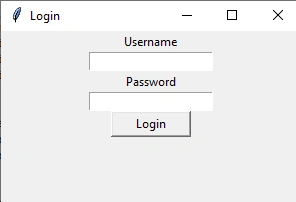
Logic page program
- from tkinter import *
- login=Tk()
- login.title("Login")
- login.geometry("300x250")
- Label(login, text="Username").pack()
- username= Entry(login, textvariable="username")
- username.pack()
- Label(login, text="Password").pack()
- password = Entry(login, textvariable="password", show= '*')
- password.pack()
- Button(login, text="Login", width=10, height=1).pack()
- login.mainloop()
Output
Conclusion
In this article, we have seen GUI programming (Tkinter) in Python. I hope this article was useful to you. Thanks for reading!
Join the conversation! Your thoughts help the community grow.