

Introduction
In this article, you will see the Complete Reference - Set Operations in MS SQL: UNION [ALL], INTERSECT, EXCEPT.
Article Overview
- Background
- Prerequisites
- Set Operations in MS SQL: UNION [ALL], INTERSECT, EXCEPT
- Basic Rules on Set Operations
- Difference between UNION, UNION ALL, INTERSECT, and EXCEPT Operators
- Summary
Background
Using set operations, the results of multiple queries can be combined into a single result set. Set operators include UNION, EXCEPT, and INTERSECT in MS SQL.
There are various situations where you need to combine the results of multiple queries into a single result set.
For example, you have Speakers and Authors' data.
-
Now, you want to display the list of speakers and/or authors. For, such a requirement, you can use UNION.
-
Let us consider another case; you want the list of people who are speakers and they are also authors. This can be done using INTERSECT.
-
Take another scenario, you want the list of people who are only Speakers i.e. they are not Authors. This can be done using EXCEPT.
To perform such kind of various set operations on the multiple data set; SQL mainly provides the following three operators:
-
UNION, UNION ALL
-
INTERSECT
-
EXCEPT
Prerequisites
- You should have a basic knowledge of MS SQL and queries.
Set Operations in MS SQL - UNION [ALL], INTERSECT, EXCEPT
Now, let us understand each operator one by one with a practical example.
Before beginning, let us create one Member table and insert some data into it with the following script:
Create Table
CREATE TABLE Speakers
(
  Name VARCHAR(25),
)

CREATE TABLE Authors
(
  Name VARCHAR(25),
)
Insert data into the table
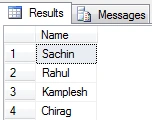
INSERT INTO Speakers VALUES ('Sachin')
INSERT INTO Speakers VALUES ('Rahul')
INSERT INTO Speakers VALUES ('Kamplesh')
INSERT INTO Speakers VALUES ('Chirag')

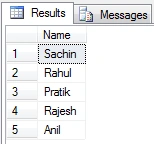
INSERT INTO Authors VALUES ('Sachin')
INSERT INTO Authors VALUES ('Rahul')
INSERT INTO Authors VALUES ('Pratik')
INSERT INTO Authors VALUES ('Rajesh')
INSERT INTO Authors VALUES ('Anil')
Speakers
Authors
UNION
Union is used to combine the results of two queries into a single result set of all matching rows. Both the queries must result in the same number of columns and compatible data types in order to unite. All duplicate records are removed automatically unless UNION ALL is used.
Generally, it can be useful in applications where tables aren't perfectly normalized, for example, a data warehouse application.
Syntax
{ <query_specification> | ( <query_expression> ) }
{ UNION | UNION ALL}
{ <query_specification> | ( <query_expression> ) }
Example 1.
You want to invite all the Speakers and Authors to the annual conference. Hence, how will you prepare the invitation list?
select name from Speakers
union
select name from Authors
order by name
Output
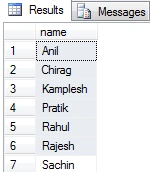
As you can see here, the default order is ascending order and you have to use the last query instead of both queries.
UNION ALL
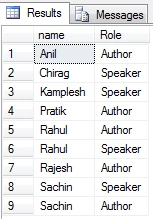
It will not remove duplicate records. It can be faster than UNION.
Example 2.
You want to give a prize to all the Speakers and Authors at the annual conference. Hence, how will you prepare the prize list?
select name, 'Speaker' as 'Role' from Speakers
union all
select name, 'Author' as 'Role' from Authors
order by name
Output
INTERSECT
It is used to take the result of two queries and returns only those rows which are common in both result sets. It removes duplicate records from the final result set.
Syntax
{ <query_specification> | ( <query_expression> ) }
{ EXCEPT | INTERSECT }
{ <query_specification> | ( <query_expression> ) }
Example 3.
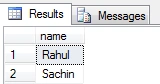
You want the list of people who are Speakers and they are also Authors. Hence, how will you prepare such a list?
select name from Speakers
intersect
select name from Authors
order by name
Output
EXCEPT
It is used to take the distinct records of two one query and returns only those rows which do not appear in the second result set.
Syntax
{ <query_specification> | ( <query_expression> ) }
{ EXCEPT | INTERSECT }
{ <query_specification> | ( <query_expression> ) }
Example 4.
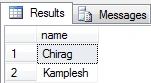
You want the list of people who are only Speakers and they are not Authors. Hence, how will you prepare such a list?
select name from Speakers
except
select name from Authors
order by name
Output
Example 5.
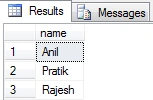
You want the list of people who are only Authors and they are not Speakers. Hence, how will you prepare such a list?
select name from Authors
except
select name from Speakers
order by name
Output
Basic Rules on Set Operations
- The result sets of all the queries must be the same number of columns.
- In all result sets the data type of each of the columns must be well-matched and compatible with the data type of its corresponding columns in another result set.
- For sorting the result, the ORDER BY clause can be applied to the last query.
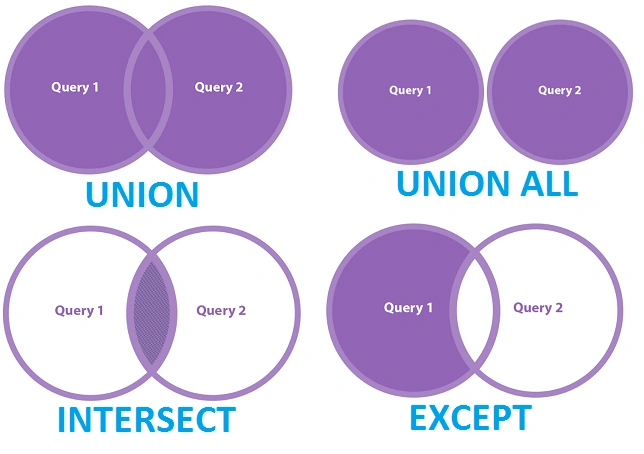
Difference between UNION, UNION ALL, INTERSECT, and EXCEPT Operators
Summary
Now I believe you understand the key important things about UNION, UNION ALL, INTERSECT, EXCEPT in MS SQL.
- UNION combines results from both tables.
- UNION ALL combines two or more result sets into a single set, including all duplicate rows.
- INTERSECT takes the rows from both the result sets which are common in both.
- EXCEPT takes the rows from the first result data but does not in the second result set.
Join the conversation! Your thoughts help the community grow.