

Introduction
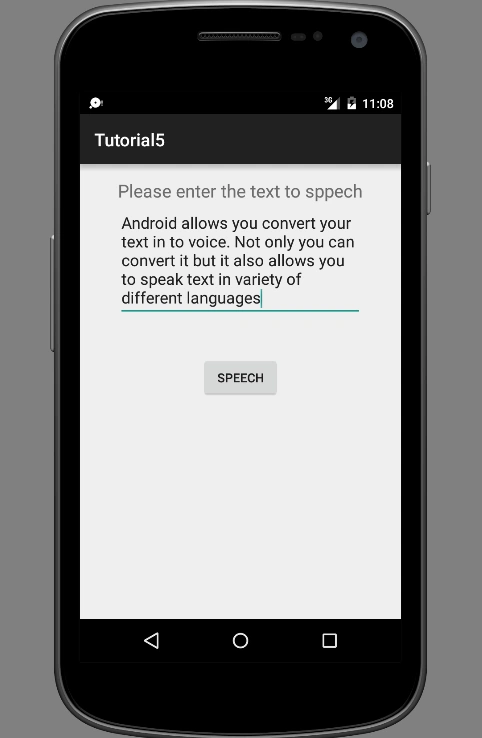
Android allows to user to convert his or her text in to voice. Android provides a class named TextToSpeech for the purpose of converting text to voice. We can produce the voice output in different languages. Here I am going to show you how we can use this feature in Android. For that I created an application with an Edit text and a button. The edit text will accept text from the user and on clicking on the button will speech the text from the edit text that is entered by the user. For that first create your layout file.
- <RelativeLayout xmlns:android="http://schemas.android.com/apk/res/android"
- xmlns:tools="http://schemas.android.com/tools" android:layout_width="match_parent"
- android:layout_height="match_parent" android:paddingLeft="@dimen/activity_horizontal_margin"
- android:paddingRight="@dimen/activity_horizontal_margin"
- android:paddingTop="@dimen/activity_vertical_margin"
- android:paddingBottom="@dimen/activity_vertical_margin" tools:context=".MainActivity">
- <TextView android:text="Please enter the text to speech" android:layout_width="wrap_content"
- android:layout_height="wrap_content"
- android:textSize="20sp"
- android:layout_alignParentTop="true"
- android:layout_centerHorizontal="true"
- android:id="@+id/textView" />
- <EditText
- android:layout_width="wrap_content"
- android:layout_height="wrap_content"
- android:id="@+id/editText"
- android:layout_below="@+id/textView"
- android:layout_alignLeft="@+id/textView"
- android:layout_alignStart="@+id/textView"
- android:layout_alignRight="@+id/textView"
- android:layout_alignEnd="@+id/textView" />
- <Button
- android:layout_width="wrap_content"
- android:layout_height="wrap_content"
- android:text="Speech"
- android:id="@+id/speechButton"
- android:layout_below="@+id/editText"
- android:layout_centerHorizontal="true"
- android:layout_marginTop="43dp" />
- </RelativeLayout>
- editText = (EditText) findViewById(R.id.editText);
- Button button = (Button) findViewById(R.id.speechButton);
- textToSpeech = new TextToSpeech(MainActivity.this, new TextToSpeech.OnInitListener() {
- @Override
- public void onInit(int i) {
- if( i != TextToSpeech.ERROR){
- textToSpeech.setLanguage(Locale.US);
- }
- }
- }) ;
- CANADA
- CHINA
- ENGLISH
- FRANCE
- GERMANY
- ITALY
- JAPAN
- etc
- button.setOnClickListener(new View.OnClickListener() {
- @Override
- public void onClick(View view) {
- String toSpeak = editText.getText().toString() ;
- textToSpeech.speak(toSpeak, TextToSpeech.QUEUE_FLUSH, null) ;
- }
- });
- public void onPause(){
- if( textToSpeech != null){
- textToSpeech.stop() ;
- textToSpeech.shutdown() ;
- }
- super.onPause();
- }
- stop() will stop the speaking.
- shutdown() release the resources used by Text To Speech engine.
Apart from the speak() there is some other methods like getLanguage(), isSpeaking() shutDown() etc.
Please see the screenshots also...
Kuppurasu NagarajPosted May 11, 2016, 9:16 AM
Nice Sharing..
Mohammed IbrahimPosted May 11, 2016, 8:19 AM
nice
Munesh SharmaPosted May 10, 2016, 1:36 PM
good